This is the full developer documentation for AtmanID
# AtmanID Documentation
> AI-native Identity & Access Management — concepts, guides, reference, tutorials, Iris, and architecture & security.
## Where to start
Concepts
Narrative explanations of how AtmanID thinks about access governance, JML lifecycle, non-human identity, and the audit chain. Start here if you’re evaluating AtmanID or onboarding to identity governance for the first time.
Guides
Step-by-step task recipes for admins and operators — registering non-human identities (curl and SDK), the MCP bearer-token flow, MCP gateway policy, agent insights standing instructions, and branding, with more landing each sprint. For end-to-end scenarios like onboarding an app and running a certification campaign, see Tutorials. This is what you reach for at 4pm on a Friday.
Reference
The v1 API (generated from the OpenAPI spec), the TypeScript SDK, and the changelog. The fall-back when guides don’t cover your edge case. The RBAC model lives in Architecture & Security and the Iris tool catalog in the Iris section.
Iris
AtmanID’s natural-language interface to your IAM data. Ask “how many users are active” or “show me overdue certifications” and Iris answers — with citations.
Tutorials
End-to-end walkthroughs combining concepts and guides into complete scenarios. “Onboard your first app and run a certification campaign,” “Set up an external auditor for SOC2 evidence.”
Architecture & Security
Tenant isolation model, audit chain integrity, cross-tenant defense, encryption posture, SOC2 status, NIST/ISO mapping. The page CISOs and procurement teams go to first.
Developers
Curated entry into the docs for developers building integrations. Fastest path from “what is this?” to “I shipped my first integration” — links straight to first API call, SDK setup, API/SDK reference, common patterns, and changelog.
## For developers
Your first authenticated call, in full. Set `ATMANID_BASE_URL` to your tenant’s base URL (provided with your onboarding) and `ATMANID_API_KEY` to an API key:
```bash
curl -X GET "$ATMANID_BASE_URL/api/v1/users" \
-H "Authorization: Bearer $ATMANID_API_KEY" \
-H "Accept: application/json"
```
```json
{
"data": [
{ "id": "3f2b9c1e-…", "email": "sarah.chen@example.com",
"first_name": "Sarah", "last_name": "Chen", "status": "ACTIVE" }
],
"total": 48, "page": 1, "limit": 25, "total_pages": 2
}
```
Every response carries an `X-Request-Id` that correlates to a tamper-evident audit row — so any action is provable, not just plausible. Identity-creating mutations take an `idempotency_key` body field; lists always return the `{ data, total, page, limit, total_pages }` envelope.
Jump straight to the [Developers landing](/developers/) for the curated entry — first API call in 10 minutes, TypeScript SDK setup, endpoint reference, common patterns. Building with a coding agent? Use the [agent integration prompt](/developers/agent-integration/). Or go straight to [Reference → API](/reference/api/) for the OpenAPI spec, [Reference → SDK](/reference/sdk/) for the TypeScript client, or [Tutorials → First API call](/tutorials/first-api-call/) for the end-to-end walkthrough.
## What makes AtmanID different
AtmanID is an AI-native IAM platform: runtime enforcement for AI agents, with humans and agents governed on one identity model and one tamper-evident audit trail. Most IAM platforms were designed before generative AI existed and added chat to an existing UI. AtmanID was designed around the question *“what does Identity & Access Management look like when an AI assistant is the primary interface?”* The answer reshapes everything from the data model up.
Four differentiators that show up everywhere in this documentation:
* **Iris** — natural-language interface to your IAM data. Ask any question, get a cited answer. See the [Iris section](/iris/) for what it can do.
* **Runtime enforcement for agents** — agent tokens are scoped to specific MCP servers and tools (and can be DPoP-bound), and every agent tool call through the AtmanID MCP gateway is checked against scope and policy, can be held for human approval, and is recorded.
* **Agent-native by design** — these docs themselves are consumable by Iris and external LLMs as structured knowledge. Every page has machine-readable metadata; the entire corpus is published at `/llms.txt` and `/llms-full.txt` for any agent to ingest.
* **Audit-first architecture** — every action writes to a tamper-evident audit chain. SOC2 evidence isn’t a separate report; it’s a query.
For LLMs and coding agents
The entire docs corpus is published for ingestion at [`/llms.txt`](/llms.txt) (index) and [`/llms-full.txt`](/llms-full.txt) (full text). Building an integration with a coding agent? Paste the [agent integration prompt](/developers/agent-integration/) into Claude Code, Cursor, Codex, Windsurf, or Copilot and it will write a correct AtmanID v1 integration in one pass.
# Architecture & Security
> Engineering-depth architecture for security architects + engineering CISOs. Tenant isolation model, audit chain integrity, threat surface, encryption posture. The page you read when you've finished evaluating and now need to know HOW it actually works.
This section is for **security architects, engineering CISOs, and implementing engineers** doing technical due diligence on AtmanID. The depth is implementation-level — code references, schema details, mitigation strategies, accepted risks. If you’re evaluating AtmanID for compliance posture (SOC 2, certifications, subprocessors), the [Trust page](https://atmanid.com/trust) on the main app is your starting point — that’s the procurement surface. This section is the **engineering** surface.
Different audience, different content depth, different question being answered:
| Surface | Audience | Question |
| ------------------------------ | ---------------------------------------- | ----------------------------------------------------------------------------------------------------------------- |
| `/trust` (AtmanID website) | Procurement, security shopping | “Are you SOC 2? What subprocessors? Can we get the report?” |
| **`/architecture/` (here)** | **Security architect, engineering CISO** | **“How does the tenant isolation actually work? Can I review the audit chain design? What’s your threat model?”** |
| Compliance Hub, in your tenant | Customer operator | “Show me MY tenant’s posture, MY audit log, MY current SoD violations.” |
Both readers are sometimes the same human at different funnel positions — a CISO doing pre-purchase evaluation today and post-purchase architecture review next month. The two surfaces complement each other; don’t conflate them.
## What’s in this section
### Multi-tenancy isolation
[How AtmanID isolates tenant data](/architecture/multi-tenancy/) — PostgreSQL Row-Level Security on every tenant table, a tenant context set on every query from the signed-in session, Iris queries the server builds rather than the model, and the CI checks and database canaries that stop regressions.
### Audit chain integrity
[How AtmanID’s audit chain works](/architecture/audit-chain/) — an append-only audit log, hash-chained per tenant, with the chain head signed outside the database. Recent entries are re-verified nightly, and a weekly job walks the whole history and checks it against the signed chain heads (a run that reaches its time limit is reported as incomplete, never as verified). Also covers the `X-Request-Id` → audit-record correlation an auditor uses to reconstruct who did what, when.
### Threat model
[Threat model (STRIDE)](/architecture/threat-model/) — threat surface by component, mitigations and accepted risks.
### Encryption posture
[Encryption posture](/architecture/encryption-posture/) — at rest, in transit, key management and rotation.
### RBAC architecture
[RBAC architecture](/architecture/rbac-architecture/) — per-tenant permissions checked on every request, what happens if the permission store is unreachable, and what is recorded.
### Data residency and recovery
[Data residency + disaster recovery](/architecture/data-residency-dr/) — where data lives, how it is recovered, and the multi-region roadmap.
### Compliance mapping
[Compliance mapping](/architecture/compliance-mapping/) — SOC 2 status and readiness, and how controls map to NIST CSF and ISO 27001.
## What’s NOT in this section
* **Compliance certifications + subprocessor list** — these live on the [Trust page](https://atmanid.com/trust) (the procurement surface). When AtmanID adopts a hosted trust portal (Drata/Vanta/SafeBase/Conveyor), that becomes the deep-dive evidence layer.
* **Customer operational dashboards** — your tenant’s compliance posture, audit log search, SoD violations live in the AtmanID app. This section is general architecture; that’s per-tenant operational data.
* **API endpoint signatures** — those live in [API Reference](/reference/api/). This section answers “how does the system architecturally work”; the API reference answers “how do I call endpoint X.”
* **Specific feature how-to guides** — those live in [Guides](/guides/). This section answers “how does the audit chain work in design”; guides answer “how do I run a certification campaign in practice.”
## How to read this section
Pick the page that matches your concern:
* **“How do you prevent tenant A from seeing tenant B’s data?”** → [Multi-tenancy isolation](/architecture/multi-tenancy/)
* **“How do you prove the audit log wasn’t tampered with after the fact?”** → [Audit chain integrity](/architecture/audit-chain/) — DB-enforced append-only, a hash chain, and chain heads signed outside the database
* **“What’s your STRIDE-style threat model?”** → [Threat model](/architecture/threat-model/) — full STRIDE table with mitigations and accepted risks
## Adjacent
* [Concepts → Architecture overview](/concepts/architecture-overview/) — the 5-minute conceptual version (what AtmanID is built on; trust boundaries; data flow). Read first if you want orientation before the deep dive.
* [Concepts → How AtmanID thinks about IAM](/concepts/how-atmanid-thinks-about-iam/) — mental model: identities vs accounts vs entitlements, JML lifecycle, the three pillars of IAM, audit chain as compliance substrate.
* [Reference → API Reference](/reference/api/) — full endpoint surface, scopes, error codes, idempotency semantics.
# Audit chain integrity
> What AtmanID's audit log guarantees — who did what and when, append-only storage, a hash chain with externally signed checkpoints, regular re-verification, and export to your SIEM.
## Why the audit log gets its own page
For an IAM platform the audit log is the evidence behind every other control. If it is incomplete, late, or editable after the fact, everything built on it is weaker. This page states what AtmanID’s audit log guarantees and what it does not. Implementation detail is available under NDA through the [Trust page](https://atmanid.com/trust).
## What each record captures
Every privileged action writes an audit record with:
* **Who** — the actor, and whether it was a person, an AI agent, or the system (scheduled jobs and API keys). The actor’s name and email are captured as they were at that moment, so a later rename does not rewrite history.
* **What** — the kind of action and the thing it acted on.
* **Before and after** — for changes, the state before and after, so a reviewer can see exactly what changed without reconstructing it from other data.
* **When** — a timestamp set by the database, not by the application.
* **Which request** — a request ID that is also returned to the caller, so one action can be followed from the caller’s own logs to the API usage record and the audit record. The audit API can be searched by request ID.
* **For AI-assisted actions** — the user the agent acted for, and whether the action was confirmed by a click or ran under a time-limited standing authorisation.
## Append-only
The application’s database login cannot update, delete or truncate audit records, so even a compromised application credential cannot rewrite or erase history. The only sanctioned change is redaction of personal data for an erasure request, which runs through a separate path and is itself recorded.
Every record carries a hash version. In current records (version 3) the personal fields — actor, target, delegating user, IP address, user agent, and the before and after state — enter the hash as salted commitments rather than as values. An erasure replaces those values and deletes their salts, so the chain still verifies while the erased values can no longer be confirmed by guessing. Older records are redacted the same way; the verifier excuses them only where a later, chained erasure event lists them.
## Tamper evidence
Each tenant’s audit records form a hash chain: every record carries a sequence number and a cryptographic hash that covers its own contents and the previous record’s hash. Records can only be added through a single database function that keeps each tenant’s chain in order, and the database rejects any record that does not carry a hash.
As a result:
* **Changing** a past record breaks its hash and every hash after it.
* **Removing** a record leaves a gap in the sequence.
* **Rewriting history wholesale** — recomputing every hash — is caught by signed checkpoints. Every few minutes the latest position of each tenant’s chain is signed with a key the database never holds, and the signature is stored both in the database and outside our database provider. Someone with full control of the database could recompute hashes but could not forge matching signatures.
The chain is re-verified regularly:
* **Nightly**, the most recent records of every tenant’s chain are checked.
* **Weekly**, every tenant’s full history is checked from its first record, along with every signed checkpoint.
* **On demand**, administrators can check up to the latest 10,000 records from the Audit Log page.
A failed check records an audit event, raises an in-app alert, and sends a webhook your SIEM or on-call tooling can act on.
**One caveat:** records written before the hash chain was introduced (before March 2026) carry sequence numbers but no hash. The verifier reports them as unchained rather than as verified. Every record written since is chained.
## Getting audit data out
* **SIEM export.** Audit events can be exported to Splunk, Microsoft Sentinel, QRadar or a custom endpoint, as CEF, LEEF or JSON. Export runs every five minutes and resumes from where the last export stopped, so a missed run does not leave a gap.
* **API.** The audit API is scoped to the calling key’s tenant and can be filtered by time, actor, action and request ID.
* **Evidence packs.** The Compliance Hub generates an evidence pack from the audit log for a chosen period, for use in audits.
## Keeping coverage complete
An automated check runs before every push and in CI, and fails any change that adds a data-changing API route without an audit write (or a recorded, reviewed exemption). Action names follow a fixed naming convention so the record stays searchable by category.
## Retention
Audit records are not deleted by age while a tenant is active. Each tenant sets an audit retention period between one and seven years (two by default), which governs how long its audit trail is kept after the account is closed.
## What this design does not provide
* **Retention beyond seven years.** Customers who need longer retention need an archive arrangement — for example, keeping the SIEM export.
* **Customer deletion of audit records.** Customers cannot delete their own audit records, by design: a feature that lets an account erase its own trail is an evasion route.
* **Per-tenant encryption keys.** Audit data is encrypted at rest with platform-managed keys, not a key per tenant. Customer-managed keys are on the roadmap.
* **Customer-visible operator access logs.** AtmanID’s operator has production database access for operations. That access is not yet logged in a form customers can review; this is on the roadmap. The append-only protection and the signed checkpoints above still apply to it.
## Adjacent reading
* [Multi-tenancy isolation](/architecture/multi-tenancy/) — how audit records are kept within their tenant
* [Threat model](/architecture/threat-model/) — tampering and repudiation threats
* [Reference → API](/reference/api/) — the audit API
# Compliance mapping
> How AtmanID's product controls are designed to support SOC 2, ISO 27001, NIST CSF 2.0, GDPR and HIPAA programmes — and an honest statement that no third-party attestation is held yet.
This page maps AtmanID’s **product controls** to common frameworks, to help you place AtmanID in your own compliance programme. It describes what the product is designed to support; it is not a statement of certification. For questionnaires and documents under NDA, use the [Trust page](https://atmanid.com/trust).
## Attestation status
**AtmanID does not yet hold a SOC 2 report, an ISO 27001 certificate, a HIPAA attestation, or any other third-party attestation.** Nothing on this page should be read as one. When an attestation is obtained, it will be listed on the Trust page with its date and scope.
* **PCI DSS** is out of scope: AtmanID does not store, process or transmit payment card data.
* **FedRAMP** is not held and not on the near-term roadmap.
* **GDPR and CCPA**: AtmanID provides features that help customers meet their obligations — erasure with audit redaction, configurable retention, export — and a data processing agreement can be put in place. Compliance with these laws depends on how each customer uses the product, so AtmanID does not describe itself as “compliant” with them.
* **HIPAA**: AtmanID is not positioned for protected health information today; ask before storing any.
## Product controls and where they help
| Product control | Supports | Detail |
| ------------------------------------------------------------------------------------- | ------------------------------------------------------------------------ | ------------------------------------------------------- |
| Role-based access, checked on every request, per-tenant and live-editable | SOC 2 CC6.1–CC6.3 · ISO 27001 A.5.15, A.5.18, A.8.2 · NIST CSF 2.0 PR.AA | [RBAC architecture](/architecture/rbac-architecture/) |
| MFA, enforced per tenant by role | SOC 2 CC6.1 · ISO 27001 A.8.5 · NIST CSF 2.0 PR.AA | [Threat model](/architecture/threat-model/) |
| Tenant isolation in the database | SOC 2 CC6.1, C1.1 · ISO 27001 A.8.3 · NIST CSF 2.0 PR.DS | [Multi-tenancy isolation](/architecture/multi-tenancy/) |
| Append-only, hash-chained audit log with signed checkpoints and regular verification | SOC 2 CC7.2, CC4.1 · ISO 27001 A.8.15 · NIST CSF 2.0 DE.CM | [Audit chain integrity](/architecture/audit-chain/) |
| Audit export to your SIEM | SOC 2 CC7.2 · ISO 27001 A.8.16 · NIST CSF 2.0 DE.CM, DE.AE | [Audit chain integrity](/architecture/audit-chain/) |
| Access reviews and certification campaigns | SOC 2 CC6.2, CC6.3 · ISO 27001 A.5.18 · NIST CSF 2.0 PR.AA | Product documentation |
| Joiner, mover and leaver automation with revocation | SOC 2 CC6.2 · ISO 27001 A.5.16, A.5.18 · NIST CSF 2.0 PR.AA | Product documentation |
| Separation-of-duties rules | SOC 2 CC6.1 · ISO 27001 A.5.3 | Product documentation |
| Encryption at rest and in transit; application-layer encryption for high-risk secrets | SOC 2 CC6.1, CC6.7 · ISO 27001 A.8.24 · NIST CSF 2.0 PR.DS | [Encryption posture](/architecture/encryption-posture/) |
| Point-in-time database recovery | SOC 2 A1.2 · ISO 27001 A.8.13 · NIST CSF 2.0 RC.RP | [Data residency + DR](/architecture/data-residency-dr/) |
| Erasure with audit redaction; configurable retention | SOC 2 C1.2, P4 · ISO 27001 A.8.10 · GDPR Art. 17 | [Audit chain integrity](/architecture/audit-chain/) |
| Evidence packs generated from the audit log | Audit fieldwork for any of the above | Compliance Hub |
NIST mappings use CSF 2.0, which added a Govern function and reorganised several categories from 1.1. AtmanID’s product controls sit mainly in Protect (PR.AA, PR.DS), Detect (DE.CM, DE.AE) and Recover (RC.RP).
## Where the product does not yet help
* **Separate backups outside the database provider**, and regional failover. See [Data residency + DR](/architecture/data-residency-dr/).
* **Customer-managed encryption keys.** See [Encryption posture](/architecture/encryption-posture/).
* **Masking of production data in non-production environments.**
* **Customer-visible logging of operator access** to production. See [Threat model](/architecture/threat-model/).
* **Cryptographic proof of deletion.**
* **Data residency outside the United States.**
## Organisational controls
Frameworks such as SOC 2 and ISO 27001 also cover the organisation running the service — personnel security, training, incident response, vendor management and risk assessment. AtmanID is an early-stage company; these controls will be described, with evidence, as part of a future attestation, and are available for discussion under NDA in the meantime. This page covers product controls only.
## Adjacent reading
* [Threat model](/architecture/threat-model/) — threats, controls and accepted risks
* [Audit chain integrity](/architecture/audit-chain/) — the evidence layer most controls rely on
* [Trust page](https://atmanid.com/trust) — documents under NDA and current status
# Data residency + disaster recovery
> Where customer data lives today (United States), how it is backed up and recovered, and what AtmanID does not yet offer for strict residency or regional failover requirements.
This page states where data lives and what recovery AtmanID can and cannot offer today. Provider and region detail is available under NDA through the [Trust page](https://atmanid.com/trust).
## Where data lives
* **Customer data** — the application database, including identities, access, and the audit log — is stored in a single cloud region in the **United States**.
* **Uploaded files** such as tenant logos are stored in the United States and may be cached at the hosting provider’s edge locations worldwide.
* **Application servers** run on the hosting provider’s network; requests that need data are served from the database’s region.
* **Sub-processors** — the AI provider used by Iris, the embedding provider, email delivery, and error monitoring — process data in the United States. The current list is available on request.
**There is no EU, APAC or government-cloud residency option today.** Customers with data-localisation requirements cannot use AtmanID without accepting US residency.
## Backup and recovery
* **Point-in-time recovery.** The database provider keeps continuous backups that allow the database to be restored to any moment within its retention window. This is the main defence against logical errors — for example, a misconfigured bulk change — because a copy from before the error can be restored alongside the live database and the affected data recovered without disturbing other tenants.
* **Where backups live.** Backups are held by the same database provider, in the same region as the live database, under the same provider-managed encryption.
## If the region fails
AtmanID does not run a standby in a second region. If the database’s region became unavailable, the platform would be unavailable until service was restored there or the database was rebuilt elsewhere. The documentation site, which has no database dependency, would keep serving.
## Roadmap
* **A backup copy held outside the database provider**, in separate storage, with immutable retention. This is the next step, and closes the gap that a provider-level failure or compromise could affect both the live database and its backups.
* **EU residency**, when a customer contracts for it.
* **Regional failover**, when a customer contracts for a failover commitment.
## What this design does not provide
* **An off-provider backup.** Today all backups sit with the database provider (see Roadmap).
* **Regional failover** or a published recovery-time commitment for a region-level outage.
* **Data residency outside the United States.**
* **Snapshot-consistent exports.** Customers can export their data through the API, but exports read the live database, so a long export can include changes made while it ran.
* **Proof of deletion.** Erasure requests delete personal data and redact it from the audit log; AtmanID does not provide cryptographic proof of deletion.
## Adjacent reading
* [Encryption posture](/architecture/encryption-posture/) — how data and backups are encrypted
* [Audit chain integrity](/architecture/audit-chain/) — audit retention and erasure redaction
* [Compliance mapping](/architecture/compliance-mapping/) — how these controls map to frameworks
# Encryption posture
> What AtmanID encrypts at rest and in transit, which secrets get an extra application-layer layer, how keys are managed and rotated, and what the design does not yet provide.
This page states what AtmanID’s encryption guarantees and what it does not. Implementation detail is available under NDA through the [Trust page](https://atmanid.com/trust).
## At rest
* **Everything** in the database, and every uploaded file, is encrypted at rest by the hosting providers with AES-256, using provider-managed keys.
* **High-risk secrets** get a second, application-layer layer: connector credentials for your target systems, MFA (TOTP) secrets, inbound and outbound webhook secrets, and SIEM credentials. Each record is encrypted with AES-256-GCM under its own data key, and that data key is wrapped by a key held in a cloud key management service, which never leaves it. Newly written records are bound to their tenant, so a record copied into another tenant’s row does not decrypt; records written before that binding was introduced still decrypt without it. Decryption requires the full 16-byte GCM authentication tag, so a truncated tag is rejected.
* **Passwords, MFA backup codes and API keys are stored as one-way hashes.** Passwords are salted bcrypt hashes; MFA backup codes are bcrypt hashes (older codes: keyed HMAC-SHA256); API keys, which are long random values, are SHA-256 hashes, and a key is shown once. The one exception: when a new API key needs a second administrator’s approval, the approved key is held encrypted (AES-256-GCM) until the requester collects it, once, and the encrypted copy is then deleted.
## In transit
* All traffic to AtmanID is HTTPS (TLS 1.2 or later; TLS 1.3 is preferred). Every response sends a two-year HSTS header, so browsers will not fall back to plain HTTP.
* Connections from AtmanID to its database, file storage, AI provider, email provider and your connected systems use TLS.
* Outbound webhooks are signed (HMAC-SHA256) so your receiver can confirm a delivery came from AtmanID and was not altered.
## Key management
* **Encryption keys for application-layer secrets** live in a cloud key management service. Every record has its own data key, so there is no single static key in the application’s configuration for those secrets.
* **A small number of lower-risk configuration values** are encrypted with AES-256-GCM under a platform key held as an encrypted environment variable, rather than under per-record data keys. Older records written in that format before the move to the key management service still decrypt.
* **Platform secrets** — session signing, database credentials, and keys for third-party services — are held as encrypted environment variables in the hosting platform and rotated when there is a reason to: a change in who has access, a suspected exposure, or the provider’s guidance. They are not yet rotated on a fixed schedule.
* **Customer-held credentials** — API keys and webhook secrets — are rotated by the customer. API keys can be rotated without downtime: create a new key, move callers to it, then revoke the old one.
## What is not encrypted at the application layer
These are protected by storage encryption and access control, but not by the extra application-layer layer:
* **Audit records and identity data** (names, emails, roles, entitlements). These have to be searchable and filterable; encrypting them in the application would prevent that.
* **Configuration**, such as approval workflows and policies.
## What this design does not provide
* **Customer-managed keys.** Storage encryption uses provider-managed keys, not a key per tenant or a key you control. Customer-managed keys are on the roadmap.
* **HSM-backed platform secrets.** Platform secrets are held in the hosting platform’s encrypted environment variables, not a hardware security module. A compromise of the hosting account could expose them.
* **Separately keyed backups.** Backups are encrypted by the database provider under the same provider-managed scheme as the live database.
* **FedRAMP authorization.** Not held; it would require customer-managed keys and dedicated infrastructure.
## Adjacent reading
* [Multi-tenancy isolation](/architecture/multi-tenancy/) — the tenant boundary inside the database
* [Data residency and disaster recovery](/architecture/data-residency-dr/) — where data lives and how it is backed up
* [Compliance mapping](/architecture/compliance-mapping/) — how these controls map to frameworks
# Multi-tenancy isolation
> How AtmanID keeps tenants apart — database-enforced row isolation on every tenant table, a tenant context the application cannot skip, Iris queries the server builds, and automated checks that keep it from regressing.
## Why multi-tenancy gets its own page
Cross-tenant data exposure is the most consequential failure an IAM platform can have: a bug that lets one tenant see another’s users is a data breach, not a defect. AtmanID therefore puts the boundary in the database, where a mistake in application code fails closed, and adds independent checks around it.
This page states what each control guarantees and what it does not cover. Implementation detail is available under NDA through the [Trust page](https://atmanid.com/trust).
## The controls at a glance
1. **Row-Level Security on every tenant table.** A row is visible only to a request running for that row’s tenant, and the application’s database login cannot bypass it.
2. **A tenant context on every query.** The tenant is set from the signed-in session for each query. A query with no tenant sees no tenant data.
3. **Iris queries built by the server.** The AI assistant never writes SQL, and its queries run on a login that can read only curated, tenant-filtered views.
4. **Checks that stop regressions.** Automated checks fail changes that weaken isolation, and a database canary probes every tenant table for cross-tenant access.
## 1 — Row-Level Security
PostgreSQL Row-Level Security attaches a policy to every query against a table. AtmanID’s policies compare each row’s tenant with the tenant recorded for the current request, so the database filters every read **and every write** — a request can neither see another tenant’s rows nor insert a row into another tenant. The application also filters by tenant in its own queries, as a second layer.
Two details make this hold:
* **The application cannot bypass the policies.** It connects with a dedicated database login that has no permission to bypass Row-Level Security, separate from the login that changes the schema.
* **The policies also bind the tables’ owners.** PostgreSQL normally exempts a table’s owner from its policies; AtmanID forces them on the owner as well. A small number of tables — five — are deliberately not forced, because they are written by tightly scoped database functions or must be read before a request’s tenant is known. The application login still cannot read across tenants in any of them, and an automated check fails any change that adds another.
## 2 — The tenant context on every query
The tenant comes from the signed-in session — never from the request body, the URL or anything else the browser supplies. Each query runs in its own short transaction that records the tenant first, so the setting cannot carry over to another request that reuses the same connection.
If a query ever ran without a tenant set, it would return no tenant data rather than all of it, and the application logs such queries so the gap is visible. Routes that serve signed-in users get the tenant context from shared authentication code, so an individual route cannot forget it.
## 3 — Iris queries
Iris answers data questions through a read-only tool that does not accept SQL. The model describes the question in a fixed structure — which curated view, which columns, filters and groupings — and the server checks every name against the view’s real columns before building the query itself. Nothing the model writes is executed as SQL.
Those queries run on a separate login that can read only the curated views, never the underlying tables, inside a read-only transaction with a time limit and with the tenant taken from the session. Results are checked again before they are returned, as a backstop; any blocked result is recorded in the audit log.
## 4 — Checks that stop regressions
* **Tenant context.** An automated check fails a change that adds a database query outside a tenant context, other than in explicitly cross-tenant work such as a scheduled job that visits each tenant in turn.
* **Forced policies.** An automated check fails a change that adds a tenant table without forced Row-Level Security.
* **Database canary.** When the schema changes, and weekly, a database is built from the repository and every tenant table is probed as the application login: can it read, change, delete or insert another tenant’s rows, and is anything visible with no tenant set? The most recent run, on 2026-10-10, found no leak.
* **Adversarial Iris tests.** Every change runs a library of cross-tenant attack patterns against the Iris query builder, including attempts to change the tenant from inside a question.
## Data that is not per tenant
A small amount of data is deliberately global — the list of tenants itself, schema version tracking, and reference data shared by every tenant. Each table without a tenant is classified as global by design, scoped through a parent that does belong to a tenant, or reserved for a feature not yet in use, so that “no tenant” never means “forgotten.”
Some tables hold platform defaults alongside tenant rows — for example, a default MFA policy readable by every tenant — while each tenant’s own rows remain private to it.
## What this design does not provide
* **Per-tenant encryption keys.** Data at rest is encrypted by the database provider with platform-managed keys, not a key per tenant. Customer-managed keys are on the roadmap.
* **Network-level separation.** All tenants share the same application and database. Isolation is enforced in the application and the database, not by separate infrastructure.
* **Complete per-tenant quotas.** Some resources, such as agents and applications, have per-tenant quotas; others do not yet.
* **A self-service isolation test environment.** Customers cannot currently test cross-tenant isolation themselves. Contact us if your review needs independent evidence.
## Adjacent reading
* [Audit chain integrity](/architecture/audit-chain/) — how privileged actions and blocked access attempts are recorded
* [Threat model](/architecture/threat-model/) — information-disclosure threats and accepted risks
* [How AtmanID thinks about IAM](/concepts/how-atmanid-thinks-about-iam/) — conceptual framing of identities, accounts and entitlements
# RBAC architecture
> How AtmanID decides who can do what — per-tenant role permissions checked on every request, live-editable without a deploy, with permission changes and policy refusals recorded.
AtmanID uses role-based access control. Each user holds one or more roles; each role is allowed or denied each action. This page describes the guarantees. Implementation detail is available under NDA through the [Trust page](https://atmanid.com/trust).
## Permissions are per tenant and live-editable
Every tenant has its own permission table: for each role and each action, allowed or not. A tenant’s identity administrators change it from the Permission Matrix in the product, and the change takes effect within about a minute — no deploy, no support ticket. Tenants can also define custom roles with their own combination of permissions.
## Every request is checked
* Every API route checks that the caller is signed in and that one of their roles allows the action, before it reads or changes anything.
* Every product page is mapped to a permission, so a user does not see pages they cannot use. Automated checks fail any change that adds a page without a permission mapping, maps a page to a permission no role can hold, or changes how an existing API route authenticates.
* Pages hide what a role cannot do as a convenience; the server-side check is what actually enforces it.
## What happens if the permission store is unreachable
Availability and safety are traded off deliberately:
* **Reads** fall back to the platform’s default permissions, so people can keep viewing data during a brief database problem. Those defaults can be broader than permissions a tenant has tightened.
* **Writes** are refused once loading the tenant’s permissions has failed repeatedly, rather than being decided by the defaults.
## What is recorded
Role assignments and removals, changes to the Permission Matrix, and refusals made by the central policy check are written to the tamper-evident [audit log](/architecture/audit-chain/). Refusals are useful evidence for access-control reviews and for spotting someone probing what they can reach.
## Roles
AtmanID ships standard roles for the common jobs — platform administration, the organisation’s accountable owner, day-to-day identity administration, privileged-access administration, security leadership, security analysts (read-only), compliance, managers who approve and review their team’s access, external audit (read-only and time-limited), engineers who register AI agents, and end users who view their own access and request more. Tenants assign these or define their own.
## What this design does not do
* **Attribute-based rules.** Access is decided by role, not by attributes such as department. Custom roles are the workaround; they scale poorly with many departments.
* **Cross-tenant roles.** A role applies within one tenant only.
* **Relationship-based authorization.** Delegation chains and per-resource relationships (Zanzibar-style) are a long-term direction, not a current capability.
## Adjacent reading
* [Multi-tenancy isolation](/architecture/multi-tenancy/) — the tenant boundary underneath every permission check
* [Audit chain integrity](/architecture/audit-chain/) — how permission changes and refusals are recorded
* [Threat model](/architecture/threat-model/) — elevation-of-privilege threats
# Threat model (STRIDE)
> How AtmanID defends against each STRIDE threat class — the controls in place and the risks we accept. Component-level detail is available under NDA.
This page summarises, for each STRIDE threat class, what AtmanID guarantees and which risks it accepts. It deliberately leaves out component-level implementation detail; a full architecture pack is available to customers and prospects under NDA through the [Trust page](https://atmanid.com/trust).
## Trust boundaries
1. **Internet → application.** All traffic is HTTPS. Every request after sign-in carries a signed session that is re-checked against the user’s current role and account status.
2. **Session → permission check.** Every API route checks the caller’s permission for the action before touching data.
3. **Request → AI assistant (Iris).** Iris acts with the signed-in user’s permissions. Actions that change access go through a confirmation step.
4. **Application → database.** Every query runs under the caller’s tenant, and PostgreSQL Row-Level Security enforces it. See [Multi-tenancy isolation](/architecture/multi-tenancy/).
## S — Spoofing
| Threat | Controls | Accepted risk |
| ------------------------------------------------------ | --------------------------------------------------------------------------------------------------------------------------------------------------------------------------------------------------- | ------------------------------------------------------------------------------------------------------------------------------------------------------------------------------ |
| Stolen user credentials | Each tenant sets which roles must use MFA. Once required, an enrolled user must pass MFA for every session; newly covered users get a short window to enrol. Passwords are stored as salted hashes. | Roles a tenant has not put under its MFA policy can sign in with a password alone. |
| An unregistered script posing as a registered AI agent | Agents must be registered and authenticate with their own credentials; tokens are checked on every tool call. | A leaked agent secret stays valid until the customer rotates it. |
| Session theft | HTTPS-only, HttpOnly session cookies; sessions expire and are re-validated against the user’s current status. | A successful cross-site scripting attack against a signed-in user could use their session; a per-request nonce-based Content Security Policy reduces but does not remove this. |
## T — Tampering
| Threat | Controls | Accepted risk |
| -------------------------------------------------------- | ------------------------------------------------------------------------------------------------------------------------------------------------------------------------------------------------------------------------------------------------------------------ | ---------------------------------------------------------------------------------------------------------------------------- |
| Editing or deleting audit records | The audit log is append-only, enforced by database permissions, and hash-chained. The chain head is signed outside the database. Recent entries are re-verified nightly and the whole history weekly. See [Audit chain integrity](/architecture/audit-chain/). | Entries written before the hash chain was introduced are reported as unchained rather than verified. |
| Forged or altered access requests | Requests follow defined approval workflows; every state change is recorded in the audit log with the before and after state. | A compromised approver account can approve requests; the audit trail records it. |
| Script or styling injected through organisation branding | Uploaded SVG logos and icons are parsed and rebuilt from an allowlist of elements and attributes; custom navigation icons are drawn only as CSS masks. Organisation themes are validated tokens rendered by the server — no customer-written CSS reaches the page. | — |
| Prompt injection against Iris | Iris answers from a catalogue of named tools and never writes SQL. Actions that grant, extend or re-route access always need an explicit confirmation showing values read from the database. | Iris can still be steered into a wrong answer about the user’s own data, or into proposing an action the user then confirms. |
## R — Repudiation
| Threat | Controls | Accepted risk |
| ------------------------------------ | -------------------------------------------------------------------------------------------------------------------------------------------------------- | --------------------------------------------------------------------------------------------------------------- |
| A user denies having taken an action | Every action is recorded with the actor, the time, a request ID linking multi-step workflows, and the before and after state. | Someone using stolen credentials is recorded as the account owner; MFA raises the bar but does not remove this. |
| Denying an Iris-assisted action | Each Iris action records the user it ran for, the tool used, and whether it was confirmed by a click or run under a time-limited standing authorisation. | As above. |
| Shared API keys | Each call is recorded against the key that made it. | Customers can share a key between people; AtmanID cannot prevent that. |
## I — Information disclosure
| Threat | Controls | Accepted risk |
| ---------------------------------- | ------------------------------------------------------------------------------------------------------------------------------------------------------------------------------------------------------------------------------------------------------------- | ------------------------------------------------------------------------------------------------------ |
| One tenant reading another’s data | Row-Level Security on every tenant table, a tenant context set from the session on every query, Iris queries built by the server on a read-only login, and automated checks against regressions. See [Multi-tenancy isolation](/architecture/multi-tenancy/). | Tenants are isolated logically in one database, not in separate infrastructure. |
| Connector credentials leaking | Stored encrypted; never returned by the API after they are saved. | Encryption keys are managed by the platform, not per tenant; customer-managed keys are on the roadmap. |
| Error messages revealing internals | Clients receive a generic error code and message with a request ID; detail goes to server logs only. | — |
## D — Denial of service
| Threat | Controls | Accepted risk |
| -------------------------------- | --------------------------------------------------------------------------------------------------------- | ---------------------------------------------------------------------------------------------- |
| Request floods | Rate limits on every route that changes data and on sign-in, plus the hosting provider’s edge protection. | A large distributed attack could still degrade service. |
| Expensive queries | Every list is paginated and bounded; large tables are indexed for the queries the product runs. | — |
| Driving up AI costs through Iris | Bounded tool calls per question and rate limits on chat. | Sustained abuse by an authenticated user is detected by monitoring, not blocked automatically. |
## E — Elevation of privilege
| Threat | Controls | Accepted risk |
| ------------------------------------------------------- | ------------------------------------------------------------------------------------------------------------------------------------------------------------------------------------------------------- | ----------------------------------------------------------------------------------------------------------------------------------------------------------------------------------------------------------------------- |
| A permissions bug exposing an action | Permissions are stored per tenant and checked on every request; automated checks ensure every route maps to a permission. | If the permission store cannot be reached, read access falls back to the platform’s default permissions, which can be broader than permissions a tenant has tightened; write access is refused after repeated failures. |
| Escalation through Iris | Anything that grants, extends or re-routes access needs explicit confirmation. A user may let Iris run actions that only reduce access (revoke, reject) without asking each time, for a limited period. | A user can be talked into confirming a harmful action; the audit trail records it. |
| A connector account with more access than AtmanID needs | Connectors request only the scope AtmanID uses. | If a customer grants the connector account broader rights, a compromise of AtmanID could misuse them. |
## Risks we accept today
* **Customer credential hygiene.** AtmanID can require MFA for its own sign-in, but cannot stop customers sharing API keys or storing them insecurely.
* **Operator access.** AtmanID’s operator has production database access for operations. That access is not yet logged in a form customers can review; separate, customer-visible logging of operator access is on the roadmap.
* **Supply chain.** Dependencies are scanned for known vulnerabilities on every change and builds run in CI; builds are not yet produced by an attested (SLSA) pipeline.
* **Cloud provider security.** Hosting and database providers are SOC 2 audited; AtmanID relies on their physical and infrastructure controls. On-premise deployment is not offered.
## Adjacent reading
* [Multi-tenancy isolation](/architecture/multi-tenancy/)
* [Audit chain integrity](/architecture/audit-chain/)
* [How Iris stays accurate](/iris/how-iris-stays-accurate/)
# Concepts
> Narrative explanations of how AtmanID thinks about IAM — start here if you're evaluating, onboarding, or trying to understand why a feature exists.
The Concepts section explains *how AtmanID thinks about Identity & Access Management*. If you’re evaluating AtmanID, onboarding to IAM for the first time, or trying to understand *why* a feature exists (vs *how* to use it), start here.
## Where things live in the product
The product is organised into five hubs along the top of the screen, each focused on one kind of work.
### My Workspace
Everyone
Your own work: what is waiting for your decision, the access you have and can ask for, and the agent that acts for you.
### Identity & Access
Identity administrators
The people, applications and accounts you govern — how identities arrive, change and leave, and how access is granted and taken away.
### Security & Risk
Security, compliance and auditors
Where risk shows up and is proven: reviews of who has access, policy conflicts, privileged access, and the audit evidence behind it all.
### AI Governance
Agent owners and security
Every AI agent as an identity: who owns it, what it may do, what it is doing right now, and stopping it mid-call when it should not.
### Platform Config
Administrators
How the platform behaves for your organisation: policies and approvals, sign-in rules, integrations and the API.
**Iris** — the assistant — opens from every page and knows which page you are on.
The five hubs along the top of the product, and what each one is for.
## Reading order
These pages build on each other. Read in sequence for the strongest mental model — each card below is a chapter.
[1. What is AtmanID](/concepts/what-is-atmanid/)The elevator pitch — what the product does, who it's for, why it's different from every IAM tool that came before.
[2. How AtmanID thinks about IAM](/concepts/how-atmanid-thinks-about-iam/)The mental model — identities vs accounts vs entitlements, the JML lifecycle, the three pillars of IAM, the audit chain as compliance substrate.
[3. Personas](/concepts/personas/)Who uses AtmanID and how — Sarah the daily operator, Priya the CISO, Marcus the auditor, Dev the platform engineer, the end user, the AI agent.
[4. Architecture overview](/concepts/architecture-overview/)The technical foundation — tenant isolation enforced by PostgreSQL, Iris queries the server builds rather than the model, and the append-only, hash-chained, externally signed audit log.
[5. Iris explained](/concepts/iris-explained/)The differentiator — what natural-language IAM means, why it changes the operator experience, how Iris stays accurate at scale.
Each page is 5-10 minutes of reading. The full sequence is \~45 minutes total — call it the *AtmanID 101* for an evaluator who wants to understand the product before scheduling a demo.
## What’s NOT in this section
The icon on each card tells you where to look instead.
How to use specific features
Lives in [Guides](/guides/). Concepts answers *why*; guides answer *how*.
API and SDK reference
Lives in [Reference](/reference/), auto-generated from the source code.
Step-by-step end-to-end scenarios
Lives in [Tutorials](/tutorials/).
Security review-grade architectural detail
The deeper version of the architecture overview lives in [Architecture & Security](/architecture/) for CISO and procurement teams.
# Architecture overview
> The technical foundation — one database with every row owned by a tenant, isolation enforced by PostgreSQL itself, Iris queries the server builds rather than the model, and an audit log that is append-only, hash-chained and signed outside the database.
This page is the *concept-level* architecture overview — enough to understand how AtmanID keeps customers apart and keeps an honest record, not enough to satisfy a security review on its own. For the review-grade version (threat model, compliance mapping, sub-processors), see [Architecture & Security](/architecture/).
It describes what each control guarantees. It deliberately does not describe how our monitoring recognises an attack: that detail helps an attacker more than it helps a reviewer.
## The stack
AtmanID is a Next.js (App Router) application hosted on Vercel, backed by PostgreSQL on Neon. Iris, the assistant, uses Anthropic’s Claude for language and Voyage AI embeddings to choose which tools fit a question. Data is encrypted in transit (TLS) and at rest (managed by Neon).
## Multi-tenant by design
Every customer organisation is a tenant. Every row that holds customer data is marked with its tenant, and the database will not hand a row to a request made for a different tenant.
**Why one database rather than one per customer:** a database per tenant multiplies deployments, migrations and backups by the number of customers, and a model with no tenant column turns every isolation failure into an application bug that is hard to see. A single database whose rows are owned by tenants, with the database enforcing that ownership, is the established pattern for multi-tenant SaaS. We follow it carefully rather than invent a new one.
## How tenants are kept apart
Isolation is enforced by PostgreSQL, so a mistake in application code fails closed instead of exposing another customer’s data.
### The database enforces it
Every tenant-owned table has Row-Level Security switched on, and on all but a small, deliberate set it also binds the table’s owner. Automated checks fail any change that weakens this. A row is visible to a request only when it belongs to the tenant that request is running for.
Each query runs in its own short transaction that first records which tenant it is for. A query that arrives without a tenant sees no tenant data at all, rather than every tenant’s. The application connects as a role that cannot bypass these rules; roles that change the schema are separate and are not used to serve requests. Automated checks block new code that queries tenant data outside this path.
The result: if a developer forgets to filter a query by tenant, the database still returns only the caller’s rows.
### Iris never writes the SQL
Iris answers data questions through a read-only tool, and that tool does not accept SQL. The model describes the question in a fixed structure — which curated view, which columns, which filters and groupings — and the server checks every name against the view’s real columns, then builds the parameterised query itself. Nothing the model writes is ever executed as SQL, so there is no SQL for a manipulated prompt to inject into.
Those queries run:
* through a dedicated, read-only database login that can see only the curated views;
* inside a read-only transaction with a time limit;
* against views that filter on the caller’s tenant, over tables whose row-level security is forced and so binds the view too;
* with the tenant set from the signed-in user’s session — never from anything the model or the browser supplies.
Results are checked again before they are returned, and anything that should not be there is blocked and recorded in the audit log. That check is a backstop; the controls above are what keep tenants apart.
These protections are tested on every change against a library of cross-tenant attack patterns, including attempts to change the session’s tenant from inside a query.
## The audit log
Everything AtmanID does is written to an audit log: who acted (a person, an AI agent, or the system — which includes API keys and scheduled jobs), what they did, to what, and the state before and after. A request ID ties together the steps of a multi-step workflow.
Three controls make the log trustworthy:
**It is append-only, enforced by the database.** The application’s database role can add audit rows but cannot change or delete them. A row without its integrity hash is rejected.
**It is hash-chained.** Each row carries a per-tenant sequence number and a hash that covers the event and the previous row’s hash. Changing any earlier row breaks every hash after it, and a missing sequence number shows that a row was removed.
**The head of the chain is signed outside the database.** Every few minutes the latest point of each tenant’s chain is signed with a key the database never holds, and the signature is also copied to separate storage outside our database provider. Someone who gains full control of the database still cannot produce a valid signature, so rewriting history or removing the newest entries shows up when the chain is checked against those signatures.
Every night the most recent entries of each tenant’s chain are re-verified, and every week the whole history is — each entry, and each signature against the entry it signed. A break raises an alert, including a webhook your SIEM can consume. Compliance, audit and admin roles can check up to the latest 10,000 entries on demand from the Audit Log page, or ask Iris to check the most recent ones, and get either “intact” or the exact point where it breaks. Evidence collection becomes a check rather than a project.
## The Iris layer (light touch — full detail in [Iris explained](/concepts/iris-explained/))
Iris chooses which of its tools can answer a question, calls them with the signed-in user’s permissions, and writes the answer from what they return. It can only reach data and actions that user could reach in the product.
Actions that change access go through a confirmation step:
* The confirmation card shows what the action will do using values read fresh from the database, not the model’s description of them.
* Each confirmed action is signed for that user and that tenant, can be used once, and is written to the audit log.
* A user can let Iris carry out some actions without asking each time, for a limited period. That only ever covers actions that reduce access or change nothing about it (revoking, rejecting, running a scan). Anything that grants, extends or re-routes access always asks.
Text that arrives as data — a justification someone typed, a name synced from another system — can try to steer the model. The confirmation rules above are what stop such text from granting access: at worst it can prompt an action that reduces access, and the user still sees what was done.
## Runtime enforcement for AI agents
AI agents are governed on the same identity model as people, and their tool calls are enforced at runtime:
* An agent’s token is scoped to specific MCP servers and tools, and can be DPoP-bound so it is useless without the agent’s own key.
* Every agent → MCP tool call passes through the AtmanID gateway, which checks the token, the server and tool scope, intent policy and rate limits, and can hold the call until a person approves it. The agent’s credentials are never forwarded to the upstream server.
* Each server’s enforcement starts in shadow mode — calls that would be denied are recorded but still forwarded — and an operator promotes it to enforce once satisfied. Every call through the gateway is recorded.
## What the architecture does not do
Important to be honest about the boundaries:
* **Synced data is not instant.** Identity providers that support SCIM 2.0 push user and group changes to AtmanID as they happen. Account and entitlement data from connected applications, identity sources and file feeds is synced on a schedule — daily by default — or on demand from the application’s page. Between syncs, AtmanID reflects the last sync; a change made and reversed inside that window will not appear.
* **No on-premise deployment.** AtmanID is cloud-only, so air-gapped environments are not supported.
* **No federation across tenants.** Each customer is one tenant, and tenants are isolated from each other; there is no primitive for granting a user in one tenant access in another.
* **No client-side encryption.** Data is encrypted in transit and at rest, but AtmanID can read it to provide the service. We are not a zero-knowledge platform.
## Where to go next
* **For the security-review-grade detail (threat model, compliance mapping, sub-processor list):** [Architecture & Security](/architecture/)
* **For how Iris chooses tools and stays accurate:** [Iris explained](/concepts/iris-explained/)
* **For practical operational guides:** [Guides](/guides/)
# How AtmanID thinks about IAM
> The mental model — three pillars (Identity Management / Identity Governance / Access Management), the JML lifecycle, the identity vs account vs entitlement distinction, and the audit chain as compliance substrate.
This page is the mental model that makes the rest of AtmanID’s documentation make sense. If you’ve worked in IAM before, much of this will be familiar — read it anyway, because some of the vocabulary is used precisely (entitlement vs role vs permission vs grant — these are NOT synonyms in this product) and the precision matters when you’re configuring or operating.
If you’re new to IAM, this is a 10-minute crash course in how identity governance professionals think about access.
## The three pillars
IAM is one term covering three different problem domains that sometimes get muddled. AtmanID treats them as distinct because the workflows, the audiences, and the data models are different.
**Identity Management (IDM)** answers *“who exists in our systems?”* — provisioning new users, deprovisioning departed users, syncing identity attributes from authoritative sources (HRIS like Workday, IdP like Okta, Active Directory). The Joiner-Mover-Leaver (JML) lifecycle lives here. Most operational pain in IAM comes from JML — you’d be surprised how many organizations have ex-employees with active access months after departure.
**Identity Governance (IG)** answers *“is the access people have appropriate?”* — access certifications (periodic reviews of who has what), Segregation of Duties (SoD) policy enforcement, access requests with approval workflows, role design, entitlement minimization. Governance is where compliance auditors look first; it’s also where the most political organizational dynamics show up (managers who don’t want to do quarterly reviews, business owners who don’t want their power-user access flagged, etc.).
**Access Management (AM)** answers *“who can sign in and what can they do once authenticated?”* — Single Sign-On (SSO), Multi-Factor Authentication (MFA), session management, runtime access enforcement. For people, AtmanID intentionally does NOT compete with Okta/Auth0/Azure AD on the authentication layer — that surface is well-served by incumbents and standards (SAML, OIDC, SCIM). AtmanID lives downstream: once authentication has decided WHO the user is, AtmanID governs WHAT they can do.
For AI agents, AtmanID does enforce at runtime. Agents receive tokens scoped to specific MCP servers and tools (optionally DPoP-bound, so a stolen token is useless without the agent’s key), and every agent → MCP tool call passes through the AtmanID gateway, which checks the token, the tool scope, intent policy and rate limits, and can hold a call for human approval. New enforcement starts in shadow mode (log what *would* be denied) and is promoted to enforce once an operator is satisfied. Humans and agents share one identity model and one tamper-evident audit trail.
A way to remember the split: IDM is provisioning, IG is policy, AM is enforcement. AtmanID owns IG end-to-end, covers IDM for cloud-first identity providers and SaaS targets (with on-prem AD/Exchange and the long tail of legacy systems on the roadmap, not in v1), integrates with (rather than replaces) human SSO/MFA, and is itself the runtime enforcement point for AI agents.
## The data model — getting the vocabulary right
Sloppy vocabulary causes real bugs in IAM. AtmanID uses these terms precisely:
**Identity** — a person, service account, or AI agent that the platform tracks. An identity is the *thing*, not the credentials it uses to sign in. Sarah Chen is one identity, regardless of whether she has 20 different application accounts or 1.
**Account** — a credentialed login record in a specific application. Sarah Chen the identity might have an account in Salesforce, an account in Snowflake, an account in GitHub, and an account in the AtmanID platform itself. Each account is tracked separately (one row per application account, correlated back to the identity that owns it). Accounts are the unit of provisioning: connectors create, disable and sync them.
**Entitlement** — a specific privilege within an application. “Salesforce admin” is an entitlement. “Snowflake read access to the marketing schema” is an entitlement. “GitHub write access to the `payments-api` repo” is an entitlement. Entitlements are defined per application in `entitlements` and are granted to the **identity** (the person, service account or agent), not to one of its application accounts.
**Role** — a named bundle of entitlements. “Marketing Analyst” might be a role that grants 8 specific entitlements across 4 apps. Roles exist so you can assign coherent jobs-to-be-done instead of hand-picking 8 entitlements every time someone joins the marketing team. AtmanID supports both built-in platform roles (`identity_admin`, `compliance_officer`, etc.) and custom application roles.
**Permission** — what a role/entitlement allows once assigned. “Read”, “write”, “delete”, “execute”-shaped capabilities. This is the lowest level — what the actual code checks.
**Grant** — the record that an identity holds an entitlement, with metadata: who granted it and when, where it came from, the access request that carries the business justification, an optional expiry, revocation details, and when it was last used. Grants can be time-bounded; “Sarah has Salesforce admin access” is shorthand for “there is an active, non-expired, non-revoked grant of the Salesforce admin entitlement to Sarah.”
The key disambiguation: **identity ≠ account**, **role ≠ entitlement**, **grant ≠ permission**. Grants hang off the identity; accounts are the separate per-application login records that provisioning acts on. If you treat these as synonyms, you’ll write SQL queries that return wrong counts — counting accounts is not counting people, and counting grants is not counting accounts.
## The JML lifecycle is the backbone
Most of identity management is one of three events:
**Joiner** — new identity arrives. Workday signals “new employee starting Monday.” AtmanID resolves the birthright access profiles that match the person’s department, identity type and job title, grants those entitlements, generates login IDs, and provisions an account in each target application — through the connector where there is one, or as a provisioning ticket where there isn’t. A joiner can optionally wait for manager approval before the application accounts are created, and a returning employee is recognised as a rehire.
**Mover** — existing identity changes role/manager/department. The trickiest case. The naive approach is “grant the new role’s access” — but you also have to revoke access from the old role that the new role doesn’t include. Most legacy IAM tools handle joiner well and mover badly; access accumulates over time as people change jobs and the old grants never get cleaned up. On a department transfer AtmanID works out which grants the person held only because of the department they left, raises revocation for those, and re-runs the Segregation of Duties scan.
**Leaver** — identity departs. AtmanID disables the person’s accounts in connected applications (or opens a revocation ticket, which can be pushed to Jira or ServiceNow, where there is no connector), marks the identity deprovisioned, kills their outstanding email approval links, re-evaluates their live sessions, and deactivates the AI agents they own. For Microsoft 365 it can also remove mailbox forwarding rules and distribution-group memberships, set an out-of-office reply, delegate the calendar, and convert the mailbox to a shared mailbox. An immediate termination also revokes every grant in the same transaction as the status change. The 24-hour window between “HR marks user as terminated” and “all credentials revoked” is the highest-risk window in IAM — disgruntled ex-employees, social-engineering attacks against now-orphaned accounts, etc.
JML is invisible when it works and catastrophic when it doesn’t. Most security incidents at the IAM layer trace back to a JML gap (access that should have been revoked at termination but wasn’t).
## The audit chain — compliance as a query, not a project
Every action AtmanID takes writes to an audit record. Each row has:
* `actor_id` (who or what initiated the action — identity ID, agent ID, or system)
* `action_type` (`USER_PROVISIONED`, `ENTITLEMENT_GRANTED`, `CERT_CAMPAIGN_CREATED`, `CERTIFICATION_REVOKED`, `IRIS_SQL_EXECUTED`, etc.)
* `target_resource_type` + `target_resource_id` (what the action affected)
* `previous_state` + `new_state` (JSONB snapshots — the before-and-after diff)
* `created_at` (timestamp)
* `tenant_id` (multi-tenant isolation)
* `sequence_num` (monotonic per tenant — gap = tampering)
* `previous_hash` (hash of the previous row’s `integrity_hash`)
* `integrity_hash` (SHA-256 over the row’s content including `previous_hash`)
* `hash_version` (which hashing format the row uses, so older rows keep verifying as the format improves)
Because each record’s hash covers the previous record’s, the chain means **any tampering with a historical row breaks the chain at that point AND at every row after it**. Iris’s audit-chain check re-checks the most recent entries on request and reports any break, and the chain is re-verified automatically: the most recent entries every night (02:30 UTC), the whole history every week (Sunday 03:30 UTC).
Personal data in the chain is erasable without breaking it. In current rows the fields that can identify a person (actor and target ids, IP address, user agent, the before/after snapshots) enter the hash as salted commitments. Erasing a person’s data replaces the values and deletes the salts: the chain still verifies, and the erased values can no longer be confirmed by guessing. SOC2 auditors love this; it converts evidence collection from “we have audit logs, here’s a screenshot” to “we have a tamper-evident chain, and here is the check that proves it’s intact.”
Beyond integrity: the structured event taxonomy means *compliance evidence is a query*. Need to prove you ran access certifications every quarter last year? Filter campaigns by date. Need to prove every critical grant has a documented business justification? Search grants of critical entitlements for an empty justification — the expected answer is none.
## The five operating principles
These principles are baked into every product decision:
1. **“You can’t govern access you can’t see.”** Entitlement data must flow from target systems into AtmanID before any governance is possible. Provisioning without capturing entitlements is incomplete.
2. **“Access only grows unless something deliberately takes it away.”** Every grant has a corresponding revocation path. There are no one-way doors.
3. **“Audit-readiness should fall out of daily operations — never be a separate project.”** Every workflow writes to the audit log. No exceptions.
4. **“A review without context is a rubber stamp.”** Reviews must show the certifier: original business justification, last-used date, peer-group comparison. Without context, certification is compliance theatre.
5. **“Access governance is a business process, not an IT ticket queue.”** Workflows touching business stakeholders (managers, app owners) must be completable without IAM expertise. The UI explains *why*, not just *what*.
These principles distinguish AtmanID from tools that “have the feature” without thinking through whether the feature is usable in practice.
## Where to go next
* **For who exercises which surface:** [Personas](/concepts/personas/)
* **For the technical foundation that makes audit-chain integrity provable:** [Architecture overview](/concepts/architecture-overview/)
* **For why natural-language interfaces change the operator experience for IAM specifically:** [Iris explained](/concepts/iris-explained/)
* **For the practical “how do I do X” recipes:** [Guides](/guides/)
# Iris explained
> What it means to make natural language the primary IAM interface — how Iris picks a tool instead of writing a query, how it checks its own answers, why every action waits for your confirmation, and how it stays inside your tenant.
Iris is the differentiator. Every other IAM platform was designed before generative AI existed and bolted chat onto an existing UI. AtmanID was designed around the question *“what does Identity & Access Management look like when an AI assistant is the primary interface?”*
This page explains what that means in practice, why naive “chatbot on top of an admin UI” approaches fall short, and how Iris stays accurate as the product surface grows.
## What Iris is and isn’t
**Iris IS:**
* The natural-language interface to your tenant’s IAM data — counts, breakdowns, lookups, multi-table questions, and actions you confirm
* A chooser, not a query writer: it picks a pre-built, tested tool for your question
* A structured fallback (`iris_sql`) for cross-table questions the catalog doesn’t cover — it never runs SQL the model wrote
* Bounded by your permissions and your tenant, with an audit row for every question and every action
* Self-checking: when an answer has the wrong shape for the question, it corrects itself before replying
**Iris is NOT:**
* A general-purpose chatbot — it answers IAM questions about YOUR tenant’s data, not “what is access governance”
* A replacement for the admin UI — the UI exists for visual workflows where chat doesn’t fit (e.g., dragging a workflow stage diagram)
* A search box that returns docs — though “how do I…” questions are answered from this documentation, with citations to the pages used, while questions about your data go to the data tools
* An always-correct oracle — Iris uses a language model (see [Building on Iris](/iris/building-on/) for which) and can be wrong. The design limits how far a mistake can reach rather than promising there are none.
## Why chatbot-on-top-of-admin-UI doesn’t work
If you’ve ever used a SaaS product that retrofitted a chatbot, you’ve probably noticed the same failure modes:
* The chatbot only knows about a small subset of features (the ones the chatbot team built integrations for); the actual product has 10× more functionality
* Asking anything specific routes you to a help-center article, not an answer
* Mutations require leaving the chat and going to the UI anyway
* The chatbot can’t see your data, so questions like “how many users are inactive” return generic guidance, not numbers
The root cause: those chatbots were built as **add-ons** to a product designed for visual UI navigation. The data model wasn’t structured for tool-calling. The auth surface wasn’t structured for chat-mediated mutations. The audit trail wasn’t structured for tracking chat-initiated actions.
AtmanID inverts this. The data model, the tool catalog, the auth surface, and the audit trail were all designed assuming Iris would be the primary mutation surface. When Iris invokes a tool, the tool returns structured data ready for synthesis. When Iris proposes a mutation, the HITL confirmation flows through the same audit-emitting code path as a UI-initiated mutation. Iris isn’t a layer on top; Iris is one of two equally-first-class interfaces (chat + UI) that share the same backend.
## How Iris picks a tool
Before the model sees your question, Iris narrows the catalogue to the tools that fit: by the wording of the question, by the page you’re on, and — when neither points anywhere — by meaning. The model then chooses among those few, and only among tools your role is allowed to use. Fewer, better-matched choices mean fewer ways to go wrong; it is also why asking “show me the high-priority ones” on the Pending Approvals page returns approvals.
## The tool catalog
Iris’s job is to **choose** a tool, not to write one. Each tool is built and tested in advance — “count active users”, “list pending access requests”, “group audit events by action over a period” — and runs a known query against your tenant. Breakdowns combine a metric with a dimension that makes sense for it (active users by department, access requests by status); a combination that doesn’t make sense is refused rather than guessed. The catalogue grows as customers ask questions it can’t answer yet. The full list is in the [tool catalog](/iris/tool-catalog/).
When no tool fits, Iris falls back to `iris_sql`, a read-only tool over curated views. It does not accept SQL: Iris describes the question in a fixed structure, and the server checks every name against the view and builds the query itself.
## Checking its own answers
Language models sometimes choose a similar-but-wrong tool — answering “top 5 users by entitlements” with a plain listing instead of a ranking. Iris checks whether a result has the shape the question asked for, and when it doesn’t, it makes one corrected call with the right kind of tool before answering. This is a structural check on the answer, not a better-worded prompt.
## Mutations — HITL confirmation as the default
Iris CAN mutate state — submit access requests, approve workflows, certify reviews, revoke access, configure policies, register agents, etc. Every mutation routes through a confirmation gate by default:
1. User asks Iris to do something mutation-shaped: *“approve REQ-1234”*
2. Iris prepares the action (e.g., approving the request) with its parameters
3. The platform doesn’t execute immediately — instead it returns a “proposed action” card to the user
4. User reviews the proposed action: who/what/why, signs off explicitly
5. Platform executes the mutation, audit-logs the user as the actor (NOT the agent), returns confirmation
The exception: standing authorization. For specific tool/user combinations, the user can pre-authorize Iris to auto-execute (e.g., “always let Iris cancel my own draft requests without confirmation”). This is per-tool, per-user, time-bounded, and audit-logged on every grant + revoke.
The principle: humans are accountable for mutations. Iris is the tool that lets humans act faster; it’s never the actor of record.
## What Iris can and can’t see — the security model
* Every tool runs in the tenant taken from the signed-in session — never from anything the model or the browser supplies — and the database itself enforces the tenant.
* Iris can do only what the person asking can do: the tools it is offered, and the rows those tools return, follow that person’s role.
* `iris_sql` never runs SQL the model wrote, so there is no raw query to smuggle across tenants; results are checked for rows from any other tenant before they are shown, and an attempt is recorded for security review.
* These guarantees are tested on every change by a library of cross-tenant attack patterns. How tenants stay apart in general is in [Multi-tenancy isolation](/architecture/multi-tenancy/).
## Where to go next
* **For the actual Iris reference (tool catalog, query patterns, security model):** [Iris section](/iris/)
* **For the architectural foundation:** [Architecture overview](/concepts/architecture-overview/)
* **For “how do I use Iris for X” recipes:** [Guides](/guides/) (specifically the Iris query pattern guides)
* **For the API surface that lets you build on Iris:** [Reference](/reference/)
# Personas
> Who uses AtmanID and how — the daily operator, the CISO, the auditor, the platform engineer, the end user, the AI agent. Each has different jobs-to-be-done and different surfaces of the product.
AtmanID is multi-persona by design — different humans (and now agents) interact with the platform through different surfaces and for different reasons. Understanding which persona is on which surface clarifies why features look the way they do.
The platform recognizes eleven built-in roles. Each persona below maps to one of those roles + a representative example from the smoke-test seed identities (Sarah Chen, Priya Singh, Marcus, etc.) used throughout the documentation.
## Sarah Chen — the daily operator (`identity_admin`)
Sarah is the security engineer or IAM administrator who lives in AtmanID for several hours a day. Her jobs-to-be-done:
* Provision new users when they join, deprovision when they leave
* Investigate access requests that need her judgment (most are auto-routed to managers)
* Run quarterly access certifications and chase down delinquent reviewers
* Investigate SoD violations as they fire
* Onboard new applications + connectors
* Respond to “Sarah, can you give me access to X” questions from across the org
* Be the human in the loop for high-risk Iris-mediated actions
Sarah’s primary surface is the AtmanID web app + Iris chat. She uses Iris constantly — to count, to filter, to look up, to take quick actions. Her favorite query is some variant of *“show me everyone who hasn’t completed their certification reviews and tag their managers.”*
Sarah’s tier in the RBAC model: **`identity_admin`** — full read on everything in her tenant and full write on lifecycle, access and governance. The security controls an admin must not switch off on themselves (MFA, session and SSO policy, break-glass, custom admin roles, API key policy) belong to `tenant_owner`, and the permission matrix itself to `super_admin`.
## Dev Torres — the platform engineer (`agent_engineer`)
Dev is the platform engineer or developer who builds the AI agents and integrations that AtmanID governs. Her jobs-to-be-done:
* Register new AI agents (Slack bots, custom internal LLM agents, automation scripts)
* Define each agent’s capability scope (what tools/tables/actions it’s allowed to use)
* Set up rotation policies for agent credentials
* Investigate agent anomalies (unexpected behavior patterns, failed policy evaluations)
* Build SDK-based integrations that consume the AtmanID API for org-internal use cases
Dev’s primary surface is the API, the SDK (`@atmanid/sdk`), the agent management pages, and the developer-facing parts of Iris. She rarely uses the human-IAM surfaces (provisioning, certifications) — those aren’t her job. Her favorite query is *“show me every action my agent took in the last 24 hours, grouped by capability”* with a follow-up to investigate any anomaly count > 0.
Dev’s tier in the RBAC model: **`agent_engineer`** — full agent surface, identity surface for the agents she owns, no governance access.
## Priya Singh — the CISO (`ciso`)
Priya is the Chief Information Security Officer or VP of Security who answers to the board. Her jobs-to-be-done:
* Get a real-time read on org’s IAM posture (how many open SoD violations, how many overdue certifications, how many privileged accounts, what’s the trend)
* Ensure compliance certifications stay current (SOC2, ISO 27001, sometimes SOX)
* Respond to incidents (privileged access misuse, insider threat indicators)
* Brief the audit committee quarterly on security posture
* Make budget decisions about IAM investment
Priya rarely takes administrative actions herself — she delegates execution to Sarah. Her primary surface is the executive dashboard + Iris (for ad-hoc questions during board prep) + the trust report (for compliance evidence). Her favorite query is *“give me a one-page summary of our IAM risk posture this quarter.”*
Priya’s tier: **`ciso`** — read across intelligence, risk, audit and compliance, with a short list of executive-level mutations (approving or rejecting access requests, accepting risk, issuing time-boxed auditor access).
## Marcus / Taylor Brooks — the external auditor (`external_auditor`)
Marcus is the external auditor (a contractor from a Big Four firm or a specialized compliance consultancy) who needs to verify AtmanID is doing what it claims for SOC2 or ISO 27001 evidence. His jobs-to-be-done are scoped and time-limited:
* Pull evidence packs for a specific date range
* Verify the audit chain integrity (the tamper-evidence proof)
* Sample-check certification campaigns to verify they were actually completed (not rubber-stamped)
* Verify privileged access has documented business justification
* Generate a report he can hand back to his audit firm
Marcus’s primary surface is read-only views + the audit trail + the trust report endpoints. He has zero mutation capability. His favorite query is *“verify the audit chain integrity for tenant X for date range Y to Z”* — and the platform’s tamper-evident chain (per [Architecture overview](/concepts/architecture-overview/)) makes this answer either “✅ chain intact” or “❌ chain broken at sequence N” — no ambiguity.
Marcus’s tier: **`external_auditor`** — read-only access that only works while he holds a time-boxed auditor grant (at most 90 days, revocable, issued by a compliance officer or CISO). The grant names which read scopes he gets — audit view, audit export, report export, compliance reports — so he sees what was explicitly shared for the engagement, not everything.
## End user (manager / employee / approver)
The end user is *anyone in the customer organization who isn’t on the security team* — managers approving access requests for their reports, employees requesting access to apps they need, approvers in workflow chains. Their jobs-to-be-done are minimal:
* Submit access requests when needed
* Approve/reject requests routed to them as managers or app owners
* Complete certification reviews on schedule (this is the most-frustrating workflow because it’s quarterly and feels like busywork)
* Look up “what access do I have” in their profile
End users rarely log into the full AtmanID web app. Their primary surface is **email** (request notifications, certification reminders) and **Slack/Teams** (notifications in-channel; in Slack, a lightweight approve button). The full app exists for them as a fallback. Their favorite Iris query — to the extent they use Iris at all — is *“what apps do I have access to?”*
End user tier: **`end_user`** — read-only on their own data, mutation only on request submission and approval workflow tasks routed to them.
## The AI agent (NHI / autonomous capability)
This is the persona that doesn’t exist in legacy IAM tools. An AI agent is a non-human identity (a Slack bot, a Cursor sidebar agent, a custom LLM-powered automation) that takes actions on behalf of humans. Its jobs-to-be-done:
* Authenticate to AtmanID via API key or OAuth credential (agent tokens can be DPoP-bound to the agent’s own key)
* Call MCP tools through the AtmanID gateway, which checks every call against the agent’s token scope and policy
* Invoke specific capabilities scoped by its registration (the capability catalog)
* Request just-in-time access elevation for one-off privileged operations (with HITL gating)
* Emit telemetry that humans can monitor for anomalies
Each agent has:
* A registered identity with an explicit owner (a human responsible for it)
* A capability catalog defining exactly what it can do (no implicit capabilities)
* A credential rotation interval
* An anomaly-detection profile that flags behavior outside the expected envelope
* A revocation path (one click in the UI; one API call from the SDK)
Agents are first-class identities in the data model. They appear in the audit log (as `actor_type='agent'`), in access certifications (Marcus the auditor reviews agent access just like human access), and in incident response (revoking a misbehaving agent is the same kind of action as revoking a misbehaving human’s access).
Agent “tier” — agents don’t have human RBAC tiers; they have **capability scopes** declared at registration time. The capability catalog is the agent equivalent of RBAC.
## Sam Rivera — the break-glass admin (`super_admin`)
Sam is the rarely-used break-glass identity. Her jobs-to-be-done are emergency-only:
* Recover from a P0 incident where normal RBAC chains can’t act (the identity\_admin’s account is compromised, the CISO is unavailable, the platform itself needs admin intervention)
* Authorize platform-level changes that no other role can (the permission matrix, platform settings)
Sam’s tier: **`super_admin`** — full unrestricted write access. Every action she takes writes to the audit log like anyone else’s, and break-glass activation needs approval from another super admin, who is emailed the request. Frequent super\_admin usage is itself an anomaly worth investigating.
## How the personas overlap
In smaller organizations, one human plays multiple personas — the security engineer is also the CISO is also the platform engineer. AtmanID supports this via the role assignment model (one user can have multiple roles). The persona model is a frame for thinking about jobs-to-be-done, not a rigid org chart.
The eleven built-in roles:
* `super_admin` (Sam)
* `tenant_owner` (the organisation’s accountable owner: everything `identity_admin` can do plus the security controls)
* `identity_admin` (Sarah)
* `pam_admin` (privileged access: vault entries and service identities)
* `compliance_officer` (a hybrid of Priya + Marcus, sometimes a separate hire in larger orgs)
* `security_analyst` (Priya’s deputy in larger orgs)
* `ciso` (Priya)
* `agent_engineer` (Dev)
* `external_auditor` (Marcus)
* `manager` (end-user with approval routing)
* `end_user` (everyone else)
Plus the agent capability surface for non-human identities.
## Where to go next
* **For the technical model that supports all these persona surfaces:** [Architecture overview](/concepts/architecture-overview/)
* **For the natural-language interface every persona uses:** [Iris explained](/concepts/iris-explained/)
* **For step-by-step recipes scoped per persona:** [Guides](/guides/)
* **For end-to-end scenarios like “onboard your first app and run a certification campaign”:** [Tutorials](/tutorials/)
# What is AtmanID
> AtmanID is an AI-native Identity & Access Management platform — runtime enforcement for AI agents, with humans and agents governed on one identity model and one tamper-evident audit trail, operated through a natural-language interface (Iris).
AtmanID is an **AI-native Identity & Access Management (IAM) platform**: runtime enforcement for AI agents, with humans and agents governed on one identity model and one tamper-evident audit trail. It is for organizations that need to govern who — and what — has access to which applications, data, and capabilities. The “and what” is load-bearing: AtmanID treats AI agents and service accounts as first-class identities, not afterthoughts retrofitted onto a human-centric data model.
The shorter version: AtmanID covers the core IGA functions — provisioning, access certification, segregation of duties, audit, joiner/mover/leaver lifecycle — that legacy enterprise IGA platforms (SailPoint, Saviynt, Okta IGA, Microsoft Entra ID Governance) ship as their feature surface, but built from the ground up around the assumption that an AI assistant should be the primary interface, not a chatbot bolted onto a 2010-era admin UI. Connector breadth is intentionally narrower in v1 — cloud-first identity providers and IGA-shaped SaaS, not the long tail of legacy on-prem systems.
## Three things that make AtmanID different
**1. Iris is the primary interface, not a feature.** Every other IAM tool has a chatbot somewhere. In AtmanID, the chat IS the product surface for most operator workflows. Ask *“how many users haven’t logged in for 90 days”* and Iris answers with a count + breakdown. Ask *“revoke Sarah’s PAM access to the production database”* and Iris proposes the action with a confirmation gate. Ask a question no pre-built tool covers — *“which users with admin entitlements haven’t logged in for 90 days, by department?”* — and Iris builds a structured query over curated, tenant-scoped read-only views; the server checks it and writes the SQL, so the model never runs SQL of its own. Iris is not a search box that returns documentation — it’s the operational interface to your IAM data, with a natural-language router that knows when to use a pre-built aggregation tool, when to build a query, and when to refuse a question outside its scope.
**2. The audit chain is tamper-evident by construction, not by policy.** Every action AtmanID takes — every access grant, every role assignment, every certification decision, every Iris-mediated mutation — writes to an audit log row with a `sequence_num` (monotonic per tenant), a `previous_hash`, and an `integrity_hash` (SHA-256 over the full event including previous\_hash). The chain head is also signed every few minutes with a key the database never holds. The most recent entries are re-verified every night and the whole history every week, and compliance, audit and admin roles can check the chain on demand — from the Audit Log page, or by asking Iris. Most IAM tools have audit logs. AtmanID’s audit log can prove it hasn’t been edited.
**3. AI agents and non-human identities are first-class.** The data model has explicit support for: humans (employees, contractors, partners), service accounts (machine-to-machine), and AI agents (autonomous capabilities). Each has its own lifecycle, its own credential rotation policy, its own capability scoping, its own delegation model. The agent-specific surface includes things SailPoint doesn’t have because AI agents weren’t a category when SailPoint was designed: trust chains, capability catalogs, just-in-time elevation with HITL gates, anomaly detection on agent behavior, scope attenuation for delegated agent access. None of this is bolted-on; it’s how the data model thinks about identity from row 1.
And for agents, AtmanID does not stop at governance on paper. Agent tokens are scoped to specific MCP servers and tools and can be DPoP-bound to the agent’s key; every agent → MCP tool call passes through the AtmanID gateway, which checks scope, intent policy and rate limits, can hold a call for human approval, and records the decision. New enforcement starts in shadow mode and is promoted to enforce when you are ready.
## Who AtmanID is for
The honest answer: **mid-market to enterprise security teams** who currently use a legacy IAM tool (or no IAM tool) and are feeling pain from one of:
* **Operator velocity** — the security team can’t keep up with access requests, certifications, joiner-mover-leaver events, audit responses. The current tool requires too many clicks. Iris collapses most operator workflows from “navigate to the right page → run the right report → export → analyze” to “ask Iris.”
* **AI agent governance** — the org is deploying AI agents (Slack bots, Cursor sidebars, custom internal LLM tools, AutoGPT-style automations) and the security team has no central registry of what those agents can do, who authorized them, what credentials they hold, or how to revoke them. AtmanID’s NHI + agent identity surface is purpose-built for this.
* **Audit-readiness friction** — SOC2 / ISO 27001 / SOX evidence collection currently takes weeks of manual work. AtmanID’s tamper-evident chain + structured event taxonomy makes evidence collection a SQL query, not a project.
* **Cost vs incumbent tools** — SailPoint and Saviynt are priced for F500 enterprise IT budgets. AtmanID is built for organizations that want F500-grade IAM capability without F500-grade pricing or implementation timelines.
## Who AtmanID is NOT for (yet)
Worth being honest about the boundary:
* **Single-app shops with <50 users** — Google Workspace’s built-in admin tools are sufficient. The IAM problem only becomes painful at scale (multiple apps × many users × complex access patterns × compliance requirements).
* **Pure SSO/MFA-only buyers** — for people, AtmanID is governance + lifecycle + audit, not authentication. Okta and Auth0 own the SSO/MFA layer. AtmanID lives downstream of authentication, governing what authenticated users can do. (The runtime enforcement it does provide is for AI agents’ tool calls, not human sign-in.)
* **Organizations that mandate on-premise deployment** — AtmanID is cloud-native. Hybrid/air-gapped deployment isn’t on the roadmap.
* **Organizations that fear AI in their security stack** — Iris is the primary interface; if the security team needs every action mediated through a deterministic UI with no LLM in the loop, AtmanID isn’t the right fit. The alternative tools they probably want are SailPoint or Saviynt.
## The core promise in one sentence
**AtmanID lets a small security team operate the IAM program of a much larger organization** — by collapsing operator workflows into natural-language interactions, by making compliance evidence a query instead of a project, and by treating the next decade’s identity types (AI agents, NHIs, machine identities) as first-class instead of legacy retrofits.
## Where to go next
* **For the mental model that makes the product make sense:** [How AtmanID thinks about IAM](/concepts/how-atmanid-thinks-about-iam/)
* **For who uses what surface:** [Personas](/concepts/personas/)
* **For the architecture deep-dive:** [Architecture overview](/concepts/architecture-overview/) (or the security-review-grade version at [Architecture & Security](/architecture/))
* **For the differentiator narrative:** [Iris explained](/concepts/iris-explained/)
* **For the API and SDK:** [Reference](/reference/)
# Build with AtmanID
> Versioned API platform for identity governance. Mint a key, browse the contract, ship an integration in a single sitting.
Building with a coding agent?
Skip the boilerplate. Paste the [agent integration prompt](/developers/agent-integration/) into Claude Code, Cursor, Codex, Windsurf, or Copilot and it writes a correct AtmanID v1 integration — auth, identities, idempotency, audit correlation, and webhooks — in one pass.
## Three pillars
Versioned
Semantic versioning on the contract itself. Our deprecation policy enforces a 6-month minimum window with standard RFC 8594/9745/8288 Sunset/Deprecation/Link headers. Every breaking change is announced in advance.
[Read the changelog →](/reference/changelog/)
Auditable
Every mutation produces an immutable audit row linked to the originating call by `request_id`. Cross-table forensic chain operational across all `v1.*` surfaces. An auditor can trace any workflow run to its audit row in two clicks.
[See the contract →](/reference/api/)
GitOps-ready
NHI lifecycle (joiner / mover / leaver) exposed at `/api/v1/agents` with idempotency keys + `managed_by` ownership scoping. Two reference consumers in production: a GitHub Action and an MCP server.
[Try the quickstart →](/tutorials/first-api-call/)
## Three paths in
[🤖 Paste the agent prompt](/developers/agent-integration/)Let your coding agent write the integration. One canonical prompt for Claude Code, Cursor, Codex, Windsurf, or Copilot — correct on the first pass.
[📖 Read the API spec](/reference/api/)Browse every endpoint, scope, and response shape. Live OpenAPI 3.1 — interactive Scalar explorer with try-it-now per endpoint.
[📋 See what shipped](/reference/changelog/)Versioned changelog with type-tagged change entries (added / changed / deprecated / fixed).
[⚡ Try the quickstart](/tutorials/first-api-call/)cURL + Node + GitHub Action snippets you can paste into a fresh project — first authenticated call in 10 minutes.
## Recent changes
Latest 3 spec versions. Full timeline in the [changelog](/reference/changelog/).
v1.12.0 — 2026-10-08
Contract changes since 1.11.0 — a new `EXPIRED` user status, stricter joiner name validation, `total_pages` always at least 1, and webhook behaviour and documentation corrections.
v1.11.0 — 2026-08-26
Audit API surfaces who — or what — performed each action: `actor_type`, `delegated_by`, `confirmation_method`, `agent_session_id`.
v1.10.0 — 2026-06-10
Dual agent ownership — a managing team (`owner_group_name`) distinct from the accountable individual, with team-aware offboarding.
## Already a tenant?
Mint keys from your tenant dashboard
Sign in at your tenant’s base URL → **Settings → Developer → API Keys** → Create new key → pick scopes → copy the secret once, store it. The same console exposes Webhooks CRUD + per-key usage analytics.
***
## The four entry paths
If you prefer prose to cards, pick the route that matches what you’re building:
### 1. First-time integrator → start with `curl`
The [first API call tutorial](/tutorials/first-api-call/) walks through authentication, your first `GET /v1/users`, parsing the response, and verifying the audit log entry. No SDK, no framework — just `curl` and the response body. \~10 minutes. Everything else builds on this.
### 2. Building a TypeScript / Node integration → use the SDK
The [TypeScript SDK tutorial](/tutorials/first-sdk-script/) covers the same scenario with the TypeScript SDK (vendored source for pilot customers today; the `@atmanid/sdk` npm package is planned for v2): typed responses, retry on transient failures, structured errors, IDE autocomplete on every endpoint. \~10 minutes. Then read the [SDK Reference](/reference/sdk/) for the full surface.
### 3. Looking up an endpoint → use the API Reference
[API Reference](/reference/api/) is the source of truth for HTTP semantics — paths, parameters, request bodies, response schemas, error codes. Backed by the OpenAPI spec generated from the API’s own schemas (live at `$ATMANID_BASE_URL/api/v1/openapi`; this site serves a copy refreshed with every API change). Interactive Scalar explorer embedded — try calls without leaving the page.
### 4. Hitting a specific integration pattern → use the cookbook
[Common Patterns](/tutorials/common-patterns/) covers the integration patterns you’ll actually use in production: pagination, error handling, retry logic, rate limit handling, webhook signature verification, idempotency keys. If you’re hitting a specific shaped problem (“how do I retry on 429?”), this is the page.
## Contract rules at a glance
A handful of rules hold across every `/api/v1/*` surface. Code against these and you won’t be surprised:
| Rule | What it means |
| --------------------- | ------------------------------------------------------------------------------------------------------------------------------------------------------------------------------------------------------------------------------------------------ |
| **Auth** | `Authorization: Bearer atman_…` on every request. Not `x-api-key`. |
| **Versioning** | All paths under `/api/v1/`. Semver + 6-month deprecation, with `Sunset`/`Deprecation` headers. |
| **Pagination** | Lists return `{ data, total, page, limit, total_pages }` — never a bare array. `limit` max 100. |
| **Idempotency** | Identity-creating endpoints require an `idempotency_key` **body field** (not a header) — same key within 24h returns the cached response. Retry safely with the same key. |
| **Errors** | `{ "error": { "code": "", "message": "…", "request_id": "req_…", "details": { … } } }` (`details` optional). Branch on `code`, never the message. |
| **Audit correlation** | Every response carries `X-Request-Id`; every mutation writes a tamper-evident audit row keyed to it. |
| **Rate limits** | Per API key by key tier (standard 60/min, partner 600/min). On `429` (`RATE_LIMITED`), honour `Retry-After` and retry idempotent calls with the same key — see [Common patterns → Rate limits](/tutorials/common-patterns/#rate-limit-handling). |
Don’t trust a 2xx as proof
A `2xx` means the request was accepted — not that the side effect is durable and compliant. For any compliance-relevant write, capture `X-Request-Id` from the response and confirm the matching audit row. This is the difference between “it returned 200” and “we can prove it happened.”
## Reference at a glance
| Need | Where |
| ------------------------------------ | -------------------------------------------------------------------------------- |
| HTTP endpoint signatures | [API Reference](/reference/api/) |
| Live OpenAPI spec (machine-readable) | `$ATMANID_BASE_URL/api/v1/openapi` |
| TypeScript SDK reference | [SDK Reference](/reference/sdk/) |
| API changelog | [Changelog](/reference/changelog/) |
| Webhook event types | [Webhook events](/reference/webhook-events/) |
| Rate limit tiers | [Common Patterns → Rate Limits](/tutorials/common-patterns/#rate-limit-handling) |
| Error codes | [API Reference → Errors](/reference/api/#errors) |
## Operating on your account (authenticated console)
The static documentation at `docs.atmanid.com` is intentionally read-only. For anything that requires your account context — minting API keys, configuring webhooks, viewing usage analytics, drilling into webhook delivery history — use the Developer Console inside the AtmanID app.
The split is deliberate: docs answer “how does this work?” The console answers “show me MY data and let me change it.” Different surfaces, different problems.
## What goes where on the AtmanID surfaces
Three production surfaces, each with a clear job:
* **`docs.atmanid.com`** (this site) — all static documentation. Concepts, guides, tutorials, reference, this developer landing. Public, no auth.
* **The AtmanID app** — at your tenant’s base URL, provided with your onboarding. Authenticated. Includes the Developer Console for API key / webhook / usage management.
* **[`atmanid.com`](https://atmanid.com)** — the product site. What AtmanID is, a product walkthrough, comparisons with other identity platforms, free early access (the design partner programme), and the trust centre (security, privacy and accessibility).
Sign in to the app at your tenant’s base URL (provided with your onboarding). The in-app developer portal mirrors this docs site. If you find a broken link, email .
## Keep going
* New to AtmanID overall? Read [What is AtmanID?](/concepts/what-is-atmanid/) for the 5-minute conceptual overview before integrating.
* Want to understand the data model you’ll be calling against? [How AtmanID thinks about IAM](/concepts/how-atmanid-thinks-about-iam/) covers the entitlement / role / certification model.
* Building agent / non-human-identity integrations? [Iris](/iris/) is the AI surface that helps developers reason about agent identities at scale.
# Agent integration prompt
> Paste this prompt into Claude Code, Cursor, Codex, Windsurf, or GitHub Copilot and your coding agent will write a correct AtmanID v1 integration — auth, identities, idempotency, audit correlation, and webhooks.
AtmanID is an **agent-native** platform, so the fastest way to integrate is to let your coding agent do it. Paste the block below into your agent; it contains every canonical URL, header, and contract rule needed to write a correct integration in one pass.
Paste into your coding agent
Works with **Claude Code, Cursor, Codex, Windsurf, and GitHub Copilot**. Add one line at the top describing your stack (e.g. *“My stack: Next.js + TypeScript on Vercel”*) and the agent will tailor the code.
## The prompt
```md
# AtmanID v1 integration — do this exactly
You are integrating AtmanID (AI-native Identity & Access Management) into .
Every URL, header, and enum below is canonical — do not paraphrase or "improve" them.
## 1. Get an API key
- In the AtmanID app: Settings → Developer → API Keys → Create new key.
- Pick least-privilege scopes (e.g. read:users, write:nhi, write:jml).
- The secret is shown ONCE and starts with `atman_`. Store it as ATMANID_API_KEY.
## 2. Base URL + auth
- Base URL: your AtmanID tenant's base URL (provided with your onboarding).
Store it as ATMANID_BASE_URL and build every request from it.
- All API paths are under /api/v1/.
- Auth header on EVERY request: Authorization: Bearer
- Always send: Accept: application/json
## 3. First read (verify auth works)
GET /api/v1/users
Response is the standard paginated envelope — code against this shape everywhere:
{ "data": [ ... ], "total": N, "page": 1, "limit": 25, "total_pages": M }
Never assume a bare array. Never assume more than `limit` rows per page; paginate with ?page= & ?limit= (max 100).
## 4. Create a governed identity
Humans and AI agents share the same Joiner/Mover/Leaver primitives.
- Human: POST /api/v1/jml/joiner (NOT /api/v1/users — that endpoint is read-only)
- AI agent / non-human identity: POST /api/v1/agents
Scopes: POST /api/v1/agents needs write:nhi; POST /api/v1/jml/joiner needs write:jml.
Headers on ALL mutations (POST/PATCH/DELETE):
Authorization: Bearer
Content-Type: application/json
Idempotency is a BODY FIELD, not a header: every create body REQUIRES
`idempotency_key` (a fresh UUID per logical operation). The same key within
24h returns the cached response instead of creating a duplicate.
Example body for an agent (required: idempotency_key, name, type, owner_team, owner_email):
{ "idempotency_key": "", "name": "ci-deploy-bot", "type": "ci-automation",
"owner_team": "platform-eng", "owner_email": "dev.torres@example.com",
"environment": "Production", "managed_by": "platform-eng-gitops" }
`managed_by` is an optional ownership TAG (a workflow/team label for GitOps
scoping), not a user id.
Example body for a human:
{ "idempotency_key": "", "email": "sarah.chen@example.com",
"first_name": "Sarah", "last_name": "Chen", "identity_type": "employee" }
On success you get 201 with the new identity's id and status (an agent starts in
PENDING_REVIEW; a joiner can also return 202 when it is accepted for later processing).
Replaying the same idempotency_key returns 200 with `cached: true`.
## 5. Audit correlation (this is the whole point)
- Every response carries an X-Request-Id header.
- Every mutation writes a tamper-evident, hash-chained audit row.
- The audit row is correlated to your call by that same request id.
- To prove an action happened: capture X-Request-Id from the response, then look the
action up in the audit trail (see /reference/api/ → audit endpoints). Do not treat a
2xx as proof on its own — confirm the audit row when the operation is compliance-relevant.
## 6. Errors
- Error responses use a stable shape:
{ "error": { "code": "", "message": "", "request_id": "req_...", "details": { ... } } }
(`details` is optional.)
- Branch on error.code (additive, never repurposed) — NOT on the message string.
- Handle 400 (VALIDATION_ERROR / INVALID_JSON), 401 (UNAUTHENTICATED — bad/missing key),
403 (RBAC_DENIED — missing scope, or the key owner's role lacks the permission),
404, 409 (name/state conflict), 422 (semantically invalid), 429 (RATE_LIMITED).
## 7. Rate limits
- Requests are rate limited per API key by key tier (standard 60/min, partner 600/min).
On 429, read the Retry-After header and back off;
retry creates with the SAME `idempotency_key` body field. See /tutorials/common-patterns/#rate-limit-handling.
## 8. Webhooks (if you consume events)
- Register a destination + subscribe to events in the Developer Console.
- VERIFY the webhook signature before trusting any payload — see
/tutorials/common-patterns/#webhook-signature-verification for the exact algorithm.
## 9. Hard rules — do not change
- Auth is `Authorization: Bearer atman_...` (NOT x-api-key).
- All paths are versioned under /api/v1/ — never call unversioned paths.
- Creates REQUIRE an `idempotency_key` BODY field (NOT an Idempotency-Key header).
- Human creation is POST /api/v1/jml/joiner (NOT POST /api/v1/users).
- Pagination envelope is { data, total, page, limit, total_pages } — never a bare array.
- Branch on error.code, never on error.message.
- Capture X-Request-Id and verify the audit row for compliance-relevant writes.
## 10. Now build
Based on :
1. A typed API client (auth header + JSON + error-code handling + 429 retry reusing `idempotency_key`).
2. The create-identity call (joiner or agent) with idempotency.
3. A function that captures X-Request-Id and verifies the audit row.
4. A webhook receiver with signature verification (if events are used).
When unsure, fetch https://docs.atmanid.com/llms-full.txt for the full corpus.
```
Why the “hard rules” matter
These are the rules an LLM is most likely to get wrong from priors: it will reach for `x-api-key`, assume a bare-array response, send idempotency as a header instead of the `idempotency_key` body field, POST to `/users` instead of `/jml/joiner`, or branch on the error *message*. The block above pins all five so the generated code is correct on the first pass.
## Prefer the SDK or the raw API?
* Use the TypeScript SDK
Best for Node/TypeScript apps. Typed responses, retries, structured errors, and IDE autocomplete on every endpoint — fewer ways to get the contract wrong.
Pilot customers receive the SDK source today and vendor it into their project; the standalone `@atmanid/sdk` npm package ships with v2. See [First SDK script](/tutorials/first-sdk-script/) for setup and the [SDK Reference](/reference/sdk/).
* Call the REST API directly
Best for non-Node stacks, server-to-server jobs, batch processing, or full control over transport. Everything is plain HTTP + JSON.
Start with [First API call](/tutorials/first-api-call/) and the [API Reference](/reference/api/).
### Which one for your situation?
| Question | Use the SDK | Use the raw REST API |
| -------------------------------------- | ------------------------------- | ------------------------------- |
| Node / TypeScript app? | ✅ Yes | Works, but you give up types |
| Non-Node stack (Python, Go, Ruby…)? | — | ✅ Yes |
| Want typed responses + autocomplete? | ✅ Yes | ✗ |
| Batch / server-to-server jobs? | Fine | ✅ Yes |
| Building a coding-agent integration? | Either — paste the prompt above | Either — paste the prompt above |
| Need the absolute thinnest dependency? | ✗ | ✅ Yes |
## Integration surfaces at a glance
| Surface | What it is | Status | Best for |
| ---------------------------- | --------------------------------------------------------------------------------------------- | ----------------- | ------------------------------------- |
| REST API | Versioned HTTP + JSON under `/api/v1/` | ✅ Live | Any language, full control |
| TypeScript SDK | Typed client (vendored source for pilot customers; `@atmanid/sdk` npm package planned for v2) | ✅ Live (vendored) | Node / TypeScript apps |
| GitHub Action | `atmanid/workflow-sync` GitOps consumer | ✅ Live | Manifest-driven lifecycle in CI |
| MCP server | Model Context Protocol reference consumer | ✅ Live | Agent / LLM tool-calling integrations |
| `llms.txt` / `llms-full.txt` | Full docs corpus for LLM ingestion | ✅ Live | Feeding an agent the whole product |
## Next steps
* [First API call](/tutorials/first-api-call/) — the same flow by hand in \~10 minutes.
* [Common patterns](/tutorials/common-patterns/) — pagination, retries, 429 handling, idempotency, webhook signatures.
* [API Reference](/reference/api/) — the OpenAPI 3.1 source of truth with a try-it-now explorer.
# Guides
> Step-by-step task recipes for AtmanID admins, operators and developers — access requests, certifications, SoD, joiner/mover/leaver, MFA, privileged access, audit, branding and AI agents.
The Guides section is *how-to recipes for getting work done in AtmanID*. Each guide is a short procedure with expected outcomes — written for admins, operators and developers who need to ship something today.
## Guides
### Access and governance
* [Onboard an application](/guides/onboard-an-application/) — register it, bring in its access, set an owner, publish it
* [Request access, and approve or deny a request](/guides/submit-and-approve-an-access-request/)
* [Launch a certification campaign](/guides/launch-a-certification-campaign/) — and see it through to evidence
* [Review access offline with a spreadsheet](/guides/review-access-offline/)
* [Configure Segregation-of-Duties rules](/guides/configure-sod-rules/)
* [Investigate and resolve a separation-of-duties violation](/guides/investigate-an-sod-violation/)
* [Build a custom approval workflow](/guides/build-a-custom-approval-workflow/)
### Lifecycle and connectors
* [Handle joiner, mover and leaver events](/guides/handle-joiner-mover-leaver-events/)
* [Set up the Okta connector](/guides/set-up-the-okta-connector/)
* [Use Iris to find inactive users](/guides/use-iris-to-find-inactive-users/)
### Security and privileged access
* [Require MFA and track enrollment](/guides/drive-mfa-enrollment/)
* [Set your organisation’s password policy](/guides/set-your-password-policy/)
* [Privileged access — PAM vault, break-glass and just-in-time access](/guides/set-up-privileged-access/)
* [Set rotation intervals and handle overdue machine credentials](/guides/configure-nhi-rotation-policies/)
### Audit and compliance
* [Navigate the audit trail](/guides/navigate-the-audit-trail/)
* [Configure scheduled reports](/guides/configure-scheduled-reports/)
* [Give an external auditor time-boxed, read-only access](/guides/give-an-external-auditor-read-only-access/)
### Organisation settings
* [Appearance and branding — themes, your organisation’s theme and icons](/guides/branding-appearance/)
### AI agents and developers
* [Register a non-human identity via curl](/guides/register-nhi-via-curl/)
* [Register an NHI with the TypeScript SDK](/guides/register-nhi-via-sdk/)
* [MCP Bearer-token flow for AI agent integrations](/guides/mcp-bearer-token-flow/)
* [MCP Gateway — enforcement modes, rate limits, and DLP inspection](/guides/mcp-gateway-policy-engine/)
* [Enforce AtmanID decisions in your own API gateway (Envoy, Kong)](/guides/enforce-mcp-decisions-in-your-gateway/)
* [Agent Insights — standing instructions and autonomous remediation](/guides/agent-insights-standing-instructions/)
## Adjacent sections
* [Concepts](/concepts/) — read the underlying concept first if a guide assumes terminology you’re unfamiliar with
* [Tutorials](/tutorials/) — for end-to-end scenarios that combine multiple guides
* [Reference](/reference/) — when a guide references a specific API endpoint, RBAC permission, or audit event type
# Agent Insights — standing instructions and autonomous remediation
> Subscribe to standing notifications for SoD violations, certification failures, and risk-score changes — from a settings toggle or by asking Iris — and optionally grant narrow, revocable autonomy to close one high-confidence gap automatically.
Most of AtmanID is pull-based: you open a dashboard, ask Iris a question, or wait for a scheduled report. **Agent Insights** is the push-based counterpart — a standing subscription that watches for a condition you care about and tells you the moment it happens, without you having to go looking.
It ships in two layers, and they’re deliberately separate:
1. **Notifications** — “tell me when X happens.” Always available, always just a notification. Nothing is changed on your behalf.
2. **Autonomous remediation** — an optional, narrowly-scoped, separately-granted permission for the agent to *fix* one specific kind of finding automatically, instead of only notifying you about it.
## Setting up a standing instruction
Go to **Settings → My Agent** and open the **Standing Instructions** card. You can subscribe to three event types:
| Event type | Fires when |
| --------------------- | --------------------------------------------------------------------------------------------------------------------------------------------- |
| SoD violation | A new Separation-of-Duties violation is detected |
| Certification failure | A certification review decided to revoke access, and that access is still active past its grace period |
| High risk score | A user’s composite risk score crosses a threshold — a default from the settings toggle, or the cutoff you set when you subscribe through Iris |
Subscriptions are evaluated on an hourly sweep. When one matches, you get an in-app notification, and the match is written to the audit trail attributed to you personally — not to a generic system job — so the record of “why was I told this” stays intact.
You don’t have to use the settings page. You can ask Iris directly:
> “Tell me about SoD violations in Finance.”
Iris scopes the subscription to the Finance department and creates it the same way the settings toggle does — same underlying subscription, same audit trail, just a different way of expressing it. (Department scoping is currently available for SoD violations; certification-failure and risk-score subscriptions already take their own thresholds, like a grace-period window or a risk cutoff.) You can also ask Iris what you’re currently subscribed to, and it will read your standing instructions back to you.
A creation or edit made conversationally goes through the same confirmation step every Iris-initiated change does — see [Iris explained](/concepts/iris-explained/) for how that confirmation gate works. Once you’ve confirmed it once, you can authorize Iris to make that specific kind of change without asking again next time, the same standing-authorization mechanism available to any other Iris write action.
## Autonomous remediation — the narrow exception
Notifications never change anything. Autonomous remediation is different: it lets the agent take an action on your behalf, without a per-instance confirmation click, when a subscription’s condition matches.
This is deliberately restricted to exactly one pattern today: **a certification review already decided to revoke an entitlement, and the revoke didn’t take** — the access is still active past its grace period. That’s the narrowest case available, because the judgment call (“should this access be removed?”) was already made by a human during the certification review. Turning on autonomous remediation for this pattern just means the agent closes the fulfillment gap instead of you having to notice the notification and manually re-trigger the revoke.
SoD violations and risk-score crossings are **not** eligible for autonomous remediation — both require a human judgment call about *which specific access* to remove, not a single unambiguous action, so those stay notify-only.
Turning it on requires a separate, explicit step from the notification subscription itself: a “Confirm & enable” grant on that specific subscription, distinct from just having notifications turned on. It’s revocable at any time — turning it back off reverts that subscription to notify-only immediately, with no partial or delayed state.
When the agent does act autonomously, the audit trail marks it distinctly: you can tell an autonomous remediation apart from an action you clicked to confirm yourself, and both are distinct from a plain notification. Autonomous remediation also passes through the same delegation and risk checks as any other agent-executed write — it doesn’t get a separate, looser path just because no one clicked a button.
## What this is (and isn’t)
Agent Insights is not a general-purpose automation engine. It’s scoped, auditable, and — outside the one remediation pattern above — strictly observational. If you’re looking for tenant-wide, admin-configured automation across many users at once, that’s a different capability (Playbooks, configured by an administrator); Agent Insights is your own personal standing instruction over your own subscriptions, not a policy that applies to anyone else.
# Appearance and branding — themes, your organisation's theme and icons
> Choose which Appearance themes your people can pick and the default, publish your organisation's own theme (colours, corners, font) with a built-in readability check, and replace the navigation icons with your own.
Everything on this page is in **Settings → Branding** and needs the *edit organisation settings* permission (organisation administrators). Every change is recorded in the audit log.
## Appearance options — which themes people can pick
Each person chooses a theme from the **Appearance** menu (the sun/moon button in the top bar). Under **Appearance options** you decide:
* **Themes offered** — tick the themes people may choose. Untick one and it disappears from everyone’s menu; anyone using it moves to the organisation default.
* **Default for people who have not chosen** — *Match system* (follows each computer’s light/dark setting) or one of the offered themes.
Two things are always available, whatever you choose, so nobody loses an accessibility setting:
* **Match system**, which also switches to High Contrast when a computer asks for more contrast.
* **High Contrast** (every text colour at 7:1 or better).
A person’s own choice still wins when it is offered. An operating-system request for more contrast wins over the organisation default.
## Organisation theme — your colours
Under **Organisation theme** you pick:
| Setting | What it colours |
| --------------------------------------- | --------------------------------------------------------------------------------- |
| Base | Light (dark text) or Dark (light text) |
| Page background, Cards and tables, Text | The main surfaces and the text on them |
| Grey tint | A subtle tint for secondary text and borders (kept grey) |
| Accent | Buttons, links and selected items — your brand colour, if set, still overrides it |
| Navigation | The left navigation background |
| Corners, Font | From a short list (fonts are hosted by AtmanID) |
As you edit, the **readability check** lists nine text/background pairs with their contrast ratio. **Publish** stays off until every pair reaches 4.5:1 (WCAG AA). **Preview on this page** applies your draft to the real screen you are on; stopping the preview puts your own theme back.
After publishing, make sure **Organisation theme** is ticked under Appearance options so people can choose it (or make it the default). Every publish is kept in **History**; *Use this version* re-publishes an older one, and *Stop using it* turns the organisation theme off without deleting the history.
What you cannot change, by design:
* **Status colours** — healthy, attention and failing look the same in every organisation and every theme.
* **Custom CSS** — themes are a fixed set of colours and choices that AtmanID validates, never stylesheets.
## Navigation icons
Under **Navigation icons** you can replace the five hub icons in the navigation with your own:
* **SVG only, up to 64 KB.** Every upload is cleaned on our side (scripts, event handlers and external references are removed); an SVG that cannot be cleaned is refused.
* Icons take the colour of the navigation text in every theme, so **single-colour artwork** works best.
* **Reset** puts the built-in icon back.
Icons for actions and status (approve, revoke, warnings) are never replaceable, so their meaning never changes.
# Build a custom approval workflow
> Create approver groups, build a multi-stage approval workflow template with SLAs and an SLA-breach policy, route it by risk level, application or entitlement, and test it with a real access request.
Approval workflows are reusable templates of one to ten stages. Templates and approver groups are on **Platform Config → Access & Approvals**, tabs **Approval workflows** and **Approver groups**. Creating and editing them needs Identity Admin, Tenant Owner or Super Admin; Compliance Officer and CISO can view. For a worked scenario, see the [workflow designer tutorial](/tutorials/workflow-designer-custom-approval/).
## 1. Create an approver group (optional)
Use a group when any one of several people may approve a stage.
1. **Approver groups** → **New Group**. Enter a **Group Name** and an optional description, then **Create Group**.
2. Click the group to expand it, pick a user in **Add member…** and click **Add**. Repeat for each member.
Every member except the person receiving the access is asked to approve; the first decision counts. A group with no eligible members falls back to the application owner. Deleting a group does not update templates that use it.
## 2. Create the template
1. **Approval workflows** → **New Template**.
2. Enter a **Template Name** and an optional **Description**.
3. Under **Applies to Risk Levels**, select the levels (**Low**, **Medium**, **High**, **Critical**) this template should handle automatically.
4. Tick **Set as default template** if it should be the final fallback. Only one template can be the default.
5. Add stages. The editor opens in **Visual**; **List** and **Code** (a YAML manifest) are the other views. For each stage set a label, an **Approver Role** and an **SLA** in hours:
| Approver Role | Who approves |
| ------------------ | --------------------------------------------- |
| Manager | The requester’s direct manager |
| App Owner | The application owner set in the App Registry |
| Entitlement Owner | The owner set on the entitlement |
| Compliance Officer | A user with that role |
| Named Individual | The person you pick |
| Approver Group | Any member of the group you pick |
**Identity Admin** and **Security Analyst** are also listed, but currently route to the application owner (or an administrator) rather than to everyone with that role.
6. Optional in Visual view: **Add Condition** branches on **Risk Level**, **Entitlement Count**, **User Type**, **Department** or **Sensitivity Level**; **Add Notification** emails the manager, security team or requester, or calls a webhook.
7. Set the **SLA-breach policy**: **At the deadline** choose **Auto-reject (fail-closed)** (default) or **Auto-approve (fail-open)** with a risk ceiling, plus a **Decision deadline (days)** (default 14) and **Escalations before reassign** (default 3). A breached stage is re-notified daily, then reassigned to the approver’s manager.
8. Click **Create Template**.
Each save keeps a version; **History** lets you **Restore** an earlier one. The same person cannot approve two stages of one request, and requesters cannot approve their own requests.
## 3. Attach the template
Templates are chosen per access request in this order. There is no binding by request type.
1. **Entitlement override**: App Registry → the application → **⚙ Config** → **Access & approvals** → expand **Entitlement-level overrides** and pick the template next to the entitlement. It saves immediately.
2. **Application default**: in the same section, choose the template under **Approval workflow** and click **Save**.
3. **Risk level**: a template whose **Applies to Risk Levels** includes the entitlement’s risk (Medium if it has none). If several match, the default template wins; otherwise avoid overlapping risk levels.
4. **Default template**, then any template.
## 4. Test it
1. As a test requester, open **My Workspace → Request Access → Catalog**, add the entitlement to the cart and expand it in the cart (the arrow next to the item, tooltip *Show approval chain*). The stages and their SLAs are listed before you submit.
2. Submit. As the stage-1 approver, open **Inbox → Multi-stage** (only requests with more than one stage appear there; single-stage requests are in **Approvals**).
3. Open the request: **Approve Stage** advances it; **Reject** needs a reason, then **Confirm Rejection**. The final stage’s approval approves the whole request.
## Not supported today
* A dry-run or simulate button (use the cart preview).
* Date or time conditions, and location conditions.
* Per-stage escalation targets.
* **Min approvals** / **Min rejections** in List view may not take effect for templates saved from the Visual view; treat every stage as single-approver.
## Audit trail
`WORKFLOW_TEMPLATE_CREATED`, `WORKFLOW_TEMPLATE_UPDATED`, `WORKFLOW_TEMPLATE_RESTORED`, `APPROVER_GROUP_CREATED`, `APPROVER_GROUP_MEMBER_ADDED`, `ENTITLEMENT_WORKFLOW_OVERRIDE_UPDATED`, `APP_UPDATED`, `APPROVAL_STAGE_APPROVED`, `APPROVAL_STAGE_REJECTED`, `SLA_BREACH_ESCALATION`. See [the audit trail](/guides/navigate-the-audit-trail/).
# Run certification campaigns and export the decision log by API
> Launch an access review from your own scheduler, record reviewers' decisions from the tool they work in, pull the evidence file for an audit, and stream the MCP gateway's decisions into your SIEM.
Certification campaigns run in the console ([launch a campaign](/guides/launch-a-certification-campaign/)). This API runs the same campaigns from outside it: a quarterly job launches them, reviewers decide items from another tool, and the evidence file goes straight into your audit folder. The same API exports the MCP gateway’s decisions on agents’ tool calls.
## Before you start
An API key acts as the person who created it, and that person needs the matching permission in the console, checked on every call. A key whose owner is suspended or has left stops working.
| Scope | Lets the key | The key’s owner needs |
| ----------------------- | ----------------------------------------------- | ---------------------------------------------------- |
| `read:certifications` | list campaigns and their items; export evidence | to see campaigns (and, for evidence, to export them) |
| `write:certifications` | launch a campaign or save a draft | to launch campaigns |
| `decide:certifications` | certify, revoke or escalate an item | to review |
| `read:mcp_decisions` | export the gateway’s decision log | to see MCP Gateway events |
Launching and deciding are high impact, so a key with those scopes waits for approval before it is issued. An owner who reviews items but doesn’t run campaigns (a manager, say) sees only the campaigns they review in, and only their own items.
## Launch a campaign
```bash
curl -X POST https://app.atmanid.com/api/v1/certifications/campaigns \
-H "Authorization: Bearer $ATMANID_KEY" -H "Content-Type: application/json" \
-d '{"name": "Q4 manager review", "campaign_type": "manager_certification", "deadline": "2026-12-15",
"min_risk": "MEDIUM", "exclude_recently_certified_days": 30}'
```
```json
{ "id": "0b6e7f4a-…", "status": "ACTIVE", "campaign_type": "manager_certification", "reviews_queued": 412, "reviews_skipped_no_reviewer": 0, "wave_count": null }
```
The body takes the console’s launch options: scoping (`min_risk`, `exclude_recently_certified_days`, `granted_before_days`, `scope_criteria` or `scope_query`, `incremental_only`), `stages` for multi-stage review, `wave_size` to release reviewers in waves, and `non_response_action` for items nobody decides. Send `"save_as_draft": true` to store it without notifying anyone. Reviewers are notified when the campaign launches.
`GET /api/v1/certifications/campaigns` lists campaigns 25 per page (up to 100), newest first, with `progress` as a percentage. Filter with `status` (one value or several, comma-separated) and sort with `sort_by` (`created_at`, `deadline`, `name`, `progress`, `urgency`). `GET …/campaigns/{id}` adds the item counts by status, and `GET …/campaigns/{id}/reviews` lists the items, which you can filter by `status` or `reviewer_id`.
## Decide an item
```bash
curl -X POST https://app.atmanid.com/api/v1/certifications/reviews/5c1d…/decision \
-H "Authorization: Bearer $ATMANID_KEY" -H "Content-Type: application/json" \
-d '{"decision": "REVOKE", "note": "Moved to the platform team in October"}'
```
`decision` is `CERTIFY`, `REVOKE` or `ESCALATE`. The checks are the console’s:
* The item is decided on what it covers in AtmanID; nothing in the body can change the subject.
* An item assigned to someone else can be decided only by an owner allowed to override, with a `note` of at least 20 characters: `422 JUSTIFICATION_REQUIRED` otherwise. Your policy may also require a note on some decisions.
* Nobody certifies their own access: `403 SELF_CERTIFICATION_FORBIDDEN`.
* A cancelled campaign takes no decisions: `409 CAMPAIGN_CANCELLED`.
* `REVOKE` works only where one decision can remove the access; otherwise `400`.
Each decision is recorded with its decision trace, as in the console, plus a `CERT_REVIEW_DECIDED_VIA_API` record that carries your API key’s id. A `REVOKE` that the blast-radius check intercepts answers `202` with `"decided": false`: nothing changed, and the item waits for review in the console.
## Export the evidence
```bash
curl -o q4-evidence.csv https://app.atmanid.com/api/v1/certifications/campaigns/0b6e7f4a-…/evidence?status=REVOKED \
-H "Authorization: Bearer $ATMANID_KEY"
```
This is the console’s export: reviewer, subject, application, entitlement, risk, decision, when, how long, delegations and escalation notes. Filter with `status` (`ALL` by default) or `reviewer_id`. Every export is recorded (`CERT_CAMPAIGN_EXPORTED`); if the record can’t be written, no file is sent.
## Export the MCP gateway decision log
```bash
curl "https://app.atmanid.com/api/v1/mcp/decisions?since=2026-10-29T00:00:00Z&until=2026-10-30T00:00:00Z&decision=hold&limit=100" \
-H "Authorization: Bearer $ATMANID_KEY"
```
Each record gives the agent, server, tool and decision. `decision` is `allow`, `deny`, `hold` (waiting for a person’s approval, under enforce), `would_deny` (shadow) or `bypass`. Records also carry the deny reason, the intent policy that fired, inspection flags, status, latency, and your gateway’s name and `decision_id` when the decision was made for it. Request payloads are never included.
`since` and `until` are required, and a window can be at most 31 days. Keep both fixed while you page, so new decisions can’t shift the pages. Filter by `decision`, `agent_id`, `server_id`, `tool`, `deny_reason` or `caller_gateway`. For a SIEM, page through one window, then move it forward.
The full request and response schemas are in the [API reference](/reference/api/).
# Set rotation intervals and handle overdue machine credentials
> Give each non-human identity a rotation interval, choose what happens when it goes overdue (quarantine or push a new secret to the source system), record rotations, rotate vaulted secrets, and find overdue credentials in the posture view.
Rotation for non-human identities (NHIs) is driven by each NHI’s own **rotation interval**. AtmanID flags an NHI as overdue when its interval has passed, and an administrator decides what happens next. Nothing rotates on a schedule by itself: rotation runs when someone records it, rotates a vaulted secret, or quarantines overdue NHIs.
The pages are under **Security & Risk → Machine Identities** (tabs **All NHIs** and **Posture**).
## Who can do what
| Task | Roles |
| ---------------------------------------- | ------------------------------------------------------------------------------------------------ |
| View NHIs, overdue list, posture | Identity Admin, Tenant Owner, PAM Admin, Security Analyst, Compliance Officer, CISO, Super Admin |
| Change an NHI (interval, overdue action) | Identity Admin, Tenant Owner, PAM Admin, Super Admin |
| **Mark Rotated** in the detail drawer | Identity Admin, Tenant Owner, Super Admin |
| Bulk mark rotated, **Quarantine** | PAM Admin, Identity Admin, Super Admin (Tenant Owner via the API) |
| Vault: store and rotate secrets | PAM Admin, Super Admin |
## 1. Set the rotation interval
When you register an NHI (**Register NHI** on **All NHIs**), fill in **Rotation Interval (days)**, and an **Expiry Date** for API keys and certificates. Leave the interval empty to use your organisation’s default for the type (see [NHI Policy Settings](#nhi-policy-settings)). An NHI without an interval shows **No policy** and never appears as overdue; the posture score counts the missing policy as a risk factor. An NHI with an interval counts as **Never rotated** (and so overdue) until a rotation is recorded: if its secret is new, click **Mark Rotated** after registering it.
To change it later, open the NHI and click **Change** next to **Rotation Policy** on the **Details** tab. Enter 1–3650 days, or leave the field empty and **Save** to remove the policy. The API equivalent is `PATCH /api/nhi/{id}` with `rotation_interval_days` (a number, or `null` for no policy).
## 2. Choose what happens when it goes overdue
Open the NHI and, on the **Details** tab, set **Overdue Action**:
| Option | When you quarantine an overdue NHI |
| ----------------------------------- | ----------------------------------------------------------------------------------------------------------------------------- |
| **Quarantine (default)** | It is set to inactive and its owner is notified. |
| **Auto-rotate (push to source)** | AtmanID creates a new credential in the linked application and stores it in the vault. If that fails, the NHI is quarantined. |
| **Auto-rotate, quarantine on fail** | Same as Auto-rotate. |
The change saves immediately. Auto-rotate needs the NHI to be linked to an application whose connector supports rotation (AWS IAM; Entra ID and Google Cloud service-account keys are not yet verified in production).
After the new secret is stored in the vault, AtmanID retires what it replaced: earlier vault versions are marked **Rotated**, and the previous credential is deactivated (not deleted) in the source system when AtmanID created it in an earlier rotation. The first automatic rotation of an NHI cannot do that, because its original key was made outside AtmanID: disable that one in the source system yourself. The `NHI_SECRET_ROTATED` event’s `old_credential` field says which happened (`deactivated`, `not_recorded`, `unsupported` or `failed`).
## 3. Work the overdue list
On **All NHIs**, the banner shows *N NHIs overdue for secret rotation*. Click **Show** to open the list. Each row shows **Never rotated** or **{n}d overdue** and its risk.
* **Mark Rotated** (per row) or **Mark {n} Rotated** (selected rows): records that the secret was rotated outside AtmanID. Nothing changes in the source system.
* **Quarantine {n}**: applies each selected NHI’s **Overdue Action** after a confirmation. Quarantine is reversible: once the secret has been rotated (or recorded with **Mark Rotated**), open the NHI and click **Reactivate**. While it is still overdue the button is disabled and says why, since the next quarantine run would take it straight back out.
The **Mark Rotated** button in an NHI’s detail drawer does the same as the per-row action and accepts an optional note.
## 4. Rotate a vaulted secret
If you store the NHI’s secret in AtmanID, open the **Vault** tab in the detail drawer (PAM Admin and Super Admin only). Click **Rotate** on the secret, paste the **New Secret Value**, add **Rotation Notes (optional)**, and click **Confirm Rotation**. The old version is kept as **Rotated** under **Rotation History** and the NHI’s last-rotated date updates. You still have to put the new value into the system that uses it. A secret’s **Rotation Due** date is shown only; nothing alerts on it.
## 5. Watch posture
**Machine Identities → Posture** scores every NHI. Rotation adds *Rotation overdue by Nd* (weight 30) and *No rotation policy* (15 for API keys and certificates, 8 otherwise). Expired and soon-expiring credentials add their own factors.
## NHI Policy Settings
**Platform Config → Governance Settings → NHI policy** holds **Rotation Interval Defaults by Type**, a **Secret Rotation Threshold**, a rotation reminder and owner auto-escalation. Changes are audited (`NHI_SETTINGS_UPDATED`).
* **Rotation Interval Defaults by Type**: an NHI registered without its own **Rotation Interval** (from the dashboard, the API or Iris) gets the default for its type; `NHI_REGISTER` records `rotation_interval_from_type_default`. NHIs that already exist keep their interval; change those on each NHI. The **Impact preview** shows how many existing NHIs without an interval would be overdue if they had these defaults.
* **Secret Rotation Threshold**, the reminder and owner auto-escalation are saved but not applied yet: they are for scheduled rotation and owner reminders, which are not running. Overdue detection and the posture score use each NHI’s own interval.
## Not supported today
* Scheduled automatic rotation, or reminders to owners before the due date.
* An overlap window for the old secret after an automatic rotation.
AI agent keys are separate: rotate them with **Rotate** on **AI Governance → Credentials & Delegation → Credentials** (or on the agent’s **Credentials** tab). The new key is shown once, with a **Copy** button; copy it before you dismiss the dialog. The old key stops working immediately. A revoked key cannot be rotated; issue a new one.
## Audit trail
`NHI_SECRET_ROTATED` (recorded, bulk-marked, vault or automatic rotation), `NHI_ROTATION_ENFORCED` (quarantined), `NHI_QUARANTINED_ROTATION_UNSUPPORTED` (automatic rotation failed), `NHI_UPDATE` (interval or overdue action changed, or reactivated — `reactivated: true`). See [the audit trail](/guides/navigate-the-audit-trail/).
# Configure scheduled reports
> Email a governance report to up to 20 people on a daily, weekly, monthly or custom schedule — creating, pausing and deleting a schedule, what recipients receive, run history, and the current limits.
A scheduled report runs a governance report on a schedule and **emails** the result to a list of recipients. Email is the only delivery method. Schedules live in two places, and both open the same editor:
* **Security & Risk → Analytics & Reports → Reports** (the **Reports Hub** page), on the **Scheduled Reports** tab.
* The **Data Hub** page, on its **Scheduled Reports** tab. Here each row also has a **Pause** / **Activate** button.
| Role | Can |
| ------------------------------------------ | ---------------------------------------------------------- |
| Identity Admin, Tenant Owner, Super Admin | View, create, edit, pause and delete schedules |
| Compliance Officer, CISO, Security Analyst | View schedules and their run history, and download the PDF |
## Create a schedule
1. On the **Scheduled Reports** tab, click **New scheduled report**.
2. Fill in the form:
| Field | Values |
| -------------------------- | ------------------------------------------------------------------------------------------------------------------------------------------------------- |
| **Name** (required) | 2–200 characters |
| **Description** | Optional |
| **Report Type** (required) | Audit Summary, Access Review, SoD Violations, Certification Status or Identity Lifecycle |
| **Format** (required) | CSV (spreadsheet), PDF (auditor-ready), JSON (API consumers) or HTML Email Digest (exec scorecard format) |
| **Frequency** (required) | Daily at 09:00, Weekly — Monday at 09:00, Weekly — Friday at 17:00, Monthly — 1st of month at 09:00, or Custom cron expression (a five-field UNIX cron) |
| **Timezone** | An IANA name such as `Europe/London` (see the limits below) |
| **Recipients** (required) | 1 to 20 email addresses, separated by commas, semicolons or new lines |
| **Status** | Draft (not yet active), Active (will run on schedule) or Paused (skipped until resumed) |
3. Click **Create scheduled report**. A new schedule starts as a draft, and only **Active** schedules send anything.
There are two shortcuts that fill the form in for you:
* In the **Report Catalog**, open any of the 16 ready-made reports and click **Schedule**. This sets that report, PDF, every Monday at 09:00, and you as the recipient.
* In **Custom Reports**, click **Schedule** on a saved report. This sets that report and CSV.
## What recipients get
Each email has the subject “\[AtmanID] *report name* — *date*”. Nothing is attached:
| Format | Email contents |
| ----------------- | ---------------------------------------------------------------------------------- |
| CSV | A summary, the row count, and the first 25 rows as CSV text in the email body |
| JSON | The result in the email body, up to 50 KB |
| PDF | A summary and a **Download PDF report** link. Opening it needs an AtmanID sign-in. |
| HTML Email Digest | Currently the same as CSV. A separate digest layout is not built yet. |
Each run includes at most 1,000 rows.
## Pause, change or delete
Click a row to open the editor. Then:
* **Pause:** set **Status** to Paused. On the Data Hub you can use **Pause** / **Activate** instead.
* **Change it:** edit any field and click **Save changes**.
* **Delete it:** click **Delete**, then **Delete report**. The schedule stops and disappears from the list.
## Run history
When you edit a schedule, the **Run history & export** section lists the last 10 deliveries. Each run is marked **Success** (every recipient got it), **Partial** (some did) or **Failed** (none did), with its row count and any error. **Download PDF** builds the PDF from live data at the moment you click it.
## Current limits
* **There is no “run now”.** To get a copy today, open the report in the **Report Catalog** and download it as **CSV** or **JSON**.
* **Times are in UTC.** The **Timezone** you enter is saved, but the next run is always calculated in UTC.
* **The first email arrives within about 15 minutes of activation**, not at the first scheduled time. Schedules are checked every 15 minutes, and a schedule that has never run counts as due straight away.
* **Editing or resuming keeps the old next-run time.** A schedule resumed after missing its time sends at the next 15-minute check.
* There is no `/api/v1` endpoint for scheduled reports.
## Audit events
`SCHEDULED_REPORT_CREATED`, `SCHEDULED_REPORT_UPDATED` (this includes pause and resume), `SCHEDULED_REPORT_DELETED` and `SCHEDULED_REPORT_PDF_DOWNLOADED`. Every delivery writes `SCHEDULED_REPORT_DELIVERED`, with the outcome and the number of recipients reached.
## Other recurring exports
To send data to a system rather than to people, use **SIEM Export** or **Data Warehouse Exports** under **Platform Config → Integrations & API**.
# Configure Segregation-of-Duties rules
> Write an SoD rule for two conflicting entitlements, choose Block or Warn and a risk level, see where AtmanID stops a conflict and where it detects one later, manage exceptions, and test the rule before anyone requests access.
SoD rules are on **Security & Risk → SoD & Policy Engine** (page **SoD & Policy Engine**), on the **Rule Builder** tab. Identity Admins, PAM Admins, Tenant Owners and Super Admins see the **New Rule** and **Run Scan** buttons.
## What a rule is
A rule names **two entitlements** that one person must not hold together, such as “Create vendor” and “Approve payment”. Rules are always between entitlements, never between roles, applications or whole permission sets. When AtmanID checks a person, an entitlement they hold through a role counts as held. You can have only one rule for each pair of entitlements. The entitlements must already be in the catalog, which you fill by onboarding the application first.
## Create a rule
1. On the **Rule Builder** tab, click **New Rule**.
2. Fill in **Create SoD Rule**:
| Field | Notes |
| ----------------------------------------------- | -------------------------------------------------------------------------------------------- |
| **Rule Name** (required) | For example “Accounts Payable vs Vendor Setup” |
| **Description** | Why the combination is a control risk |
| **Entitlement A**, **Entitlement B** (required) | Search the catalog. A and B must be different. |
| **Enforcement Action** | **Block** or **Warn** (the default). See below. |
| **Risk Level** | **Critical**, **High** (the default) or **Medium** |
| **Financial Exposure (optional)** | The dollar exposure if the combination is abused. Leave it blank to use your tier’s default. |
| **Compliance Tags** | Free text, with quick-add chips: SOX, HIPAA, PCI-DSS, GDPR, ISO-27001, NIST, SOC2 |
3. Click **Create Rule**. New rules are active straight away.
To change a rule, click **Edit** on its row. You can change everything except the entitlement pair. For a different pair, create a new rule. **Disable** and **Enable** turn a rule off and on; rules are never deleted. **Export** and **Import** move rule sets as JSON, up to 100 rules per import.
## Block and Warn, at request time
When someone asks for access, the request form checks it straight away. On submit and at final approval, AtmanID checks again against the access the person already holds:
| Action | What happens |
| --------- | ----------------------------------------------------------------------------------------------------------------------------------------------------------------------------------------------------------- |
| **Block** | The requester sees “SoD Conflict — Request Blocked” and cannot submit. An approver cannot approve it either. A blocked conflict can never be given an exception. |
| **Warn** | The requester sees “SoD Conflict Detected” and can still submit. The request goes ahead, and AtmanID records an open violation for review. A Warn does not hold the request until an exception is approved. |
Grants made directly, rather than through a request, are not blocked. They are checked only when **Run SoD detection on every access provisioning event** is turned on. That option is off by default and is under **Platform Config → Governance Settings → SoD**.
## Detection after the fact
A scan checks everyone’s current access against every active rule. It runs every day at 03:00 UTC, or now if you click **Run Scan**. Each conflict it finds appears on the **Violations** tab with one of these statuses: New, Escalated, Queued (for remediation), Exception or Resolved. Each row has these actions:
* **Remediate**: revoke one of the two entitlements. You need a justification of at least 20 characters.
* **Escalate**: send the violation to your organisation’s SoD escalation role.
* **Exception**: offered only for **Warn** rules.
## Exceptions
1. On a violation, click **Exception**.
2. Enter a **Business Justification**, any **Compensating Controls**, and an **Expiry (days) — max 90**.
3. Click **Submit Exception Request**.
A PAM Admin, Identity Admin, Tenant Owner or Super Admin decides the request in the **Exception Inbox**. Nobody can approve their own request. Once approved, the violation shows **Exception** and the conflict stops being flagged until the exception expires. **Revoke** ends an exception early and reopens the violation. Requests left pending for 7 days are denied automatically. Under **Platform Config → Governance Settings → SoD** you can set the **Exception Duration Cap** and **Minimum Justification Length**.
## Test a rule
On the **What-If Simulator** tab, pick a **User** and a **Hypothetical entitlement to grant**, then click **Run simulation**. The result shows whether the grant would be blocked, warned or allowed. Nothing is granted or recorded. The simulator checks saved, active rules only, so save the rule first. A rule cannot be previewed in draft.
## Audit events
`SOD_RULE_CREATED`, `SOD_RULE_UPDATED`, `SOD_RULE_DEACTIVATED`, `SOD_SCAN_COMPLETED`, `ACCESS_REQUEST_SOD_BLOCKED`, `ACCESS_REQUEST_SOD_WARNING`, `APPROVAL_SOD_BLOCKED`, `SOD_VIOLATION_REMEDIATED`, `SOD_EXCEPTION_REQUESTED`, `SOD_EXCEPTION_APPROVED`, `SOD_EXCEPTION_DENIED` and `SOD_EXCEPTION_REVOKED`. Find them in the [audit trail](/guides/navigate-the-audit-trail/).
# Connect any MCP client through the AtmanID gateway
> Point Claude Code, Cursor, VS Code or an agent SDK at the AtmanID gateway with the standard MCP protocol. Every tool call is checked, and a refusal tells the model why.
Each MCP server you register in AtmanID has a standard MCP endpoint on the gateway:
```plaintext
https:///v1/mcp//mcp
```
It speaks the MCP protocol’s Streamable HTTP transport, so any MCP client that can send a header connects to it unchanged: Claude Code, Cursor, VS Code, and the OpenAI and Claude agent SDKs. The client sees one MCP server. Every tool call it makes goes through the gateway’s checks before it reaches the real server.
## 1. Get the agent’s token
The agent authenticates with its AtmanID token, minted for this server ([token flow](/guides/mcp-bearer-token-flow/)). The token decides which tools the agent may call on this server.
## 2. Add the server to your client
**Claude Code**
```bash
claude mcp add --transport http github-via-atmanid \
https:///v1/mcp//mcp \
--header "Authorization: Bearer "
```
**Cursor** (`.cursor/mcp.json`)
```json
{
"mcpServers": {
"github-via-atmanid": {
"url": "https:///v1/mcp//mcp",
"headers": { "Authorization": "Bearer " }
}
}
}
```
**VS Code** (`.vscode/mcp.json`)
```json
{
"servers": {
"github-via-atmanid": {
"type": "http",
"url": "https:///v1/mcp//mcp",
"headers": { "Authorization": "Bearer " }
}
}
}
```
**Google Antigravity** (`~/.gemini/config/mcp_config.json`; some builds use `~/.gemini/antigravity/mcp_config.json`. The editor’s Manage MCP servers → View raw config opens the right one.)
```json
{
"mcpServers": {
"github-via-atmanid": {
"serverUrl": "https:///v1/mcp//mcp",
"headers": { "Authorization": "Bearer " }
}
}
}
```
Antigravity takes `serverUrl`, not `url`: a config copied from Cursor loads no server. The file allows no comments, and Antigravity reads it at start-up, so restart it after an edit. Its own file, terminal and browser tools never pass through an MCP server, so turn down what you want governed: terminal auto-execution to ask first, and the browser agent off.
**An agent SDK:** use its Streamable HTTP client with the same URL and header.
Tokens expire. A client that keeps a static header needs a fresh token before then; an agent that mints its own token at start-up does not.
**If your organisation requires DPoP-bound agent tokens** (the Agent Token Policy page), a client that can only send a header — Claude Code, Cursor, VS Code — can’t add the per-request DPoP proof, and the token endpoint refuses it a plain token. Give that agent a time-boxed exception on the same page. Agents built on an SDK that signs DPoP proofs don’t need one.
## What the client sees
| The client asks for | What it gets |
| --------------------------------------------- | -------------------------------------------------------------------------------------------------------------------------------------------------------------------- |
| The tool list | The tools the server’s owner approved, limited to the agent’s grant. A tool whose definition changed since approval isn’t shown until the owner approves the change. |
| A tool call that is allowed | The server’s answer, after response inspection (and redaction, for servers marked as handling personal data). |
| A tool call that a policy refuses | A tool result marked as an error, with the reason in plain words, so the model can tell its user why. |
| A tool call held for approval | A tool result saying the call is waiting for a person. Once it’s approved, the same call with the same arguments goes through. |
| Resources, prompts or other non-tool features | “Method not found”. The gateway governs tools only. |
An expired or invalid token is an HTTP 401, which MCP clients treat as “re-authenticate”.
Every call is an event in **MCP Gateway → Events** and on the audit trail, whichever way it ends.
## Which servers this works with
The server behind the endpoint can be:
* **a standard MCP server** you host, or a vendor’s hosted server such as GitHub, Slack or Stripe ([put a hosted server behind AtmanID](/guides/put-a-hosted-mcp-server-behind-atmanid/)); or
* **a server that implements AtmanID’s tool API** (`POST …/tools/`).
You choose which per server in **MCP Gateway → Settings**, in the protocol choice under the upstream URL. The client doesn’t need to know.
Local servers that a client starts on the same machine (stdio) never cross the network, so the gateway can’t see them ([local servers](/guides/deploy-so-nothing-bypasses-the-gateway/#local-stdio-servers)).
# Approve or deny held agent calls and access requests by API
> Decide a held MCP tool call or an access request's approval stage from your own tool (a chat bot, a ticketing system, a script), with the same checks and the same audit record as a decision in the console.
Approvals happen in the AtmanID console by default. If your approvers live somewhere else, such as a Slack bot, a ServiceNow form or an on-call runbook, that tool can make the decision through the API. The decision belongs to **the person who owns the API key**. AtmanID checks that person exactly as it would in the console and records the decision the same way, with the API key’s id attached.
## Before you start
A key decides as **the person who created it**, so create one key per approver and keep it with them; a shared key would hide who decided. Creating API keys needs the **Manage API keys** permission (identity administrators and tenant owners), and keys with these scopes are high impact: they wait for approval before they are issued. Pick the scope you need:
| Scope | Lets the key | The key’s owner must also |
| ----------------------------------------------------- | --------------------------------------------------- | ------------------------------------------------------------------------------- |
| **Decide Held MCP Calls** (`mcp:decide`) | approve or deny a held agent tool call | hold the agent-oversight permission (the roles that see **Agents → Approvals**) |
| **Decide Access Requests** (`decide:access_requests`) | approve or reject an access request’s current stage | be an approver of that stage, either assigned or through an active delegation |
Both checks run on every call, not only when the key is created. If the owner loses the role, or is suspended, locked or leaves, the key stops deciding.
One key can’t both ask for a decision and make it. AtmanID refuses a key with `mcp:authorize` and `mcp:decide` together (your gateway would approve its own holds), and a key with `write:access_requests` and `decide:access_requests` together.
## Decide a held MCP tool call
When AtmanID holds an agent’s call (`POST /api/v1/mcp/authorize` answered `hold`), the answer carries `hold.id`. To approve or deny it:
```bash
curl -X POST https://app.atmanid.com/api/v1/mcp/authorize/holds/hitl-eval-7f3a/decision \
-H "Authorization: Bearer $ATMANID_KEY" -H "Content-Type: application/json" \
-d '{"decision": "approve", "note": "Expected release PR", "category": "manual_verification"}'
```
```json
{
"ver": 1,
"id": "hitl-eval-7f3a",
"status": "approved",
"decided_by": "Ana Approver",
"decided_at": "2026-10-30T14:02:11.000Z",
"approval_expires_at": "2026-10-30T15:02:11.000Z"
}
```
* `note` is the reason, recorded with the decision.
* `category` (from API version 1.42.0) says why the decision goes against AtmanID’s suggestion: approving a HIGH or CRITICAL hold, or denying a MEDIUM or LOW one. Use one of `policy_exception`, `urgent_request`, `manual_verification` or `agent_error`, the same reasons the console asks for. Any other value is `400 VALIDATION_ERROR`.
Both are optional today, and nothing is refused without them. In a later API version, announced with its date before it takes effect, a decision on a HIGH or CRITICAL hold will require `note`, and a decision against the suggestion will require `category`. To be ready, send `note` with every decision and `category` with every approve: gateway holds are created at HIGH risk. Until then, the audit record of a decision without them names what was missing in `new_state.reason_rule`, so you can find the calls to change.
An approval lets the call through once, and only until `approval_expires_at` (your tenant’s approval window). The agent’s gateway sends the same call again and AtmanID allows it. A `deny` keeps the call denied.
You can decide a hold only while it is open:
* `409 ALREADY_DECIDED`: someone already decided it, or used the approval, or the approval’s window ran out. When two API calls decide the same hold at once, one lands and the other gets this error.
* `409 HOLD_EXPIRED`: the hold passed its deadline with no decision, so it counts as denied. The agent has to ask again.
* `404 NOT_FOUND`: no gateway hold in your tenant has that id.
The audit trail records `AGENT_HITL_DECIDED` (or `AGENT_HITL_OVERRIDE` when the decision goes against the system’s recommendation), with `channel: api`, the API key’s id and, when you sent one, the category as `override_category`.
## Decide an access request
```bash
curl -X POST https://app.atmanid.com/api/v1/access-requests/0b6e7f4a-1c2d-4e5f-8a9b-0c1d2e3f4a5b/decision \
-H "Authorization: Bearer $ATMANID_KEY" -H "Content-Type: application/json" \
-d '{"decision": "APPROVE", "comments": "Needed for the Q4 close"}'
```
```json
{
"ok": true,
"decision": "APPROVE",
"outcome": "Stage 1 APPROVED — advanced to stage 2 of 2",
"request_status": "PENDING",
"current_stage": 2,
"total_stages": 2,
"quorum": { "approved": 1, "required": 1, "met": true }
}
```
The call is one vote on the **current stage**, and it goes through the same checks as the console:
* A `REJECT` needs `comments` or `decision_reason`.
* Nobody approves their own request, or a request for themselves, including from a second account linked to the same person.
* One vote per person per stage, and a different person at each stage.
* When the entitlement’s reach is unknown and your tenant requires attestation, send `"attested": true`; without it the call fails with `422 ATTESTATION_REQUIRED`.
* On the last stage, the separation-of-duties re-check runs. A blocking conflict returns `409` with `details.conflicts`. When AtmanID can offer a time-boxed grant instead, `details.safe_alternative` describes it; send the decision again with `"accept_safe_alternative": true` to take it.
* A stage that needs several approvals stays `PENDING` until it has them.
There is no administrator override by API. An administrator who isn’t an approver of the stage decides in the console, where the override is recorded as one.
`request_status` tells you where the request stands after your vote. The audit trail records `APPROVAL_STAGE_APPROVED` or `APPROVAL_STAGE_REJECTED` with `channel: api`, the API key’s id and the `X-Request-Id` of your call.
## Errors
Every refusal uses the standard error shape. Switch on `error.code`; keep `error.request_id` for support.
```json
{ "error": { "code": "RBAC_DENIED", "message": "Stage 1 is assigned to lee@acme.com — you are not authorized to decide this stage", "request_id": "req_01KQ…" } }
```
The full request and response schemas are in the [API reference](/reference/api/).
# Deploying so nothing bypasses the gateway
> The AtmanID gateway decides every agent call that reaches it. Make it the only way in, by having each MCP server accept only AtmanID's signed agent token. This page also covers what happens when something fails and what to do about local (stdio) servers.
The [MCP gateway](/guides/mcp-gateway-policy-engine/) checks every call that passes through it: the agent’s token and DPoP proof, tool scope, rate limits, payload inspection, intent policy and approval holds. It cannot check a call that goes around it. An agent that knows your MCP server’s URL, and holds a key the server accepts, can call the server directly, and the gateway never sees that call.
Closing that path is a deployment task on the MCP server’s side, and it comes down to one rule:
> **Your MCP server accepts a call only when it carries a valid AtmanID agent token for its own audience.**
AtmanID mints that token only for calls it has authorised, so a call without one did not come through the gateway.
## 1. Turn on the agent token for the server
In **MCP Gateway → Settings → Upstream identity**, set the server to **Token exchange** and give it an audience: a string that names this server, for example `https://mcp.example.com/github`. On every call it forwards, the gateway then sends a short-lived token that AtmanID signs for that audience only, in the `x-atmanid-agent-token` header. [Telling your MCP server which agent is calling](/guides/mcp-gateway-policy-engine/#telling-your-mcp-server-which-agent-is-calling) lists the claims.
Before you change the server, point a test server at the echo endpoint the dialog shows and call a tool through the gateway. You will see a real token and whether it verifies.
Once your server verifies the token (step 2), tick **Require the token** in the same dialog. The gateway then also sends the token as `Authorization: Bearer `, and refuses the call itself if it cannot issue one, so a call never reaches your server without its credential. The row in **MCP Gateway → Settings** reads **Token Exchange (Required)**.
## 2. Make the server require it
Change the MCP server, or a proxy directly in front of it, so that every tool call is refused (HTTP 401) unless all of these hold. Read the token from `Authorization: Bearer` once the server is set to require it, or from `x-atmanid-agent-token`, which carries the same token in both modes.
| Check | Refuse when |
| -------------------------------------------------------------------------------------- | ------------------------------------------------------------------ |
| The token is present | it is missing |
| Signature verifies against your tenant’s key set (`…/token-exchange//jwks`) | it does not, or the `kid` is unknown after you refresh the key set |
| Header `typ` is `atmanid-agent+jwt` and `ver` is `1` | anything else |
| `iss` is your tenant’s issuer (the key set URL without `/jwks`) | another issuer, including another AtmanID tenant |
| `aud` is this server’s audience | it names a different server |
| `exp` is in the future | it has expired (tokens live 5 minutes) |
| The tool being called is listed in `scope` | the agent is not granted that tool |
Use a maintained JWT library (for example `jose` in Node.js or PyJWT in Python) and pin the algorithm to ES256. Cache the key set by `kid`, and fetch it again when a token carries a `kid` you do not have. Keys rotate every 90 days, and the previous key stays published until every token it signed has expired.
The gateway reuses a token for the same agent and server across calls for up to its 5-minute life, so **do not refuse a `jti` you have already seen**. Use `jti` to tie your server’s log lines to AtmanID’s audit trail. Replay is limited by the short life and the audience: a token that leaks from this server’s logs is useless at any other server and stops working within five minutes. Keep the header out of your logs anyway.
**Leave the tool listing readable.** The check above is for tool calls: `POST …/tools/`, or a `tools/call` message for a standard MCP server. AtmanID reads each server’s tool list (`GET …/tools`, or `initialize` and `tools/list`) every hour without a token, to catch a tool whose name, description or schema changed after you approved it. If your server refuses that read, change detection stops for that server. The listing reveals what tools exist, but it can’t run one.
Log every refusal, including the reason. A request that arrives without a valid token is either a misconfiguration or an attempt to go around the gateway, and you want to see both.
## 3. Remove every other way in
The token check is worth nothing while the server still accepts something else.
* **Retire the credentials agents could hold.** Revoke any static API key, shared secret or personal token that the server accepted before. Agents don’t need one: the gateway authenticates them with their AtmanID token, and that token never reaches your server.
* **Don’t treat network position as the control.** AtmanID’s gateway reaches your server over the public internet, from outbound addresses AtmanID does not publish, so an IP allowlist can’t tell gateway traffic from other traffic. The token is the control. Keep the server’s own surface small: serve only the MCP endpoints over HTTPS, nothing else on that host.
* **Keep the URL out of agents’ configuration.** Agents call the server’s gateway endpoint — `https:///v1/mcp//mcp` for an MCP client ([connect a client](/guides/connect-an-mcp-client/)), or `…/v1/mcp//tools/` — never the server itself. The server’s own URL belongs in the gateway settings only.
* **Know your DIRECT servers.** The DIRECT gateway mode is a break-glass lever: the gateway answers with a redirect to the server and runs none of its checks. A server that requires the token refuses those redirected calls, because they carry no token. That is the safe outcome. To break glass on such a server, its owner has to relax the server’s own check, which is a deliberate act on their side and leaves a record there.
### If you run your own API gateway
When Envoy, Kong or another gateway [asks AtmanID for the decision](/guides/enforce-mcp-decisions-in-your-gateway/), your gateway is the enforcement point, so the same rule applies to it. Your MCP servers must be reachable only through that gateway, by network policy or by a credential that only the gateway holds. The decision API does not hand out the agent token yet; it will carry one in a later version.
## What happens when something fails
The gateway is in the call path. If it cannot decide, it does not let the call through.
| Failure | What the agent sees |
| --------------------------------------------------------------------------------- | ------------------------------------------------------------------------------------------------------------------------------- |
| AtmanID unreachable, or the agent’s token, DPoP proof or tenant cannot be checked | The call fails. There is no path to the server that skips the checks. |
| Intent policy returns an outcome the gateway does not recognise | Refused. An unknown outcome never counts as an allow. |
| A hold is not approved in time | Refused (`INTENT_HITL_TIMEOUT`), or allowed and reported under a shadow intent mode |
| The MCP server is unreachable, or its URL fails the outbound safety check | `502 UPSTREAM_UNAVAILABLE` |
| AtmanID cannot issue the agent token, and **Require the token** is on | Refused by the gateway: `502 UPSTREAM_UNAVAILABLE`, recorded as a denial. Nothing is sent to your server. |
| AtmanID cannot issue the agent token, and **Require the token** is off | The call is forwarded **without** the token, and the failure is logged. A server that checks for the token (step 2) refuses it. |
The last two rows are why both halves matter. Your server’s check (step 2) refuses anything that did not come through the gateway, and **Require the token** makes the gateway refuse rather than send a call without its credential. With both on, a failure on either side ends in a refusal, never an unauthenticated call.
If you put AtmanID’s decision API behind your own gateway, configure that gateway to fail closed too. The [Envoy and Kong examples](/guides/enforce-mcp-decisions-in-your-gateway/) do: Envoy with `failure_mode_allow: false`, Kong by refusing anything but `allow`.
## Local (stdio) servers
Many MCP servers run as a local process that a desktop or IDE client starts from its config file and talks to over stdin and stdout. That traffic never crosses a network, so **the gateway does not see it and cannot govern it today**.
* **Host anything that doesn’t need local files.** Run the server over HTTP — the standard MCP protocol (Streamable HTTP) or AtmanID’s tool API — register it in AtmanID with that protocol, and require the token as above. Most servers that talk to a SaaS API (GitHub, Jira, Slack, a database) can move this way, and vendors’ hosted servers can sit behind the gateway as they are ([hosted servers](/guides/put-a-hosted-mcp-server-behind-atmanid/)).
* **Treat what stays local as ungoverned.** A filesystem or shell server has to run on the machine it works on. Give it the narrowest access the operating system allows (a single directory, a user without admin rights). Don’t give it credentials for systems you govern through the gateway: an agent that can reach a system both ways will use the way with no checks.
* **Coming:** a local wrapper that the client config starts in place of the server. It asks AtmanID’s decision API before each tool call, so local servers get the same policy and audit trail as the gateway, failing closed for servers you mark sensitive. Until then, local servers are outside what AtmanID enforces.
### Record which local servers are in use
AtmanID cannot govern a local server, but it can keep a list of where each one is configured. `POST $ATMANID_BASE_URL/api/v1/mcp/local-servers/report` takes what a scan of one device found: every MCP server that the device’s client config files declare. It is meant to be called by `atmanid-mcp-scan`, a scanner in AtmanID’s `@atmanid/mcp-stdio` package, which reads the config files of Claude Desktop, Claude Code, Cursor, VS Code and Windsurf and sends this report. The package is not yet published to npm, so for now the report can also be sent by your own tooling.
Call it with an API key that has the `mcp:report` scope. The key’s creator must be allowed to manage MCP servers (an agent engineer or a super admin), and that is checked each time the key is used.
```bash
curl -s -X POST "$ATMANID_BASE_URL/api/v1/mcp/local-servers/report" \
-H "Authorization: Bearer $ATMANID_API_KEY" \
-H "Content-Type: application/json" \
-d '{
"schema_version": 1,
"device": { "name": "ada-macbook", "platform": "darwin" },
"servers": [{
"client": "claude-desktop",
"config_path": "~/Library/Application Support/Claude/claude_desktop_config.json",
"name": "files",
"transport": "stdio",
"command": "npx",
"args": ["-y", "@modelcontextprotocol/server-filesystem", "/Users/ada/docs"],
"env_keys": [],
"wrapped": false,
"fingerprint": "v1:f303341cca83f42a201a482a22e274500d615ed86d0afe279fdb9d57fca6447f"
}]
}'
```
What AtmanID records:
* **One MCP server per distinct server.** Servers are told apart by a fingerprint: SHA-256 over the command’s file name and its arguments for a local server, or over the URL for an `http` one. AtmanID recomputes it and ignores an entry whose reported fingerprint differs. A new server is created with governance status **discovered**, scope local, owner Unassigned and risk Medium, and audited as `MCP_LOCAL_SERVER_DISCOVERED`. A server already known has its last-seen time refreshed.
* **One sighting per device, client and config file**, with the device name, the operating-system user if sent, whether the config starts the AtmanID wrapper in front of the server (`wrapped`), the API key that reported it, and when it was first and last seen.
* **No secrets.** The report carries the names of environment variables, never their values, and AtmanID masks argument values that look like credentials before storing them, whatever the sender did. The URL of an `http` server is stored as sent, because an approved server is proxied to it, and masked wherever it is shown. A field the schema does not name is refused.
The response counts what the report did: `servers_new`, `servers_seen`, `sightings`, `unwrapped` (local servers seen without the wrapper) and `mismatched` (entries ignored for a wrong fingerprint). A report holds at most 200 servers. Set `name_prefix` to `"[Test] "` while trying it out, so every server it creates is easy to find and remove.
The report does not change what is enforced. A discovered server is not granted to any agent; it is approved through the same flow as any other server. Calls that an agent makes to a local server still never pass through the gateway, so the limitation above stands. What the report adds is the inventory the checklist below asks for: which local servers exist, on which devices, and which of them run without the wrapper.
## Checklist
* [ ] Every server registered in AtmanID is set to **Token exchange**, with its own audience
* [ ] Every server refuses a tool call without a valid token for its audience, and logs the refusal (the tool listing stays readable)
* [ ] **Require the token** is on for every server that verifies it
* [ ] Static keys that agents could have held are revoked
* [ ] Agents’ configuration names only gateway URLs
* [ ] No server is in DIRECT mode unless that is a deliberate, current exception
* [ ] Your own API gateway, if you use one, fails closed and is the only route to its servers
* [ ] Local stdio servers are listed, and anything that can be hosted has moved behind the gateway
# Require MFA and track enrollment
> Require multi-factor authentication per role with an optional grace period, require passkeys for sensitive roles, see who has and has not enrolled, and reset a user's factors. Covers what users see when they enroll.
AtmanID has no “enrollment campaign” object. You drive enrollment with three controls: a per-role **requirement** (with a grace period), the **User Compliance** view of who is enrolled, and the reminder users see until they enroll. All of it is on **Platform Config → Authentication → MFA** (the **MFA Management** page).
## Who can do what
| Task | Roles |
| --------------------------------- | ---------------------------------------------------------------------------- |
| Open MFA Management | Identity Admin, Tenant Owner, Security Analyst, PAM Admin, CISO, Super Admin |
| Edit policies and exception rules | PAM Admin, Tenant Owner, Super Admin |
| Reset a user’s MFA | Identity Admin, Tenant Owner, Super Admin |
## Factors users can enroll
* **Authenticator App (TOTP)**: one per user, six-digit codes.
* **Passkey (WebAuthn)**: Touch ID, Windows Hello or a security key. A user can register several.
* **Backup Codes**: one-time recovery codes, issued when a user enrolls and regenerated from their MFA page.
SMS, email codes, push and voice are not supported.
## Require MFA for a role
1. Open the **Enforcement Policies** tab. Each role shows whether it uses **Your organisation** settings or the **Platform default**, and an **Adoption** bar (enrolled / total).
2. Click **Edit** on the role.
3. Tick **Require MFA for this role**.
4. Set the **Enrollment Grace Period** (0–90 days). At 0, users without MFA are blocked at their next login. The grace clock starts when you switch the requirement on; editing other fields later does not restart it. Users who already have a factor get no grace: they are challenged at their next sign-in.
5. Optionally set **Minimum Authenticator Strength** to **Phishing-resistant only**. Only passkeys are then accepted; TOTP and backup codes are rejected at login after the **Phishing-Resistant Grace Period** (0–90 days).
6. Check the **Pending Changes** preview and click **Save Policy**.
For Super Admin, PAM Admin, Identity Admin and CISO you can only make the policy stricter than the platform default; a weaker setting is rejected. **Reset to default** removes your organisation’s override for that role.
**Allowed Factors** limits which factors a role may sign in with (Authenticator App, Passkey, Backup Codes). It is checked at every sign-in. While enforcement is in its warn phase, a sign-in with a factor outside the list still succeeds and is recorded in the audit trail as `MFA_FACTOR_NOT_ALLOWED` (outcome `would_block`); once enforcement is switched on, it is refused and the user is told which factors they can use. Check those audit events before you remove a factor that people are still signing in with.
## What a user who has not enrolled experiences
* While a grace period runs, they can work normally. End users also see a banner on their dashboard, *Multi-factor authentication is not set up on your account*, with a **Set up MFA** button.
* Once the grace period ends (or immediately, with no grace), every page except their profile redirects to **Multi-Factor Authentication** (`/dashboard/profile/mfa`) until they enroll.
* Enrolling: **Set up authenticator app**, scan the QR code, enter the 6-digit code, **Confirm & activate MFA**, then save the backup codes. Passkeys are added under **Passkeys (Phishing-Resistant)** → **Add a passkey**.
* A user whose role requires MFA cannot remove their last factor.
## Track who has enrolled
On the **User Compliance** tab, the stat cards (**Total Users**, **Enrolled**, **MFA Required**, **Non-Compliant**) filter the table when clicked. The filter pills are **All, Enrolled, MFA Required, Compliant, Non-Compliant, Optional, Exempt**. **Non-Compliant** is your follow-up list: required but not enrolled.
You can also filter **Identity & Access → Directory** by **MFA enrollment** (**Enrolled** / **Not enrolled**).
There is no export, scheduled MFA report or reminder email to non-enrolled users. Follow up through your own channels using the Non-Compliant list.
## Require MFA for one user, or on risky sign-ins
* **One user:** on **Security & Risk → Risk & Intelligence**, the **Require MFA** row action requires MFA for that user whatever their role’s policy. On **User Compliance** their **Required?** column then reads **Required for This User**; **Clear** next to it removes the per-user requirement, and their role’s policy applies again from their next sign-in. Identity Admin, Tenant Owner and Super Admin can set and clear it. Both are recorded in the audit trail (`INTELLIGENCE_MFA_ENFORCEMENT_REQUESTED`, `INTELLIGENCE_MFA_ENFORCEMENT_CLEARED`).
* **Risky sign-ins:** **Authentication → Risk-based auth → Policy** has an **MFA Required Threshold**. Logins scoring above it must pass MFA.
## Exceptions
The **Exceptions** tab holds rules by **Email pattern (LIKE)** or **Individual user (UUID)**. Every rule needs an **Expires** date, at most 365 days ahead. Until then, a matching user is shown as **Exempt** on User Compliance and their role’s MFA requirement is lifted at sign-in. An exception never covers:
* the Super Admin, PAM Admin, Identity Admin or CISO roles;
* a user who has an individual **Require MFA** (see above);
* a sign-in the risk engine scores as high-risk.
Each sign-in a rule covers is recorded as `MFA_EXEMPTION_APPLIED`. While exemptions are in their warn phase, the user is still asked for MFA and the event’s outcome is `would_exempt`; once exemptions are switched on, it is `exempted`.
Rules created before expiry dates were required show **No Expiry — Report Only**. They do not apply at sign-in and do not make anyone Exempt; remove them and add a rule with an expiry date.
## Reset a user’s MFA
On **User Compliance**, click **Reset MFA** on the user’s row and confirm. All their TOTP and passkey factors are removed, they receive an in-app notification, and they set up MFA again at next sign-in. You cannot reset your own MFA, and your own session must have passed MFA.
## Audit trail
Look for `MFA_POLICY_UPDATED`, `MFA_POLICY_OVERRIDE_REMOVED`, `MFA_FACTOR_NOT_ALLOWED`, `MFA_EXCEPTION_CREATED`, `MFA_EXCEPTION_DELETED`, `MFA_EXEMPTION_APPLIED`, `MFA_RESET_BY_ADMIN`, `mfa_enrolled`, `MFA_CREDENTIAL_ENROLLED` and `MFA_CREDENTIAL_REVOKED` in the [audit trail](/guides/navigate-the-audit-trail/).
# Enforce AtmanID decisions in your own API gateway (Envoy, Kong)
> Keep Envoy, Kong or your own gateway in front of your MCP servers and let AtmanID decide every agent tool call — the same checks, holds and audit trail as the AtmanID gateway.
The [AtmanID MCP gateway](/guides/mcp-gateway-policy-engine/) sits between your agents and your MCP servers. If you already run Envoy, Kong or another API gateway there, you don’t need a second proxy: your gateway asks AtmanID for the decision on each tool call and enforces it. The decision is the one the AtmanID gateway makes — agent token and DPoP proof, server governance, tool scope, rate limits, payload inspection, Intent policy and approval holds — and every decision is recorded in **MCP Gateway → Events**, marked “via” your gateway.
## Before you start
1. **Mint an API key** on the **API Keys** page with the scope **Authorize MCP Calls** (`mcp:authorize`). Only someone who can manage MCP servers can create it, and the key answers only for agents of your own tenant.
2. **Register the MCP server** in AtmanID as usual. Its ID is what your gateway sends as the server. Its gateway mode applies: under **Shadow** every call is allowed and the would-be refusal is reported (`would_deny`); under **Enforce** (or **Direct**) the decision is enforced.
3. Your agents get their tokens from AtmanID exactly as for the AtmanID gateway ([token flow](/guides/mcp-bearer-token-flow/)).
## The decision API
`POST /api/v1/mcp/authorize`, with `Authorization: Bearer `:
```json
{
"ver": 1,
"server_id": "mcp-github",
"tool": "create_pull_request",
"arguments": { "repo": "acme/web", "title": "Fix login" },
"agent_credential": {
"authorization": "DPoP eyJ…",
"dpop": "eyJ…",
"htm": "POST",
"htu": "https://gw.example.com/mcp/mcp-github/tools/create_pull_request",
"workload": "eyJ…"
},
"caller": { "gateway": "kong-prod-eu" }
}
```
`agent_credential` is what the agent sent you: its `Authorization` and `DPoP` headers, and the method and full URL of its request — the DPoP proof is bound to those. `workload` is its `Workload-Identity-Token` header, the signed identity of the workload it runs on, or `null` (or an empty string) when it sent none; AtmanID checks it against the workloads the agent is registered to run as. That check refuses nothing yet: its result is recorded on the decision in MCP Gateway → Events, not returned in this answer. Leave the field out only if your gateway cannot forward that header: the call is then not checked for its workload. The answer is always HTTP 200:
```json
{ "ver": 1, "decision": "allow", "decision_id": "6f1c…", "reason": null, "message": null,
"mode": "enforce", "would_deny": null, "hold": null, "retry_after_seconds": null, "flags": [] }
```
| `decision` | What your gateway does |
| ---------- | ------------------------------------------------------------------------------------------------------------------------------------------------------ |
| `allow` | Forward the call. Under Shadow, `would_deny` says what would have refused it. |
| `deny` | Refuse it. `reason` is the code (for example `INSUFFICIENT_SCOPE`, `INSPECTION_FLAGGED`, `INTENT_DENY`); a rate refusal carries `retry_after_seconds`. |
| `hold` | Refuse it for now: a person must approve it. `hold.poll` tells you when. |
**HTTP 503 means AtmanID could not decide.** Refuse the call — never treat it as allowed.
### Holds
A hold is answered at once. Poll `GET /api/v1/mcp/authorize/holds/{id}` (same API key): `pending`, then `approved`, `rejected` or `expired`. Once it is `approved`, **send the same call to `/api/v1/mcp/authorize` again**: it is allowed once, while the approval is valid. Changed arguments are a new call and are held again; an approval that was already used reads `used`.
## Envoy
Use Envoy’s `ext_authz` filter in HTTP service mode with `/api/v1/mcp/ext-authz` as the path prefix. Envoy then sends each agent request’s method, path, `Authorization` header and body to AtmanID and lets it through only on HTTP 200. Every other answer is a 403 carrying `x-atmanid-decision` (`deny`, `hold`, `unavailable` or `invalid`).
Because Envoy forwards the agent’s own `Authorization` header, your API key travels in `x-atmanid-api-key`. The agent’s path must end in `/{server_id}/tools/{tool}`, or in `/{server_id}/mcp` for a standard MCP server (any prefix before it is fine), and `x-atmanid-origin` is your gateway’s public origin, so AtmanID can rebuild the URL the agent’s DPoP proof is bound to.
**Standard MCP servers.** When the path ends in `/{server_id}/mcp`, Envoy must send the body (`with_request_body`), and AtmanID reads it as an MCP message:
* A `tools/call` is decided like any tool call: its `name` is the tool, its `arguments` the arguments.
* `initialize`, `ping`, `tools/list` and notifications are allowed when the agent’s token is valid for the server.
* Any other method (resources, prompts) is refused, with `x-atmanid-reason: MCP_METHOD_NOT_GOVERNED`. The gateway governs tools only.
A tool list fetched through Envoy comes from the server itself, unfiltered. Calling a tool that changed since approval is still held. For a list that shows only approved tools, agents use the AtmanID gateway’s own endpoint ([connect a client](/guides/connect-an-mcp-client/)).
```yaml
http_filters:
- name: envoy.filters.http.ext_authz
typed_config:
"@type": type.googleapis.com/envoy.extensions.filters.http.ext_authz.v3.ExtAuthz
failure_mode_allow: false # required: if AtmanID is unreachable, refuse
with_request_body:
max_request_bytes: 1048576
allow_partial_message: false # a cut body cannot be inspected
allowed_headers:
patterns:
- exact: dpop # Authorization, method, path and host are always sent
- exact: workload-identity-token # the agent's workload identity, for the workload check
http_service:
server_uri:
uri: https://ATMANID_HOST
cluster: atmanid
timeout: 2s
path_prefix: /api/v1/mcp/ext-authz
authorization_request:
headers_to_add:
- key: x-atmanid-api-key
value: "atman_…" # from your secret store
- key: x-atmanid-origin
value: https://gw.example.com
- key: x-atmanid-gateway
value: envoy-prod
authorization_response:
allowed_upstream_headers:
patterns:
- prefix: x-atmanid-decision
allowed_client_headers:
patterns:
- prefix: x-atmanid-
- exact: retry-after
- name: envoy.filters.http.router
```
The `atmanid` cluster is an ordinary TLS cluster for your AtmanID host (set `sni` to it). Envoy forwards the agent’s `Host` header with the check; if your AtmanID URL needs its own host name, override it in `headers_to_add`.
## Kong
Kong calls the JSON API from a `pre-function` plugin in the `access` phase (the key and URL come from the environment; declare them with Kong’s `nginx_main_env`):
```lua
local http = require "resty.http"
local cjson = require "cjson.safe"
return function()
local path = kong.request.get_path()
local server, tool = path:match("/([^/]+)/tools/([^/]+)$")
if not server then return end
local args = cjson.decode(kong.request.get_raw_body() or "{}") or {}
local workload = kong.request.get_header("workload-identity-token")
if workload == nil or workload == "" then workload = cjson.null end
local res = http.new():request_uri(os.getenv("ATMANID_URL") .. "/api/v1/mcp/authorize", {
method = "POST",
headers = { ["Authorization"] = "Bearer " .. os.getenv("ATMANID_API_KEY"), ["Content-Type"] = "application/json" },
body = cjson.encode({
ver = 1, server_id = server, tool = tool, arguments = args,
agent_credential = {
authorization = kong.request.get_header("authorization") or "",
dpop = kong.request.get_header("dpop"),
htm = kong.request.get_method(),
htu = "https://gw.example.com" .. path,
workload = workload,
},
caller = { gateway = "kong-prod" },
}),
})
-- Fail closed: no answer, a 503, or anything but "allow" refuses the call.
local d = res and res.status == 200 and cjson.decode(res.body)
if not d or d.decision ~= "allow" then
return kong.response.exit(403, { decision = d and d.decision or "unavailable", reason = d and d.reason, hold = d and d.hold })
end
end
```
## What you see in AtmanID
Every decision is a row in **MCP Gateway → Events**, with “via kong-prod” (your `caller.gateway`) under the decision; hover it for the `decision_id` your gateway received. Refusals, holds and approvals work exactly as for the AtmanID gateway — approvers see held calls on the same queue.
# Give an external auditor time-boxed, read-only access
> Set up an External Auditor account, issue a scoped auditor grant that expires on its own, see what the auditor can open, revoke the grant early, and find every step in the audit log.
An external auditor gets two things: the **External Auditor** role, which is read-only everywhere, and an **auditor grant**, which time-boxes that role: without an active grant the role opens nothing (see [No standing access](#no-standing-access) for how this is being switched on). Grants are managed on **Security & Risk → Compliance → Auditor access** (the **Auditor Access Grants** page).
## Who can do what
| Task | Roles |
| ------------------------------------- | ----------------------------------------- |
| Create the auditor’s user account | Identity Admin, Tenant Owner, Super Admin |
| Assign the External Auditor role | Super Admin |
| Issue, list and revoke auditor grants | Compliance Officer, CISO, Super Admin |
Identity Admin and Tenant Owner cannot issue grants. An auditor cannot issue a grant to themselves.
## 1. Create the auditor’s account
There is no invitation tied to a grant; the auditor needs a normal user account first.
1. **Identity & Access → Directory** → **New Identity**, and fill in the auditor’s details. A temporary password is shown once; send it to the auditor through a channel you trust.
2. Open the user, click **Manage Roles** and, in **Manage Platform Roles**, give them **External Auditor**. Only a Super Admin can assign this role.
The account must be **Active** to receive a grant.
## 2. Issue a grant
1. On **Auditor Access Grants**, click **Issue grant**.
2. **External auditor**: choose the auditor (active External Auditors in your organisation are listed).
3. **Scopes**: tick at least one.
| Scope | What it unlocks |
| ----------------- | ------------------------------------------------------------------------------------------ |
| Audit View | The **Auditor Portal** summary |
| Report Export | Evidence-pack history, generating evidence packs, and the SOC 2 evidence pack |
| Compliance Report | The AI agent inventory report |
| Audit Export | Decision-trace exports (JSON, PDF, bundle); evidence packs need it alongside Report Export |
For a typical engagement tick all four.
4. **Access window**: 1 hour, 8 hours, 24 hours (default), 7 days, 30 days or 90 days. 90 days is the maximum.
5. **Reason (optional)**: for example the engagement name.
6. Click **Issue grant**. The grant appears with status **Active**.
There is no edit: to extend or change scopes, issue a new grant. Nobody is notified when a grant is issued, so tell the auditor yourself.
## 3. What the auditor sees
The auditor works from **Security & Risk → Compliance → Auditor portal**: open SoD violations, active certifications, recent identity and audit events, framework posture, and links to **Evidence Packs**, the **Compliance Hub**, the **Audit Log**, **SoD Violations** and **Certifications**. The portal is view-only.
The External Auditor role is read-only throughout the product. When the engagement ends, revoke the grant (or let it expire) and remove the External Auditor role or deactivate the account, so the account holds nothing it no longer needs.
### No standing access
An auditor acts only inside an active grant, on every page and API the role can open, checked on the server:
* **No active grant:** the External Auditor role is taken off the auditor’s session within a few minutes of the grant ending (revocation or expiry), and off Iris in Slack on their next message. They keep only what any signed-in user has, plus any other role you gave them.
* **Outside the grant’s scopes:** an export the grant does not cover is refused on that request. The auditor sees *Active auditor grant required — ask a compliance officer to issue a time-boxed grant.* or *Your auditor grant does not include …*.
This is being switched on in two phases. In the first (warn) phase nothing is taken away; each time it would have been, `AUDITOR_GRANT_ENFORCEMENT` is recorded with an outcome starting `would_`. Review those events, then enforcement is switched on and the outcomes read `auditor_role_suspended` or `denied`. The Auditor Portal summary, evidence-pack and SOC 2 downloads, and the AI inventory report already refuse an auditor without the right grant in both phases.
## 4. Revoke or let it expire
* **Revoke**: click **Revoke** on an **Active** row. Exports stop on the auditor’s next request, and the role’s other views within a few minutes. There is no confirmation step, and a revoked grant cannot be reinstated.
* **Expiry**: the grant stops working the moment its window ends and shows **Expired**. A daily job records the expiry and notifies the person who issued it (not the auditor). The auditor’s account stays active.
## 5. Check the audit trail
| Event | When |
| --------------------------- | ------------------------------------------------------------------------------------------------------------------- |
| `AUDITOR_GRANT_ISSUED` | Grant issued (auditor, scopes, expiry and reason) |
| `AUDITOR_GRANT_REVOKED` | Grant revoked |
| `AUDITOR_GRANT_EXPIRED` | Expiry recorded by the daily job |
| `AUDITOR_PORTAL_VIEWED` | Auditor opened the portal (at most once every 5 minutes) |
| `EVIDENCE_PACK_GENERATED` | An evidence pack was generated |
| `AUDITOR_GRANT_ENFORCEMENT` | The grant check refused (or, in the warn phase, would have refused) the auditor, or their grant became active again |
Filter for these in the [audit trail](/guides/navigate-the-audit-trail/).
# Handle joiner, mover and leaver events
> How joiner, mover and leaver events reach AtmanID, what each workflow actually does (including the leaver's AI-agent and Exchange Online steps), JML policies, pausing and returning an identity, and where to watch progress.
JML work happens on **Identity & Access → Lifecycle → Joiners, movers, leavers** (page **Identity Lifecycle (JML)**). Starting, approving and pausing events needs **Identity Admin**, **Tenant Owner** or **Super Admin**. A **Manager** can approve or reject joiners assigned to them.
## How events arrive
Events started from AtmanID itself, and a termination date that arrives, run the complete workflows described below. The other sources are narrower:
| Source | What it actually does |
| ---------------------------------------------------------------------------------------------------------- | ------------------------------------------------------------------------------------------------------------------------------------------------------------------------------------------------------------------------------------------------------------------------------------------------------------------------------------------------------------------------------------------------------------------------------------------------------------------------------ |
| **Joiner**, **Mover**, **Leaver** buttons on the JML page; **Offboard Now** on the **Contract ending** tab | The full workflows below |
| Identity sources (HR feeds such as Workday or Rippling), on their schedule or **Run Sync Now** | Adds new people as active, updates changed fields, sets leavers to inactive and opens revocation tickets. It does **not** grant birthright access, provision accounts or run the leaver steps. |
| HRIS API (`POST /api/v1/jml/joiner`, `/mover`, `/leaver`, API-key scope `write:jml`) | Joiner: creates or reactivates the person (as pre-hire if the start date is in the future). Mover: updates department and title. Leaver: sets the termination date. No accounts are provisioned or revoked by the call itself. Each call records a **Pending** event. The leaver event completes on the termination date, when the leaver runs. Joiner and mover events stay pending until you run the **Joiner** or **Mover** workflow for that person, which completes them. |
| Termination date reached, or the end of gardening leave or a notice period (daily, 12:00 UTC) | The full leaver workflow below, run by the system. It keeps the termination date HR set. |
A termination date set through the HRIS API or by hand is enough for the full leaver to run on that date. An HR feed that only marks a person inactive is not: start those departures from the **Leaver** button.
If the scheduled run cannot finish a leaver, it still sets the person to deprovisioned so they cannot sign in, and the run is reported as failed under **Platform Config → Operations → Scheduler** with the reason. Finish the clean-up with **Offboard Now**. A scheduled leaver that would remove your last Tenant Owner is refused and reported the same way.
## Joiner
Click **Joiner**, choose the **Identity** (it must already exist), and optionally a **Department**, **Title** and **Hire Date**. Then:
1. **Auto Birthright Access** works out the starting access from your Birthright Access Profiles and preselects those applications.
2. With **Require Manager Approval**, the button reads **Submit for Approval**. Birthright entitlements are granted straight away, but applications are provisioned only after the manager clicks **Approve & Provision**. **Reject** removes the birthright entitlements again.
3. Each application gets an account through its connector if the connector can create accounts. Otherwise a ticket is opened, and sent to Jira or ServiceNow if you have connected one.
4. The new starter receives a welcome email.
The joiner does **not** schedule an access review, 30-day or otherwise. Someone returning after deprovisioning is detected as a re-joiner. Their HR sync is paused for 30 days, and earlier login IDs can be reused.
## Mover
Click **Mover** and enter **New Department**, **New Title** or **New Role**. The mover updates the person and opens a review ticket for each application you chose to review, and a pending account for each new application. It does not grant the new department’s birthright access by itself. It then compares old and new birthright access: leftover low-risk access is revoked automatically, and anything else becomes a revocation ticket. A certification campaign is started only if you have a **MOVER** certification trigger rule.
## Leaver
Click **Leaver** and choose the **Identity**, **Termination Date** and **Reason**. The **Blast radius** panel shows how many AI agents the person owns. Tick the confirmation and click **Trigger Leaver**. The workflow:
1. Disables each app account through its connector, or opens an urgent revocation ticket where there is no connector. For a person on leave, this includes the accounts that **Pause** disabled in AtmanID only.
2. Sets the person to deprovisioned and cancels their unused email approve/reject links.
3. Suspends their live sessions. This applies only when session enforcement is on; in shadow mode it is only recorded.
4. Flags the machine identities they own as orphaned, and deactivates the AI agents they own. Agents with a managing team keep running and are flagged for a new owner instead.
5. For each Exchange Online application: removes inbox forwarding rules and removes the person from Microsoft 365 and security groups. Classic distribution lists are left for manual removal, and a PowerShell command is returned for each.
An out-of-office reply, calendar delegation and keeping the mailbox as shared are **API-only** (not on the Leaver form). Shared-mailbox conversion is always handed back as a manual PowerShell step: Microsoft Graph cannot do it.
The leaver does not remove the person’s entitlement records in AtmanID; it acts on their app accounts. A leaver is refused if it would remove your last Tenant Owner.
## JML policies
Under **Policy Engine**, **New Policy** creates a rule. A rule matches by **Event Type**, **Department**, **Identity Type** and **Title Contains**, and lists applications to **Provision**, **Review** or **Deprovision**. Policies only **preselect applications** in the Joiner and Mover forms. They do not run on their own. **Dry-run only** keeps a rule out of live matching.
## Pause and return
**Pause** places an active person on leave. Choose a **Leave type**: Leave of absence, Sabbatical, Secondment, Notice period, Gardening leave or Suspension. Their app accounts are disabled or revoked in AtmanID (no connector calls), and the AI agents they own are suspended, except during a secondment. **Return** re-enables the accounts and restores only the agents that the pause suspended. Leave of absence, sabbatical and secondment return automatically on their end date. Gardening leave and notice period end as a leaver. A suspension can only be ended by hand.
## Watch progress
The **Activity** view lists events by **All Events**, **Joiners**, **Movers** and **Leavers**. Each event has a status of Pending, Pending Approval, In Progress, Completed, Partial or Failed. Open an event for its **Application Breakdown**. For a partial or failed event, use **Retry (New Event)** or **Mark Remedied**. Events stuck in progress for more than two hours are closed as partial or failed automatically. **Timeline** shows one person’s history; pauses do not appear in it.
Audit events: `JML_JOINER_TRIGGERED`, `JML_JOINER_PENDING_APPROVAL`, `JML_JOINER_APPROVED`, `JML_MOVER_TRIGGERED`, `JML_LEAVER_TRIGGERED`, `AGENT_DEACTIVATED_ON_LEAVER`, `FORWARDING_RULES_REMOVED`, `DISTRIBUTION_GROUPS_REMOVED`, `JML_PAUSE_TRIGGERED` and `JML_RESUME_TRIGGERED`.
# Investigate and resolve a separation-of-duties violation
> Find an SoD violation, read the two conflicting entitlements and how the conflict was detected, then remediate by revoking one side or grant a time-limited exception — and see what each choice records in the audit trail.
A separation-of-duties (SoD) violation means one person holds two entitlements that a rule says must not be held together — for example *create vendor* and *approve payment*. Each rule is either **WARN** (the conflict is allowed but flagged, and can be excepted) or **BLOCK** (the conflict must be removed).
Violations live in the **Security & Risk** hub → **SoD & Policy Engine** → **SoD** tab (**SoD & Policy Engine**). Remediating and escalating need **Compliance Officer**, **PAM Admin**, **Identity Admin** or **Super Admin**. Deciding exception requests needs **PAM Admin**, **Identity Admin** or **Super Admin**.
[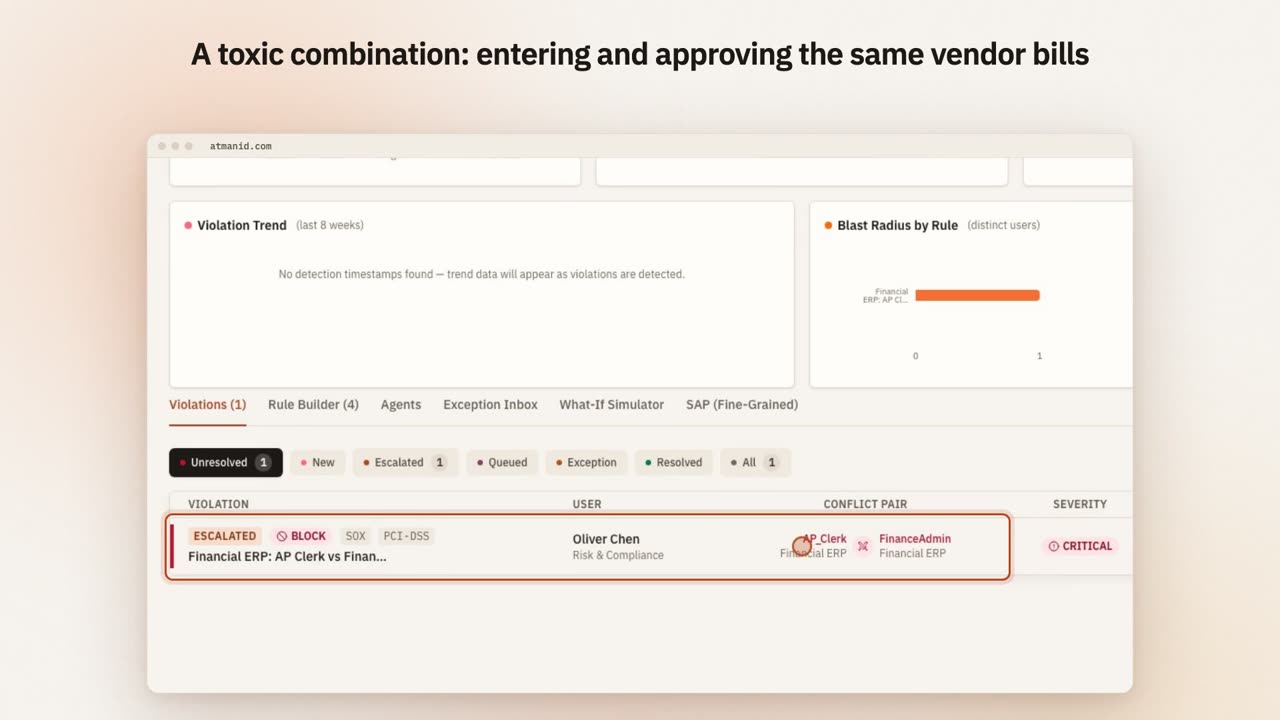](https://atmanid.com/video/card-sod.mp4)
A blocked separation-of-duties conflict — entering and approving the same vendor bills — with grant exception, escalate and remediate on the same row.
## 1. Find the violation
1. Open the **Violations** tab. The number beside it is the count of open violations.
2. Filter by status:
| Filter | Meaning |
| ---------- | ------------------------------------------------------------------------------------- |
| Unresolved | Everything still needing action (the default) |
| New | Detected, nobody has acted yet |
| Escalated | Routed to your organisation’s SoD escalation role |
| Queued | One entitlement revoked in AtmanID; a revocation ticket is open for the target system |
| Exception | An exception has been requested or approved |
| Resolved | Closed |
3. Each row shows the **Violation** (rule), **User**, **Conflict Pair**, **Severity** and **Age** (days open). The conflict pair also shows how recently each connected application was synced, so you know whether the data is current.
Violations come from the scheduled SoD scan, from the check that runs when someone requests access, and from the scan that runs when a person changes role (a JML mover event).
## 2. Read the conflict
Expand the row (the chevron at the end). You see:
* **Iris’s read** of the violation, with a recommendation, at the top.
* **Detection** — how and when it was found.
* **Conflicting Entitlements** — both entitlements and the application each belongs to.
* **Resolution** — what has been done so far, or how long it has been unresolved.
Before deciding, check which of the two entitlements the person actually uses in their job; that is usually the one to keep.
## 3. Decide
**Remediate (any rule).** Select **Remediate**. In **Remediate SoD Violation**, choose **Revoke** for one of the two entitlements, enter a **Justification** (at least 20 characters) and select **Confirm Revocation**. AtmanID removes the entitlement from the person’s record at once and opens a high-priority revocation ticket so it is removed in the target system too; the violation moves to **Queued**, and to **Resolved** once the ticket closes. Any open remediation task for the violation is closed automatically.
**Request an exception (WARN rules only).** Select **Exception** on the row, or **Request Exception** inside the remediation dialog. Enter a **Business Justification** (required), any **Compensating Controls**, and **Expiry (days) — max 90** (the default is 30; your organisation may set a lower ceiling under **Platform Config** → **Governance Settings** → **SoD** tab). Select **Submit Exception Request**.
BLOCK-rule violations cannot be excepted — revoking one side is the only resolution.
**Escalate.** **Escalate** routes the violation to your organisation’s SoD escalation role and notifies them.
## 4. Approve or deny the exception
Open the **Exception Inbox** tab. For a pending request, select **Approve**, or **Deny**, add an optional note and select **Confirm Deny**. You cannot approve an exception you requested yourself. An approved exception can be ended early with **Revoke** → **Confirm Revoke**.
Exceptions are never permanent. When one expires, the violation re-opens automatically. Requests left undecided past the decision deadline are denied automatically.
## Audit trail
| Event | Written when |
| ---------------------------------------------------- | -------------------------------------------------- |
| `SOD_VIOLATION_REMEDIATED` | An entitlement is revoked to resolve the violation |
| `SOD_VIOLATION_ESCALATED` | The violation is escalated |
| `SOD_EXCEPTION_REQUESTED` | An exception is requested |
| `SOD_EXCEPTION_APPROVED`, `SOD_EXCEPTION_DENIED` | An approver decides |
| `SOD_EXCEPTION_REVOKED` | An approved exception is ended early |
| `SOD_EXCEPTION_EXPIRED`, `SOD_EXCEPTION_AUTO_DENIED` | The system expires or auto-denies an exception |
Search for these on **Audit & Reports** (**Security & Risk** → **Audit & Forensics**). Every event name the platform writes is listed in the [audit event reference](/reference/audit-events/).
Not available today: the remediation dialog has no “accept the risk” option, and exceptions cannot be granted for BLOCK rules or extended — request a new exception when one expires.
# Launch a certification campaign and see it through to evidence
> Create an access certification campaign with the five-step wizard, scope it, let reviewers certify, revoke or escalate with usage and peer context, close it, follow revocations to completion and export the decisions as evidence.
Campaigns live in the **Security & Risk** hub → **Access Certifications** → **Campaigns** tab (**Access Campaigns**). Launching one needs the *launch certifications* permission: **Compliance Officer**, **Identity Admin**, **Tenant Owner** or **Super Admin**. Reviewing needs **Manager**, **Compliance Officer**, **Identity Admin**, **Tenant Owner** or **Super Admin**, and being assigned the item.
## 1. Create the campaign
Select **Launch Campaign**. The **New certification campaign** wizard has five steps; **Save as Draft** is available throughout and **Launch Campaign** only on the last.
1. **Basics** — **Campaign Name** and **Deadline** (both required; the campaign closes at 23:59 UTC on that date), and **Campaign Type**:
| Type | Scope you pick | Who reviews |
| ---------------------------------- | -------------------------- | ----------------------------- |
| Manager Certification | Optional department filter | Each user’s manager |
| App Owner Certification | An application | The application’s owner |
| Role Owner Certification | A role | The role’s owner |
| Entitlement Owner Certification | An entitlement | The entitlement’s owner |
| Vendor / Contractor Sponsor Review | Optional sponsor | Each external user’s sponsor |
| NHI Owner Certification | Optional environment | Each machine identity’s owner |
2. **Scope** — narrow what is reviewed: **Scope to risk level**, **Exclude access certified in the last (days)**, **Only access granted more than (days) ago**, **Incremental review** (only new or changed access) and attribute criteria. A live estimate of the population sits beside this step.
3. **Reviewers** — optionally **+ Add a review stage** (App owner, Manager or Entitlement owner) after the initial reviewer, **Allow Certifier Delegation**, and what happens on no response: **Escalate**, **Auto-Revoke** or **Auto-Certify** (the last two after a grace period you set).
4. **Schedule** — **Launch Now**, **Scheduled** (recurring), **Event-Based** or **Threshold**; reminders; and **Stagger reviews in waves** if you want to release reviewers in batches.
5. **Review & launch** — check the summary, then **Launch Campaign**.
## 2. Reviewers decide
Reviewers find their items in **My Workspace** → **Inbox** → **Reviews** tab (**My Reviews**), or on the campaign’s page. Each row shows the context needed to decide:
* **Last used** — when the access was last exercised, where AtmanID has that signal.
* **Peers with this access** — how many people with the same role hold it (or *No peer data*).
* **Iris** — a short explanation and a recommendation (Certify, Review or Revoke); select the **Iris** toggle on the row to expand it.
* The original **Justification**, if the access came from a request.
Actions: **Certify**; **Revoke** (shown inline for High and Critical items, in the ⋯ menu otherwise); **Escalate** (routes the item to a PAM admin, falling back to an identity admin). Your organisation can require a comment on every decision or only on revokes, and can block people from certifying their own access (**Platform Config** → **Governance Settings** → **Certifications** tab).
When all your items are decided, the campaign page shows **Complete review & sign off**; confirm with **Sign Off & Complete**. In a multi-stage campaign, sign-off passes items to the next stage.
## 3. What a revoke does
A revoke does not remove access on the spot. It marks the review **Revoked** and opens a revocation ticket with an SLA (8 hours for High or Critical entitlements, 24 hours otherwise) in the **Revocation Queue** (**Identity & Access** hub → **Provisioning Queues** → **Revocation** tab). The access is removed when that ticket is worked. Track progress on the campaign’s **Remediation** tab.
## 4. Close the campaign
The campaign closes itself (status Completed) as soon as no item is left pending. If it is still open when progress reaches 100%, administrators see **Close Campaign** on the **Campaign Items** tab; **Confirm Close** locks all decisions. Revocation tickets keep processing after close. Closing cannot be undone.
## 5. Export the evidence
On the campaign page, administrators can download every decision as a CSV — **Export CSV** while the campaign is open, **Export Report** once it is closed. Assembled evidence for auditors is in **Security & Risk** → **Compliance** → **Evidence packs**.
Every step is in the audit log: `CERT_CAMPAIGN_CREATED`, `ACCESS_CERTIFIED`, `ACCESS_REVOKE_QUEUED`, `ACCESS_REVIEW_ESCALATED`, `CERT_REVIEW_ATTESTED` (sign-off), `CAMPAIGN_COMPLETED` (automatic close) or `CERT_CAMPAIGN_STATUS_UPDATED` (manual close), and `CERT_CAMPAIGN_EXPORTED`.
# Manage agent policies and enforcement modes by API
> Write the intent policies that allow, deny or hold agents' MCP calls from your own pipeline, test them before they apply, and move an MCP server from shadow to enforce once the preview shows what it would deny.
The [MCP gateway](/guides/mcp-gateway-policy-engine/) decides every agent tool call with **intent policies** and applies them in a server’s **mode**: shadow logs what it would deny, enforce denies it. The console’s Intent Policies and MCP Gateway pages manage both. This API does the same from a script or a GitOps pipeline, with the same checks and the same audit records.
## Before you start
Create an API key with the scopes you need. The key acts as the person who created it, and that person needs the same permission in the console, checked on every call:
| Scope | Lets the key | The key’s owner needs |
| ---------------------- | --------------------------------------------------- | ------------------------------------------ |
| `read:agent_policies` | list, read and simulate intent policies | to see intent policies (and simulate them) |
| `write:agent_policies` | create and change intent policies | to manage intent policies |
| `read:mcp_servers` | list servers, read their modes, preview a promotion | to see the MCP gateway’s tool bindings |
| `write:mcp_servers` | switch a server between shadow and enforce | to manage MCP servers |
The write scopes are high impact: a key that has them waits for approval before it is issued. A key can’t also hold `mcp:authorize`, so the gateway that enforces policy can’t rewrite it or switch it off. Writes also need the owner to be an active person: a suspended or departed owner’s key stops working.
## Write a policy, test it, then turn it on
Create the policy as a draft. Drafts are stored but not evaluated.
```bash
curl -X POST https://app.atmanid.com/api/v1/agent-policies \
-H "Authorization: Bearer $ATMANID_KEY" -H "Content-Type: application/json" \
-d '{"name": "Hold pushes to main", "intent_pattern": "github:push", "resource_pattern": "*/main",
"action": "REQUIRE_HITL", "priority": 20}'
```
Test what the active policies would decide for one call. Nothing is written:
```bash
curl -X POST https://app.atmanid.com/api/v1/agent-policies/simulate \
-H "Authorization: Bearer $ATMANID_KEY" -H "Content-Type: application/json" \
-d '{"agent_id": "agt-release-bot", "intent": "github:push", "resource": "acme/web/main"}'
```
The answer gives `decision` (what the policies say), `enforced_decision` (what the gateway would return right now, counting an active just-in-time session), and a `trace` of every policy and why it matched or not. The simulator reads ACTIVE policies only, so a draft shows up in it once you activate it.
When you’re ready, activate the policy:
```bash
curl -X PATCH https://app.atmanid.com/api/v1/agent-policies/aip-mh3k2x9 \
-H "Authorization: Bearer $ATMANID_KEY" -H "Content-Type: application/json" \
-d '{"status": "ACTIVE"}'
```
A PATCH changes only the fields you send; `"status": "ARCHIVED"` retires a policy. A second policy with the same name is refused with `409 CONFLICT`. Every change is recorded (`AGENT_POLICY_CREATED`, `AGENT_POLICY_UPDATED`) with the key’s owner and the API key’s id.
`GET /api/v1/agent-policies` lists policies 25 per page (up to 100) with the usual `data`, `total`, `page`, `limit` and `total_pages`. Filter with `agent_id` (the agent’s own policies and the global ones, as the gateway reads them), `status` and `action` (a value outside the listed ones is `400 INVALID_PARAM`); sort with `sort_by` (`priority`, `name`, `created_at`, `updated_at`) and `sort_dir`.
## Move a server from shadow to enforce
New servers start in shadow. First see what enforce would deny:
```bash
curl https://app.atmanid.com/api/v1/mcp/servers/mcp-github/mode-preview -H "Authorization: Bearer $ATMANID_KEY"
```
The preview covers the last 7 days. For the gateway mode it counts the calls it would deny (`would_deny_*`) by reason: tool scope, the two rate limits, and payload inspection. For intent policy it gives the same counts, plus `coverage`: tools agents may call that no intent binding covers. Enforce denies those even if nobody called them during the week. If the would-deny counts are calls you meant to allow, fix the grants or policies first.
Then switch:
```bash
curl -X PATCH https://app.atmanid.com/api/v1/mcp/servers/mcp-github/mode \
-H "Authorization: Bearer $ATMANID_KEY" -H "Content-Type: application/json" \
-d '{"gateway_mode": "ENFORCE", "intent_mode": "ENFORCE"}'
```
`gateway_mode` takes `SHADOW` or `ENFORCE`; `intent_mode` takes `OFF`, `SHADOW` or `ENFORCE`. Direct mode, which skips the gateway’s checks, can’t be set by API. Both modes change together or not at all, and `changed` lists what this call moved. Every call is recorded, even one that sets a mode it already has, as a save in the console is: `AGENT_MCP_GATEWAY_MODE_UPDATED` or `AGENT_MCP_INTENT_MODE_UPDATED` with the before and after values and the API key’s id. Moving into enforce also sets `gateway_promoted_at`. A call is safe to repeat.
`GET /api/v1/mcp/servers` lists servers with their modes. Filter with `gateway_mode`, `intent_mode` or `governance_status`. Upstream URLs, credentials and launch commands are never returned, and a locally discovered server’s description is masked as in the console.
The full request and response schemas are in the [API reference](/reference/api/).
# MCP Bearer-token flow for AI agent integrations
> How an AI agent obtains a scoped Bearer token to call MCP tools through AtmanID — the reference flow with RFC 6749 client credentials and RFC 7662 introspection.
The Model Context Protocol (MCP) lets AI agents invoke tools on remote servers. AtmanID acts as the authorization layer — every tool call must present a Bearer token AtmanID issued, with the right scope for the requested tool. This guide walks the token-issuance + introspection loop end-to-end.
If you’re new to MCP itself, the [Anthropic spec](https://modelcontextprotocol.io) is the authoritative source. This guide assumes you’ve decided to use AtmanID as the auth layer and want to understand the wire format.
## The flow at a glance
Four steps, two RFCs, one audit chain:
1. The agent mints an OAuth token via `POST /api/agents/mcp/oauth/token` (RFC 6749 §4.4 client\_credentials grant), for one MCP server (`audience`) and a set of that server’s tools (`scope`).
2. The token is presented on every `Authorization: Bearer ...` call to an MCP tool endpoint.
3. The MCP server introspects the token via `POST /api/agents/mcp/tokens/introspect` (RFC 7662), authenticating with its own AtmanID API key, to verify it’s active and scoped for the tool.
4. Every step writes an audit record keyed by `request_id` — full forensic trail from agent → token → tool invocation.
## 1. Mint the OAuth token
Authenticate with the agent’s client credentials: `client_id` is the agent’s ID, and `client_secret` is an agent credential (an `ifagt_…` key) issued from the **AI Tool Credentials** page → **Issue Credential**. Send them with HTTP Basic auth, or as `client_id` / `client_secret` form fields. The agent must be `ACTIVE` and must hold an active access grant for the MCP server named in `audience`.
```bash
# Replace ATMANID_BASE_URL with your tenant URL
export ATMANID_BASE_URL="https://your-atmanid-instance.com" # replace with your AtmanID base URL
curl -X POST \
-u "$AGENT_ID:$AGENT_CREDENTIAL" \
-H "Content-Type: application/x-www-form-urlencoded" \
--data-urlencode "grant_type=client_credentials" \
--data-urlencode "audience=$MCP_SERVER_ID" \
--data-urlencode "scope=search_tickets create_ticket" \
"$ATMANID_BASE_URL/api/agents/mcp/oauth/token"
```
* `audience` (required) — the ID of the MCP server the token is for.
* `scope` (required) — space-separated **tool names** on that server.
* `ttl_minutes` (optional) — token lifetime, 5 to 1440 minutes; default 1440 (24 hours).
Response (200 OK — RFC 6749 envelope plus AtmanID extensions):
```json
{
"access_token": "ifmcp_3f9c2a...",
"token_type": "Bearer",
"expires_in": 86400,
"scope": "search_tickets create_ticket",
"audience": "mcp-srv-helpdesk",
"issued_at": "2026-10-10T09:00:00.000Z",
"token_id": "tok-7a2c8d9f"
}
```
Things worth noting on the response:
* `token_type` is `Bearer`, or `DPoP` when the token request carried a `DPoP` proof header (RFC 9449) — the token is then bound to that key. A tenant can require DPoP-bound agent tokens, in which case a request without a proof is refused with `invalid_dpop_proof`.
* `scope` is never silently narrowed: if any requested tool is outside the agent’s grant for that server, the whole request fails with `invalid_scope`.
* `expires_in` is seconds, not a timestamp. Mint a new token before expiry by re-running the same call.
## 2. Use the token on tool calls
The agent SDK or MCP client presents the token on every request to the MCP tool endpoint. If the call goes straight to the MCP server, that server is responsible for verifying the token before fulfilling the request — see step 3. If it goes through the AtmanID [MCP Gateway](/guides/mcp-gateway-policy-engine/), the gateway validates the token and enforces its scope before forwarding.
```http
POST https://your-mcp-server/tools/some-tool
Authorization: Bearer ifmcp_eyJhbGc...
Content-Type: application/json
{ ...tool-specific payload... }
```
Tokens are opaque. Don’t try to parse them client-side; just present them on the wire and let the MCP server validate.
## 3. The MCP server introspects (RFC 7662)
The MCP server validates incoming tokens by calling AtmanID’s introspection endpoint with a JSON body. The MCP server authenticates itself (RFC 7662 §2.1) with an AtmanID API key that holds the `read:nhi` scope and belongs to the agent’s organisation — mint it at `Settings → API Keys → Create new key` for the MCP server, not for the agent:
```bash
curl -X POST \
-H "Authorization: Bearer atman_MCP_SERVER_KEY" \
-H "Content-Type: application/json" \
-d '{"token": "ifmcp_3f9c2a..."}' \
"$ATMANID_BASE_URL/api/agents/mcp/tokens/introspect"
```
* A token from another organisation reads as `{ "active": false }` with your key.
* Calls without a key are still answered during the transition (and recorded in the audit log); they will then be refused with `401`, and a key without `read:nhi` with `403`. Add the key now.
* A standard-tier key allows 60 introspection calls a minute.
Send JSON, not a form-encoded body — a body that can’t be parsed as JSON is answered with `{ "active": false }`.
Response (200 OK — RFC 7662 envelope, when active):
```json
{
"active": true,
"token_type": "Bearer",
"scope": "search_tickets create_ticket",
"client_id": "agt-mcp-7a2c8d9f",
"sub": "agt-mcp-7a2c8d9f",
"username": "helpdesk-triage-agent",
"aud": "mcp-srv-helpdesk",
"exp": 1760173200,
"iat": 1760086800,
"mcp_server_id": "mcp-srv-helpdesk",
"grant_type": "client_credentials"
}
```
The response also carries AtmanID extensions such as `agent_type` and `agent_risk_score`. For a DPoP-bound token, `token_type` is `DPoP` and a `cnf.jkt` confirmation claim (RFC 7800) is included so the MCP server can verify the proof itself. Check that `aud` is your own server’s ID and that the requested tool is in `scope`.
If the token is expired, revoked, or unknown, the response is just:
```json
{ "active": false }
```
…with no other fields. The MCP server should reject the request with `401 Unauthorized` when `active: false`.
## Audit trail
Every token issuance writes an `MCP_OAUTH_TOKEN_ISSUED` audit record (if that record can’t be written, the token is revoked and not returned), and every introspection of a token AtmanID issued writes an `MCP_TOKEN_INTROSPECTED` record — including introspections of expired or revoked tokens. Introspecting a string that was never an AtmanID token returns `{ "active": false }` without an audit record. An auditor can trace any tool invocation by joining MCP server logs (which carry `request_id`) to the corresponding AtmanID audit records.
Example: every token introspection since a given time, from the audit API (needs the `read:audit_logs` scope):
```bash
curl -s "$ATMANID_BASE_URL/api/v1/audit?action_type=MCP_TOKEN_INTROSPECTED&since=2026-10-07T00:00:00Z" \
-H "Authorization: Bearer $ATMANID_API_KEY"
```
Each record carries its `request_id`, the token, the MCP server and the time — match the `request_id` against the MCP server’s own logs. Both endpoints also return the `X-Request-Id` header.
This isn’t a contrived example — it’s the exact pattern an auditor uses when investigating “did agent X actually call tool Y at time Z?”
## Why introspection (not JWT verification)?
This is a deliberate design choice with a tradeoff worth understanding.
Tokens are opaque, not self-describing. The MCP server can’t decode the token locally — it has to call AtmanID for every validation. This costs one network round-trip per tool invocation (typically \~30-80ms in the same region).
In exchange:
* **AtmanID can revoke a token immediately** and the MCP server sees the change on the very next introspection call. With JWT, revocation requires a denylist or short expirations — both have leakage windows.
* **Audit trail is server-side authoritative.** Every introspection writes a row; you can’t accidentally lose audit data by failing to log on the MCP server side.
* **Agent status changes propagate instantly.** If you suspend or deprovision an agent, the next introspection of any of its tokens returns `active: false`. (A token’s scope is fixed when it is issued — to narrow it, revoke the token and have the agent mint a new one.)
This is the right trade for privileged agent operations where revocation latency matters more than introspection RTT. For high-throughput non-privileged operations where you can tolerate \~5-minute revocation lag, JWT may be the better fit — file an issue if you want AtmanID to support it as an option.
## Common errors
The token endpoint returns RFC 6749 §5.2 errors: `{ "error": "", "error_description": "" }`.
| Status | `error` | What’s wrong | Fix |
| ------ | ------------------------------------------- | --------------------------------------------------------------------------------------------- | ---------------------------------------------------------------------------------------------- |
| 401 | `invalid_client` | `client_id`/`client_secret` missing or wrong, credential expired, or the agent isn’t `ACTIVE` | Issue a new credential, or have the agent approved |
| 400 | `unsupported_grant_type` | `grant_type` not `client_credentials` | Only client\_credentials is supported |
| 400 | `invalid_request` | `scope` or `audience` missing, or `audience` isn’t a known MCP server | Send both; check the MCP server’s ID |
| 400 | `invalid_scope` | A requested tool isn’t in the agent’s grant for that server | Request only granted tools, or widen the agent’s access grant |
| 403 | `unauthorized_client` | The agent has no active (unexpired) access grant for that server, or the server is disabled | Grant the agent access to the MCP server |
| 400 | `invalid_dpop_proof` | The DPoP proof is invalid, or the tenant requires DPoP and none was sent | Send a valid `DPoP` proof header |
| 429 | (`{ "error": { "code": "RATE_LIMITED" } }`) | Token endpoint limit hit (5 requests/minute per client address) | Cache the token and reuse it until `expires_in` — don’t mint per request; honour `Retry-After` |
| 200 | `{ active: false }` from introspection | Token expired/revoked/unknown (NOT an error per RFC 7662) | MCP server returns 401 to the agent caller |
## Going further
* What happens after the token is issued, when calls go through the AtmanID gateway: [MCP Gateway — enforcement modes, rate limits, and DLP inspection](/guides/mcp-gateway-policy-engine/)
* The [API Reference](/reference/api/) documents every field in both envelopes
* For HITL approval gates inside an agent flow, see the upcoming `jit/request` recipe (queued v1.2)
* For agent-as-an-identity concepts (lifecycle, ownership, attribution), read [Iris explained](/concepts/iris-explained/) and [Personas](/concepts/personas/)
# MCP Gateway — enforcement modes, rate limits, and DLP inspection
> Move an MCP server from shadow logging to active enforcement, tune per-agent rate limits, and layer tenant-authored DLP rules on top of the built-in PII/secret checks — the policy engine sitting in front of every agent-to-MCP-server call.
[MCP Bearer-token flow](/guides/mcp-bearer-token-flow/) covers how an agent gets a scoped token to call an MCP tool. This guide covers what happens *after* the agent has that token — every call transits the MCP Gateway, which is where AtmanID actually enforces policy, rather than trusting the downstream MCP server to enforce it correctly on its own.
## Why a gateway, not just an issued token
A Bearer token with the right scope is only as good as the server that checks it. A misconfigured or third-party MCP server can skip validation, honor the token but ignore its scope, or simply not tell you what data an agent sent it. The gateway closes that gap by sitting inline: every agent → MCP call is validated, scope-checked, rate-limited, and inspected by AtmanID *before* it reaches the destination server — so enforcement lives on infrastructure you control, not on someone else’s.
Go to **MCP Gateway** in the Agents section of the dashboard: the **Events** view shows every call, what the gateway decided and why, with a drill-down into any individual event; the **Settings** view holds each server’s mode and rate limit and your DLP rules.
Agentcalls a tool through the gateway
↓
AtmanID gateway — every call, inline
1. **Who is calling**The agent’s AtmanID token and its proof of possession; the agent is active and in your organisation.
2. **Which server and tool**With the recommended settings: the server is approved, with a named owner, and the tool is one its owner approved and has not changed since.
3. **Is it allowed**The tool is in the agent’s grant; the agent is within its rate limits.
4. **What it carries**The payload is inspected for credentials, payment cards and government identifiers — decoded as well as raw — and for data another server just handed the agent.
5. **Should it happen**Your intent policies decide: allow, deny, or hold the call for a person to approve.
Any stage can refuse the call, with its reason. In *shadow* mode a would-be refusal is recorded and the call goes on, so you can see what a policy would do before it does it.
↓
Forwarded to the MCP servernever with the agent’s own token — optionally with a short-lived token AtmanID signs for that server only
↓
The response comes back through the gatewayinspected; personal data redacted for servers that handle it
↓
Every decision — allowed, denied, held or would-deny — is an event, and lands on the tamper-evident audit trail.
One agent tool call through the AtmanID MCP gateway.
[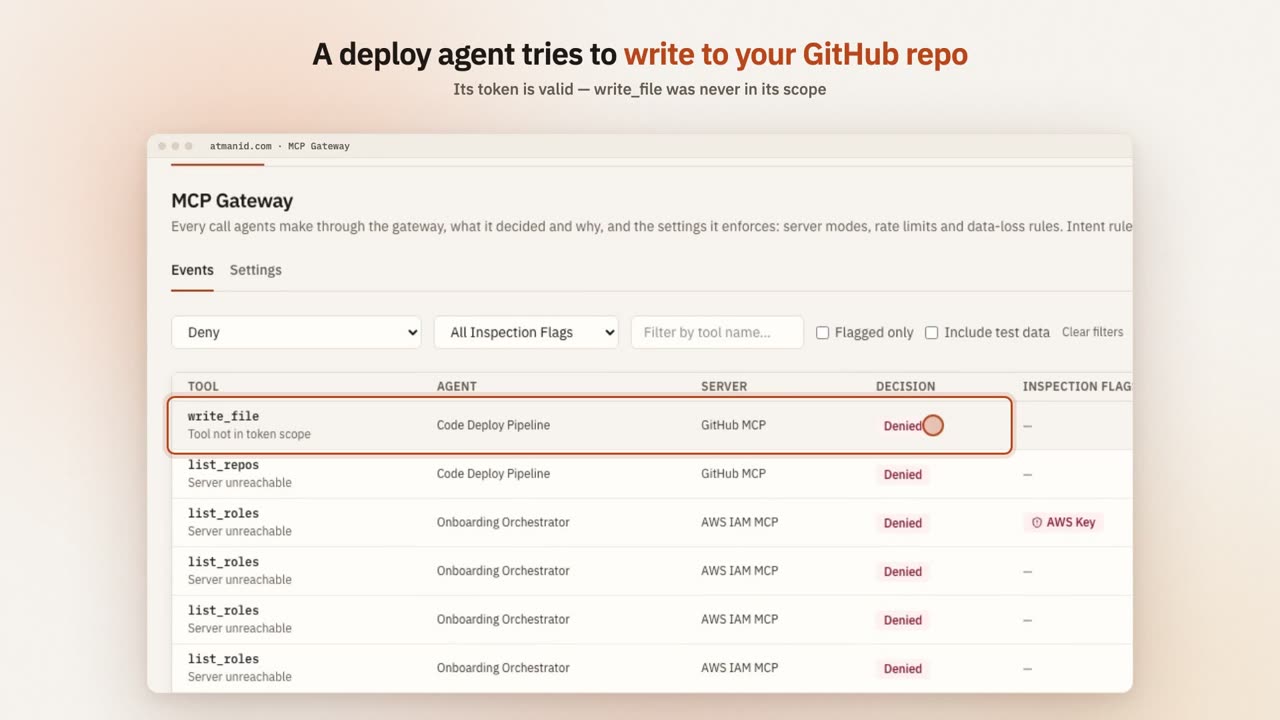](https://atmanid.com/video/card-gateway.mp4)
A deploy agent with a valid token calls write\_file on its GitHub MCP server — a tool its grant never included. The gateway denies the call before it reaches GitHub, and the event shows why.
## The three enforcement modes
Every MCP server has a `gateway_mode`, and it governs scope enforcement, rate limiting, and DLP inspection uniformly — one lever, not three separate switches:
* **SHADOW** (default for new servers) — the gateway runs the full validation chain, but its own checks never block. If a call *would* have been denied, the outcome is logged as `WOULD_DENY` with the reason, and the call goes on to intent policy, which applies its own mode (below). This is how you find out what a policy change would actually affect before it affects anyone.
* **ENFORCE** — the same checks now actually block. A scope mismatch, a rate-limit breach, or a flagged payload returns a real denial instead of a logged one.
* **DIRECT** — bypasses the gateway entirely. This is a break-glass lever only, not something exposed as a UI toggle, and every server running in DIRECT mode is a standing exception worth knowing you have.
Promoting a server from SHADOW to ENFORCE is done from the server’s row in **MCP Gateway → Settings**, and it shows you a promotion-safety preview first — a summary of what the shadow log would have denied, scoped to the specific reasons `gateway_mode` governs, so you’re not flipping the switch blind.
### Gateway mode and intent mode are independent
Gateway enforcement (scope, rate limits, inspection) and intent enforcement (your allow, deny and require-approval policies) are two separate settings. A gateway in SHADOW never switches off intent enforcement: a call the gateway only logs is still refused, or held for approval, if its server’s intent mode is ENFORCE and a policy says so.
## Enforcement settings
Each check that can block has a setting in **MCP Gateway → Settings → Enforcement Settings**, with a description and a **Recommended** marker. Identity admins, tenant owners and CISOs change them there, and every change is audited and takes effect within 30 seconds. New organisations start with the recommended checks on: credentials blocked in every mode, extended secret inspection, holding tools with suspicious descriptions or unapproved changes, approved servers only, response redaction, blocking sensitive data moving between servers, and strictest-match policy resolution. Enforcing intent policy for every agent starts off, because calls that match no policy are denied; turn it on once your policies are in place. Once it is on, you can exempt a single agent without SDK integration for up to 30 days, with a reason, under that setting: its calls are still checked and would-be refusals recorded, but not blocked, and the exemption ends on its own. Granting and ending one are audited.
## Rate limiting
Two limits apply, both configurable per tenant:
* A **global per-agent limit** — total calls per minute across every MCP server the agent talks to, closing the gap where an agent under any single server’s threshold could still fan out across many servers and overwhelm downstream systems in aggregate.
* A **per-(agent, server) limit** — a tighter cap on one specific server, when you want a stricter ceiling than the tenant default for a particular integration.
The tenant-wide default is shown, and changed, in **MCP Gateway → Settings**; individual servers can override it. A limit breach in ENFORCE mode returns a real rate-limit denial; in SHADOW mode it’s logged as a would-deny and the call still goes through.
## DLP inspection
Every request payload — and every response coming back from the MCP server — is scanned by built-in checks in three classes: **credentials and secrets** (cloud access keys, private keys, tokens, and API keys for common developer, payment and AI services), **payment card numbers** (checksum-validated, not just pattern-matched) and **government identifiers**. The scan reads the payload decoded as well as raw, so a value wrapped in a common encoding is still seen. A match is recorded as a flag on the event; in ENFORCE mode a flagged *request* is blocked outright rather than merely logged.
Extended inspection starts in warn mode: its findings are recorded on events (filter Events by **Flagged only** to see them) but only block once **Block secrets found by extended inspection** is on in **MCP Gateway → Settings → Enforcement Settings**. Separately, **Block credentials in every mode** refuses any request carrying a credential even when the server’s gateway mode is SHADOW — a secret leaving through an agent is not something to soak-test. Personal data keeps following the gateway mode.
Response inspection matters as much as request inspection: a compromised or misconfigured MCP server could otherwise leak a secret back *through* the gateway in its reply with no record of it. Both directions run through the same checks. By the time a reply arrives its tool call has already run, so a finding in a response is recorded on the event for investigation, and for servers that handle personal data the values can be redacted before the agent reads them (below).
### Adding your own rules
The built-in checks can’t be edited or turned off — they’re the floor, not a starting point you’re expected to customize away. On top of them, you can author your own tenant-specific DLP rules from the **DLP Rules** card in **MCP Gateway → Settings**: a rule is either a literal substring match or a regular expression, and it adds a new flag alongside the built-in ones. Regex rules run on a linear-time (RE2-style) engine, so no pattern can backtrack catastrophically; a pattern is checked at save time and rejected if it uses features that engine doesn’t support, such as lookarounds or backreferences. A rule you add can’t itself become a denial-of-service vector.
### Data that moves between servers
Each call can look harmless on its own while two calls together leak data: read a customer record from one tool, then send it out through another. When a server’s response hands an agent personal data or a credential, the agent is marked for a period afterwards, and a call it then makes to a *different* server is flagged **Data From Another Server** (`TAINTED_SESSION`) on the event. The flag is recorded only until **Block sensitive data moving between servers** is on; then it blocks like any inspection flag, following the server’s gateway mode.
### Personal data in responses
A server’s owner can mark it as handling personal data (**MCP Gateway → Settings → Personal data → Redact**). The gateway then replaces government identifiers and valid payment card numbers in that server’s responses with a `[REDACTED:…]` marker before the agent reads them — JSON responses stay valid JSON. Each event records how many values were found, never the values. Redaction starts in warn mode: until **Redact personal data in responses** is on, the gateway counts what it would redact and passes the response through unchanged, so you can check the counts in Events first.
## Telling your MCP server which agent is calling
By default the gateway forwards a call with **no credential**: the agent’s AtmanID token never leaves AtmanID, so your server can’t tell agents apart. To let it, open **MCP Gateway → Settings → Upstream identity** and choose **Token exchange**, with the audience your server expects. For each call the gateway then sends a short-lived token that AtmanID signs for that server only, in the `x-atmanid-agent-token` header. It is sent in addition to whatever your server uses today, so you can verify it before you rely on it. Once your server verifies it, tick **Require the token**: the gateway then also sends it as `Authorization: Bearer `, and refuses a call it cannot issue a token for instead of forwarding it without one.
The token is a JWT (ES256). Your server should check:
| Check | Value |
| ------------ | -------------------------------------------------------------------------------------------------------------------------------- |
| Header `typ` | `atmanid-agent+jwt` |
| Signature | against the key set at `https:///api/agents/token-exchange//jwks` (the dialog shows the exact URL) |
| `iss` | the same URL without `/jwks` |
| `aud` | the audience you configured |
| `exp` | not passed; tokens live 5 minutes |
| `ver` | `1` |
The claims tell your server who is calling. `sub` and `act.sub` are the agent, and `scope` lists the tools the agent is granted on your server. `jti` identifies the token in your logs. The gateway reuses a token for the same agent and server across calls for up to its 5-minute life, so don’t refuse a `jti` you have seen before. If the server’s owner opts in, `act` also names the person the agent acts for, as `act.act.sub: "user:"`. That is off by default, so no personal data reaches your server unless you ask for it.
To see a real token before you change your server, point a test server’s upstream URL at `https:///api/agents/token-exchange//echo`, set it to Token exchange, and call a tool through the gateway. The response says whether the token verified, where it arrived (`sent_in`), and its header and claims.
To make the gateway the only way to reach your server, require this token and refuse everything else: see [Deploying so nothing bypasses the gateway](/guides/deploy-so-nothing-bypasses-the-gateway/).
Signing keys rotate every 90 days. The previous key stays in the key set until every token it signed has expired, so cache the key set by `kid` and refresh it when you see an unknown one. Every token issued is recorded in the audit trail as **MCP upstream token issued**.
## The tool list agents see
An agent that asks an MCP server for its tools reads whatever the server says today — including a description that changed after you approved it, or one written to instruct the model (“ignore your previous instructions”, “don’t tell the user”, “read \~/.ssh first”). Agents that ask the gateway instead (`GET /v1/mcp/{serverId}/tools`) get the **approved** inventory: the name, description and schema the server’s owner approved, never a pending change, and only the tools the agent’s token may call.
Every description is also scanned for instructions aimed at the model and for invisible characters. Findings are shown to the owner on the server’s Tool Inventory and recorded in the audit trail. With **Hold tools with suspicious descriptions** on, a flagged new tool is held for the owner instead of being trusted automatically, and a flagged tool nobody has reviewed is left out of the tool list; a tool the owner approved after seeing the findings is listed.
## Intent policy: what an intent is, and how a decision is made
An **intent** is what the agent is trying to do, as a name such as `repo:delete` or `crm:export`. For a gateway call it is the tool’s bound intent (or the tool name when none is bound), and the **resource** is extracted from the call’s arguments. An intent policy matches intent and resource patterns (`*` wildcards), optionally argument conditions and budgets, and says ALLOW, DENY or REQUIRE\_HITL.
A decision is made in this order:
1. **The agent’s own state** — a suspended or deprovisioned agent is denied before any policy is read; runtime holds (an ITDR alert, configuration drift) only ever add a human.
2. **Matching policies** — agent-specific policies before tenant-wide ones, then by priority. By default the first match decides. With **Strictest matching policy wins** on, the **strictest** matching policy decides (DENY over REQUIRE\_HITL over ALLOW), so an older broad ALLOW cannot mask a newer DENY; until then, a case where the two would differ is logged.
3. **No match** — denied (default-deny), and the gap is raised for review.
4. **Risk threshold** — an ALLOW from a policy with a risk threshold becomes REQUIRE\_HITL when the agent’s risk level (Low, Medium, High or Critical) reaches it. It only ever adds a human, never relaxes a decision; it applies once **Hold high-risk agents at a policy’s risk threshold** is on, and is logged until then.
5. **Approval** — a REQUIRE\_HITL holds the call for a person. A policy can name its **approver** (an active user’s email), who can then decide its holds alongside agent-oversight roles. A just-in-time session approved in advance can satisfy a hold.
6. **Owner risk and budgets** — an agent whose owner has a high-risk sign-in is held, and an ALLOW that would exceed a policy’s daily budget takes that policy’s action instead.
The policy simulator (**Agent Policies → Policy Simulator**) resolves matching policies the same way — first match, or the strictest when **Strictest matching policy wins** is on — and shows when a stricter policy also matches. It reports the policy decision; the agent-specific steps after it (risk threshold, owner risk, budgets) depend on live state and are applied only at enforcement.
## Querying the audit trail
Every gateway transit — allowed, denied, would-deny, or bypassed — writes an event, whether or not the DLP scan found anything. If you need to answer “what did this agent actually call, and what did we do about it,” the event log (**MCP Gateway → Events** in the dashboard) is a single place to look rather than reconstructing the answer from the downstream MCP server’s own logs, which you may not control. Request payloads are hashed by default rather than stored in full — full-payload capture is an explicit opt-in per server, not the default, so investigating an incident doesn’t require storing sensitive data you didn’t need to keep.
# Navigate the audit trail
> Find audit events with filters, read an event record, export what you found, check the hash chain's integrity, and hand auditors the evidence they need.
The audit trail is at **Security & Risk → Audit & Forensics → Audit trail**. The page title is **Audit & Reports**. Every view of the page is itself logged as `AUDIT_LOG_VIEWED`.
| Role | What they see |
| ------------------------------------------------------------------------------------------- | ------------------------------------ |
| Compliance Officer, CISO, Super Admin | The whole trail |
| Identity Admin, Tenant Owner, Security Analyst, PAM Admin, Agent Engineer, External Auditor | The whole trail, read-only |
| Manager | Events for their direct reports only |
| End User | No access |
## Find events
Use the **Filters** card above the table:
| Filter | What it does |
| ----------------- | --------------------------------------------------------------------------------------------------------------------------------------------- |
| **Search** | Free text matched against the action, actor name, resource ID, resource type and agent name |
| **Category** | Provisioning, Entitlement, Certification, PAM, Agent, Policy, System, Reconciliation or API Hub. Each category matches by action-name prefix. |
| **Actor Type** | Human, Agent or System |
| **From** / **To** | Date range. **To** includes the whole day. |
**Agent Activity (90d)** is a shortcut: it shows events by AI agents over the last 90 days. **Clear** resets every filter. Click the **Actor**, **Action**, **Resource** or **When** column header to sort. The table shows 50 events per page. **Columns** hides or shows columns, and your choice is remembered in your browser.
Links from other pages, such as a user’s or an agent’s page, open the trail already filtered to one actor, resource, action type, request or trace. A **Showing only:** bar appears, with **Show the whole log** to remove that filter.
There is no outcome or IP-address filter. Action names follow `DOMAIN_OBJECT_VERB`, for example `LOGIN_SUCCESS`, `ENTITLEMENT_REVOKED`, `JML_LEAVER_TRIGGERED` and `SOD_RULE_CREATED`. The table shows a readable label for each. One quirk: the **Certification** category matches `CAMPAIGN_*` actions only, so `CERT_CAMPAIGN_*` events appear under **System**. Use **Search** to find them.
## Read a record
Click a row, or press Enter on it, to expand it. **Event Details** shows the **Event ID**, **Action Type**, **Resource ID**, **Timestamp (UTC)** and **Actor Type**. Below that is the raw JSON of the state recorded with the event. The actor’s name is the name they had when the action happened. Actors erased under GDPR show “(redacted per GDPR)”. The **Action Type** is the event’s name — the same name in the CSV export, the audit API and your SIEM; every one is listed in the [audit event reference](/reference/audit-events/).
The page does **not** show a before/after comparison, the IP address or user agent, or the hash values. The public API (`GET /api/v1/audit`, API-key scope `read:audit_logs`) returns `previous_state` and `ip_address` where they were recorded.
## Export
**Export CSV** downloads the events currently on screen: one page, up to 50 rows. It is not the whole filtered result. Every export is logged as `AUDIT_LOG_EXPORTED` before the file is created. If that log entry cannot be written, the download is stopped and you see “Export blocked”. For larger extracts, use one of these:
* `GET /api/v1/audit`: filter by `action_type`, `resource_type`, `since` and `until`, up to 100 rows per page.
* **Forensics** tab: signed JSON or PDF evidence exports. These need Identity Admin, Tenant Owner, CISO, External Auditor or Super Admin.
* **SIEM Export** (**Platform Config → Integrations & API**): sends new audit events to your SIEM every five minutes.
## Check the chain
Every event is hashed into a tamper-evident chain. Compliance Officers and Super Admins see a chain banner at the top of the page. Its buttons are **Verify now**, **Re-check** and **Re-verify**. A check covers the latest 500 entries and reports one of these:
* **Audit chain intact — tamper-evident**: all good.
* **Audit chain tampered — review immediately**: an entry no longer matches its hash.
* **Audit chain — records require review**: there is a gap in the sequence.
* **Audit chain intact — benign historical rows noted**: old rows have known, harmless issues.
AtmanID also checks the chain on its own:
| Check | When (UTC) | What it covers |
| -------------- | --------------- | ------------------------------------------------------------------------------------------ |
| Nightly | 02:30 daily | The latest 500 entries. Writes `AUDIT_CHAIN_VERIFIED`, or `AUDIT_CHAIN_BROKEN` on failure. |
| Weekly | Sunday 03:30 | The whole chain, plus every signed anchor |
| Anchor signing | Every 5 minutes | Signs the chain head. Anchors are mirrored offsite. |
If a check fails, Super Admins, Identity Admins, CISOs and Compliance Officers get an **Audit integrity alert** notification that links back to this page. See [Audit chain](/architecture/audit-chain/) for how the chain works.
## Evidence for auditors
* Give an outside auditor time-limited, read-only access in **Security & Risk → Compliance → Auditor access**. The auditor then works from the **Auditor Portal**.
* **Compliance → Evidence packs** builds a pack for a period and framework: SOX (ITGC), ISO 27001, SOC 2 (TSC) or All Sections. Click **Generate Pack**, then **Print / Save as PDF** or **Download JSON**.
## Retention
Super Admins can set an **Audit trail** retention period on the **GDPR erasure** page (**Platform Config → Administration**): 730 days by default, between 365 and 2555. The period is recorded but not yet enforced; old audit events are not deleted today.
# Onboard an application — register it, bring in its access, set an owner, publish it
> Add an application to the App Registry, connect a connector or upload a CSV to bring in its accounts and entitlements, assign the app owner who approves requests, and publish it to the Access Catalog so people can request it.
Applications live in the **Identity & Access** hub → **Applications** → **Registry** tab (the page is titled **Applications**). Adding and configuring an application needs the *create* and *edit application* permissions, which **Identity Admin**, **Tenant Owner** and **Super Admin** hold. Deleting one is **Super Admin** only.
## 1. Register the application
1. Select **Add Application**. A three-step dialog opens: **Choose Type**, **App Details**, **Connector**.
2. Choose how AtmanID learns who has access:
| Type | Use it when |
| ----------- | --------------------------------------------------------------------------------- |
| Connected | AtmanID can reach the app through a connector and discover accounts automatically |
| Manual | There is no connector; accounts and entitlements are tracked by hand |
| CSV-Managed | There is no API, but you can export a CSV of accounts on a schedule |
3. Enter the **Application Name** (required) and an optional **Description**.
4. For a Connected app, pick a connector tile (Okta, Azure AD / Entra ID, Exchange Online (Microsoft 365), Google Workspace, GitHub Enterprise, Salesforce, AWS IAM, Jira, ServiceNow) or skip it — AtmanID then uses the generic SCIM connector and you can change it later. The dialog may pre-select a connector it recognises from the name (*Suggested from name*).
5. Select **Create Application**.
Every new application starts as **Draft**: it is not in the Access Catalog yet. Open it from the registry to finish the setup. Its page has the tabs **Overview**, **Attributes**, **Entitlements**, **Access Risk**, **NHIs**, **Accounts**, **Activity** and **⚙ Config**.
## 2. Bring in accounts and entitlements
Go to **⚙ Config** → **Connection & sync**. What you see depends on the type.
**Connected apps**
1. Under **Connection credentials**, select **Configure credentials**, enter them and save. Credentials are encrypted before storage and never shown again.
2. Under **Entitlement discovery**, select **Discover** to pull the app’s groups, roles and permissions.
3. On the **Accounts** tab, select **Sync Now** to import accounts.
**CSV-Managed apps**
1. Under **CSV account pickup**, choose a `.csv` file and select **Upload**. Required columns: `username`, `display_name`, `email`, `status` (`active`, `disabled` or `suspended`); optional: `entitlement_code`, `department`, `job_title`.
2. Check the preview — **Added**, **Updated**, **Removed**, **Unchanged** — then select **Apply Changes**. If the upload would remove an unusually large share of accounts, the **Orphan Safety Gate** stops it; **Force Apply** overrides it once you have checked the file.
**Any app (including Manual)** — under **Entitlement descriptions**, upload a CSV with `entitlement_name` and `description` (optional `risk_level`: LOW, MEDIUM, HIGH or CRITICAL). Names that already exist get their description updated; new names are added as entitlements. Plain-language descriptions are what reviewers read during certifications, so write them for a business reader.
The imported entitlements appear on the **Entitlements** tab.
## 3. Set the owner and the approval route
In **⚙ Config** → **Identity & catalog**, find **App owner**, search for a person by name or email and select **Save**. The owner is the approver for any workflow stage that uses the *App Owner* role, and the reviewer in an App Owner Certification. Until an owner is set, those stages fall back to an identity admin.
In **Access & approvals**, **Approval workflow** sets the default approval chain for requests to this app (otherwise the platform default applies). You can override it for individual entitlements.
The **Configuration at a glance** strip at the top of the tab shows Owner, Connection, Approval workflow, Trust threshold, Requestable and Type; select any of them to jump to its setting.
## 4. Make it requestable
1. Still under **Identity & catalog**, **Catalog requestability** controls who can see the app in the catalog: **Unrestricted (all roles)**, or **Restricted to specific roles** with the roles ticked. Select **Save Requestability**. Restricting with no roles ticked hides the app from everyone.
2. On the **Overview** tab, **Catalog readiness** shows Draft, Published or Hidden. Select **Publish**.
Only **Published** apps appear in the Access Catalog. **Unpublish** returns the app to Draft; **Hide** removes it from the catalog entirely.
## What is recorded
Creating an app writes `APPLICATION_CREATED` to the audit log; owner, requestability, workflow and catalog-status changes write `APP_UPDATED`; an entitlement CSV writes `ENTITLEMENT_CSV_IMPORTED`. Search for these on **Audit & Reports** (**Security & Risk** hub → **Audit & Forensics**).
# Provision users and groups with SCIM
> Let an identity provider such as Okta or Microsoft Entra ID create, update, suspend and remove AtmanID users and groups over SCIM 2.0. Covers the token, the endpoints, what each operation does to a person, the policy checks, the audit events and what is not supported yet.
AtmanID runs a SCIM 2.0 server. Your identity provider (IdP), for example Okta or Microsoft Entra ID, calls it to create people in AtmanID, keep their name and email current, suspend them when they are disabled, remove them when they are deleted, and push groups. AtmanID does not call your IdP; every change on this page starts with a request from it.
In the examples, `$ATMANID_BASE_URL` is the address of your AtmanID tenant, and `$SCIM_TOKEN` is a token you create below.
## Before you start
* You need a role that can configure SCIM: identity admin, tenant owner or super admin.
* Inbound provisioning must be on. It is on unless someone has turned it off with the **Inbound provisioning** switch on the **SCIM Provisioning** page. While it is off, every SCIM request with a valid token is answered `403` and nothing is written.
* Read [what is not supported yet](#what-is-not-supported-yet) before you connect a production IdP.
## The base URL
Point your IdP at:
```plaintext
$ATMANID_BASE_URL/api/scim/v2
```
| Resource | Path | Methods |
| ----------------------- | ------------------------ | ------------------------------- |
| Users | `/Users` | `GET`, `POST` |
| One user | `/Users/{id}` | `GET`, `PUT`, `PATCH`, `DELETE` |
| Groups | `/Groups` | `GET`, `POST` |
| One group | `/Groups/{id}` | `GET`, `PUT`, `PATCH`, `DELETE` |
| Service provider config | `/ServiceProviderConfig` | `GET`, no token needed |
| Schemas | `/Schemas` | `GET`, no token needed |
| Resource types | `/ResourceTypes` | `GET`, no token needed |
The **SCIM Provisioning** page (Inbound tab) shows the same base URL for your tenant with a copy button. A separate health check, `$ATMANID_BASE_URL/api/scim/health`, needs no token and always answers `200`: `status` is `operational` when AtmanID can reach its database and `degraded` when it cannot.
## Create a token
1. Open **SCIM Provisioning** and stay on the **Inbound** tab.
2. Under **SCIM Bearer Tokens**, type a name that says which IdP will use it, for example `Okta production`, and select **Generate Token**.
3. Copy the token straight away. It is shown once. AtmanID keeps only a SHA-256 hash of it and shows its first eight characters in the list so you can tell tokens apart.
A token is 64 hexadecimal characters. It does not expire. It belongs to the tenant it was created in: AtmanID works out which tenant a SCIM request is for from the token alone, so one IdP connection can only ever write to one tenant. Revoke a token from the same list; every request is checked against the stored hashes, so the next request with a revoked token gets `401`. Creating and revoking a token are audited as `SCIM_TOKEN_CREATED` and `SCIM_TOKEN_REVOKED`.
Send the token on every request:
```bash
curl -s "$ATMANID_BASE_URL/api/scim/v2/Users?count=5" \
-H "Authorization: Bearer $SCIM_TOKEN"
```
A missing, unknown or revoked token gets `401` with the detail `Unauthorized — valid Bearer token required`.
## Users
### Attributes
| SCIM attribute | Stored as | Notes |
| ------------------------------------------------------------------------- | ------------------- | ------------------------------------------------------------------------------------------------------ |
| `userName` | email | Also returned as `emails[0].value` and `externalId`. |
| `emails[0].value` | email | Used only when `userName` is absent. |
| `name.givenName`, `name.familyName` | first and last name | `name.formatted` is returned, not stored. |
| `title` | job title | |
| `urn:ietf:params:scim:schemas:extension:enterprise:2.0:User` `department` | department | Subject to the department source setting on create. |
| `active` | status | `true` or `false`, or the strings `"True"`/`"False"` in any case. Anything else is refused with `400`. |
Other attributes in the body are accepted and ignored. AtmanID returns its own `id` (a UUID) for each user; use it in `/Users/{id}`.
### Create a user
```bash
curl -s -X POST "$ATMANID_BASE_URL/api/scim/v2/Users" \
-H "Authorization: Bearer $SCIM_TOKEN" \
-H "Content-Type: application/scim+json" \
-d '{
"schemas": ["urn:ietf:params:scim:schemas:core:2.0:User"],
"userName": "ada@example.com",
"name": { "givenName": "Ada", "familyName": "Lovelace" },
"title": "Analyst",
"urn:ietf:params:scim:schemas:extension:enterprise:2.0:User": { "department": "Finance" },
"active": true
}'
```
`userName` or an email is required. A new person is created `ACTIVE`, or `SUSPENDED` and held by the IdP when the body says `"active": false`, so a later `active: true` makes them active. A second create with an email that already exists in the tenant gets `409`.
Before anything is written, the create is checked against the **Provisioning Rules** card on the SCIM Provisioning page, in this order:
1. **Auto-Provision** off: every create is refused. Updates to people who already exist still apply.
2. **Allowed Email Domains** set: the email’s domain must be in the list (case-insensitive).
3. **Excluded Departments** set: a person whose department matches an entry is refused (case-insensitive).
A refused create gets `403` with the reason in `detail`, for example `Email domain 'contractor.io' is not in the provisioning scope (allowed: example.com)`, and is audited as `SCIM_USER_PROVISION_BLOCKED` with the same reason. It is never dropped silently.
The same card sets what a created person gets:
* **Default Platform Role**: assigned on create. A stored value of `super_admin`, or anything that is not a platform role, is replaced with `end_user`. If the role cannot be assigned, the person is still created and the failure is logged.
* **Department Source**: with SCIM (the default) the department from the IdP is stored; with manual or HR, the configured default department is stored instead.
* **Require MFA at First Login**: when on, the created person is required to use MFA whatever their role’s MFA policy says.
A successful create is audited as `SCIM_USER_PROVISIONED`, with the applied default role, MFA requirement and department source.
### Read a user or the list
`GET /Users/{id}` returns `404` for an unknown id and for a person who has been deprovisioned.
`GET /Users` returns the tenant’s users, oldest first, a page at a time. `startIndex` is 1-based (default 1) and `count` is the page size (default 100, at most 200; `0` returns only the total). `totalResults` is the number of users that match, across all pages. Deprovisioned people are left out of the list, as they are from `GET /Users/{id}`.
IdPs look a person up before creating them, so `GET /Users` takes a `filter` with one equality test:
| Filter | Matches |
| --------------------------------------------------------------------------------------------------------- | ----------------------------------------------------------------------------------------------------------------------------------------------------------------- |
| `userName eq "ada@example.com"` | The person with that email, in any letter case. |
| `emails[value eq "…"]`, `emails[type eq "work" and value eq "…"]`, `emails.value eq "…"`, `emails eq "…"` | The same. |
| `externalId eq "…"` | The same, because AtmanID returns the email as `externalId`. An `externalId` your IdP sent is not stored, so filtering by your IdP’s own identifier finds nobody. |
| `id eq "…"` | The person with that AtmanID id. |
Attribute names and `eq` can be in any case, and an attribute can carry the core schema prefix (`urn:ietf:params:scim:schemas:core:2.0:User:userName`). A filter that matches nobody returns `totalResults: 0` and no users. Any other filter, such as `co`, `sw`, `pr`, `or`, `and` outside `emails[...]`, or another attribute, is refused with `400` and `scimType: invalidFilter`; it is never ignored.
```bash
curl -s -G "$ATMANID_BASE_URL/api/scim/v2/Users" \
-H "Authorization: Bearer $SCIM_TOKEN" \
--data-urlencode 'filter=userName eq "ada@example.com"'
```
### Update a user
`PUT` replaces the email, first name, last name, title and department with the values in the body. An attribute left out is stored as empty. When `active` is present it is applied as described in [suspension and removal](#suspension-and-removal); when it is absent the status does not change. If the department or title changes for a person who is active afterwards, the change is audited (`MOVER_AUTO_DETECTED`) and passed to [lifecycle automation](/guides/handle-joiner-mover-leaver-events/) as a mover, by the mode set for that kind of person. The department source setting is not applied to `PUT`.
`PATCH` applies these operations:
| Operation | Effect |
| ------------------------------------------------------------------------------------------------------------- | ----------------------------------------------------------------------- |
| `replace`, `path` `active` | Suspends or restores, as below. |
| `replace`, `path` `userName` or `emails[type eq "work"].value` | Changes the email. |
| `replace`, no `path`, `value` object with `active` | Suspends or restores. Key names match in any case. |
| `replace`, no `path`, `value` object with `givenName` / `name.givenName`, `familyName` / `name.familyName` | Changes the first or last name. |
| `replace` or `add`, `path` `title` or `urn:ietf:params:scim:schemas:extension:enterprise:2.0:User:department` | Changes the title or department. `remove` with the same path clears it. |
| `replace` or `add`, no `path`, `value` object with `title`, `department` or the enterprise extension object | Changes the title or department. |
A title or department must be a string of at most 200 characters, or null to clear it; anything else is refused with `400` before anything changes. The department follows the department source setting: unless it is SCIM, a `PATCH` does not change the department (the title still changes). When several operations set the same attribute, the last one applies. A change of department or title for a person who is active afterwards is passed on as a mover, as for `PUT`. Any other operation, such as `remove` of another attribute or a `replace` with a path such as `name.givenName`, is accepted and has no effect. Every `PATCH` is audited, as `SCIM_USER_UPDATED` unless it suspended or deprovisioned the person.
```bash
curl -s -X PATCH "$ATMANID_BASE_URL/api/scim/v2/Users/$USER_ID" \
-H "Authorization: Bearer $SCIM_TOKEN" \
-H "Content-Type: application/scim+json" \
-d '{
"schemas": ["urn:ietf:params:scim:api:messages:2.0:PatchOp"],
"Operations": [{ "op": "replace", "path": "active", "value": false }]
}'
```
### Changing the email of an administrator
The email is the account’s sign-in name and where its password-reset mail goes. A SCIM token has no person behind it, so AtmanID treats it as holding the authority of an identity admin, the lowest role that can create one. When a `PUT` or `PATCH` would change the email of an account that holds permissions beyond that (a tenant owner, a super admin, or a custom admin role with more), AtmanID checks it before anything is written:
* By default (warn mode) the change is made and audited as `SCIM_EMAIL_CHANGE_WOULD_DENY`, with the permissions the account holds beyond the ceiling.
* When a platform operator turns on enforcement, the request is refused with `403` and audited as `SCIM_EMAIL_CHANGE_REFUSED`. Nothing in that request is applied. The detail tells your IdP admin to change that email in AtmanID as an administrator who holds those permissions.
### Suspension and removal
`active: false` suspends; it is not a leaver. `DELETE` is the leaver.
| Request | Person’s status before | What happens |
| --------------- | ------------------------------------------------------------------------------------------------- | ---------------------------------------------------------------------------------------------------------------------------------------------------------------------------------------------------------- |
| `active: false` | `ACTIVE` | `SUSPENDED`, held by the IdP. Their AtmanID sessions end at once. Entitlements, roles and requests are kept. Audited `USER_SUSPENDED`. |
| `active: false` | `ON_LEAVE`, `LOCKED` or already `SUSPENDED` | The status stays. AtmanID records that the IdP disabled them, so lifting the status later lands in `SUSPENDED`. Audited `USER_IDP_DISABLED_MARKED`. |
| `active: false` | `PRE_HIRE` | The hire is rescinded: `DEPROVISIONED`, with the leaver revocation and revocation tickets. |
| `active: true` | suspended by the IdP | Back to `ACTIVE` under the same rules as an admin reactivation, so an external whose end date has passed stays suspended. Audited `USER_SCIM_REACTIVATED`. |
| `active: true` | deprovisioned because of the IdP (its suspension window ran out, or a rescinded pre-hire) | A rehire: `ACTIVE`, with none of their previous access restored. Audited `SCIM_USER_REHIRED`. Deferred (`SCIM_REACTIVATE_DEFERRED`) while leaver work for them is still open; the IdP’s next push retries. |
| `active: true` | left for any other reason (an admin, HR, an emergency termination, a SCIM `DELETE`), or `EXPIRED` | Not reactivated. The response is `200` with `active: false`, audited `SCIM_REACTIVATE_REFUSED_DEPARTED` at most once a day per person. Bringing them back is an admin’s reinstatement. |
| `DELETE` | anyone | `DEPROVISIONED`. The record is kept for the audit trail. Returns `204`. |
While a person is not `ACTIVE`, API keys, MCP tokens and agent tokens they own are refused when used. They are not revoked, so restoring the person makes them work again.
A person the IdP suspends does not stay suspended forever. A daily job runs the full leaver for anyone the IdP disabled more than 30 days earlier. The window is a per-tenant setting, but there is no page or API to change it yet.
`DELETE` is the immediate leaver. In one transaction AtmanID sets the person to `DEPROVISIONED` and revokes their AtmanID authority: platform, custom admin and RBAC roles, unused MFA backup codes, and open access requests. API keys they created are counted and logged by default and revoked only when the platform’s leaver-revokes-API-keys setting is on. Then, for a person who had not already left, AtmanID opens a revocation ticket for every active account they hold in a connected application, with a termination priority and a four-hour SLA, for the [revocation queue](/guides/handle-joiner-mover-leaver-events/). The delete is audited as `SCIM_USER_DELETED`.
## Groups
A SCIM group is stored as an AtmanID group with members. Supported attributes are `displayName`, `externalId` and `members[].value`. A member’s `value` can be the AtmanID user id or the person’s email; values that match nobody in the tenant are skipped.
| Request | Effect | Audit event |
| --------------------- | ---------------------------------------------------------------------------------------------------------------------------------------------------------------------------------------------------------------------------------------------------------------------------------------------------------------------------- | -------------------- |
| `POST /Groups` | Creates the group. A `displayName` that already exists (case-insensitive) gets `409`. Each member found gets the membership and an approved access request recording the group. | `SCIM_GROUP_CREATED` |
| `GET /Groups` | Lists groups with their members. Supports `startIndex`, `count` (at most 200) and the filter `displayName eq "…"`. | |
| `PUT /Groups/{id}` | Replaces the name, `externalId` and the whole member list. | `SCIM_GROUP_UPDATED` |
| `PATCH /Groups/{id}` | `add` with `path` `members` adds members. `remove` with `members[value eq "…"]` removes one; with `path` `members` and a value list removes those; with `path` `members` and no value removes everyone. `replace` with a `displayName` in the value renames. Any other remove is refused with `400` before anything changes. | `SCIM_GROUP_UPDATED` |
| `DELETE /Groups/{id}` | Deletes the group and its memberships. Returns `204`. | `SCIM_GROUP_DELETED` |
A person who has left is checked before they are added to a group on create, and is not added when the tenant enforces that check.
## Discovery endpoints
`/ServiceProviderConfig`, `/Schemas` and `/ResourceTypes` need no token. They declare: `PATCH` supported; filtering supported with at most 200 results a page; bulk, sort, ETags and password change not supported; authentication with the per-tenant bearer token described above. `/Schemas` lists the core User schema, the enterprise extension and the core Group schema; `/ResourceTypes` lists `User` and `Group`.
## Errors and limits
Errors use the SCIM error schema:
```json
{
"schemas": ["urn:ietf:params:scim:api:messages:2.0:Error"],
"detail": "Resource not found",
"status": "404"
}
```
| Status | When |
| ------------ | ------------------------------------------------------------------------------------------------------------------------------------------------------------------------------------------ |
| `400` | The body is not JSON, fails validation (`detail` names the field), a group `remove` this server cannot apply, or a user `filter` this server does not support (`scimType: invalidFilter`). |
| `401` | No bearer token, or the token is unknown or revoked. |
| `403` | Inbound provisioning is off, a create is outside the provisioning rules, or an administrator’s email change is refused under enforcement. |
| `404` | The user or group does not exist in your tenant. |
| `409` | The email (create) or group name (create) already exists. A deprovisioned person still holds their email, so creating them again gets `409` even though the list no longer shows them. |
| `429` | Rate limited. Wait for the number of seconds in `Retry-After`. |
| `500`, `503` | A failure on AtmanID’s side. The user list and single-user read answer `503` rather than a partial or empty result. |
Writes to users and every groups request are limited to 60 requests a minute per client IP address for each path. The user reads are not rate limited.
## Set up Okta
Okta labels vary between its app integration wizard versions; look for these fields.
1. Create a SCIM app integration (or add SCIM provisioning to your existing AtmanID app) and open its provisioning settings.
2. **SCIM connector base URL**: `$ATMANID_BASE_URL/api/scim/v2`.
3. **Unique identifier field for users**: `userName`. Map it to the person’s email, because AtmanID stores `userName` as the email.
4. **Authentication mode**: HTTP Header. Paste the token as the bearer token in **Authorization**.
5. Choose the provisioning actions you want: push new users, push profile updates and push groups. Okta commonly sends profile updates as `PUT`, which AtmanID applies to every attribute in the table above.
6. Test the connection, then assign one test person and confirm they appear in AtmanID with an audit event `SCIM_USER_PROVISIONED`.
## Set up Microsoft Entra ID
1. In your enterprise application, open **Provisioning** and set the provisioning mode to **Automatic**.
2. Under **Admin Credentials**, set **Tenant URL** to `$ATMANID_BASE_URL/api/scim/v2` and **Secret Token** to the token.
3. Select **Test Connection**, then save.
4. Review the attribute mappings. Keep `userName` mapped to the person’s email (often `userPrincipalName` or `mail`), keep it as the matching attribute, and keep `active` mapped. Entra ID matches people with `GET /Users?filter=userName eq "…"`, which AtmanID answers exactly. Entra ID sends updates as `PATCH` with a `path` for each attribute; of those, AtmanID applies only `active` and the email paths (see [Update](#update-a-user)).
5. Assign one test person, start provisioning, and check the provisioning log in Entra ID and the audit trail in AtmanID.
Entra ID sends `active` as the string `"False"`; AtmanID accepts that.
## What is not supported yet
These are gaps in the current server, stated so you can plan around them.
* **User filters are equality only**, on the attributes listed in [Read a user or the list](#read-a-user-or-the-list). Other filters are refused with `400`.
* **`GET /Groups` understands only `displayName eq "…"`.** Any other group filter is ignored and every group is returned, so match groups by display name.
* **Re-creating a deprovisioned person gets `409`.** Their email stays reserved by the deprovisioned record. To bring someone back, an admin reinstates them in AtmanID.
* **`PATCH` on a user ignores most attributes**, as listed in [Update](#update-a-user). Use `PUT`, or map changes to the attributes `PATCH` applies.
* **`/Schemas` lists an enterprise `manager` attribute** that AtmanID does not store.
* **The Send Welcome Email setting** on the Provisioning Rules card is saved but not used by SCIM creates.
* **Deleting a group** removes the memberships only. It does not open revocation tickets or revoke the access requests the group created.
* **The suspension window** (30 days by default) cannot be changed from the app.
* No bulk operations, sorting, ETags or password changes.
# Put a hosted MCP server behind AtmanID (GitHub, Slack, Stripe)
> Govern a vendor's hosted MCP server — GitHub, Slack, Stripe or any standard MCP server — with the AtmanID gateway, using a credential AtmanID holds for you.
Many MCP servers are hosted by the vendor: GitHub, Slack and Stripe each run one. They speak the standard MCP protocol and accept only their own vendor’s credential. AtmanID governs them like any other server: your agents call the AtmanID gateway, and the gateway calls the vendor’s server on their behalf with a credential it holds for you. The agents never hold the vendor credential.
## 1. Register the server and point it at the vendor
In **MCP Gateway → Settings**, for the server:
1. Set the **upstream URL** to the vendor’s MCP endpoint, for example `https://api.githubcopilot.com/mcp/`, `https://mcp.slack.com/mcp` or `https://mcp.stripe.com`.
2. Set the protocol under it to **Standard MCP**.
The gateway now speaks the MCP protocol to that server. Once it has the credential (step 2), it records the server’s tools, checks the list every hour, and holds any tool whose definition changes until you approve the change.
## 2. Give AtmanID the vendor credential
Open **Upstream Identity** for the server, choose **Stored credential** and paste the credential:
| Server | Credential to create | Narrow it with |
| ------ | --------------------------------------------------------------------- | --------------------------------------------------------------------------------------------------------------- |
| GitHub | A fine-grained personal access token, or a GitHub App token | Only the repositories and permissions the agents need. Read-only if they only read |
| Slack | A user token issued through a Slack app your workspace admin approved | The fewest scopes that cover the agents’ tasks. Leave out search of private channels and DMs unless it’s needed |
| Stripe | An agent API key (restricted) | Only the resources the agents need, in test mode until you’re ready |
Use a credential made for this purpose only, never a person’s own token.
How AtmanID holds it:
* **Encrypted** with your tenant’s key, and bound to this one server.
* **Write-only.** Once saved, AtmanID shows only its last four characters, and you can replace or remove it.
* **Audited.** Every save and removal is recorded, without the value.
* **Sent only after the gateway allows the call.** It goes as `Authorization: Bearer` to this server’s URL. If AtmanID can’t use it, the call is refused rather than sent without it.
The vendor sees one identity for every agent that uses the server, so the narrowing above is what limits them at the vendor’s end. Per-agent limits are AtmanID’s job: the grant, intent policies, holds and inspection.
## 3. Review the tools, then decide who may call them
When the first tool list arrives, review it in the server’s tool inventory. Then:
* **Grant agents only the tools they need.** A GitHub agent that triages issues needs the issue tools, not `delete_file` or `merge_pull_request`.
* **Hold the high-impact tools for a person.** Use intent policies to hold calls such as a merge, a payment action, or a message to a channel for approval, or deny them outright.
* **Start in Shadow.** Leave the server in **Shadow** until the events show what would be refused, then switch it to **Enforce**.
## 4. Connect the agents
Agents use the server’s AtmanID endpoint, never the vendor’s URL ([connect any MCP client](/guides/connect-an-mcp-client/)).
## What to know
* **Content from these servers can carry instructions.** Issue text, chat messages and record fields are written by other people, and some are written to steer an agent. Grants, holds and inspection limit what a steered agent can do. Keep the high-impact tools held.
* **Close the side door.** An agent that also has the vendor credential can go around the gateway. Keep vendor credentials out of agents’ configuration, and revoke any it had before.
* **Resources and prompts aren’t served.** The gateway governs a server’s tools. Its resources and prompts answer “Method not found” through the gateway.
* **A server you host yourself works the same way.** Set it to **Standard MCP**, and use [token exchange](/guides/deploy-so-nothing-bypasses-the-gateway/) instead of a stored credential if it can verify AtmanID’s signed agent token.
# Receive shared signals from your identity provider
> Let an OpenID Shared Signals transmitter, such as Okta or Microsoft Entra ID, end or re-challenge a person's AtmanID sessions by pushing CAEP events. Covers which events are acted on, how a stream is registered, how each event is verified, the limits, and what is not built yet.
AtmanID can act as a receiver for the OpenID Shared Signals Framework (SSF). A transmitter, typically your identity provider, pushes a signed Security Event Token (SET) to AtmanID when something changes about a person’s session or credentials, and AtmanID ends or re-challenges that person’s AtmanID sessions. This is push delivery (RFC 8935) only.
In the examples, `$ATMANID_BASE_URL` is the address of your AtmanID tenant.
## What it does with each event
AtmanID acts on the five event types of OpenID CAEP 1.0, and only on those your stream lists as accepted. A new stream accepts only `session-revoked` unless you list more.
| CAEP event type | Payload value | What AtmanID does |
| -------------------------- | ---------------------------------- | ------------------------------------------------------------------------------------------------------------- |
| `session-revoked` | (any) | Suspends every live AtmanID session of the person. |
| `credential-change` | `change_type` `revoke` or `delete` | Suspends every live session. |
| `credential-change` | `change_type` `create` or `update` | Nothing. |
| `assurance-level-change` | `change_direction` `decrease` | Requires a fresh challenge on every active session. |
| `assurance-level-change` | `change_direction` `increase` | Nothing. |
| `device-compliance-change` | `current_status` `not-compliant` | Requires a fresh challenge on every active session. |
| `device-compliance-change` | `current_status` `compliant` | Nothing. |
| `token-claims-change` | | Nothing. It can be listed but has no action: AtmanID does not use the transmitter’s tokens for authorisation. |
The full event type URIs are `https://schemas.openid.net/secevent/caep/event-type/` followed by the name in the first column.
A suspended session is not resumed by a later challenge; the person signs in again. Suspending and re-challenging are audited as `SESSION_SUSPENDED_BY_CAEP` and `SESSION_STEP_UP_BY_CAEP` against the person, with the event type, the number of sessions affected and the transmitter’s issuer, even when the person had no live session.
RISC events (account disabled, credential compromise and the rest of the RISC profile) are not accepted. A stream can list only the CAEP types above, and a SET carrying any other event type is acknowledged and recorded as unsupported, with no action.
The SSF `verification` event is always accepted, whatever the stream lists, and recorded as `verified`, so you can test the connection.
## How the person is found
The event’s `subject` (RFC 9493 subject identifier) is matched to one AtmanID user. The stream’s `subject_match` setting decides how:
| `subject_match` | Subject formats it resolves |
| -------------------- | --------------------------------------------------------------------------------------------------------------------------------------------------------------------------------------------------------------------------------------------------------- |
| `email` | `email`, matched case-insensitively against the user’s email |
| `external_id` | `iss_sub` (its `iss` must equal the stream’s issuer), `opaque` (`id`) and `account` (`uri`, with any `acct:` prefix removed), matched against the external id of an account in one application you name, synced by its connector and correlated to a user |
| `auto` (the default) | The external id first, when the stream names an application, then the email |
If two users or two accounts match, AtmanID refuses to choose and does nothing. An event whose subject cannot be resolved is recorded as `unresolved_subject` with the reason; the transmitter is still told it was accepted, because it did nothing wrong.
## Register a stream
There is no page in the app for this yet, and AtmanID does not implement the SSF stream-management API, so a transmitter cannot register itself. A tenant owner or super admin registers each transmitter with the admin API while signed in to AtmanID: `POST $ATMANID_BASE_URL/api/admin/ssf/inbound-streams`.
| Field | Required | Meaning |
| ----------------- | ----------------- | ------------------------------------------------------------------------------------------------------------------------------------- |
| `issuer` | Yes | The transmitter’s `iss` value, exactly. One issuer can be registered by one tenant on the whole platform. It cannot be changed later. |
| `jwks_uri` | Yes | Where AtmanID fetches the transmitter’s public keys. Must be a public `https` address. |
| `audience` | Yes | The value the transmitter puts in `aud`. Choose a string that names your AtmanID tenant and give the same string to the transmitter. |
| `allowed_algs` | No | Asymmetric algorithms only: RS, PS or ES with 256, 384 or 512. Default `RS256`, `ES256`, `PS256`. |
| `events_accepted` | No | Up to 10 CAEP event type URIs. Default: `session-revoked` only. |
| `subject_match` | No | `auto` (default), `email` or `external_id`. |
| `application_id` | For `external_id` | The AtmanID application whose synced accounts hold the external ids. |
```json
{
"issuer": "https://example.okta.com",
"jwks_uri": "https://example.okta.com/oauth2/v1/keys",
"audience": "atmanid-acme",
"events_accepted": [
"https://schemas.openid.net/secevent/caep/event-type/session-revoked",
"https://schemas.openid.net/secevent/caep/event-type/credential-change"
],
"subject_match": "email"
}
```
The values above are placeholders: take the issuer and key set URL from your transmitter’s SSF configuration. AtmanID refuses a stream it could never use (a key set URL it will not fetch, a symmetric algorithm, an unknown event type, `external_id` without an application, or another tenant’s application) with `400` when you save it, rather than storing it.
`PATCH /api/admin/ssf/inbound-streams/{id}` changes any field except `issuer`, and sets `status` to `enabled`, `paused` or `disabled`. `DELETE` removes the stream. Creating, changing and deleting a stream are audited. `GET /api/admin/ssf/inbound-streams` lists streams with their last error and rejection count (compliance officers, CISOs, tenant owners and super admins can read it), and `GET /api/admin/ssf/inbound-streams/{id}/events` lists what arrived, filterable by outcome.
## Configure the transmitter
In your identity provider’s shared signals settings, create a push stream to AtmanID with:
* **Delivery method**: push, `urn:ietf:rfc:8935`.
* **Endpoint URL**: `$ATMANID_BASE_URL/api/ssf/receive`.
* **Audience**: the `audience` you registered.
* **Events**: the CAEP event types the stream accepts.
* **Subject format**: one your `subject_match` setting resolves, usually `email`.
The endpoint takes no bearer token or shared secret. The SET’s signature is the only authentication. Okta and Microsoft Entra ID expose shared signals in different places and not on every plan; check their documentation for where to create a receiver stream. Then ask the transmitter to send a verification event and confirm it appears in the stream’s events with the outcome `verified`.
## How a SET is verified
For each `POST` to `/api/ssf/receive`, AtmanID:
1. Rejects a body over 64 KB.
2. Reads the unverified `iss` only to find the registered stream. An unknown issuer is refused with `invalid_issuer`; a stream that is not `enabled` with `access_denied`.
3. Fetches the stream’s key set (cached up to 10 minutes, refetched at most every 30 seconds for an unknown key id, 5-second timeout) and verifies the signature with the stream’s algorithms only.
4. Requires `iss` and `aud` to match the stream, and `iat` within the last 5 minutes, allowing 60 seconds of clock drift in either direction. SETs carry no `exp`, so this is the only freshness limit.
5. Requires the JWS header `typ` to be `secevent+jwt` (or `application/secevent+jwt`).
6. Requires a `jti` and an `events` claim with 1 to 10 events, each a JSON object.
Each event is then recorded under its issuer, `jti` and event type before it is acted on, so a replay of the same SET is acknowledged and ignored.
## Responses
| Status | Meaning | What the transmitter should do |
| -------------------------------- | ----------------------------------------------------------------------------------------------------------------------------------------- | ---------------------------------------------------------- |
| `202`, empty body | Verified. Includes events with no action, an unsupported type or an unresolved subject. | Nothing. |
| `400` `{ "err", "description" }` | The SET is defective: `invalid_request`, `invalid_issuer`, `invalid_audience`, `invalid_key`, `authentication_failed` or `access_denied`. | Do not resend it. |
| `429` | Rate limited: 60 requests a minute per client IP. | Retry after `Retry-After`. |
| `503` `{ "error" }` | AtmanID could not finish: its database or your key set was unreachable, or an event could not be applied. | Resend. Events already applied are recognised and skipped. |
Two deliveries of the same SET at the same moment can produce a `503` for one of them; its resend is then acknowledged.
Rejections increase the stream’s rejection count and set its last error, and an accepted SET resets the count. The count never pauses or disables a stream: anyone who knows the issuer can send bad requests, so only a person changes a stream’s status.
## Limits and what is not built yet
* Push delivery only. Poll delivery (RFC 8936) is not supported.
* No SSF stream-management API and no transmitter configuration discovery: streams are registered through AtmanID’s admin API, and there is no page in the app for them.
* CAEP only. RISC events are not accepted.
* `token-claims-change` is accepted on a stream but never acted on.
* The action is limited to AtmanID’s own sessions. An inbound event does not suspend the person, change their access, or open revocation tickets.
* A SET must arrive within 5 minutes of its `iat`, and carry at most 10 events and 64 KB.
AtmanID also transmits shared signals to other receivers. That is configured separately, and `$ATMANID_BASE_URL/api/ssf/jwks` is the key set for SETs AtmanID sends; it plays no part in receiving.
# Register a non-human identity via curl
> The 3-minute path to your first audit-traceable NHI registration. Mints a key, makes one POST to /api/v1/agents, verifies the audit row by request_id.
Goal: register one non-human identity (NHI) with a single `curl` call and verify the audit row. This is the smallest possible end-to-end loop with AtmanID’s API platform — no SDK, no framework, just an HTTP request and a database row to inspect.
If you’re new to AtmanID generally, read [What is AtmanID?](/concepts/what-is-atmanid/) first for context on why NHIs need their own identity primitive distinct from human users.
## Prerequisites
You need two things before starting:
* An AtmanID tenant — sign in to the dashboard at least once (at your tenant’s base URL, provided with your onboarding)
* An API key with the `write:nhi` scope (add `read:audit_logs` to verify the audit row from the API in step 3) — mint at `Settings → API Keys → Create new key`. Copy the secret once, store it somewhere safe (you can’t retrieve it later). The key’s owner must also hold the permission to manage non-human identities; it is checked on every call.
Set the key in your shell before running the curl below:
```bash
export ATMANID_API_KEY="atman_YOUR_KEY_HERE"
export ATMANID_BASE_URL="https://your-atmanid-instance.com" # replace with your AtmanID base URL
```
## 1. Make the call
The body matches `AgentCreateBody` in the API spec. `idempotency_key` + `name` + `type` + `owner_team` + `owner_email` are required; everything else is optional (`environment` is one of `Production` (default), `Staging`, `Development`, `Testing`). The `idempotency_key` dedupes retries within a 24-hour window — set it to something deterministic like `-` so re-running the curl doesn’t create a duplicate.
```bash
curl -X POST \
-H "Authorization: Bearer $ATMANID_API_KEY" \
-H "Content-Type: application/json" \
-d '{
"idempotency_key": "register-stripe-listener-2026-04-29",
"name": "stripe-webhook-listener",
"type": "External AI Tool",
"framework": "node-stripe-sdk",
"owner_team": "payments",
"owner_email": "payments-eng@example.com",
"environment": "Production",
"vendor": "stripe",
"purpose": "Listens for Stripe webhook events and triggers reconciliation"
}' \
"$ATMANID_BASE_URL/api/v1/agents"
```
## 2. Read the response
On success the API returns 201 with the new `agent_id` and a `request_id` (in the `X-Request-Id` response header) that you can use to grep the audit log:
```json
{
"ok": true,
"agent_id": "agt-v1-7a2c8d9f1234",
"status": "PENDING_REVIEW",
"name": "stripe-webhook-listener",
"advisory": true,
"message": "Agent registered. Status is PENDING_REVIEW — an administrator must approve before full policy enforcement activates.",
"next_step": "An AtmanID administrator will review and approve. Until then, advisory-mode policy applies."
}
```
Two things to capture for the next step:
Re-running the same call with the same `idempotency_key` within 24 hours returns `200` with `"cached": true` and the original `agent_id` instead of creating a duplicate.
* `agent_id` — the canonical ID for this NHI; use it in subsequent API calls
* `X-Request-Id` response header — typically `req_01KQ...` — same value lands in the corresponding audit record
**One ID, two tables, full forensic trail.** This is the audit chain pattern you’ll see across every AtmanID API call.
## 3. Verify in the audit trail
In the dashboard, navigate to **Audit & Reports** and search by your `X-Request-Id`. You’ll see exactly one row with:
* `action_type = AGENT_REGISTERED`
* `target_resource_id` matching your `agent_id`
* `target_resource_type = ai_agent`
* `actor_name` showing the API key name (e.g. “stripe-integration-key”)
If you prefer to verify via the API directly (needs `read:audit_logs`), list recent `AGENT_REGISTERED` events and match on `request_id` — the audit API filters by action type and time, not by request id:
```bash
curl -s -H "Authorization: Bearer $ATMANID_API_KEY" \
"$ATMANID_BASE_URL/api/v1/audit?action_type=AGENT_REGISTERED&since=2026-10-10T00:00:00Z&limit=100" \
| jq '.data[] | select(.request_id == "req_01KQ...")'
```
## What just happened
Three things:
* One `POST /api/v1/agents` registered one agent with `status = PENDING_REVIEW`
* A linked audit record was written with the same `request_id`, same `target_resource_id`
* An identity admin can now approve the agent in `Machine Identity (NHI)` to activate full policy enforcement (move from `PENDING_REVIEW` to `ACTIVE`)
The `PENDING_REVIEW` state is intentional. NHIs land in a holding pen by default so an identity admin reviews them before they can perform privileged operations. This is how AtmanID enforces “least privilege from the moment of identity creation” — distinct from the JML “Joiner” flow for humans, which auto-provisions baseline access on creation.
## Common errors
| Status | `error.code` | What’s wrong | Fix |
| ------ | ----------------------------------------------------------------------------- | -------------------------------------------------------------------------------------- | ------------------------------------------------------------------------------------------------------------------------------------------- |
| 401 | `UNAUTHENTICATED` | No `Authorization: Bearer` header, or the key is malformed, revoked, expired or typo’d | Send `Authorization: Bearer $ATMANID_API_KEY`; mint a fresh key if needed |
| 403 | `RBAC_DENIED` | Key lacks `write:nhi`, or the key owner’s role can’t manage non-human identities | Mint a key with `write:nhi` selected, owned by someone with that permission |
| 400 | `VALIDATION_ERROR` | Required field missing or wrong type | Check `error.details` for the specific field |
| 400 | `OWNER_GROUP_NOT_FOUND` | `owner_group_name` doesn’t match a group in your tenant | Use an existing group name, or omit the field |
| 409 | `AGENT_ALREADY_EXISTS` / `AGENT_NAME_CONFLICT` | An agent with this `name` already exists in your tenant (`ACTIVE`, or another status) | Pick a unique name, or clear the prior registration first. A new `idempotency_key` will not get past this check |
| 409 | `TENANT_QUOTA_EXCEEDED` / `TIER_QUOTA_EXCEEDED` / `TENANT_QUOTA_UNCONFIGURED` | Your tenant’s agent quota is reached or not configured | Deactivate unused agents or ask your administrator to raise the quota |
| 429 | `RATE_LIMITED` | Hit the per-key rate limit | Wait for `Retry-After`, then retry with the same `idempotency_key` (see [Common Patterns](/tutorials/common-patterns/#rate-limit-handling)) |
All errors return the standard envelope: `{ error: { code, message, request_id, details? } }`. Quote the `request_id` in support requests; it matches the `X-Request-Id` response header.
## Going further
* For multi-agent GitOps workflows, see the [GitHub Action recipe](/guides/) (coming soon)
* To tag agents you own and avoid mover/leaver flows touching anyone else’s, set `managed_by` on the body — see [GitOps NHI lifecycle](/tutorials/gitops-nhi-lifecycle/)
* For TypeScript instead of curl, see [First SDK script](/tutorials/first-sdk-script/) — same scenario, typed responses, retry logic, IDE autocomplete
* For the full endpoint surface, see [API Reference → Agents](/reference/api/)
# Register an NHI with the TypeScript SDK
> The TypeScript path to your first audit-traceable NHI registration. Typed calls, idempotent registration, a retry on transient failures, and a request_id forensic chain on every call.
Goal: register one non-human identity (NHI) from Node/TypeScript code, with an idempotency key and a forensic-chain `request_id` on every call. Same end-to-end loop as the [curl recipe](/guides/register-nhi-via-curl/) — but typed and safe to retry.
This guide assumes you’ve completed [First SDK script](/tutorials/first-sdk-script/) and have the TypeScript SDK (`AtmanIDClient`) vendored into your project. Pilot customers receive the SDK source today; the `@atmanid/sdk` npm package is planned for v2. If you haven’t set it up, start there.
## Prerequisites
* An AtmanID tenant — sign in to your tenant dashboard (at your tenant’s base URL, provided with your onboarding) at least once
* An API key with the `write:nhi` scope (plus `read:nhi` to list agents and `read:audit_logs` to verify the audit row) — mint at `Settings → API Keys → Create new key`
* Node.js 18+ (the SDK uses native `fetch`; the example uses `crypto.randomUUID`)
* The SDK vendored at `./vendor/atmanid-client` (see [First SDK script](/tutorials/first-sdk-script/) for setup)
## 1. Make the call
`idempotency_key` is required. Generate one per logical registration and reuse it on every retry of that registration — the same key within 24 hours returns the original result instead of creating a duplicate. Derive it from something stable (a job id, a manifest entry) when you need deduplication across processes, for example a job queue retrying after a worker crash.
```typescript
import { randomUUID } from 'node:crypto';
import { AtmanIDClient, AtmanIDError, AtmanIDClientError } from './vendor/atmanid-client';
const client = new AtmanIDClient({
apiKey: process.env.ATMANID_API_KEY!,
baseUrl: process.env.ATMANID_BASE_URL, // e.g. https://your-atmanid-instance.com
});
try {
const result = await client.agents.register({
idempotency_key: randomUUID(),
name: 'stripe-webhook-listener',
type: 'External AI Tool',
framework: 'node-stripe-sdk',
owner_team: 'payments',
owner_email: 'payments-eng@example.com',
environment: 'Production',
vendor: 'stripe',
purpose: 'Listens for Stripe webhook events and triggers reconciliation',
});
console.log('Registered:', result.agent_id); // → 'agt-v1-7a2c8d9f1234'
console.log('Status: ', result.status); // → 'PENDING_REVIEW'
console.log('request_id:', client.lastRequestId); // → 'req_01KQ...'
} catch (err) {
if (err instanceof AtmanIDClientError) {
console.error(`API error ${err.status} (${err.code}): ${err.message}`);
}
if (err instanceof AtmanIDError) {
console.error(`Forensic chain: request_id=${err.requestId}`);
}
throw err;
}
```
## 2. What the SDK gives you over raw curl
**Typed bodies and results.** `client.agents.register()` takes a typed body (required fields are enforced by the compiler) and returns a typed result, including `cached: true` when an idempotent replay returned the original registration.
**A retry on transient failures.** On a 5xx response or a network error (including the 8-second default timeout) the SDK waits briefly and retries once. It never retries 4xx responses — including `429` — so handle rate limiting yourself: wait for `Retry-After`, then retry with the **same** `idempotency_key`.
**`request_id` on every call.** The `X-Request-Id` of the most recent call is on `client.lastRequestId`, and every error carries it as `err.requestId` — the same value recorded on the corresponding audit record. In concurrent code, read it from the error rather than from `lastRequestId`, which reflects whichever call finished last.
**Structured errors.** `AtmanIDClientError` (4xx) exposes `status`, `code`, `message`, `details` and `requestId`; `AtmanIDServerError` (5xx) and `AtmanIDNetworkError` cover the rest. All of them extend `AtmanIDError`.
## 3. List your agents back
The same client lists agents you’ve registered (scope `read:nhi`). The `managed_by` filter is the GitOps blast-radius boundary — only agents registered with the same `managed_by` value are returned. If you’re building a GitOps workflow (declarative agent management from a YAML manifest), set `managed_by` when you register and filter on it when you list, so a rogue diff can’t deactivate agents owned by other workflows.
```typescript
const { data, total } = await client.agents.list({
status: 'ACTIVE',
managed_by: 'my-stripe-workflow', // only sees agents this workflow owns
limit: 50,
});
console.log(`${total} active agents managed by my workflow:`);
data.forEach(a => console.log(` ${a.name} (${a.id}) — env=${a.environment}`));
```
For full GitOps semantics — diff manifest against tenant state, classify into CREATE/UPDATE/DEACTIVATE/SKIP, apply with safety guards — see [GitOps NHI lifecycle](/tutorials/gitops-nhi-lifecycle/).
## 4. Verify in the audit trail
Take the `request_id` you printed in step 1, navigate to **Audit & Reports** in the dashboard, and search by it — you’ll find exactly one `AGENT_REGISTERED` row with the same ID.
If you prefer to verify programmatically (scope `read:audit_logs`), list recent `AGENT_REGISTERED` events and match on `request_id` — the audit API filters by action type and time, not by request id:
```typescript
const since = new Date(Date.now() - 60 * 60 * 1000).toISOString(); // last hour
const audit = await client.audit.list({ action_type: 'AGENT_REGISTERED', since, limit: 100 });
const row = audit.data.find(e => e.request_id === 'req_01KQ...');
console.log(row);
// → { action_type: 'AGENT_REGISTERED', target_resource_id: 'agt-v1-...', actor_name: '...', request_id: 'req_01KQ...', ... }
```
**One ID, two tables, full forensic trail.** Same pattern as the [curl recipe](/guides/register-nhi-via-curl/), but the SDK captures the response header for you.
## What just happened
* One `POST /api/v1/agents` registered one agent with `status = PENDING_REVIEW`
* A linked audit record was written with the same `request_id`
* The SDK would have retried once automatically if the first call hit a 5xx or a network error
* An identity admin can now approve the agent in `Machine Identity (NHI)` to activate full policy enforcement
The `PENDING_REVIEW` state is intentional — see the [curl recipe](/guides/register-nhi-via-curl/) for the rationale on why NHIs land in a holding pen by default.
## Common errors
4xx responses throw `AtmanIDClientError`, which exposes `status`, `code`, `message`, `details` and `requestId`. The most common cases:
| `err.status` | `err.code` | What’s wrong | Fix |
| ------------ | ----------------------------------------------- | -------------------------------------------------------------------------------- | ------------------------------------------------------------------------------------------- |
| 401 | `UNAUTHENTICATED` | Key missing, revoked, expired, or typo’d | Mint a fresh key in the dashboard |
| 403 | `RBAC_DENIED` | Key lacks `write:nhi`, or the key owner’s role can’t manage non-human identities | Mint a key with `write:nhi` selected, owned by someone with that permission |
| 400 | `VALIDATION_ERROR` | Required field missing or wrong type | Check `err.details` for the specific field |
| 409 | `AGENT_ALREADY_EXISTS` / `AGENT_NAME_CONFLICT` | An agent with this `name` already exists in your tenant | Pick a unique name, or clear the prior registration first |
| 409 | `TENANT_QUOTA_EXCEEDED` / `TIER_QUOTA_EXCEEDED` | Your tenant’s agent quota is reached | Deactivate unused agents or ask your administrator to raise the quota |
| 429 | `RATE_LIMITED` | Hit the per-key rate limit | Not retried by the SDK — wait for `Retry-After`, then retry with the same `idempotency_key` |
The constructor also throws a plain `Error` if `apiKey` is missing or doesn’t start with `atman_`.
For the error envelope and the wider code list, see the [API Reference](/reference/api/#errors).
## Going further
* For the same scenario in `curl`, see [Register a non-human identity via curl](/guides/register-nhi-via-curl/)
* For mover (`PATCH /api/v1/agents/{id}`) and leaver (`POST /api/v1/agents/{id}/deactivate`) semantics, see `client.agents.update()` and `client.agents.deactivate()` in the [SDK Reference](/reference/sdk/) — both also take a required `idempotency_key`
* For GitOps multi-agent workflows with `managed_by` ownership, see [GitOps NHI lifecycle](/tutorials/gitops-nhi-lifecycle/)
* For pagination, retries and rate-limit handling patterns, see [Common Patterns](/tutorials/common-patterns/)
# Review access offline with a spreadsheet
> Download your open certification items as a spreadsheet, decide offline, upload it, and see exactly what will happen before anything is applied.
Some reviewers have hundreds of items to review, or need to work away from the app. If your organisation has turned on **offline review sheets**, you can download your open items in a campaign as a spreadsheet, decide there, and upload it. Every decision goes through the same rules as a decision made in the app.
## For administrators: turn it on
Open **Platform Config → Governance Settings**, choose the **Certifications** tab and, in **Offline Review Sheets**, tick **Let reviewers decide in a spreadsheet**, then save. It is off until you do.
The controls in **Reviewer Accountability Controls** apply to uploaded decisions exactly as they do online:
* **Justification policy** — rows that need a justification and do not have one are not applied.
* **Block self-certification** — a reviewer’s own access cannot be certified from a sheet either.
* **Bulk certification guardrail** — with *Require a justification note*, every Certify row needs one; with *Forbid bulk certification*, a sheet may certify one item only.
Every download and every applied upload is recorded in the audit trail; a preview changes nothing and is not recorded. The uploaded file itself is never stored.
## For reviewers: review offline
1. Open the campaign and go to the **Items** tab. In **Review Offline**, click **Download Sheet**.
2. Open the file in your spreadsheet program. Each row is one item, with the person, the access, its risk, how many of their peers have it, when it was last used and when it was granted.
3. In the **Decision** column, write **Certify**, **Revoke** or **Escalate** — or leave it blank to decide later. Add a **Justification** where your organisation requires one (Revoke usually does).
4. Save the file as **CSV UTF-8** — in Excel: *File → Save As → CSV UTF-8*; in Numbers: *File → Export To → CSV* (Numbers’ Save keeps a separate Numbers copy and leaves the downloaded file unchanged — upload the exported one).
5. Back in **Review Offline**, click **Upload Decisions**. You see what would happen — how many items will be certified, revoked and escalated, how many you left blank, and every row that will not be applied, with the reason. Nothing has changed yet.
6. Click **Apply Decisions**.
You can upload the same sheet again at any time — items already decided are simply skipped. Rows left blank stay open for you to decide online or in a later sheet.
### Rows that are not applied
| You see | What to do |
| ------------------------------------------------------------------------------- | ----------------------------------------------------------------------------------- |
| Not from your sheet for this campaign | Use the sheet you downloaded yourself, for this campaign. Sheets cannot be shared. |
| More than 30 days old | Download a fresh sheet — the risk and usage details in an old one may have changed. |
| Already decided, reassigned, moved to another stage, or the campaign has closed | Nothing to do — the item is no longer yours to decide. |
| Decision must be Certify, Revoke, Escalate, or blank | Fix the spelling in the Decision column. |
| Your organisation requires a justification | Add a justification in that row. |
| The same item appears on more than one row | Keep one row for the item and delete the others. |
| You cannot certify your own access | Ask the campaign owner to reassign the item. |
| Your organisation allows certifying one item at a time | Certify these items in the app. |
### If the upload is refused
* **“The file is not UTF-8 text”** — save it again as *CSV UTF-8*, not plain *CSV*.
* **“No decisions found”** — every Decision cell in the uploaded file is blank. Usually the edits were saved somewhere else: in Numbers, export with *File → Export To → CSV* and upload that file.
* **“This is not a review sheet”** — the row token or Decision column was removed. Download a fresh sheet.
* **“The file is larger than 2 MB”** — delete the context columns you do not need (keep the row token, Decision and Justification columns).
## Related
* [Launch a certification campaign](/guides/launch-a-certification-campaign/)
* [Navigate the audit trail](/guides/navigate-the-audit-trail/) — find `CERT_WORKSHEET_DOWNLOADED` and `CERT_WORKSHEET_APPLIED` entries
# Separation of duties for AI agents
> Stop one AI agent — or an agent and the person it acts for, or two agents together — from holding both halves of a sensitive task. Write agent SoD rules for MCP tools, read the findings, and certify agents' tool access in an Agent Access Review.
Separation of duties (SoD) says no one should be able to start a sensitive task and also approve it. For people, AtmanID checks pairs of entitlements ([Configure SoD rules](/guides/configure-sod-rules/)). AI agents do their work through **MCP tools**, so agent rules are pairs of tools: an agent that can both `create_payment` and `approve_payment` can pay itself.
Agent rules are on **Security & Risk → SoD & Policy Engine**, on the **Agents** tab. Identity Admins, PAM Admins, Tenant Owners and Super Admins see the **Add Suggested Rules** and **New Rule** buttons.
## What a rule covers
An agent rule names one MCP tool and what it must not be combined with:
| Must Not Be Combined With | The conflict |
| ----------------------------------------------- | ------------------------------------------------------------------------------------------------------------ |
| **Another tool (same agent)** | One agent’s grants on that server include both tools. |
| **An entitlement the person it acts for holds** | The agent holds the tool, and the person it acts for holds the entitlement — together they hold both halves. |
A rule belongs to one **MCP Server**: AtmanID’s own server, or any server you registered. A tool name only means something on its own server, so the same names on another server are not a conflict.
An agent “holds” a tool when one of its active, unexpired grants on that server lists it. A grant with no tool list allows every tool the server offers, so it holds every tool a rule names there.
## Add rules
1. On the **Agents** tab, click **Add Suggested Rules** for AtmanID’s own tools — for example **Request and approve access**, **Grant access and certify it**, **Create a role and assign it**. They are added switched off; switch on the ones that apply.
2. Or click **New Rule** and fill in **New Agent SoD Rule**: **Rule Name**, **Description**, **MCP Server**, **Tool**, **Must Not Be Combined With** (a **Second Tool** or an **Entitlement**), **When a Grant Gives Both**, and **Risk Level**.
**Switch On** and **Switch Off** on a rule’s row turn it on and off.
## When AtmanID checks
* **When a grant is made.** Granting an agent tools on a server is checked against your active rules. The grant goes through and the conflict is recorded and shown under **Open Conflicts**. Rules warn for now: a **Block** rule refuses a single-agent grant only once enforcement is switched on for your tenant.
* **Every day.** Every active grant is checked again, and conflicts that no longer hold — the grant was revoked or narrowed — are resolved.
* **When access changes around the agent.** Granting or revoking agent-to-agent access, changing an agent’s owner, and delegation changes re-check the findings that involve other agents and people.
## Findings across agents and people
One agent with both tools is the simple case. **Across Agents and People** lists the ways a rule can be split:
| Finding | What holds both halves |
| -------------------------- | -------------------------------------------------------------------------------------------------------------------------------------------- |
| **Agent and person** | The agent holds the tool; the person it acts for (its owner, or the human at the root of a delegation chain it is in) holds the entitlement. |
| **Two agents, one person** | One person owns or delegates to two agents, and each holds one tool of the pair. |
| **Call chain** | An agent holds one tool and can call another agent (up to three hops, within each link’s allowed capabilities) that holds the other. |
| **Same record** | Two different agents used the two tools on the same record — one created the payment, another approved it. |
**Same record** needs the record’s key: AtmanID reads it from tool calls on registered MCP servers that store call payloads, and keeps only a hash of it. AtmanID’s own server keeps no payload copy, so same-record findings come from your other servers. When the two agents share an owner or can call each other, the finding says so; unrelated agents are still shown, so a reviewer can decide whether it matters.
Findings are warnings. They resolve on their own once the access that caused them is gone.
## Certify agents’ tool access
An **Agent Access Review** puts agents’ tool grants in a certification campaign, next to people’s access:
1. On **Certifications**, launch a campaign and choose **Agent Access Review**. Leave the scope empty to review every agent tool grant, or enter one MCP server.
2. Each active grant becomes one review, assigned to the agent’s owner. If your certification settings forbid self-certification, an owner certifying their own agent’s access counts as self-certification, so the review goes to the owner’s manager instead. Grants with no one to review them (no active owner, or no active manager) are left out, and the launch message says how many.
3. The reviewer sees the agent, its tools (“All tools on this server” for a grant with no tool list), the server, and when the agent last called each tool through the MCP gateway — so tools it never uses stand out.
**Revoke** removes the grant straight away: the grant, the tokens issued under it and the findings that depended on it. Revoke agent reviews one at a time; bulk revoke and Iris do not revoke them. **Certify** keeps the access. Every decision is in the audit trail.
## Related
* [Configure SoD rules](/guides/configure-sod-rules/) — rules between entitlements, for people.
* [MCP gateway policy engine](/guides/mcp-gateway-policy-engine/) — what is checked on every agent tool call.
* [Launch a certification campaign](/guides/launch-a-certification-campaign/).
# Privileged access — PAM vault, break-glass and just-in-time access
> Check out vaulted privileged credentials with a justification and an automatic time limit, set and rotate them under dual control, run two-administrator break-glass during an SSO outage, request time-limited access through the catalog, and govern agents' standing credentials and JIT sessions.
Privileged access is in **Security & Risk → Privileged Access**, with tabs **PAM vault**, **Break-glass** and **ZSP posture**. Agent JIT sessions are in **AI Governance → Credentials & Delegation → JIT access**. Everything below is recorded in the audit log.
## PAM vault — check out a privileged credential
Open by PAM Admin and Super Admin (CISO can view). The page is **Privileged Access Management**, with tabs **Vault**, **Sessions** and **Approvals**.
1. On **Vault**, find an **Available** credential and click **Quick Checkout**.
2. Choose a **Session Duration** (1, 4, 8 or 24 hours) and enter a **Business Justification**, then **Confirm Checkout**.
3. While you hold it, **Reveal** shows the secret for 60 seconds (each reveal is audited). Click **Return Now** when done.
4. When you return it, or when the duration runs out (checked every 5 minutes), the credential becomes available again and is flagged **Needs Rotation**.
**Request Session** does the same with a **Target System** and a justification of at least 20 characters. By default the roles that can request sessions are also auto-approved, so sessions start immediately. To make sessions wait for approval, change `PAM_SESSION_AUTO_APPROVE` in the Permission Matrix; pending sessions then appear on **Sessions** with **Approve** / **Reject**.
## PAM vault — set and rotate credentials
* **Set Credential** / **Replace Credential** stores the secret encrypted. With **Dual control** on, the change goes to the **Approvals** tab and another administrator must approve it; the person who submitted it cannot.
* **Rotate** generates a new value of the credential’s type. If the entry is linked to a target (**Link target**: a connected application and the target principal), the new value is pushed to that system; otherwise update the target yourself.
* **Version History** keeps every version and lets you **Restore** one.
Not supported: adding or deleting vault entries from the dashboard or API, and session recording. Sessions show **No Recording** unless an external recording system supplies a link; AtmanID has no SSH/RDP proxy.
## Break-glass — emergency access during an SSO outage
Break-glass lets people sign in with a local password while SSO is enforced and unavailable. It does not raise anyone’s role. Requesting and approving needs Tenant Owner or Super Admin.
1. **Break-glass** tab → **Request Break-Glass**. Enter a **Justification** (at least 10 characters) and **Submit Request**. Only one request can be pending or active at a time.
2. Every other eligible administrator receives an email with a one-click approval link. A **different** administrator clicks **Approve (I am a different administrator)**. Unapproved requests expire after 60 minutes.
3. The session is active for 4 hours (fixed). Administrators are emailed when it activates.
4. During the session, record what was done in **Session notes** and click **Save Notes**. End early with **Revoke Session Now**.
The **SSO Enforcement** card turns **Enable SSO Enforcement** on or off. **Activation History** lists every request with who requested and approved it. There are no pre-provisioned emergency accounts.
## Just-in-time access for people
There is no separate elevation page. In the **Request Access** catalog, the request’s **Access Duration** can be **JIT (Hours)** (4, 8, 24 or 48), **Time-Limited**, **Specific Date** or **Permanent**. The request follows its normal [approval workflow](/guides/build-a-custom-approval-workflow/), and access is removed automatically when it expires. The window is counted from when the request is submitted, not when it is approved.
## Agents — ZSP posture and JIT sessions
**ZSP posture** (Zero Standing Privilege) covers agents only. It lists standing agent credentials. **Grant exception** records a **Justification**, a **Review by** date and an **Expires** date; expired exceptions are flagged for review and the owner is notified. Identity Admin, Tenant Owner and Super Admin can grant and **Revoke** exceptions.
**JIT access** → **Request JIT Session**: choose the **Agent**, **Intent**, **Resource Scope**, **Risk Tier** and **TTL (minutes)**. TTL is capped at 60 minutes for Low, 30 for Medium and 15 for High and Critical. High and Critical requests start as **Pending** and raise a human-in-the-loop approval request. **Revoke** ends a session immediately.
## Audit trail
`PAM_CHECKOUT`, `PAM_CHECKIN`, `PAM_CHECKOUT_EXPIRED`, `PAM_SECRET_REVEALED`, `PAM_CREDENTIAL_ROTATED`, `PAM_CREDENTIAL_SET_APPROVED`, `BREAK_GLASS_REQUESTED`, `BREAK_GLASS_ACTIVATED`, `BREAK_GLASS_REVOKED`, `BREAK_GLASS_EXPIRED`, `STANDING_PRIVILEGE_EXCEPTION_GRANTED`, `AGENT_JIT_REQUESTED`, `AGENT_JIT_GRANTED`, `AGENT_JIT_APPROVED`, `AGENT_JIT_REVOKED`, `JIT_SESSION_ACTIVATED`, `JIT_ACCESS_EXPIRED`.
# Set up the Okta connector
> Connect an Okta org to AtmanID — the Okta credentials you need, adding Okta as a connected application, testing the connection, the first sync, what is imported, the daily schedule and common errors.
Okta is set up as a **connected application** in the App Registry. There is no separate Okta connector page. (**Connectors → Flat-file** is for CSV imports and has nothing to do with Okta.) To create the application, test it, save credentials and sync, you need the **Identity Admin**, **Tenant Owner** or **Super Admin** role.
## 1. Prepare Okta
Choose one way for AtmanID to sign in to Okta:
| Method | What you create in Okta | AtmanID fields |
| ----------------------- | ------------------------------------------------------------------------------------------------------- | -------------------------------------------------------------------------------------------------------------------------------------------------- |
| OAuth 2.0 (recommended) | An API service app that uses public-key client authentication, with AtmanID’s public key uploaded to it | **Auth Method** = `PRIVATE_KEY_JWT`, **OAuth Client ID**, **AtmanID Signing Key (PEM)**, optional **Signing Key ID (kid)** and **Okta API Scopes** |
| API token (legacy) | Okta Admin → Security → API → Tokens | **API Token (legacy SSWS)**; leave **Auth Method** blank or set it to `PAT` |
With OAuth, AtmanID only ever requests these four scopes. Grant them on the service app under **Okta API Scopes**:
| Scope | Needed for |
| ------------------------------------- | ---------------------------------------------------------------------------------------------------------- |
| `okta.users.read`, `okta.groups.read` | Importing users, groups and memberships. These two are the default when **Okta API Scopes** is left blank. |
| `okta.users.manage` | Creating accounts (joiners) and deactivating users (leavers) |
| `okta.groups.manage` | Assigning groups (movers) and removing group access |
Any other scope is refused, including the `okta.*` wildcard and `okta.apps.manage`. Each OAuth token lasts one hour. Once a connector uses OAuth, only a Super Admin can switch it back to an API token.
## 2. Add Okta as an application
1. Go to **Identity & Access → Applications → Registry** and click **Add Application**.
2. **Choose Type**: pick **Connected**.
3. **App Details**: enter an **Application Name**, such as “Okta Production”. **Description** is optional.
4. **Connector**: pick **Okta**. If the name contains “okta”, Okta is already selected for you. If you pick nothing, the app is created as a generic SCIM app instead.
5. Click **Create Application**. You enter credentials after the app exists, not in this wizard.
## 3. Enter credentials and test
1. Open the application and go to the **Config** tab → **Connection & sync** → **Configure credentials**.
2. Enter **Okta Domain** (for example `your-org.okta.com`) and the fields for your chosen method. Fields marked with an asterisk are required for the method in **Auth Method**: **API Token (legacy SSWS)** for the API token, or **OAuth Client ID** and **AtmanID Signing Key (PEM)** for OAuth. Leave the other method’s fields blank.
3. Click **Test Connection**. This tests what you typed. A good result reads “Connected to *org name* in *N*ms”. With OAuth, the test reads one page of users (scope `okta.users.read`) and shows your Okta domain in place of the org name.
4. Click **Save Credentials**. Credentials are encrypted before they are stored and are never shown again.
## 4. Run the first sync
1. On the **Config** tab, under **Entitlement discovery**, click **Discover**. This imports your Okta groups as entitlements. Do this first: memberships are only synced for groups that have already been discovered.
2. On the **Accounts** tab, click **Sync Now**. When it finishes you see “Sync complete” with counts of found, new and updated accounts.
3. Check the result on the **Activity** tab → **Sync History**. For every connector at once, use **Identity & Access → Connectors → Sync health**.
## What is imported
| Imported | Details |
| ----------------- | --------------------------------------------------------------------------------------------------------------------------------------------------------- |
| Users | Active Okta users only, with login, display name, email, department, title, user type, last login and created date. Up to 50 pages of 200 users per sync. |
| Groups | Brought in as entitlements by **Discover** (one page of up to 200 groups). Risk is guessed from the group name. |
| Group memberships | Updated after every successful sync, for groups already discovered |
Okta applications, app assignments, MFA factors and admin roles are **not** imported. A user who is no longer returned by Okta is marked disabled in AtmanID, not deleted.
## Schedule
Every connected application with saved credentials is synced once a day at 04:30 UTC. The sync covers accounts and then memberships. You cannot change the time or frequency for a single connector. Okta supports incremental (delta) sync in the code, but the **Delta Sync** button is not offered for Okta.
## Audit events
`APPLICATION_CREATED`, `APP_CREDENTIALS_UPDATED`, `CONNECTOR_TEST_OK` or `CONNECTOR_TEST_FAILED`, `ENTITLEMENT_DISCOVERY_RUN` and `APP_SYNC_EXECUTED`. The scheduled sync’s `APP_SYNC_EXECUTED` shows `scheduler` as the actor. See [Navigate the audit trail](/guides/navigate-the-audit-trail/).
## Troubleshooting
| Message | What to check |
| ------------------------------------------------ | ---------------------------------------------------------------------------------------------------------------------------------------------- |
| Invalid API token — verify SSWS token and scopes | The API token is wrong or revoked |
| Okta refused the OAuth token (HTTP 401 or 403) | Test Connection reads users, so the service app needs `okta.users.read`. Also check the client ID and that Okta holds the matching public key. |
| Auth failed listing users | The credentials stopped working after they were saved |
| Okta rate limit — retry in a minute | Okta returned 429. Each page is already retried twice before this appears. |
| Connection timed out (10s) | Check **Okta Domain**. There is no separate “wrong domain” message. |
| Okta token exchange failed | The error names the scopes AtmanID asked for. Grant exactly those, or narrow **Okta API Scopes**. |
| No credentials configured for this application | Save credentials before you click **Sync Now** |
| A sync is already running for this application. | Wait for the current run to finish |
# Set your organisation's password policy
> Choose the minimum password length for people who sign in with a password, refuse passwords that contain names, and require a password change at next sign-in — following current NIST guidance.
This applies to people who sign in to AtmanID with a password. People who sign in with single sign-on (Okta, Entra ID and others) keep their password with their identity provider and are not affected.
Who can change it: **Tenant Owner**, **PAM Admin** and **Super Admin**. Every change is recorded in the audit log.
## How AtmanID approaches passwords
The policy follows NIST SP 800-63B (revision 4):
* **Length is the requirement.** A few unrelated words make a password that is long, strong and easy to remember.
* **No composition rules.** AtmanID does not require “an uppercase letter and a number” — those rules push people towards predictable patterns.
* **Breached passwords are always refused.** A new password is checked against known data breaches without the password ever leaving AtmanID in a usable form.
* **No scheduled expiry.** Nobody is asked to change a password just because time has passed.
**Rolling out (October 2026).** While this policy is being introduced, the earlier rules — at least 8 characters, with an uppercase letter and a number — still apply alongside it. The change and reset pages always show the rules that apply right now.
## Set the policy
Open **Platform Config → Authentication**, choose the **Session policy** tab, and scroll to **Password policy**.
| Setting | What it does | Lowest allowed |
| --------------------------------------- | ----------------------------------------------------------------------------------------------------------------- | -------------- |
| **Minimum length** | For people whose role does not require MFA (the password is their only factor) | 15 |
| **Minimum length with MFA** | For people whose role requires MFA | 8 |
| **Refuse passwords that contain names** | Refuses passwords containing the person’s name, the name part of their email address, or your organisation’s name | — |
Passwords can be up to 64 characters. You can raise the minimums but not set them below the platform floor. Click **Save password policy**.
## When it takes effect
A policy applies the **next time each person sets a password** — when they change it, reset it, or set their first password. Existing passwords keep working; nobody is locked out.
The change and reset pages show each person the requirements that apply to them before they type, with a live character count.
## Require a change at next sign-in
If you need everyone to move to the new policy now, click **Require a change at next sign-in…**. The confirmation shows how many people sign in with a password. Each of them chooses a new password, meeting the current policy, the next time they sign in. Nobody is signed out at that moment, and single sign-on users are not affected.
## Related
* [Require MFA and track enrollment](/guides/drive-mfa-enrollment/) — the MFA requirement also decides which minimum length applies
* [Navigate the audit trail](/guides/navigate-the-audit-trail/) — find `PASSWORD_POLICY_UPDATED` and `PASSWORD_CHANGE_REQUIRED_BULK` entries
# Request access, and approve or deny a request
> How a person requests an application role from the Access Catalog, how the assigned approver approves or denies it, what happens after approval (provisioning from the Provisioner Queue), and how everyone tracks the request.
Requesting access is open to everyone. Approving needs the *approve requests* permission (**Manager**, **Identity Admin**, **Tenant Owner**, **Compliance Officer**, **CISO**, **Super Admin**) **and** being an assigned approver on the request’s current stage. Administrators with full access to approvals (for example Identity Admins and Super Admins) can also act on requests not assigned to them. Nobody can approve their own request.
## Request access (requester)
1. Open the **My Workspace** hub → **Request Access** → **Catalog** tab (the **Enterprise Application Catalog**). Only applications an administrator has published, and made requestable for your role, are listed.
2. Find the application and select **Request Access** (card view) or **Request** (list view).
3. In the panel:
* **Request For** — **Myself**, or **Someone Else** (Managers, Identity Admins, Tenant Owners and Super Admins only).
* **Select Entitlement** — the role or permission you need. Peer data shows how common it is for people like you.
* **Justification** — why you need it. Your organisation can make this mandatory and set a minimum length.
* **Access Duration** — **Permanent**, **Time-Limited**, **JIT (Hours)** or **Specific Date**. If your organisation caps grants, longer durations are shortened on submission.
4. Select **Submit Now**, then **Confirm & Submit**. Or select **Add to Cart** to request up to 20 items in one checkout.
Checks that run before the request is created:
| Check | What you see |
| --------------------------------------------- | -------------------------------------------------------------------- |
| SoD conflict with a *block* rule | **SoD Conflict — Request Blocked**; the request cannot be submitted |
| SoD conflict with a *warn* rule | **SoD Conflict Detected**; you can submit and the request is flagged |
| App has a minimum trust score you do not meet | **Trust Score Too Low**; the request is refused |
The request then routes through the app’s approval workflow (or the platform default) and stage-one approvers are notified.
## Approve or deny (approver)
1. Open **My Workspace** → **Inbox** → **Approvals** tab (**My Pending Approvals**).
2. Select a row to open **Request Details**: requester, **Requested Access** (application and entitlement), **Business Justification**, **Risk Check**, **Approval Workflow** stages and **Access Expiry**.
3. Optionally set **Set / Override Expiry** — leave blank to keep the requester’s expiry.
4. Select **Approve** → **Confirm Approve**, or **Deny** → add a **Reason** (optional, up to 500 characters, shown to the requester) → **Confirm Deny**. **Bulk Approve** and **Bulk Deny** act on the selected rows.
A multi-stage request stays **Pending** until every stage approves; any denial ends it as **Rejected**. Your past decisions are under the **History** tab (**Decision History**).
## After approval
AtmanID does not grant access in the target system on its own. Approved requests wait in the **Provisioner Queue** (**Identity & Access** hub → **Provisioning Queues** → **Provisioning** tab, Identity Admins and Super Admins):
* **Execute** — for apps with a connector, creates the account if needed and assigns the entitlements in the target system. The request becomes **Provisioned** only if every item succeeds; otherwise it stays in the queue to retry.
* **Mark Provisioned** — after someone has granted the access by hand.
AtmanID does not open a Jira or ServiceNow ticket for an approved request. If your service desk needs to know, add a **New Webhook Subscription** for the `ACCESS_APPROVED` event (**Platform Config** hub → **Integrations & API** → **Developer portal** tab) and create the ticket from that event.
## Track a request
Requesters use **My Workspace** → **Request Access** → **My requests** tab. Filter by **All**, **Pending**, **Approved**, **Rejected** or **Cancelled**; open a row to see each approval stage and the denial reason, if any. An approved request for an app without a connector reads **Approved (In Progress)** until it is provisioned. A **Pending** request can be withdrawn with **Cancel this request** → **Confirm Cancel**.
## Audit trail
Submission writes `ACCESS_REQUEST_SUBMITTED` (plus `ACCESS_REQUEST_SOD_WARNING` or `ACCESS_REQUEST_SOD_BLOCKED` when a conflict is found); each stage decision writes `APPROVAL_STAGE_APPROVED` or `APPROVAL_STAGE_REJECTED`; inbox decisions write `ACCESS_REQUEST_APPROVED` or `ACCESS_REQUEST_REJECTED`; executing from the queue writes `PROVISION_EXECUTED`.
# Use Iris to find inactive users
> Open Iris, ask who has not signed in for 30, 90 or 365 days, read what Iris returns (counts, never-signed-in versus stale, breakdowns, named lists for administrators), act on the result with confirmation, and know the limits of the answer.
Iris is AtmanID’s assistant. It answers from your organisation’s live data through read-only tools, and it can carry out an action only after you confirm it.
## Open Iris
* Press **⌘J** (Mac) or **Ctrl+J** (Windows, Linux) anywhere in the app, or
* press **Shift+?** — a single-key shortcut, which you can switch off under **Single-key shortcuts** in the **Appearance** menu (useful with speech input; ⌘J keeps working), or
* select the floating **Open AI Assistant** button.
Both shortcuts are ignored while the cursor is in a text field. The panel is titled **Iris**.
## Ask
Example prompts:
* *Who hasn’t logged in in 90 days?*
* *How many inactive users do we have, by department?*
* *Show me dormant accounts by manager — inactive for more than 180 days.*
* *List the users who have never signed in, with their department.*
The window can be anything from 1 to 730 days; 90 is used when you don’t say.
## What Iris returns
For a dormant-account question Iris uses its inactive-users lookup and reports:
| Part of the answer | What it means |
| ----------------------- | -------------------------------------------------------------------------------------------------- |
| Total | Active, non-deleted users whose last sign-in is older than the window, or who have never signed in |
| Never signed in / stale | The total split into the two groups |
| Breakdown (optional) | The same total by department, role or manager |
This count is available to every role. **Names** need a person-level query (the `iris_sql` tool over the user access overview), which only **Identity Admin**, **Compliance Officer**, **CISO**, **Security Analyst** and **Super Admin** can run; it returns up to 200 rows (50 by default) with email, department, title, last sign-in and how many entitlements and applications each person holds.
To check the result yourself, open **Identity & Access** → **Directory** and set the **Last login** filter (**Never**, **>30 days ago**, **>90 days ago**, **>1 year ago**).
## Act on the result
Iris proposes; you decide. Any change Iris offers appears as a card with **Confirm** and **Cancel** (high-impact actions ask you to **Review & Confirm** first), and nothing happens until you confirm. Your role still applies.
| You want to | Ask Iris to | Who can confirm |
| ------------------------------------ | -------------------------------------------------------------------------------------------------- | ----------------------------------------------- |
| Stop someone signing in | Suspend the user (reason required) | Identity Admin, Super Admin |
| Remove a leaver completely | Offboard the user — irreversible: deprovisions them and opens revocation tickets for every account | Identity Admin, Super Admin |
| Have owners re-justify unused access | Certify the dormant access (opens a micro-certification) | Identity Admin, Compliance Officer, Super Admin |
| Remove unused entitlements | Revoke the unused access (large batches wait for a second admin) | Identity Admin, Super Admin |
Iris suspends or offboards one person at a time. For a large cleanup, launch a certification campaign instead (see [Launch a certification campaign](/guides/launch-a-certification-campaign/)) or use **Suspend User** from the Directory.
## What Iris can’t tell you
* **Sign-ins to other applications.** “Last login” is the person’s last sign-in to AtmanID (including single sign-on through your identity provider), not their last use of Salesforce or AWS. Unused *entitlements* are a separate question — ask *which access hasn’t been used in 90 days?* or open **Security & Risk** → **Risk & Intelligence** → **Dormant access**.
* **Suspended, disabled or deprovisioned people.** Only active users are counted.
* **Machine identities and AI agents.** These are not users; ask about stale credentials or NHIs instead.
* **Windows longer than two years** — 730 days is the maximum.
* **Why someone is inactive.** Leave, a new role or a second account all look the same; check with their manager before suspending.
# Iris
> AtmanID's natural-language interface to your IAM data. Ask any question, get a cited answer. The differentiator that reshapes how identity admins, security analysts, CISOs, and auditors actually use the platform.
**Iris is the differentiator.** Every other IAM platform was designed before generative AI existed and bolted chat onto an existing UI. AtmanID was designed around the question *“what does Identity & Access Management look like when an AI assistant is the primary interface?”* The answer reshapes everything from the data model up.
This section is the **operational reference for Iris** — what it can do today, the canonical query patterns, how it stays accurate at scale, the security model. If you want the conceptual framing of WHY natural-language IAM is different from “chatbot bolted onto an admin UI,” start with [Concepts → Iris explained](/concepts/iris-explained/) — that’s the WHY. This section is the WHAT and HOW.
## Why Iris matters
Traditional IAM tooling forces every question through the admin UI’s filter-and-search mental model. “How many users have access to Salesforce” requires: navigate to App Registry → click Salesforce → click Users → squint at the count or export to CSV and `wc -l`. “Show me access requests pending approval older than 14 days” requires: navigate to Approvals → set filter Status=Pending → set filter `Created<14d-ago` → read the count.
Iris collapses both into one question: “How many users have Salesforce access?” or “Show me approvals stuck more than 14 days.” You ask, Iris answers, with citations to the underlying data. The cognitive overhead of “where does this query live in the UI” disappears.
The cumulative time saving from “ask in English” vs “navigate-then-filter-then-export” compounds. An identity admin running 30+ queries per day saves \~45 min/day. Across a 50-person identity team, that’s 37 hours/day reclaimed for actual governance work instead of UI-navigation work.
## Pages in this section
The pages in this section:
### [Getting started with Iris](/iris/getting-started/)
Your first 5 minutes with Iris. Walks through the 3 most common query shapes (counts, lists, breakdowns), the response format with citations, and how to verify Iris is interpreting your question correctly before trusting the answer. Both operator (Sarah Chen) and developer (Dev Torres) perspectives.
### [How Iris stays accurate](/iris/how-iris-stays-accurate/)
The honest answer to “how do I know Iris isn’t making things up?” Named tools instead of generated queries, routing that narrows the choice, a check on the tool Iris picked, and the hard bound that keeps any mistake inside your own tenant.
### More in this section
* **[Iris query patterns cookbook](/iris/query-patterns/)** — categorized example queries (operational, compliance, agent management, audit forensics)
* **[Iris tool catalog](/iris/tool-catalog/)** — the read tools, the metrics and breakdowns you can ask for, and the action tools
* **[Iris failure modes](/iris/failure-modes/)** — when Iris doesn’t know, when it refuses, when it asks clarifying questions
* **[Building on Iris](/iris/building-on/)** — programmatic options and their limits
* **[Iris for compliance officers](/iris/for-compliance-officers/)** — Marcus’s perspective: audit chain checks, audit trail queries and per-control patterns
## What Iris is NOT
Reading this list once will save you a lot of confusion later:
* **Iris is not a chatbot wrapper around an admin UI.** It doesn’t navigate menus on your behalf. It answers data questions directly from the underlying tables.
* **Iris is not free-form SQL.** Each query routes to a specific tool from the catalog, or to `iris_sql`, a structured query over one read-only, tenant-scoped view — never raw tables. Iris does not run SQL text you paste in; it can translate a simple single-view query into that structure.
* **Iris is not an autonomous agent.** Every mutation requires explicit human-in-the-loop confirmation via a banner that names the action + impact. There’s no “Iris just deactivated 47 users for me” flow; every deactivation is a separately-confirmed click.
* **Iris is not cross-tenant.** Iris running in tenant A’s session can ONLY see tenant A’s data. Every tool runs inside your tenant context, which the database enforces; `iris_sql` additionally runs on a read-only login that can see only tenant-filtered views, and its results are checked once more before they are returned. See [Architecture → Multi-tenancy isolation](/architecture/multi-tenancy/).
* **Iris is not unaudited.** Every answered question writes a `CHAT_QUERY` row to the audit log with the tools used and the data provenance (source tables, row count, time window) — deliberately not the raw question text. Each `iris_sql` query also writes its own `IRIS_SQL_EXECUTED` (or `IRIS_SQL_REJECTED`) row with the exact query, and confirmed actions are audited by the action itself.
## Audience map
Iris serves multiple personas; each gets a different shape of value:
* **Sarah Chen (identity admin)** — daily operational queries: “how many access requests are pending?”, “which apps have stale entitlements?”, “what’s my SoD violation count today?” Iris collapses 5-click navigation patterns into single questions.
* **Priya Singh (CISO)** — strategic posture queries: “what’s our agent identity footprint vs last quarter?”, “show me the trend of denied access requests over 30 days.” Iris produces the numbers a CISO previously had to ask their team to compile.
* **Marcus Brooks (external auditor)** — forensic queries: “verify audit chain integrity for date range X”, “show me every config change in the last 90 days with before/after state.” Iris is the auditor’s SQL terminal with safety rails.
* **Dev Torres (developer)** — programmatic queries: ad-hoc lookups during integration debugging, exploring the data model before writing SDK calls, pre-checking what an API call would return.
* **End users** — every signed-in role can open Iris, but the tools offered depend on the role. An `end_user` gets help, their own access requests and request status, access bundles, and aggregate counts; the identity, compliance and infrastructure tools are reserved for the roles that hold those permissions.
## Where this fits in the docs
Iris content lives in two places by design:
* **[Concepts → Iris explained](/concepts/iris-explained/)** — the **why** content. What makes natural-language IAM different from traditional admin UIs, how Iris picks a tool instead of writing a query, and how it checks its own answers. Read this first if you’ve never used a natural-language data interface before.
* **/iris/ (this section)** — the **what + how** content. Operational walkthroughs, accuracy architecture, query patterns, building on top. Read this when you’re ready to actually use Iris.
# Building on Iris
> For developers who want Iris's answers in their own workflows. What the chat endpoint is (and isn't), how to get the same data through the published /api/v1 API, and the limits that apply to Iris itself.
This page is for developers who want Iris-style answers outside the chat panel. Two common scenarios:
1. **Pre-flight data lookups during integration debugging** (“show me the pending access requests for Salesforce, to verify my integration is creating them correctly”)
2. **Ad-hoc reports for stakeholders** (a PM asks “what’s our agent count by risk band?”)
The short answer: use Iris in the app for ad-hoc questions, and the [`/api/v1` API](/reference/api/) for anything programmatic.
## The chat endpoint is not a public API
The Iris panel talks to `POST /api/chat`. That endpoint:
* **authenticates with the signed-in browser session only** — it does not accept API keys or bearer tokens;
* takes `{ "message": "...", "history": [...], "stream": true }` and returns either a server-sent-event stream or, without `stream`, a JSON body `{ message, tools_used, provenance? }`;
* is **not part of the published `/api/v1` contract**, so its request and response shapes can change between releases without notice.
There is no supported way today to call Iris from a script, a server or another product, and no endpoint for calling a catalog tool directly.
## Getting the same data programmatically
Most questions Iris answers map onto a published, versioned `/api/v1` endpoint authenticated with an API key — for example users, identities, access requests, entitlements, applications, agents, SoD violations, audit events, JML events and webhooks. Those endpoints paginate (`{ data, total, page, limit, total_pages }`, default 25, max 100), follow the standard error shape and are covered by the [OpenAPI spec](/reference/api/).
If you are building a dashboard, call those endpoints from your server-side code rather than proxying natural-language questions — you get deterministic results, stable shapes and no model in the loop.
## The `iris_sql` view query
Inside the app, Iris’s most flexible tool is `iris_sql`, offered to `identity_admin`, `security_analyst`, `compliance_officer`, `ciso` and `super_admin`. It is useful to understand even though you can’t call it directly:
1. It does **not** accept SQL text. Iris describes the query as a structure — one view, columns, filters, grouping, aggregates, ordering and a limit of up to 200 rows.
2. The server checks every column against the view’s real columns and builds the parameterised query itself. Joins across views, unions and subqueries are not possible.
3. The query runs on a separate read-only database login that can see only the curated views, inside a read-only transaction with a 5-second limit, with the tenant taken from the user’s session.
4. Results are checked for rows from another tenant before they are returned.
Each query is audited as `IRIS_SQL_EXECUTED`, `IRIS_SQL_REJECTED`, `IRIS_SQL_EXEC_ERROR` or `IRIS_SQL_TENANT_LEAK`, with the exact query text. The answer shows the query under **Query run**.
**What it can read:** curated, read-only views of user access (grants, applications reached and last login per person), application entitlements, separation-of-duties violations with their context, certification campaign progress, recent audit volume, NHI credential rotation health, workflow status, compliance posture, an IAM summary and entitlement dormancy.
Raw tables are not reachable through Iris.
## Limits
| Limit | Value |
| ----------------------------------------- | ------------------------------------------------------------- |
| Chat requests | 60 per minute per IP |
| Iris questions per person | 120 per hour and 1,000 per day (defaults; set per deployment) |
| Iris questions per organisation | 5,000 per day (default; set per deployment) |
| Sensitive actions (API keys, break-glass) | 5 confirmations per minute per action |
| One Iris turn | 60 seconds |
| `iris_sql` | 5-second query limit, at most 200 rows |
When a usage limit is reached, `/api/chat` returns HTTP 429 with `code: "IRIS_BUDGET_EXCEEDED"` and a `Retry-After` header. A message flagged as a prompt-injection attempt is refused with HTTP 400 and recorded in the audit log as `PROMPT_INJECTION_BLOCKED`.
## Models behind Iris
Iris’s chat answers use an Anthropic Claude Haiku-class model. Routing by meaning uses Voyage AI embeddings (`voyage-3-lite`). “How do I…” questions answered from this documentation use a Claude Sonnet model. Model choices change over time. The model sees the results of the tools it calls in order to write the answer.
## Adjacent reading
* [Getting started with Iris](/iris/getting-started/) — first-5-minutes walkthrough
* [Iris tool catalog](/iris/tool-catalog/) — what tools exist and who is offered them
* [Iris failure modes](/iris/failure-modes/) — how to handle the edge-case responses
* [API Reference](/reference/api/) — the published endpoints for programmatic access
# Iris failure modes
> When Iris doesn't know, when it refuses, when it asks clarifying questions, and how to recognize a low-confidence response. The honest accounting of what Iris does at the edges of its catalog.
Most Iris responses are confident answers backed by a clear catalog tool. The interesting cases are at the edges — when Iris doesn’t know, refuses, or asks. This page maps each failure mode + the right operator response.
## Failure mode 1 — “I don’t have a tool for this”
The most common edge case. Iris tells you it can’t answer that from the data it has, usually with a suggestion to rephrase. The wording comes from the model, not a fixed template.
**When this fires:** no tool fits the question. Routing first narrows the catalogue by wording, by the page you are on and, if neither matches, by meaning. If nothing narrows it, the model is offered every tool your role allows — and when none of those fits either, it should say so rather than guess. A role with fewer tools sees this more often.
**The right operator response:**
1. **Rephrase first.** A surprising fraction of “I don’t know” responses are recoverable by rephrasing. “Tell me about user activity” might fail; “audit event volume in the last 7 days” succeeds because the second phrasing matches the canonical metric name closely.
2. **Ask about the data area directly.** For example: “from user access, list users who logged in during the last 30 days”. If your role holds `iris_sql`, Iris builds a structured read-only query over that one view — it does not run pasted SQL text — and shows it under **Query run**.
3. **File a feature request** if you ask the same question regularly + Iris can’t catch it. The catalog grows from observed gaps; feature requests are how the team picks the next 5 metrics to add.
## Failure mode 2 — Iris asks a clarifying question
When your question could reasonably mean several things, Iris may ask rather than guess:
> **Do you mean:**
>
> * All access requests in the last 30 days?
> * Pending access requests only?
> * Access requests for a specific app?
> * Access requests by status (count breakdown)?
>
> Pick one or rephrase.
**When this fires:** this is the model’s judgement, not a fixed rule — it tends to ask when a missing piece materially changes the answer. Common triggers:
* Missing time-window (Iris asks because “last week” vs “all time” produces dramatically different numbers)
* Missing status filter (e.g., “show me access requests” — pending? approved? all?)
* Ambiguous between counts vs lists (e.g., “tell me about users” — count or names?)
* Multiple compatible metrics (e.g., “agents” — could mean all agents, high-risk agents or agents pending review)
**The right operator response:** pick from the offered options. The question itself reveals which dimension Iris saw as ambiguous, so use that as the disambiguating term in future similar queries.
This is a **feature, not a failure.** Iris asks for clarification specifically to avoid producing a confident-sounding-but-wrong answer. A response that says “247 access requests” when you wanted pending-only (which is 19) is worse than the clarifying question.
## Failure mode 3 — Routing miss (rare, but real)
Iris picks a tool whose output doesn’t match your intent. Symptoms:
* The number returned feels wrong (much higher or lower than expected)
* The cited tool name doesn’t match what you asked
* The source citation queries a table you didn’t expect
**When this fires:** the model chose a similar-but-wrong tool. Iris’s self-check catches one common case — a count question answered with a listing tool — and makes one corrected call before answering. Other misses surface to you.
**The right operator response:**
1. **Re-ask with the disambiguating noun.** “Access GRANTS” not “access” if the latter routed to access-requests. “Pending access REQUESTS” not “pending access” if the latter routed to something else.
2. **Verify against the source citation.** Data answers carry a “Based on” footer naming the source tables (and, for `iris_sql`, the exact query). If the source looks wrong for your intent, the routing missed.
3. **File the miss.** If a specific phrasing reliably misroutes, file a feature request with the canonical phrasing — routing is improved when patterns emerge.
## Failure mode 4 — Tool execution failure (timeout / error)
Iris picked the right tool, but the tool’s SQL execution failed:
Iris reports that the query failed and suggests narrowing it.
**When this fires:** the tool ran but timed out OR returned an error from the database (rare — usually transient). `iris_sql` queries are stopped after 5 seconds; a whole Iris turn is limited to 60 seconds.
**The right operator response:**
1. Add a tighter filter (time window, specific user/app).
2. Ask for a count or breakdown instead of every row, or for a smaller sample (“the latest 20”).
3. If the timeout persists with reasonable filters, file a request — there may be a missing index that engineering can add.
## Failure mode 5 — Cross-tenant safeguard fired (P0 incident, very rare)
Iris’s runtime tripwire on `iris_sql` fired. Iris tells you that the safety layer detected cross-tenant data and blocked the response.
**When this fires:** the final check on `iris_sql` results (see [How Iris stays accurate](/iris/how-iris-stays-accurate/)) found rows belonging to another tenant. This is a **P0 incident** — the cross-tenant defense worked, but a near-miss occurred that warrants engineering attention. It is recorded in the audit log as `IRIS_SQL_TENANT_LEAK`.
**The right operator response:**
* Note the time of the question
* Report to AtmanID support immediately — every occurrence is investigated as a P0
* The response is blocked; no cross-tenant data was returned to you
## Failure mode 6 — Confirmation declined or expired
For actions, Iris shows a confirmation card before executing. If you cancel it, nothing runs. A proposal is signed and valid for 15 minutes; confirming it later is refused with *“This action has expired. Please try the action again.”* A proposal can be confirmed only once.
**When this fires:** any Iris-mediated action (e.g., “suspend user X”, “approve request REQ-0042”) requires an explicit click to confirm. Only executed actions write their own audit records; a cancelled card leaves no action record.
**The right operator response:** if you intended to perform the action, re-ask and confirm. If you didn’t, cancelling is the right outcome.
## Failure mode 7 — Usage limit reached
Iris counts questions per person and per organisation. The defaults are 120 per person per hour, 1,000 per person per day and 5,000 per organisation per day (your deployment may set different limits). When you hit one, Iris answers *“You have reached your Iris usage limit for this hour”* (or day), or tells you your organisation has reached its limit for today. Wait and try again, or ask an administrator.
## How to recognize a low-confidence response (vs a confident one)
Iris doesn’t currently surface a numeric confidence score on every response, but you can read confidence from the response shape:
| Signal | What it means |
| ----------------------------------------------------------------------- | --------------------------------------------------------------------------------------------------------------------------- |
| Specific number (“78 users”) + clear tool citation | High confidence — trust the answer |
| Specific number + tool citation BUT tool name doesn’t match your intent | Routing miss — re-ask with disambiguating noun |
| “Approximately N” or “around N” | Iris is hedging — verify before acting on it |
| Clarifying question | Iris detected ambiguity — pick from offered options |
| “I can’t answer that” | Out of catalog — try rephrasing or a view query |
| Long prose answer with no numeric claim or table | Iris is generating text instead of running a tool — verify by re-asking with explicit “give me a count” or “show me a list” |
The **last row** is the most important. If you ask for IAM data and get a paragraph of explanation instead of a number or table, Iris probably failed to route to a tool and is generating answer-shaped text instead of querying real data. Always re-ask with explicit aggregation language.
## Operator best practices for handling failures
1. **Always check the source citation.** Data answers carry a “Based on” footer (and the exact query for `iris_sql`). A source that doesn’t match your intent is your earliest signal of a routing miss.
2. **Trust empty results — don’t assume Iris missed.** “0 pending access requests” might mean you actually have zero, not that Iris failed. Verify by checking from a different angle (e.g., “show me access requests by status” — if Pending = 0, then 0 was correct).
3. **Cross-check with a second route.** If a catalog tool returns an unexpected number, ask for the same figure another way (a different metric, a view query, or the dashboard page the footer links to) and compare. Discrepancies indicate a catalog bug worth filing.
4. **Don’t rephrase indefinitely.** If 3-4 rephrasings all fail, the catalog genuinely doesn’t cover the question. Try a view query or file a feature request rather than continuing to rephrase.
## Adjacent reading
* [How Iris stays accurate](/iris/how-iris-stays-accurate/) — the four safeguards behind these failure modes
* [Iris tool catalog](/iris/tool-catalog/) — full reference for what’s in the catalog
* [Iris query patterns cookbook](/iris/query-patterns/) — canonical phrasings that route reliably
* [Building on Iris](/iris/building-on/) — for developers handling Iris responses programmatically
# Iris for compliance officers
> Marcus's perspective. How to use Iris for SOC 2 evidence collection, audit trail forensics, per-control query patterns, and verifying audit chain integrity. The compliance-officer playbook for the AI-native IAM interface.
You’re **Marcus Brooks, external auditor** from a Big Four firm doing SOC 2 fieldwork on an AtmanID customer. This page walks the canonical Iris query patterns for compliance work — evidence collection, control-by-control verification, audit chain integrity checks, and the queries that produce the strongest auditor evidence.
If you’re new to AtmanID’s auditor flow, read [Set up an external auditor for SOC 2 evidence collection](/tutorials/external-auditor-soc2/) first — that covers the engagement onboarding and access setup. This page focuses on the query layer.
## What you can and can’t see in Iris
As an `external_auditor`, your Iris access is:
* **Read-only.** The `external_auditor` role’s permissions are read-only, and every action Iris could propose is checked against your permissions before it runs.
* **Role-scoped.** Iris offers you the people, access, compliance, audit and AI Hub lookups (the audit trail, audit-chain verification, certification status, signed access snapshots and more) and aggregate counts. It does not offer you `iris_sql`, agent, credential or infrastructure tools. Iris reads the customer’s live tenant data that your role can see — it is not limited to an evidence pack.
* **Time-bounded.** External-auditor access is granted for a fixed period (up to 90 days) and can be revoked by the customer.
* **Logged.** Every question Iris answers for you writes a `CHAT_QUERY` row to the customer’s audit log with the tools used and the data provenance (not the raw question text).
This is the read-only forensic-investigator stance: a query interface with safety rails, not a SQL terminal.
## Audit chain integrity — your first-day check
Before any control work, verify the audit chain hasn’t been tampered with. Ask Iris:
```plaintext
verify audit chain integrity
```
Iris re-computes the hash chain over the most recent entries (up to 500) and reports **INTACT**, **CHAIN\_GAP** (a missing sequence number) or **TAMPERED** (a hash that no longer matches), with the range of sequence numbers it checked and the break point if there is one. For a longer range, the chain check on the Audit Log page verifies up to the latest 10,000 entries. The most recent entries are re-verified every night, and the whole history — every entry, checked against the signed chain heads — every week. Each run writes its result to the audit log (`AUDIT_CHAIN_VERIFIED` or `AUDIT_CHAIN_BROKEN`; the weekly one is marked `full_history`), so you can cite the latest full-history result as evidence.
If you see anything other than INTACT — STOP. A broken chain means you cannot rely on the audit log as evidence. Escalate immediately to the engagement contact. This is a P0 finding.
The audit log is append-only and hash-chained, with checkpoints signed outside the database (see [Architecture → Audit chain](/architecture/audit-chain/)). One limitation to note in your working papers: records written before the chain was introduced (before March 2026) carry no hash and are reported as *unchained historical records* rather than verified — the verifier distinguishes them from tampering.
## SOC 2 control-by-control queries
For each in-scope control, an Iris query that produces useful evidence — and where Iris stops. Iris’s audit tools cover recent activity and counts; for complete populations over a period, export from the Audit Log page.
### CC6.1 — Logical access controls
```plaintext
how many active users have not logged in for 90 days
```
Returns the dormant-account count — the population that should be reviewed or disabled. Combined with:
```plaintext
break down audit events by action type for the last 30 days
```
Returns event counts per action type (up to 90 days back), including failed authentication (`AUTH_FAILURE`). For the individual events, ask for “recent AUTH\_FAILURE audit events” (newest 100).
### CC6.6 — System-level access enforcement
```plaintext
show me recent ENTITLEMENT_GRANTED audit events
```
Returns the most recent grant events (up to 100), each with actor, target and recorded state. Combined with:
```plaintext
show me recent ENTITLEMENT_REVOKED audit events
```
Returns the corresponding revocations. Auditors testing “is access tracked and lifecycle-managed” get both halves.
For the per-app view of current access:
```plaintext
how many active grants per application
```
Returns grant and distinct-user counts per application — showing which apps carry the most access.
### CC7.2 — System monitoring
```plaintext
break down audit events by action type for the last 7 days
```
Returns the action-type frequency distribution — auditors look for unusual patterns (e.g., a spike in `RBAC_DENIED`, an abnormal volume of `USER_CREATED`).
```plaintext
who has been most active in the audit log over the last 30 days
```
Returns the top actors by event count. Iris has no per-user baseline comparison; spikes have to be judged against earlier windows you ask for.
### CC7.5 — Anomaly detection
```plaintext
show me recent PROMPT_INJECTION_BLOCKED audit events
```
Returns attempts to manipulate the AI assistant that were blocked. Iris has no tools for out-of-hours activity, new IP addresses or actions by deactivated users; use the Audit Log page or your SIEM export for those.
### CC8.1 — Change management
```plaintext
show me recent POLICY_UPDATED audit events
```
Returns policy-change records with their recorded new state (the action-type filter is a case-insensitive substring match, so related variants are included). Iris cannot test whether each change was preceded by an approval; that correlation needs the full export.
## Forensic investigation patterns
### “Show me what user X did”
```plaintext
show me the audit events by user@example.com
```
Returns that person’s most recent actions, newest first (up to 100). There is no date-range filter; for a full 90-day timeline, export from the Audit Log page.
### “Show me everything that happened to resource Y”
Iris’s audit search filters by action type and actor only — it cannot filter by target resource or request. Use the Audit Log page’s search and export for a resource’s full event history or to reconstruct the chain of events behind one request.
### “What access did this person hold on a given date?”
```plaintext
what access did jane@example.com have on 2026-06-30
```
Returns the access they held at that moment, reconstructed by replaying the audit chain. Ask to **export** it for a signed attestation you can keep in your working papers.
## Evidence pack workflow
The full SOC 2 evidence pack flow (engagement setup, pack generation, evidence sharing, closeout) is documented in [Set up an external auditor for SOC 2 evidence collection](/tutorials/external-auditor-soc2/). Brief recap of the Iris-relevant portion:
1. Customer admin generates a SOC 2 evidence pack scoped to your engagement
2. Pack contains pre-rendered evidence sections per control + queryable audit-row corpus
3. You verify pack integrity via the SHA-256 hash provided
4. You run Iris queries to dig into specific controls + reconcile with the pre-rendered evidence
5. Pack URL has 90-day TTL — download CSVs of relevant evidence rows for your working papers
## What you CAN’T do via Iris (need to escalate to engineering)
Honest accounting of Iris’s limits as an auditor tool:
* **Look at code or configuration outside the audit log and the curated views.** Iris queries the audit + production view layer, not the application source code. For source code review (e.g., “show me the implementation of the audit chain hash function”), contact us for source-code review.
* **See data in real-time.** Iris responses reflect committed transactions in the database. There may be a few-second lag between an action happening + the audit row being queryable. For continuous monitoring, customers can export audit events to their SIEM every five minutes.
* **Modify any state.** Even cancelling a stale access request requires the customer’s identity admin. Auditors observe; they don’t act.
* **Cross-tenant queries.** Iris sees only the customer’s own tenant. Comparing this customer with other customers is not possible through Iris.
## Operator best practices for auditors
* **Start every session with the chain integrity check.** Build the muscle memory; it’s the foundation of every other query’s validity.
* **Record the question, time and answer in your working papers.** Note the exact question, when you asked it and the “Based on” footer. Each answer has a matching `CHAT_QUERY` row in the customer’s audit log listing the tools used, so the customer can show which tool produced it.
* **Prefer the catalog tools.** Iris’s catalog tools are pre-built and tested. The structured view query (`iris_sql`) is not offered to the `external_auditor` role; ask the customer’s compliance officer to run one if you need it. Iris does not run SQL you paste in.
* **Document Iris-side discrepancies.** If two Iris queries that should agree (e.g., “active users via metric A” vs “active users via metric B”) disagree, file the discrepancy as a finding. The catalog could have a bug; auditor scrutiny is how those get caught.
## Adjacent reading
* [Set up an external auditor for SOC 2 evidence collection](/tutorials/external-auditor-soc2/) — the engagement onboarding flow
* [Architecture → Audit chain integrity](/architecture/audit-chain/) — how the audit chain provides the integrity guarantee
* [Architecture → Compliance mapping](/architecture/compliance-mapping/) — full SOC 2 + ISO 27001 + NIST control coverage matrix
* [Iris → Query patterns cookbook](/iris/query-patterns/) — Marcus’s column in the cookbook (audit forensics queries)
* [Iris → Failure modes](/iris/failure-modes/) — how to recognize when Iris isn’t giving you a confident answer
# Getting started with Iris
> Your first 5 minutes with Iris. Three common query shapes (counts, lists, breakdowns), how to read the response with citations, how to spot when Iris misinterprets your question and recover.
## Open Iris
Sign in to AtmanID and click the **AI Assistant** button in the bottom-right corner of any dashboard page, or press `⌘J` (`Ctrl+J` on Windows and Linux). `Shift+?` also opens it, unless you have switched off **Single-key shortcuts** in the Appearance menu. The Iris panel opens with an input field and the placeholder *“Ask about users, access, agents…”*
Every signed-in role can open Iris. What it can answer depends on your role: an `end_user` gets help, their own access requests, access bundles and aggregate counts; managers add people, compliance and policy lookups; administrators, analysts, compliance officers and CISOs add the deeper tools. Each tool also checks your permissions when it runs. The [tool catalog](/iris/tool-catalog/) lists which roles are offered which tools.
[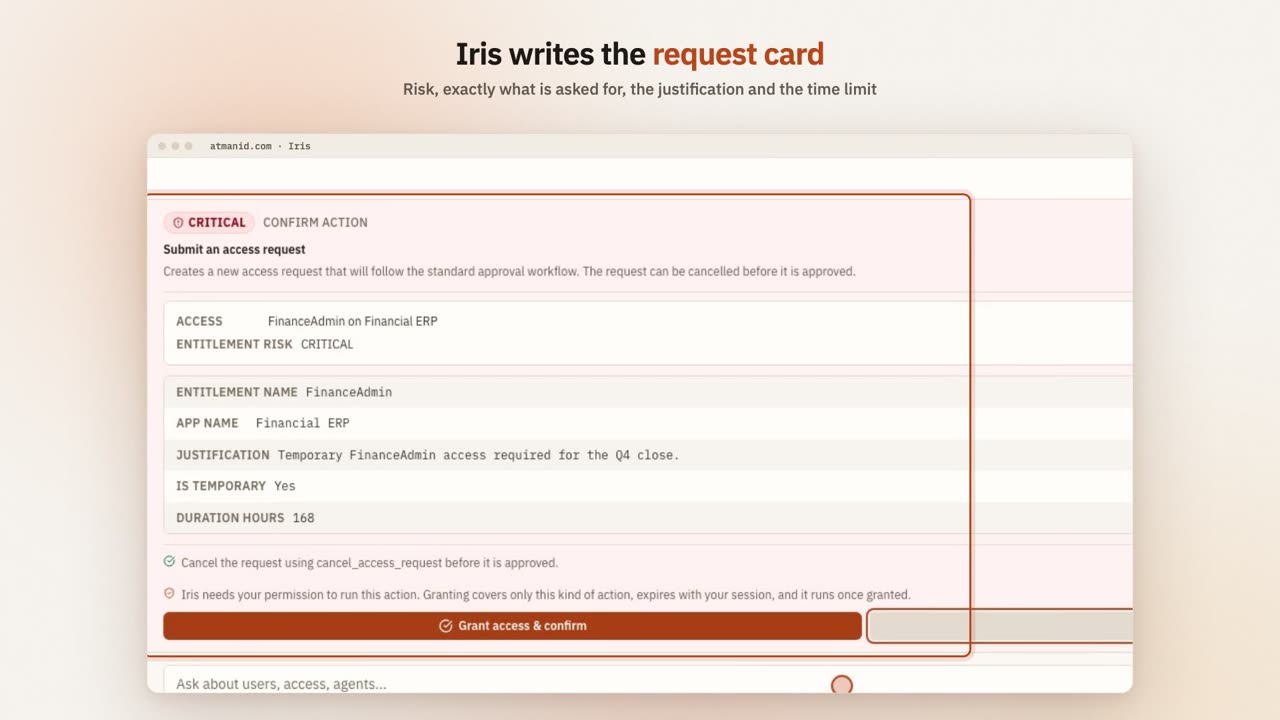](https://atmanid.com/video/card-request.mp4)
Asked in plain English for FinanceAdmin on Financial ERP for seven days, Iris writes a request card — critical risk, the access, a justification and the time limit — that is filed only when you confirm.
## Your first three queries
The three most common Iris query shapes — by frequency observed in production usage — are: counts, lists, and breakdowns. We’ll walk through one of each.
### Query 1 — A count
Type into Iris:
> **how many users are active right now**
Hit Enter. Iris responds with something like:
> **78 users are active.**
>
> BASED ON users · 78 rows
Three things worth noticing in this response:
1. **The number is concrete** (“78”) not vague (“a lot”). Iris gives you actionable data, not impressionistic answers.
2. **The source is cited.** The “Based on” footer lists the tables the answer was read from, the number of rows behind it and, where relevant, the time window. Table names link to the matching dashboard page so you can check the number yourself.
3. **A named tool answered it.** Behind the scenes Iris used `compose_metric` with its active-users metric — a pre-built, tested query, not SQL the model wrote. The tools used are recorded in the audit log and shown in the agent activity feed.
### Query 2 — A list
Type:
> **show me pending access requests**
Iris responds with something like:
> **3 access requests are pending approval:**
>
> | Request | Requester | Application | Submitted |
> | -------- | --------- | ----------- | ----------- |
> | REQ-0231 | Jane Park | Salesforce | 2 days ago |
> | REQ-0228 | Bob Lee | GitHub | 5 days ago |
> | REQ-0219 | Ana Ruiz | Workday | 14 days ago |
This one was answered by a named lookup tool for access requests. Note the response is shaped for the question: rows, not just a number. If you’d asked “how many access requests are pending,” you’d get a count from `compose_metric` instead. Iris routes aggregation questions and listing questions to different tools, and checks afterwards that it picked the right kind.
### Query 3 — A breakdown
Type:
> **break down users by department**
Iris responds:
> **Users by department:**
>
> | Department | Count |
> | ----------- | ----- |
> | Engineering | 28 |
> | Sales | 19 |
> | Operations | 12 |
> | Unassigned | 11 |
> | Marketing | 8 |
Behind it: `compose_metric` — the total-users metric, broken down by department.
Two things to notice:
1. **`Unassigned` is shown explicitly.** Missing values become their own bucket rather than being dropped — that’s a critical accuracy property for IAM data, where “users without a department” is itself an actionable signal.
2. **Breakdowns are a metric × dimension pair.** Each metric allows the dimensions that make sense for it, and an invalid pair is refused rather than guessed. See the [tool catalog](/iris/tool-catalog/).
## Reading the response — three signals to check
Every Iris response gives you three things you can verify before trusting the answer:
1. **The numeric answer or row content.** This is the “what.”
2. **The “Based on” footer.** The tables or views the answer came from, the row count and the time window. For an `iris_sql` answer, a **Query run** disclosure shows the exact query that executed.
3. **Whether the source fits the question.** If you asked about agents and the footer cites `users`, Iris read the wrong data.
If the source doesn’t match your intent, the answer might still be correct but you’ve likely found a routing miss. Ask Iris to rephrase: *“I meant agents, not users — how many agents are active?”* — Iris will route to the agents tool and re-answer.
## When Iris asks a clarifying question
Sometimes your question is ambiguous, and Iris may ask before answering. Example:
> **show me access requests**
Iris responds:
> **Do you mean:**
>
> * All access requests in the last 30 days?
> * Pending access requests only?
> * Access requests for a specific app?
> * Access requests by status (count breakdown)?
>
> Pick one or rephrase.
This is a feature, not a failure. It is the model’s judgement rather than a fixed rule, so Iris asks about some ambiguities and takes the most likely reading of others — typically when a status, a time window, or count-versus-list is unclear. The clarifying question tells you **which piece Iris sees as missing**. Pick the option that matches your intent and Iris re-routes.
## When Iris doesn’t know
If neither the wording of your question, its meaning, nor the page you are on points to a family of tools, Iris is offered every tool your role allows and the model chooses. If none fits, Iris should say it can’t answer that rather than invent a number, and suggest a rephrasing.
For questions no named tool or metric covers, Iris can build a structured `iris_sql` query over one curated view (for roles that hold it). For the long tail, tell us — new tools and metrics are added from observed gaps. Browse the [Iris tool catalog](/iris/tool-catalog/) for the closest pre-built question.
## When Iris gets it wrong (rare but real)
Iris’s tool selection is good but not perfect. The known failure modes:
* **Misroute on under-specified queries.** “Show me access” might be read as access requests when you meant current access grants, or vice versa. Recovery: rephrase with the specific noun (“show me access GRANTS” or “show me access REQUESTS”).
* **Wrong tool for similar concepts.** “How many apps do we have” might be answered with a count of applications with at least one active grant when you meant every registered application. Recovery: use the disambiguating term.
* **Timeout or row limits on large queries.** `iris_sql` queries stop after 5 seconds and return at most 200 rows; list lookups such as the audit trail return at most 100. Recovery: add a tighter filter, or ask for a count or breakdown instead of every row.
Iris’s **self-check** catches one common miss — answering a count question with a listing tool. When it sees that, it makes one corrected call to the right kind of tool. This is invisible to you in the UI (you just get a better answer).
For the deep architecture of how routing works (and why it works), see [How Iris stays accurate](/iris/how-iris-stays-accurate/).
## Iris as a developer
(Switch perspective. You’re now Dev Torres, a platform engineer integrating with AtmanID.)
Iris is built for the signed-in app. The endpoint behind the panel, `POST /api/chat`, authenticates with your browser session — it does not accept API keys and is not part of the published `/api/v1` contract, so there is no supported way to call it from a script or server today. For programmatic access to the same data, use the [`/api/v1` API](/reference/api/) (users, access requests, agents, apps, entitlements, SoD violations, audit and more) with an API key. See [Building on Iris](/iris/building-on/).
Two things developers use Iris for in the app:
1. **Pre-flight data lookups during integration debugging.** “Show me the pending access requests for Salesforce” lets a developer verify their integration is creating requests correctly without writing a custom dashboard.
2. **Ad-hoc reports for stakeholders.** A PM asks “what’s our agent count by risk band?” — Iris produces the breakdown in seconds instead of waiting for someone to write a custom report.
For questions the catalog doesn’t cover, ask in plain language. If your role holds `iris_sql`, Iris describes a query over one curated view as a structure — view, columns, filters, grouping, ordering, limit — and the server checks every column name and builds the query itself. Iris does not run SQL text you paste in; if you paste a simple single-view SELECT, it translates it into that structure, and it tells you when the query needs joins or subqueries it can’t express. Each such query is audited as `IRIS_SQL_EXECUTED` (or `IRIS_SQL_REJECTED`) with the exact query text, and the answer shows it under **Query run**.
## What’s next
* **Want to see all the tools Iris has access to?** [Iris tool catalog](/iris/tool-catalog/)
* **Want to understand HOW Iris stays accurate at this scale?** [How Iris stays accurate](/iris/how-iris-stays-accurate/) — named tools, routing, the check on the tool Iris picked, and the bound that keeps any mistake inside your tenant
* **Want the WHY?** [Concepts → Iris explained](/concepts/iris-explained/) — the conceptual framing
* **Want to use Iris for SOC 2 audit forensics?** [Set up an external auditor for SOC 2 evidence collection](/tutorials/external-auditor-soc2/) — Marcus’s perspective on Iris query patterns for compliance
# How Iris stays accurate
> The honest answer to "how do I know Iris isn't making things up?" — named tools instead of generated queries, routing that narrows the choice, a check on the tool it picked, and a hard bound that keeps any mistake inside your own tenant.
## Why this page exists
Anyone evaluating an AI assistant inside a security product asks the same question: *how do I know it isn’t making things up?* Every language model can be wrong. The useful questions are how often, how you would notice, and how bad the worst mistake can be. This page answers those for Iris. Implementation detail is available under NDA through the [Trust page](https://atmanid.com/trust).
## The safeguards at a glance
1. **Named tools, not generated queries.** Iris answers from a catalogue of tools that read your data in defined ways. It never writes SQL.
2. **Routing that narrows the choice.** Before the model chooses, Iris narrows the catalogue to the tools that fit the question and the page you are on.
3. **A check on the tool it picked.** After a tool runs, Iris checks whether a count question was answered with a listing tool, and corrects course when it was.
4. **A hard bound on mistakes.** Whatever goes wrong, Iris works with your permissions inside your tenant. A wrong answer is a wrong answer about your own data — never another tenant’s data.
## 1 — Named tools, not generated queries
Iris’s job is to **choose** a tool, not to write one. Each tool is built and tested in advance — “count active users”, “list pending access requests”, “group audit events by action over a period” — and its query is written by the server, not the model.
For flexible questions, Iris describes what it wants in a fixed structure — which curated view, which columns, which filters and groupings — and the server checks every name against the view’s real columns before building the query. Nothing the model writes is executed as SQL, so there is no query text for it to get subtly wrong and no SQL for a manipulated prompt to inject.
Choosing from a defined set is a bounded problem whose accuracy can be measured; writing free-form queries is not.
## 2 — Routing
Iris narrows the catalogue before the model chooses:
* **Wording.** Common phrasings map directly to the right family of tools.
* **Meaning.** When the wording is unusual, Iris compares the meaning of the question with the meaning of each tool’s description and keeps the closest matches.
* **Where you are.** A question asked on the Applications page (“how many do we have?”) is about applications, not users.
If none of these narrows the choice, the model is offered every tool your role allows and picks from those. When none fits, it should say it can’t answer or ask you to clarify, rather than guess.
## 3 — Checking the tool it picked
A common mistake for any assistant is answering a “how many” question with a page of rows. After a tool runs, Iris checks whether a count-shaped question went to a listing tool and, if it did, makes one forced call to the right aggregation tool. Other kinds of mismatch are not checked automatically — see what this design does not guarantee, below.
## 4 — The bound on any mistake
Even if every safeguard above failed on the same question, the damage is bounded:
* Iris acts with **the signed-in user’s permissions** and can reach only what that user could reach in the product.
* Every tool runs in the tenant taken from the user’s session — never from anything the model or the browser supplies — and the database itself enforces the tenant. See [Multi-tenancy isolation](/architecture/multi-tenancy/).
* Its most flexible tool, `iris_sql`, runs on a separate **read-only login that can see only curated, tenant-filtered views**, inside a read-only transaction with a 5-second limit. Its results are checked once more before they are returned; anything from another tenant is blocked and recorded in the audit log.
* **Actions** always need your explicit confirmation on a card before they run. For creating, approving and rejecting access requests, the card shows the names and risk read from the database rather than the model’s description of them, and every confirmed action is re-checked against your permissions when it executes.
These protections are tested on every change against a library of cross-tenant attack patterns.
## What this design does not guarantee
* **The right reading of an ambiguous question.** “Show me users” could mean active users, all users or recent ones. Iris asks for some ambiguities but not all; sometimes it takes the most likely reading. Rephrase with the qualifier you meant.
* **Complete coverage.** Some questions have no suitable tool. Iris should say so; occasionally it will answer a nearby question instead.
* **Well-calibrated confidence.** Iris can state a wrong answer confidently. Check the tool and source it cites; if either looks off, rephrase.
* **Immunity to misleading data.** Text that arrives as data — a justification someone typed, a name synced from another system — can try to steer the model. It cannot grant access without your confirmation, but it can affect what Iris says.
## Where this leaves you
If you are evaluating Iris, the question to ask is not “does it ever make mistakes” — every language model does — but “how far can a mistake reach?” For Iris, a mistake stays inside your tenant, within your permissions, read-only, and any action waits for a person to confirm it.
If you use Iris day to day: trust an answer when the cited tool matches what you would have looked at yourself; rephrase when it doesn’t; and tell us about questions you ask often that Iris can’t answer.
## Adjacent reading
* [Multi-tenancy isolation](/architecture/multi-tenancy/) — the tenant boundary underneath Iris
* [Audit chain integrity](/architecture/audit-chain/) — how Iris actions are recorded
* [Threat model](/architecture/threat-model/) — prompt injection and escalation through Iris
# Iris query patterns cookbook
> Categorized example queries you can copy + paste into Iris. Operational, compliance, agent management, audit forensics. Each pattern shows the expected response shape so you know what good output looks like.
This is the cookbook of canonical Iris queries — copy + paste, get an answer, learn the pattern. Organized by what you’re trying to accomplish, not by which underlying tool fires.
If you’re new to Iris, read [Getting started](/iris/getting-started/) first — this page assumes you understand the count/list/breakdown query shapes.
## Operational queries (Sarah Chen, daily ops)
These run constantly during normal IAM operations.
### “How many users are active right now?”
```plaintext
how many users are active
```
**Returns:** a count, from `compose_metric` (active users). The “Based on” footer names its source.
### “Users who haven’t logged in for 90 days”
```plaintext
how many active users have not logged in for 90 days
```
**Returns:** a count of active users whose last login is older than 90 days or who never logged in. Dormant accounts are a classic review target.
### “Break down active users by department”
```plaintext
break down active users by department
```
**Returns:** a group-by table. Users without a department appear as their own `Unassigned` bucket, not omitted.
### “Pending access requests older than 14 days”
```plaintext
how many access requests have been pending for more than 14 days
```
**Returns:** a count (`compose_metric`, stale access requests). For the individual requests stuck at an approval stage, ask “which access requests are stuck in approval” — Iris lists them oldest first with the current approver.
### “Connector sync health”
```plaintext
which connectors have sync errors
```
**Returns:** each connector’s sync health and last sync time (for Identity Admin and Super Admin). Operator’s morning triage — “what connectors broke overnight?”
### “Open SoD violations right now”
```plaintext
show me open sod violations
```
**Returns:** the violations with rule name, user and risk level. For just the numbers by risk level, ask “how many SoD violations by risk level”.
## Compliance queries (Priya Singh, CISO posture)
These run weekly/monthly for governance reporting.
### “Certification campaign progress”
```plaintext
show me the progress of active certification campaigns
```
**Returns:** campaigns with total, completed, pending and overdue reviews and the reviewers holding them up.
### “Rejected access requests in the last 30 days”
```plaintext
how many access requests were rejected in the last 30 days
```
**Returns:** a count for the window (`compose_metric`, rejected access requests). Weekly trend lines for access-request outcomes are not available yet; audit-event trends are (see below).
### “Users with unusually broad access”
```plaintext
which users have access to more than 10 applications
```
**Returns:** users ranked by the number of applications they can reach, from the user-access view via `iris_sql` (for roles that hold it). The pattern of “scope creep” — users who accumulated access through moves without revocation.
### “Agents by risk”
```plaintext
break down agents by risk band
```
**Returns:** agent counts by LOW / MEDIUM / HIGH / CRITICAL risk band (`compose_metric`, agents by risk band). CISO’s “what’s our agent identity surface” question. Non-human identities in the NHI registry can be broken down by environment (“break down NHIs by environment”).
### “Audit events by action type, last 7 days”
```plaintext
break down audit events by action type for the last 7 days
```
**Returns:** action-type frequency distribution. Spot anomalies (e.g., an unusual `RBAC_DENIED` spike).
## Agent management queries (Dev Torres, NHI ops)
These run during agent lifecycle work. The agent tools below are offered to `agent_engineer` and `super_admin`; counts through `compose_metric` are available to every role.
### “Riskiest agents”
```plaintext
show me the highest risk agents
```
**Returns:** agents ordered by risk score, highest first.
### “Pending agent registrations”
```plaintext
how many agents are pending review
```
**Returns:** the number of agents waiting for governance review. The morning queue for whoever owns agent approvals.
### “Shadow agents”
```plaintext
show me unregistered agents
```
**Returns:** automated processes the discovery scanner has detected but nobody has registered yet. Candidates for registration or shutdown.
### “Who can act for whom”
```plaintext
show me agent delegation chains
```
**Returns:** which agents hold delegated authority over other agents, and at what trust level. CISO’s “which agents can do dangerous things” question.
## Audit forensics queries (Marcus Brooks, external auditor)
These run during SOC 2 fieldwork. See [Set up an external auditor for SOC 2 evidence collection](/tutorials/external-auditor-soc2/) for the full engagement flow.
### “Verify audit chain integrity”
```plaintext
verify audit chain integrity
```
**Returns:** INTACT, CHAIN\_GAP or TAMPERED for the latest entries (up to 500), with the sequence range checked and the break point if any. It does not take a date range; see [Iris for compliance officers](/iris/for-compliance-officers/) for longer ranges. Auditor’s first-day check.
### “Recent actions by user X”
```plaintext
show me the audit events by user@example.com
```
**Returns:** that person’s most recent audit records, newest first, up to 100. There is no date-range filter; for a complete 90-day history, export from the Audit Log page.
### “Recent config changes”
```plaintext
show me recent audit events with action type POLICY_UPDATED
```
**Returns:** matching audit records (the action-type filter is a case-insensitive substring match), each with its recorded new state. SOC 2 CC8.1 evidence; the Audit Log page shows the full record.
### “Denied actions in the last 30 days”
```plaintext
how many RBAC_DENIED events were there in the last 30 days
```
**Returns:** the count for that action type in the window (audit event volume by action type). SOC 2 CC7 anomaly-detection evidence.
### “Cross-tenant query attempts (should be zero)”
```plaintext
show me IRIS_SQL_TENANT_LEAK events
```
**Returns:** ideally nothing. A non-zero result means the cross-tenant check on Iris’s view queries blocked a result — treat it as a P0 incident.
## Iris-specific meta-queries
### “What can you do?”
```plaintext
what can you do
```
**Returns:** a capability list. Onboarding-shaped response.
### “Show me the query”
For an `iris_sql` answer, open the **Query run** disclosure under the answer to see the exact query that executed. For other tools, the “Based on” footer names the source tables, row count and time window.
## When the cookbook doesn’t have what you need
Three escape hatches:
1. **Rephrase.** Iris also matches on meaning, not just wording, so a different phrasing often reaches the right tool. Try `"how many users have logged in this week"` if `"weekly active users count"` doesn’t match.
2. **Ask for a view query.** If your role holds `iris_sql`, describe what you want from one curated view — Iris builds a structured, read-only query and shows it under **Query run**. It does not run pasted SQL and cannot join views. See [Iris tool catalog](/iris/tool-catalog/).
3. **File a feature request.** If you ask the same question regularly and Iris can’t answer, email — the catalog grows from observed gaps.
## Adjacent reading
* [Getting started with Iris](/iris/getting-started/) — basic query shapes (count / list / breakdown)
* [How Iris stays accurate](/iris/how-iris-stays-accurate/) — why these queries return correct answers (the four safeguards)
* [Iris tool catalog](/iris/tool-catalog/) — full reference for all metrics + dimensions
* [Iris failure modes](/iris/failure-modes/) — when Iris refuses, asks clarifying questions, or returns low-confidence
* [Set up an external auditor for SOC 2 evidence collection](/tutorials/external-auditor-soc2/) — Marcus’s full engagement flow
# Iris tool catalog
> What Iris can answer and do — counts and breakdowns, lookups by area, the structured view query, and actions that always need your confirmation — and which roles are offered each. Iris picks from this catalog rather than writing SQL.
This page describes what Iris can answer and do, and which roles are offered each capability. Inside the product, every answer lists the tools that produced it under **tools used**.
> **Last synced with the product:** 2026-10-14.
## How Iris answers
Every data question Iris answers goes through one of:
1. **A named read tool** — a pre-built query for one job (look up a user, list SoD violations, read the audit trail), with a few typed parameters.
2. **`compose_metric`** — one tool that computes any of the metrics below, optionally broken down by one dimension and narrowed by filters.
3. **`iris_sql`** — a structured, read-only query over one curated view, for questions no named tool or metric covers.
Requests to change something (approve, revoke, suspend, create…) go to an **action tool**, which never runs until you confirm it.
**Who is offered what.** Iris offers each tool only to roles whose permissions cover it, and every tool checks your permissions again when it runs. “All roles” means every signed-in role, including End User.
## Counts and breakdowns
`compose_metric` computes one metric, optionally broken down by one dimension (and, for activity, over a window of days). Each metric allows only the breakdowns that make sense for it; a combination that doesn’t is refused rather than guessed. Offered to all roles.
| Area | What you can count |
| --------------------------- | ------------------------------------------------------------------------------------------------------------------------------------------------------------------------ |
| Users | total, active, disabled and inactive users; users with and without MFA, and with recent MFA use |
| Access grants and roles | active, expiring and expired grants; stale and high-risk entitlements; active applications; roles and role assignments (active and revoked); orphan application accounts |
| Access requests | all, pending, approved, rejected, cancelled and stale requests |
| Certifications | all, completed, overdue, escalated and revoked reviews; active campaigns |
| Segregation of duties | open and resolved violations; rules (and blocking rules); active and pending exceptions |
| Revocation | pending and overdue revocations; revocations completed in a window |
| Agents and NHIs | agents; agents pending review or at high risk; agent action volume; NHIs |
| Credentials and break-glass | active and expired API keys; active and pending break-glass sessions |
| Audit and API usage | audit events, API calls and failed API calls in a window |
**Breakdowns:** by status, department, title, manager, application, integration type, severity or risk level, environment, priority, agent or account type, action or resource type, actor type, and the status of a request, entitlement, role, certification, revocation, SoD violation or exception, break-glass session or API key. Missing values are shown as their own bucket (for example *Unassigned* for department) rather than dropped. One breakdown per question.
Ready-made breakdowns are also offered to all roles: users by status, MFA coverage, grants expiring soon by application, SoD violations by risk level, certification reviews by status, users inactive for N days, grants and users per application, dormant versus active grants, audit volume over recent days by action, date or actor, and NHIs by rotation status.
## `iris_sql` — structured view query
Offered to Identity Admin, Security Analyst, Compliance Officer, CISO and Super Admin. It does **not** accept SQL text: Iris describes the question in a fixed structure, and the server checks every name against the view and builds the parameterised query itself. One curated, read-only view per question — no joins, unions or subqueries — and a bounded number of rows.
The views cover user access (grants, applications reached and last login per person), application entitlements, separation-of-duties violations with their context, certification campaign progress, recent audit volume, NHI credential rotation health, workflow status, compliance posture, an IAM summary and entitlement dormancy.
It can be switched off per deployment; when it is, Iris says so and the other tools keep working.
## Lookups by area
| Area | What Iris can look up | Offered to |
| ----------------------------- | --------------------------------------------------------------------------------------------------------------------------------------------------------------------------------------------------------------- | ----------------------------------------------------------------------------------------- |
| Help and reports | how to do something in AtmanID; your reports | All roles |
| Access requests and workflows | a request’s status; where its approval workflow is; workflows that are stuck; available access bundles | All roles except Security Analyst and Agent Engineer |
| People and access | a person; entitlements; someone’s access now or as of a past date; a team’s access; the path by which someone reaches an application; a person’s risk profile; an application’s accounts and how they reconcile | All roles except End User |
| Compliance and audit | the audit trail; whether the audit chain verifies; a signed access snapshot for evidence; certification status, reviews, campaign progress and next actions; compliance posture; platform health | All roles except End User |
| Policy and SoD | SoD violations, exceptions and rules; a policy’s details; role-mining suggestions; a drafted risk rule (validated, not saved) | All roles except End User |
| Notifications | your own event subscriptions | All roles except End User |
| AI Hub | recommendations, adherence, outliers and the governance log | Identity Admin, Security Analyst, Compliance Officer, CISO, External Auditor, Super Admin |
| Lifecycle and infrastructure | an NHI; connector status; the revocation queue; joiner, mover and leaver events; reachability of an application | Identity Admin, Super Admin |
| Privileged access and APIs | vault status and privileged sessions; the API catalogue, its usage and its grants | Identity Admin, Super Admin |
| Credentials and break-glass | API keys, their usage and expiry; stale credentials; break-glass sessions, history and eligibility | Identity Admin, Super Admin |
| Agents | an agent’s status and risk; delegation chains; the approval queue for agent actions; discovered agents; what reclassifying an agent would remove | Agent Engineer, Super Admin |
Lookups return a bounded number of rows; ask a narrower question, or for a breakdown, when you need the whole picture.
## Actions
Every action needs your explicit confirmation on a card before it runs, and each one checks your permissions at execution. Iris can, among others: create, approve or reject access requests and delegate your approvals; decide certification reviews and sign off campaigns; suspend, activate, transfer, offboard or onboard people; provision and revoke access and roles; create, approve and remediate SoD exceptions and run SoD scans; register, suspend and delegate to agents and rotate their credentials; create and rotate API keys; request and approve break-glass access; and manage just-in-time access, policies, workflows, connectors, vendors and reports.
## Example questions
```plaintext
break down active users by department
access requests by status
audit events by action type, last 30 days
agents by risk band
```
## Catalog growth
New metrics, breakdowns and tools are added as customers ask for them. If a question you ask often gets no good answer, tell us — the catalog grows from observed gaps.
## Adjacent reading
* [How Iris stays accurate](/iris/how-iris-stays-accurate/) — why choosing from a catalog beats generating queries
* [Iris query patterns cookbook](/iris/query-patterns/) — patterns organised by use case
* [Iris failure modes](/iris/failure-modes/) — what happens when no tool fits
* [Building on Iris](/iris/building-on/) — programmatic options
# Reference
> Auto-generated reference — REST API surface (50 endpoint paths), TypeScript SDK, Iris tool catalog, RBAC matrix, audit event taxonomy.
The Reference section is *exhaustive enumeration for lookup*. When a [guide](/guides/) doesn’t cover your edge case, when you need to know exactly what an API endpoint returns, when you’re comparing RBAC permissions across roles — Reference is the source of truth.
**Most reference content is auto-generated** from the AtmanID source code, which means it stays in sync with the product automatically with no manual maintenance step.
## What’s in this section
| Sub-section | Source | Status |
| ------------------------------------ | ------------------------------------------------------------------------------------------------ | -------------------------------------------------------------------------------------- |
| **[API Reference](/reference/api/)** | Generated from the API’s own schemas → OpenAPI 3.1 spec at [`/openapi.json`](/openapi.json) | ✅ LIVE — 50 endpoint paths (63 operations), interactive explorer on the reference page |
| **[SDK Reference](/reference/sdk/)** | Hand-written guide today; a reference generated from the SDK’s documentation comments is planned | ✅ LIVE (guide) |
## Not yet published (planned)
* **Iris Tool Catalog** — a searchable table of every metric and dimension Iris can query. Planned.
* **RBAC Matrix** — every platform role × every permission, generated from the platform’s permission model. Planned.
* **Audit Event Taxonomy** — every audit event type emitted by the platform. Planned.
* **Connector Capability Matrix** — every shipped connector × what it syncs (users, accounts, entitlements, groups). Planned.
* **Glossary** — defined terms with stable links. Planned.
* **Error Code Reference** — every API error code, what it means, how to resolve. Planned.
## Adjacent sections
* [Tutorials](/tutorials/) — for worked examples that put reference material into context
* [Concepts](/concepts/) — for the *why* behind the API design and security model
* [Iris](/iris/) — the natural-language layer that wraps most reference functionality
# API Reference
> AtmanID v1 REST API — 50 endpoint paths (63 operations), OpenAPI 3.1 spec, interactive Scalar explorer with try-it-now per endpoint, authentication patterns.
[← Documentation](/) · [← Reference](/reference/)
The AtmanID v1 REST API exposes **50 endpoint paths (63 operations)** for programmatic access to identity, governance, and lifecycle workflows. The spec is generated from the API’s own schemas, so the contract and the code cannot drift; this site serves a copy at [`/openapi.json`](/openapi.json), refreshed with every API change.
## Interactive explorer
Live OpenAPI 3.1 spec rendered with [Scalar](https://scalar.com). Browse every endpoint, expand request/response schemas, and use the **Try It** panel to fire authenticated calls. Paste your API key into the auth box first — mint one from the Developer Console if you don’t have one.
The explorer on this page loads this site’s copy of the spec (`/openapi.json`), which is regenerated from the API’s schemas in the same change as any `/api/v1` contract change. The live spec is always available from your tenant at `$ATMANID_BASE_URL/api/v1/openapi.json`.
***
## Where else to find the spec
| Surface | URL | Purpose |
| ------------------------ | ------------------------------------------------------------------------------------------------------------------------------------------------ | --------------------------------------------------------------------------------------------------------------------------------- |
| **Interactive explorer** | `$ATMANID_BASE_URL/api/v1/explorer` | The same Scalar explorer, served by your tenant, with try-it-now per endpoint |
| **Raw OpenAPI 3.1 JSON** | `$ATMANID_BASE_URL/api/v1/openapi.json` (also `/api/v1/openapi`, same content) | Importable into Postman / Insomnia / Bruno / your tooling of choice |
| **Changelog feed** | `$ATMANID_BASE_URL/api/v1/changelog.json` | `{ current_version, total_versions, changelog[] }` — type-tagged version history; poll it to detect breaking-change announcements |
| **Current spec version** | `info.version` in the spec, and the `X-Api-Spec-Version` header on the spec and changelog responses — see the [changelog](/reference/changelog/) | Bumps on every consumer-visible change |
## Resource taxonomy
| Resource class | Endpoints | What it does |
| --------------------------------- | ----------------------------------------------------------------------------------------------------------------------------------- | -------------------------------------------------------------------------------------------------------------------------------------------------- |
| **Users / Identities** | `users.list` · `users.get` · `users.entitlements` · `users.accessSnapshot` · `identities.list` · `accessRequests.{list,create,get}` | Read the identity directory (users; `identities` lists non-human identities), a user’s entitlements and point-in-time access, file access requests |
| **Apps / Entitlements / Bundles** | `apps.list` · `entitlements.list` · `entitlements.get` · `bundles.{list,create,get,update,delete}` | App registry + entitlement catalog + role bundles |
| **Identity Lifecycle (NHIs)** | `agents.{list,register,update,deactivate}` | Non-human identity (AI agents, service accounts) lifecycle |
| **Identity Lifecycle (humans)** | `jml.{joiner,mover,leaver,status}` | Joiner / Mover / Leaver workflow triggers |
| **Governance / Observability** | `audit.list` · `sodViolations.list` · `reachability.preview` | Audit trail, SoD policy violations, access reachability analysis |
| **Webhooks** | `webhooks.{list,create,get,update,delete,test}` | Outbound event delivery to your systems |
| **Connectors** | `github.overview` · `github.discover` | GitHub connector — list workflows + discover NHIs from repo activity |
| **Workflow templates** | `workflowTemplates.{list,apply,get,delete}` | GitOps-managed approval workflow templates (`apiVersion: atmanid.com/v1`) |
## Authentication
**API key.** Every `/api/v1/*` endpoint authenticates with an API key: `Authorization: Bearer atman_`. Keys carry scopes (for example `read:users`, `write:nhi`, `write:jml`, `read:audit_logs`); each endpoint’s required scope is documented in the explorer. Mint keys in the AtmanID app under **Settings → API Keys** (also reachable from **Settings → Developer Portal**). Browser sessions are not accepted on `/api/v1/*`.
For mutating endpoints, a matching scope is necessary but not sufficient: the key owner’s current role permissions are also checked on every request, so revoking a permission from the owner’s role takes effect for their keys immediately (`403 RBAC_DENIED`). A key can also be restricted to an IP allowlist.
## Versioning + deprecation
The spec version (`info.version`) follows semantic versioning:
* **Major bumps** (e.g., 1.x.x → 2.0.0) — breaking changes, 6-month deprecation window required
* **Minor bumps** (1.8.0 → 1.9.0) — additive changes (new endpoints, new optional fields)
* **Patch bumps** (1.9.0 → 1.9.1) — bug fixes, contract-preserving
Deprecated endpoints emit `Sunset:` and `Deprecation:` HTTP response headers (RFC 8594/9745) with the removal date. Subscribe to `$ATMANID_BASE_URL/api/v1/changelog.json` to detect deprecation announcements automatically.
## Rate limits
Requests are limited per API key by the key’s tier, chosen when the key is created: **standard** 60 requests/minute, **partner** 600 requests/minute. A per-client limit of 60 requests/minute per endpoint also applies before authentication.
A limited call returns `429` with error code `RATE_LIMITED` and a `Retry-After` header (seconds) per RFC 9110. See [Common patterns](/tutorials/common-patterns/) for handling these correctly.
## Errors
Every non-2xx response from `/api/v1/*` uses one envelope:
```json
{
"error": {
"code": "RBAC_DENIED",
"message": "Insufficient scopes",
"request_id": "req_01KQ...",
"details": { "required": ["write:nhi"], "missing": ["write:nhi"] }
}
}
```
Branch on `error.code`; `message` wording may change. `details` is optional and specific to the code. Codes are additive — existing codes are never removed or repurposed. The codes you will see most often:
| Status | `error.code` | Meaning |
| --------- | -------------------------------------------------------------------------------------------------------------------- | ----------------------------------------------------------------------------------------------------------------------------------------------------------------------------------------------------------------------------------- |
| 400 | `VALIDATION_ERROR` | Body or query failed validation — see `details` |
| 400 | `INVALID_JSON` | Body is not valid JSON |
| 401 | `UNAUTHENTICATED` | Missing, malformed, revoked or expired API key |
| 403 | `RBAC_DENIED` | Key lacks the scope, the key owner’s role lacks the permission, or the request IP is outside the key’s allowlist |
| 404 | `NOT_FOUND` (or a resource-specific code such as `USER_NOT_FOUND`) | Resource absent or not visible to the caller |
| 409 | `CONFLICT`, `AGENT_NAME_CONFLICT`, `AGENT_ALREADY_EXISTS`, `USER_ALREADY_EXISTS`, `AGENT_DEPROVISIONED`, quota codes | Conflicts with existing state |
| 409 | `IDEMPOTENCY_IN_PROGRESS` | A request with this `idempotency_key` is still being processed (agent register, update and deactivate). Retry once it has finished |
| 422 | `UNPROCESSABLE`, `SSRF_BLOCKED` | Well-formed but semantically invalid (for example a webhook URL that deliveries would refuse) |
| 422 | `PERSON_DEPARTED` | The person the call names has left the organisation, so nothing was created. On `POST /access-requests`: the target is Inactive, Expired, Terminated or in a status the lifecycle does not know; `details.target_status` says which |
| 422 | `USER_DEPROVISIONED` | `POST /access-requests` for a Deprovisioned target; nothing was created. `details.target_status` is `DEPROVISIONED` |
| 422 | `IDEMPOTENCY_KEY_REUSED` | The `idempotency_key` was already used within 24 hours for a different request body (agent register, update and deactivate); nothing was done. Send a new key for a new request |
| 429 | `RATE_LIMITED` | Rate limit hit — honour `Retry-After` |
| 500 / 503 | `INTERNAL_ERROR` | Server fault; no internal detail is returned — quote `request_id` to support |
The `ErrorCode` schema in the spec currently lists an earlier seed set of codes (for example `VALIDATION_FAILED`, `UNAUTHORIZED`, `FORBIDDEN`, `RATE_LIMIT_EXCEEDED`); the codes in the table above are the ones the API actually returns.
## Where to go next
* **[First API call tutorial](/tutorials/first-api-call/)** — minimal viable curl walkthrough (get key, make request, parse response) in 10 minutes
* **[SDK Reference](/reference/sdk/)** — the TypeScript SDK (install, types, every method documented)
* **[First SDK script tutorial](/tutorials/first-sdk-script/)** — same shape as First API call but via the SDK
* **[Common patterns tutorial](/tutorials/common-patterns/)** — pagination, error handling, retries, webhook verification
## Spec sync (operator note)
The OpenAPI spec is generated from Zod schemas in the API. This docs site serves an exported copy at `/openapi.json`; it is re-exported in the same change as any `/api/v1` contract change, and CI fails if the copy is stale. Your tenant’s `/api/v1/openapi.json` always reflects the deployed contract.
# Audit event reference
> The audit events security teams alert on — sign-in, access changes, privileged access, separation of duties, AI agents and the MCP gateway — with what each means and its severity.
Every action in AtmanID writes an event to the tamper-evident audit trail. Each event has a name — the `action_type` — that is the same everywhere it appears: in the audit trail’s event details and CSV export, in the `action_type` filter of the [audit API](/reference/api/), and in every event forwarded to your SIEM.
This page lists the 145 events security teams most often build detections on. Your audit trail records many more — every configuration change, view and export — and all of them reach your export, API and SIEM. Every event in your own audit trail shows its name in **Event Details**.
**Names on this page are a contract:** they are never renamed or reused for something else. Where one row names two events, both are written today for the same kind of action; a rule should match both.
**Severity** is a suggested starting point for alerting. **Records** says whether the event is an *Action* someone took, a *Change* to access or configuration, a *Refusal* (something was blocked), or a *Detection* (something suspicious was found).
Each tool call an agent makes through the MCP gateway is recorded as a gateway event (allowed, denied, held or would-deny) in **MCP Gateway → Events**, rather than as an audit event.
## Sign-in, sessions and MFA
| Event | Severity | Records | Meaning |
| ------------------------------------- | -------- | --------- | ----------------------------------------------------------------------------------------------------------------------------------------------------------------------------------------------------- |
| `LOGIN_SUCCESS` | Info | Action | A person passed the first sign-in step (password, passkey or SSO); an MFA challenge may still follow. |
| `AUTH_FAILURE` | Medium | Refusal | A sign-in was refused (wrong credentials, a disabled account, or a failed check). |
| `CREDENTIAL_OWNER_INACTIVE_DENIED` | High | Refusal | An API key, agent credential or MCP token was refused because the person who owns it is not active (suspended, locked, on leave or gone). It works again when they are active. |
| `AUTH_BLOCKED_BY_RISK_ENGINE` | High | Refusal | A sign-in was refused because its risk was too high. |
| `FEDERATION_LOGIN_FAILED` | Medium | Refusal | A sign-in through your identity provider (SSO) failed. |
| `FEDERATION_SIGN_IN_GATE_WARNED` | Medium | Detection | An SSO sign-in went through although its end date had passed or its risk was too high, while those checks run in warning mode; it would be refused with enforcement on (would\_be names the refusal). |
| `LOGOUT` | Info | Action | A person signed out. |
| `SESSION_TERMINATED` | Medium | Change | The platform ended a session (for example the account was disabled or its access changed); the reason is recorded. |
| `SESSION_SUSPENDED_BY_CAEP` | High | Change | Another system sent a continuous-access (CAEP) signal and all of the person’s sessions were suspended (recorded even if none were active). |
| `MFA_CREDENTIAL_ENROLLED` | Low | Change | A person registered a passkey or security key as an MFA factor. |
| `MFA_CREDENTIAL_REVOKED` | Medium | Change | A person removed one of their own passkeys or security keys. |
| `MFA_RESET_BY_ADMIN` | High | Change | An administrator reset a person’s MFA. |
| `MFA_REPLAY_ATTACK_SUSPECTED` | High | Detection | A passkey or security key reported a lower signature counter than before, which suggests a cloned authenticator; the sign-in was refused. |
| `MFA_FATIGUE_FREEZE_IMPOSED` | High | Change | An administrator froze MFA prompts for an account for a set time (duration and reason recorded). |
| `BACKUP_CODE_REPLAY_ATTEMPTED` | High | Detection | A backup code that was already used was presented again. |
| `ADMIN_PASSWORD_RESET` | High | Change | An administrator reset a person’s password. |
| `TRUSTED_DEVICE_REVOKED` | Medium | Change | A trusted device was removed from an account. |
| `TRUSTED_DEVICE_MDS_REVOKED_DETECTED` | High | Detection | A weekly check found a trusted device whose authenticator model is listed as revoked or compromised in the FIDO Metadata Service; the device is not changed. |
## Access requests and access changes
| Event | Severity | Records | Meaning |
| ----------------------------------------------- | -------- | --------- | ------------------------------------------------------------------------------------------------------------------------------------------------------------------------------------------ |
| `ACCESS_REQUEST_SUBMITTED` | Info | Action | Someone requested access. |
| `ACCESS_REQUEST_APPROVED` | Info | Action | An access request was approved. |
| `ACCESS_REQUEST_REJECTED` | Info | Action | An access request was rejected. |
| `ACCESS_REQUEST_FORCE_APPROVED` | High | Change | An administrator approved a request outside its normal approval chain. |
| `ACCESS_REQUEST_SOD_BLOCKED` | Medium | Refusal | An access request was refused because it would break a separation-of-duties rule. |
| `ACCESS_REQUEST_TARGET_DEPARTED_BLOCKED` | Medium | Refusal | An access, bundle or role request was refused because the person it was for has left the organisation or their access has ended (inactive, deprovisioned, expired, terminated or deleted). |
| `ACCESS_REQUEST_TARGET_DEPARTED_CANCELLED` | Medium | Change | An access request was cancelled because the person it was for has left: at approval, at provisioning, or when the person left. |
| `ACCESS_GRANT_TARGET_DEPARTED_WARNED` | Medium | Detection | Access was granted directly to a person who has left, while the grant check runs in warning mode; it would be refused with enforcement on. |
| `ACCESS_GRANT_TARGET_DEPARTED_BLOCKED` | Medium | Refusal | A direct grant to a person who has left was refused (the tenant enforces the departed-person grant check). |
| `LEAVER_CUSTOM_ADMIN_ROLES_REVOKED` | Medium | Change | The custom admin roles a person held were revoked when they left, so a rejoin starts with none. |
| `LEAVER_PLATFORM_ROLES_REVOKED` | Medium | Change | The platform roles a person held (such as Identity Admin or Super Admin) were revoked when they left, so a rejoin starts with none. |
| `LEAVER_ROLES_REVOKED` | Medium | Change | The role memberships a person held were revoked when they left. |
| `LEAVER_ENTITLEMENTS_REVOKED` | Medium | Change | The entitlements a person held were revoked in AtmanID when they left (the record only; connector deprovisioning at the target systems is separate). |
| `ACCESS_REQUEST_TARGET_DEPARTED_CANCEL_SKIPPED` | Medium | Detection | An access request for a person who has left was left open because the tenant has switched off the automatic cancel, or because a grant made it in warning mode. |
| `APPROVAL_DECIDED_AS_DELEGATE` | Low | Action | An approval was decided by a delegate on the approver’s behalf. |
| `ENTITLEMENT_ASSIGNED` | Low | Change | An entitlement was given to a person or account. |
| `ENTITLEMENT_REVOKED` `ENTITLEMENT_REMOVED` | Low | Change | An entitlement was taken away (revoked, expired or removed by an administrator). |
| `ROLE_ASSIGNED` `ROLE_GRANTED` | Medium | Change | A role was given to a person (directly, or through an approved request). |
| `ROLE_REVOKED` | High | Change | An administrator removed one of a person’s platform roles through the AtmanID assistant; their other roles are kept. |
| `ACCESS_REVOKED_VIA_CONNECTOR` | Low | Change | Access was removed in the target application through its connector. |
| `POLICY_DENY` | Medium | Refusal | An action in AtmanID was refused because the person’s role does not permit it. |
## Privileged access
| Event | Severity | Records | Meaning |
| -------------------------------------- | -------- | ------- | ---------------------------------------------------------------------------------------------------------------------------------------------------------------------------------- |
| `BREAK_GLASS_ACTIVATED` | Critical | Change | Emergency (break-glass) access was activated. |
| `BREAK_GLASS_LOCAL_LOGIN_USED` | Critical | Action | The emergency local sign-in was used. |
| `JIT_SESSION_ACTIVATED` | Medium | Change | Just-in-time elevated access started. |
| `JIT_ACCESS_EXPIRED` | Info | Change | An administrator ran the cleanup that revoked time-limited access past its expiry. |
| `PAM_CHECKOUT` | Medium | Action | A privileged credential was checked out. |
| `PAM_CHECKIN` | Info | Action | A privileged credential was checked back in. |
| `PAM_SECRET_REVEALED` | High | Action | A person with an active checkout revealed a privileged secret or its external reference; a refused attempt after the checkout expired is also recorded, with granted set to false. |
| `PAM_SESSION_STARTED` | Medium | Action | A person requested a privileged session; it starts at once if auto-approved, otherwise it waits for approval (the approval status is recorded). |
| `PAM_SESSION_ENDED` | Info | Action | A privileged session ended. |
| `PAM_CREDENTIAL_ROTATED` | Low | Change | A privileged credential was rotated. |
| `STANDING_PRIVILEGE_EXCEPTION_GRANTED` | High | Change | An AI agent (or one of its credentials) was allowed to keep a standing credential as a documented, time-limited exception. |
| `STANDING_PRIVILEGE_EXCEPTION_REVOKED` | Medium | Change | A standing-credential exception for an AI agent was ended early. |
## Separation of duties
| Event | Severity | Records | Meaning |
| ------------------------------------------------------------ | -------- | --------- | ------------------------------------------------------------------------------------------------------------------------------------------------------------------------------------------------------------------------------------------------------------------------------------------------------ |
| `SOD_CONFLICT_DETECTED` | High | Detection | A separation-of-duties check found that a requested entitlement would conflict, under a warn-only rule, with access the person already holds or is also asking for. |
| `SOD_REQUEST_BLOCKED` `SOD_CHECK_BLOCKED` | Medium | Detection | A separation-of-duties check found that a requested entitlement would break a blocking rule, with access the person holds or is also asking for (written when a submission, approval or assignment runs the check — not by previews or dry runs; the refusal itself is ACCESS\_REQUEST\_SOD\_BLOCKED). |
| `SOD_SELF_APPROVAL_BLOCKED` | High | Refusal | Someone tried to approve or reject an access request they submitted or that is for themselves, and it was refused. |
| `SOD_EXCEPTION_REQUESTED` | Low | Action | An exception to a rule was requested. |
| `SOD_EXCEPTION_APPROVED` | High | Change | An exception was approved: the conflict is accepted until it ends. |
| `SOD_EXCEPTION_DENIED` | Low | Action | An exception was denied. |
| `SOD_EXCEPTION_REVOKED` | Medium | Change | An approved exception was ended early. |
| `SOD_EXCEPTION_EXPIRED` `SOD_EXCEPTION_AUTO_DENIED` | Medium | Change | The system expired an exception, or denied one nobody decided. |
| `SOD_VIOLATION_REMEDIATED` | Low | Change | A person resolved a separation-of-duties violation, either by removing one of the conflicting entitlements or by accepting the risk. |
| `SOD_VIOLATION_ESCALATED` | Medium | Change | A violation was escalated. |
| `SOD_RULE_CREATED` `SOD_RULE_UPDATED` `SOD_RULE_DEACTIVATED` | Medium | Change | A separation-of-duties rule was created, changed or turned off. |
## Access reviews
| Event | Severity | Records | Meaning |
| ------------------------ | -------- | ------- | --------------------------------------------------------------------------------------------------------------------------- |
| `CERT_CAMPAIGN_LAUNCHED` | Info | Change | A saved draft access review was launched (a review created and started in one step is recorded as CERT\_CAMPAIGN\_CREATED). |
| `CERT_CAMPAIGN_CLOSED` | Info | Change | An access review closed. |
| `CERT_AUTO_REVOKED` | Medium | Change | Access was revoked because its reviewer did not respond in time. |
| `CERT_AUTO_CERTIFIED` | Medium | Change | Access was kept because its reviewer did not respond in time. |
| `CERT_AUTO_ESCALATED` | Low | Change | A review item was escalated because its reviewer did not respond. |
## Joiners, movers and leavers
| Event | Severity | Records | Meaning |
| ---------------------------------- | -------- | ------- | --------------------------------------------------------------------------------------------------------------------------------------------------------------------- |
| `JML_JOINER_TRIGGERED` | Info | Change | Onboarding started for a new person. |
| `JML_MOVER_TRIGGERED` | Info | Change | A move (a change of job or department) started for a person. |
| `JML_LEAVER_TRIGGERED` | Medium | Change | Offboarding started for a person. |
| `JML_MANAGER_DEPARTED_SKIPPED` | Low | Refusal | An HR feed named a manager who has left the organization; the person was created or moved without that manager. Assign one. |
| `JML_MANAGER_NOT_FOUND_SKIPPED` | Low | Refusal | An HR feed named a manager who matches no current person; the person was created or moved without that manager. Assign one. |
| `USER_SUSPENDED` | Medium | Change | A person’s account was suspended. |
| `USER_SCIM_REACTIVATED` | Medium | Change | The identity provider set a suspended person active again (SCIM active: true); their access, kept while suspended, applies again. |
| `SCIM_USER_REHIRED` | Medium | Change | The identity provider set a person who had left active again (SCIM active: true); they rejoined with none of their previous access. |
| `USER_IDP_HOLD_CLEARED` | High | Change | An administrator cleared the identity provider’s hold on a person, against the identity provider; a person it was holding became active again. |
| `USER_IDP_HOLD_CLEAR_NOT_APPLIED` | Low | Change | An administrator’s clear of the identity provider’s hold found the hold already gone; nothing changed. |
| `SCIM_REACTIVATE_DEFERRED` | Low | Refusal | The identity provider re-enabled a person whose leaver work is still running; the rehire waits for the identity provider’s next push. |
| `SCIM_WINDOW_LEAVER_SKIPPED` | Low | Refusal | The identity provider’s window ran out for a person, but by the time the leaver ran they no longer qualified (terminated, re-enabled or put on hold); it did not run. |
| `SCIM_REACTIVATE_REFUSED_DEPARTED` | Medium | Refusal | The identity provider set a person who has left active again (SCIM active: true); they were not reactivated. A rehire is an admin decision. |
| `USER_REACTIVATED` | Medium | Change | A terminated account was reactivated as a rejoiner; its previous access was not restored. |
| `USER_TERMINATED` | Medium | Change | A person’s account was terminated. |
## AI agents
| Event | Severity | Records | Meaning |
| -------------------------------------------------------------------------------- | -------- | ------- | ---------------------------------------------------------------------------------------------------------------------------------------------- |
| `AGENT_REGISTERED` | Low | Change | An AI agent was registered. |
| `AGENT_SUSPENDED` | High | Change | An agent was suspended through the AtmanID assistant and its tokens and sessions ended (a suspension from the console is AGENT\_KILL\_SWITCH). |
| `AGENT_KILL_SWITCH` | Critical | Change | An agent was stopped immediately with the kill switch. |
| `AGENT_COHORT_CONTAINED` | Critical | Change | A group of agents was contained at once. |
| `AGENT_DECOMMISSIONED` | Medium | Change | An agent was decommissioned. |
| `AGENT_CREDENTIAL_CREATED` `AGENT_CREDENTIAL_ROTATED` `AGENT_CREDENTIAL_REVOKED` | Medium | Change | An agent credential was issued, rotated or revoked. |
| `AGENT_MCP_ACCESS_GRANTED` `AGENT_MCP_ACCESS_REVOKED` | Medium | Change | An agent was given, or lost, access to an MCP server’s tools. |
| `AGENT_HITL_REQUESTED` | Low | Action | A person with agent-oversight rights raised a request for human approval of an agent action. |
| `AGENT_HITL_DECIDED` | Low | Action | A person approved or rejected a held agent action. |
| `AGENT_HITL_OVERRIDE` | High | Change | A person decided a held agent action against the system’s recommendation; the justification is recorded. |
| `AGENT_INTENT_EXEMPTION_GRANTED` `AGENT_INTENT_EXEMPTION_REVOKED` | High | Change | An agent was exempted (for a set time) from enforced intent policy, or the exemption ended. |
| `AGENT_POLICY_CREATED` `AGENT_POLICY_UPDATED` | Medium | Change | A policy governing what AI agents may do (including intent policies) was created or changed. |
## MCP servers and the gateway
| Event | Severity | Records | Meaning |
| ----------------------------------------------------------------------------- | -------- | --------- | ------------------------------------------------------------------------------------------------------------------------------------------------------------------------------------------------------------------------------------------------------------------------------------------------------------------------------------------------------------------- |
| `MCP_OAUTH_TOKEN_ISSUED` | Info | Action | An agent obtained a token for an MCP server with its own credential. |
| `MCP_TOKEN_ISSUED` | Low | Action | An administrator issued an agent a token for an MCP server. |
| `MCP_TOKEN_REVOKED` | Medium | Change | An agent’s MCP token was revoked. |
| `MCP_TOOL_CHANGE_DETECTED` | High | Detection | A scan found that an MCP server’s tools changed, appeared, disappeared or reverted since approval; calls to changed tools are refused only when the hold-changed-tools setting is on. |
| `MCP_TOOL_CHANGE_APPROVED` `MCP_TOOL_CHANGE_REJECTED` | Medium | Change | A server’s owner approved or rejected a tool change. |
| `MCP_TOOL_INJECTION_SUSPECTED` | High | Detection | A tool’s description looks written to instruct the AI model. |
| `MCP_SERVER_UPSTREAM_CREDENTIAL_SET` `MCP_SERVER_UPSTREAM_CREDENTIAL_REMOVED` | High | Change | The vendor credential AtmanID holds for a server was saved, replaced or removed (the value is never recorded). |
| `MCP_SERVER_UPSTREAM_AUTH_CHANGED` | Medium | Change | How the gateway identifies agents to a server changed. |
| `MCP_SERVER_RETIRED` | Medium | Change | An MCP server was retired. |
| `MCP_LOCAL_SERVER_DISCOVERED` | Medium | Detection | A scan of a device’s desktop clients found a local MCP server not yet registered; it is now in the MCP Hub as discovered, with where it was seen. |
| `AGENT_DEVICE_ENROLLED` | Medium | Change | A device enrolled for the AtmanID MCP shim: its public key was registered against a new per-device agent, pending an administrator’s approval. |
| `AGENT_DEVICE_REVOKED` | Medium | Change | An enrolled device was revoked: its key stopped working and the tokens bound to it ended. The reason given is recorded, and a repeat revoke records nothing. To be used again the device must enrol as a new device (a new key and a new agent, pending approval). Retiring the agent also ends its devices; that is recorded as the retirement, not as this event. |
| `PROMPT_INJECTION_BLOCKED` | High | Refusal | A prompt-injection attempt against the AtmanID assistant was blocked. |
## API keys and non-human identities
| Event | Severity | Records | Meaning |
| ----------------------------------------------------- | -------- | ------- | ------------------------------------------------------------------------------------------------------------------------------------------ |
| `API_KEY_CREATED` `API_KEY_ROTATED` `API_KEY_REVOKED` | Medium | Change | An API key was created, rotated or revoked. |
| `API_KEY_SECRET_REVEALED` | Medium | Action | The requester collected an approved API key’s secret (shown once). |
| `API_KEY_USED_AFTER_EXPIRY` | High | Refusal | An expired API key was presented. |
| `NHI_SECRET_RETRIEVED` | Medium | Action | A stored non-human identity secret was read. |
| `NHI_SECRET_ROTATED` | Low | Change | A non-human identity’s secret was rotated by AtmanID, or an administrator recorded that it was rotated elsewhere (the method is recorded). |
| `NHI_OWNER_ASSIGNED` | Low | Change | An owner was assigned to a non-human identity. |
## Audit trail
| Event | Severity | Records | Meaning |
| ---------------------------------------------- | -------- | --------- | --------------------------------------------------------- |
| `AUDIT_CHAIN_VERIFIED` | Info | Action | The audit trail’s hash chain was verified intact. |
| `AUDIT_CHAIN_BROKEN` | Critical | Detection | Verification found the audit trail’s hash chain broken. |
| `AUDIT_LOG_EXPORTED` | Medium | Action | The audit log was exported. |
| `AUDITOR_GRANT_ISSUED` `AUDITOR_GRANT_REVOKED` | Medium | Change | An external auditor was given, or lost, read-only access. |
## Administration and security settings
| Event | Severity | Records | Meaning |
| ----------------------------------------------------------------------- | -------- | ------- | ------------------------------------------------------------------------------------------------------------------------------------------------- |
| `SECURITY_SETTING_CHANGED` | High | Change | An enforcement or security setting was changed. |
| `MFA_POLICY_UPDATED` `PASSWORD_POLICY_UPDATED` `SESSION_POLICY_UPDATED` | High | Change | The MFA, password or session policy was changed. |
| `FEDERATION_CONFIG_UPDATED` | High | Change | Single sign-on (identity provider) settings were changed. |
| `CUSTOM_ROLE_CREATED` `CUSTOM_ROLE_UPDATED` | Medium | Change | An administrative role was created or its permissions changed. |
| `SIEM_CONFIG_UPDATED` | High | Change | Where audit events are forwarded (SIEM settings) changed. |
| `SIEM_CONFIG_REMOVED` | High | Change | The SIEM integration was removed: audit events are no longer forwarded and the stored SIEM token was erased. |
| `WEBHOOK_CREATED` `WEBHOOK_DELETED` | Medium | Change | An outbound webhook was created or deleted. |
| `PRIVACY_ERASURE_EXECUTED` | High | Change | A second administrator approved an erasure request and the person’s personal data was erased (the record notes whether the erasure was complete). |
# Changelog
> AtmanID API changelog — every published version of the v1 contract, what shipped, what was deprecated. Authoritative timeline for any consumer relying on the contract.
The AtmanID v1 API uses semantic versioning. This page is the human-readable timeline; the machine-readable feed lives at `$ATMANID_BASE_URL/api/v1/changelog.json` (poll it from your CI to detect deprecations programmatically).
## How to read this page
Each entry shows the semver version, ship date, and a categorised list of changes:
* **Added** — new endpoints, new fields, new query parameters. Always backward-compatible.
* **Changed** — modified behaviour. May or may not be breaking; check the description.
* **Deprecated** — flagged for removal. Includes `Deprecation:` and `Sunset:` HTTP headers per RFC 9745 + RFC 8594.
* **Removed** — gone. Only after a 6-month minimum deprecation window.
* **Fixed** — bug fixes that don’t change the contract surface.
* **Security** — security-relevant changes (auth, authorization, audit).
## Versioning policy
We commit to a 6-month minimum deprecation window for any breaking change. When v2 ships, it lives at `/api/v2/*` while `/api/v1/*` continues to honor its existing contract. There is no silent breakage.
The current spec version is published at the top of the OpenAPI document at `$ATMANID_BASE_URL/api/v1/openapi` — `info.version`. If you’re building a long-lived integration, pin to a known version and re-test before bumping.
## Releases
Every published version, newest first. This list is generated from the same source as the machine-readable feed at `$ATMANID_BASE_URL/api/v1/changelog.json`, so the two always match.
### v1.42.0 — 2026-11-18
**A decision on a held MCP call can say why it overrides AtmanID's suggestion; a later version will require the reason fields.**
* **Added:** POST /api/v1/mcp/authorize/holds/{id}/decision — New in 1.42.0: an optional `category`, the reason for a decision that goes against AtmanID's suggestion (approving a HIGH or CRITICAL hold, or denying a MEDIUM or LOW one), with the values the console offers; the audit record carries it as `new_state.override_category`, as a console decision does, and an unknown value is 400 VALIDATION\_ERROR naming the field. Nothing changes for a request without it, and nothing is refused today. In a later version, announced with its date before it takes effect, a decision on a HIGH or CRITICAL hold will require `note`, and a decision against the suggestion will require `category`. To be ready now, send `note` with every decision and `category` with every approve: gateway holds are created at HIGH risk. Until then the audit record of a decision without them carries `new_state.reason_rule` (mode `api_key_exempt`) naming what was missing, so you can find the calls to change.
### v1.41.0 — 2026-11-17
**A joiner rehires a person whose ordinary leaver an administrator ran; only an emergency termination still refuses it.**
* **Changed:** POST /api/v1/jml/joiner for a deprovisioned person: 409 CONFLICT with details.reason `emergency_termination` is now answered only when an administrator terminated them in an emergency (Terminate now) and HR has not reconciled it. A person an administrator offboarded with an ordinary leaver (the Leaver action, bulk, the assistant, offboard now) from this version on is rehired (202) like any other leaver, with the same checks and API key revocation. People offboarded that way before this version keep the emergency marker and are still refused until reconciled or reinstated. No new error code.
### v1.40.0 — 2026-11-16
**A user's app\_account\_count counts their active application accounts; it was always 0.**
* **Fixed:** GET /api/v1/users/{id}: `app_account_count` returned 0 for every person, because the count looked for an account status that is never stored. It now counts the person's active accounts in applications of your tenant — accounts correlated to them by a sync or provisioned for them (accounts that are pending, disabled, suspended, orphaned or deprovisioned are not counted). The field's type and presence are unchanged; a value that was 0 may now be higher. GET /api/v1/users does not return the field, as before.
### v1.39.0 — 2026-11-16
**Audit records of an access review decision say which of the three review facts were on the reviewer's screen.**
* **Added:** GET /api/v1/audit: the record of a reviewer's decision on an access review item (ACCESS\_CERTIFIED, CERT\_ROLE\_CERTIFIED, ACCESS\_REVOKE\_QUEUED, CERT\_ROLE\_REVOKED, ACCESS\_REVIEW\_ESCALATED, CERT\_ADMIN\_OVERRIDE, CERT\_AGENT\_TOOL\_GRANT\_REVOKED / \_REVOKE\_FAILED, CERT\_MCP\_SERVER\_RETIRE\_REQUESTED / \_RETIRED / \_RETIRE\_FAILED) written by the console's decision paths carries `new_state.state_version` 2 and, when the decision was made on a screen that showed the item, `new_state.facts_shown`: `{ last_used, peers, original_reason }`, booleans, true for each fact that screen showed for the item (a value or its honest "none"). It is the screen's report, as `context_was_shown` is. Absent when no screen reported it — a decision through POST /api/v1/certifications/reviews/{id}/decision, the offline review sheet, or any record written before this version — which means not recorded, not false. Records without `state_version` are version 1; the assistant's (Iris chat) certify and revoke records stay version 1, and its escalations are version 2 without `facts_shown`. Existing keys are unchanged. Additive.
### v1.38.0 — 2026-11-16
**A joiner for a person who left rehires them only when their departure is settled, and revokes the API keys they created.**
* **Security:** POST /api/v1/jml/joiner for a deprovisioned person: the rehire now runs the checks an identity provider's rehire runs. It answers 409 CONFLICT, changing nothing, when the departure was run by an administrator and not yet reconciled with HR (details.reason `emergency_termination`), when their leaver steps or revocation tickets are still open (`leaver_steps_pending`, `revocation_tickets_open` — retry later), when a contractor or vendor's end date has passed (`not_reinstatable`), or when they are no longer a leaver (`not_deprovisioned`). A rehire revokes every API key the person created, clears their old termination date, and sends IDENTITY\_REACTIVATED. Rehires that previously failed with 500 now succeed. No new error code.
### v1.37.0 — 2026-11-16
**An approver's chosen end date counts at every stage of a multi-stage access request.**
* **Fixed:** POST /api/v1/access-requests/{id}/decision: `expires_at` sent with an APPROVE at a stage that does not complete the request (an earlier stage, or a vote a quorum stage still waits on) was dropped; only the completing approval's own date was applied. Every approver's date now counts: the grant ends at the earliest one. An earlier stage's date never makes the access last longer than the request asked for; only the approval that completes the request may set a later date, as before.
* **Changed:** POST /api/v1/access-requests/{id}/decision: an APPROVE that would complete a request is refused with 409 INVALID\_STATE (an existing code) when a date an earlier approver chose has already passed — approving would grant access that is already expired. Nothing is decided; reject the request instead.
### v1.36.0 — 2026-11-12
**Audit records of an agent's action name the four identities behind it: the person, the delegation, the agent and the workload.**
* **Added:** GET /api/v1/audit: a record of a registered agent's action carries `new_state.agent_identities` with `v` 1. `person` is whom the agent acts for: its owner at the time, as `user_id`, with `basis` "owner"; null when it has none. `delegation` is the authority it acted under. Its `kind` is `mcp_grant`, `admin_token`, `invocation`, `agent_delegation` or `none`. It also has `grant_id`, `granted_by`, `token_id`, `ceiling_person_id` (the person whose authority caps the token) and `chain_id`. `agent` has `id` and `name`. `workload` is where it ran: `source` (`call`, `mint`, `token_binding` or `registry`), `outcome` (the workload check's result, e.g. MATCH, MISMATCH, NOT\_REGISTERED), `identity_id`, `issuer_id` and `sub`. On a MISMATCH from a workload the agent is not registered as, `issuer_id` and `sub` name the workload the call came from. `missing` lists the parts that could not be found. `unresolved` is true when they could not be read in time; only what the writer already knew is then kept. People appear by user id only. The records an agent's confirmed change writes as its owner carry the same key, with `kind` `invocation`. The records: MCP\_TOOL\_CALL, MCP\_OAUTH\_TOKEN\_ISSUED, MCP\_TOKEN\_ISSUED, MCP\_UPSTREAM\_TOKEN\_ISSUED, MCP\_TOKEN\_EXCHANGE\_GRANTED / \_REFUSED, MCP\_WRITE\_HELD, MCP\_AGENT\_LIMIT\_EXCEEDED, AGENT\_MCP\_SCOPE\_OVER\_CEILING, GATEWAY\_RESOURCE\_UNRESOLVED, agent\_intent\_\*, and AGENT\_SESSION\_STARTED / \_ENDED when the agent opens or closes its session. GATEWAY\_RESOURCE\_UNRESOLVED now also has `actor_type` agent.
### v1.35.0 — 2026-11-04
**POST /mcp/authorize can pass the agent's workload identity token, for the workload check; an approval whose SoD re-check could not run can be refused instead of passing as clean.**
* **Added:** POST /api/v1/mcp/authorize: `agent_credential.workload` (optional) carries the agent's Workload-Identity-Token header — its workload's signed identity (a SPIFFE JWT-SVID, a Kubernetes service-account token, a Google Cloud or Azure identity token) — or null when the agent sent none. An empty string counts as none. AtmanID checks it against the workloads the agent is registered to run as (warn mode: nothing is refused for it yet). For a tool call the result is recorded on the decision in Events (a call enforce would refuse shows as would-deny with reason WORKLOAD\_\); it is not returned in this response. `mode: "authenticate"` accepts it too: there the result is counted for enforce readiness, and an allow records no decision. Omit the field if your gateway does not forward that header: the call is then decided as before and not checked for its workload.
* **Added:** POST /api/v1/access-requests/{id}/decision: when the final-stage Separation-of-Duties re-check could not run, the approval is refused with 409 CONFLICT, message "SoD check failed, needs review" and a new details.sod\_check\_failed (true) alongside details.sod\_blocked; details.conflicts is empty and the request stays PENDING. Warn mode first: until a tenant turns enforcement on (sod.gate\_fail\_closed\_enforce), the approval goes ahead as before and the failure is recorded. No new error code.
### v1.34.0 — 2026-11-04
**A rejected access request is sent as ACCESS\_REQUEST\_REJECTED; its old ACCESS\_REVOKED form is deprecated.**
* **Added:** The ACCESS\_REQUEST\_REJECTED webhook event is sent when an approver rejects an access request (in the console, by bulk reject, from an approval email, the assistant or POST /api/v1/access-requests/{id}/decision), with request\_id, ref\_code, requester\_id, entitlement, application, decision (REJECTED), stage and total\_stages. It was offered on /api/v1/webhooks but never sent; it is no longer named in an EVENT\_NOT\_AVAILABLE warning, and it is offered in the console.
* **Deprecated:** A rejection sent as ACCESS\_REVOKED with decision REJECTED. It is still sent, with the same data, alongside ACCESS\_REQUEST\_REJECTED until 2027-06-01; after that date a rejection is sent as ACCESS\_REQUEST\_REJECTED only. ACCESS\_REVOKED for an executed revocation ticket is unchanged. A subscription to both events receives two deliveries for one rejection until then (dedupe on data.request\_id). Subscribe to ACCESS\_REQUEST\_REJECTED and stop reading decision REJECTED from ACCESS\_REVOKED before then.
### v1.33.0 — 2026-11-03
**A webhook subscription is told when it names an event that is not sent yet.**
* **Added:** POST /api/v1/webhooks and PATCH /api/v1/webhooks/{id}: an event in events that AtmanID does not send yet is named in a new warnings\[] entry (code EVENT\_NOT\_AVAILABLE, events) on the 201 / 200 response. Those events used to be accepted silently and never delivered. Each one comes off this list in the release that starts sending it.
* **Added:** The identity-lifecycle webhook events are sent from every path that makes the change, so they are no longer on that list: JOINER\_PROVISIONED, MOVER\_UPDATED, LEAVER\_DEPROVISIONED, IDENTITY\_SUSPENDED, IDENTITY\_REACTIVATED, CONTRACTOR\_EXPIRING and CONTRACTOR\_EXPIRED. Each carries user\_id, email and a source naming the path; the webhook event reference lists every field.
* **Added:** New error code EVENT\_NOT\_AVAILABLE (400, details.events). Warn mode first: until a tenant turns enforcement on (webhooks.unsent\_event\_refuse\_enforce), the subscription is saved with the warning; once on, it is refused and nothing is saved. PATCH judges only the events it adds: re-sending a subscription's list, or not setting events, is never refused.
### v1.32.0 — 2026-10-31
**A call that loosens a control can wait for its key owner to confirm it with MFA.**
* **Added:** GET /api/v1/confirmations/{id} (tag Confirmations): a change that waits for a person's MFA confirmation — pending, rejected, or confirmed with the result the original call would have returned. Needs the scope the original call needed. New error code CONFIRMATION\_EXPIRED (409): nobody confirmed it within 15 minutes and nothing was changed.
* **Added:** PATCH /api/v1/mcp/servers/{id}/mode (lowering a mode), POST /api/v1/mcp/authorize/holds/{id}/decision (approving a HIGH or CRITICAL hold) and POST /api/v1/access-requests/{id}/decision (approving access whose highest-risk entitlement (on the request, in its cart, or in the requested role) is HIGH or CRITICAL) can answer 202 with { confirmation }: nothing is changed until the key's owner, or another person allowed to make the decision, confirms it with MFA in the console. Deny, reject and tightening calls are never held.
* **Changed:** Warn mode first: until a tenant turns enforcement on (api.confirm\_loosening\_enforce), these calls are applied as before and recorded as API\_CONFIRMATION\_WOULD\_REQUIRE. Handle the 202 now; it is what the call returns once enforcement is on.
### v1.31.0 — 2026-10-31
**Webhook deliveries carry a timestamped signature, and a rotated secret keeps signing it for an overlap window.**
* **Added:** Every webhook delivery carries X-AtmanID-Signature: t=\,v1=\.\">, signed afresh on every attempt, so a receiver can refuse a replayed delivery. X-Webhook-Signature is unchanged.
* **Added:** After a secret rotation, X-AtmanID-Signature carries a second v1 made with the old secret for the overlap window (24 hours by default; 0 to 168 hours, chosen when rotating), so a receiver can switch secrets without rejecting deliveries.
* **Changed:** Every new or rotated signing secret is whsec\_ followed by 64 hexadecimal characters; the admin Webhooks page and rotation issued 64 hexadecimal characters with no prefix. Secrets already issued keep working: the whole string is the HMAC key.
### v1.30.0 — 2026-10-31
**An access request's approval chain says who decided each stage.**
* **Added:** GET /api/v1/access-requests/{id}: each approval\_chain item gains decided\_by (the person who decided — the approver, their delegate, or an administrator overriding), decided\_by\_policy (sla\_auto\_rejected, sla\_auto\_approved or sla\_closed\_unreached when a deadline policy decided instead of a person) and admin\_override. The response is now documented as returned (AccessRequestDetail, ApprovalChainItem): the spec pointed this operation at AccessRequest, whose requester, status and source differ.
* **Changed:** approval\_chain: comments is null on a row a deadline policy decided (its internal "\[sla-escalate] …" note is no longer returned — read decided\_by\_policy); approver\_name is null, not " ", when the approver cannot be read; within a stage, a PENDING row comes first while the stage is open, then the row that decided, then rows closed without deciding.
* **Fixed:** An admin's override, a delegate's decision and an SLA auto-approval read as the assigned approver's own decision. approver\_\* still names who the stage was assigned to; read decided\_by for who decided.
### v1.29.1 — 2026-10-30
**A campaign's evidence lists every item it reviewed.**
* **Fixed:** GET /api/v1/certifications/campaigns/{id}/evidence listed app-entitlement items only: a campaign over platform roles, NHIs, agent tool grants, MCP servers or API scopes exported a header and no rows. It now has one row per reviewed item; Application, email and department are blank where they do not apply. Columns and parameters are unchanged. The console export had the same gap and is fixed with it.
### v1.29.0 — 2026-10-30
**Certification campaigns by API, and the MCP gateway's decision log.**
* **Added:** GET/POST /api/v1/certifications/campaigns, GET /api/v1/certifications/campaigns/{id}, GET .../{id}/reviews and GET .../{id}/evidence (CSV) — the console's campaigns, launch and evidence export. New scopes `read:certifications` and `write:certifications`.
* **Added:** POST /api/v1/certifications/reviews/{id}/decision — certify, revoke or escalate one item as the key's owner, with every console check (justification policy, override justification, self-certification, cancelled campaign). New scope `decide:certifications`.
* **Added:** GET /api/v1/mcp/decisions — the gateway's allow / deny / hold / would-deny / bypass decisions in a window of at most 31 days, filtered by decision, agent, server, tool, deny reason or calling gateway; paginated with a total. New scope `read:mcp_decisions`.
### v1.28.0 — 2026-10-30
**Manage agent intent policies and switch MCP servers between shadow and enforce by API.**
* **Added:** GET/POST /api/v1/agent-policies, GET/PATCH /api/v1/agent-policies/{id} and POST /api/v1/agent-policies/simulate — list, read, create and change the intent policies the gateway evaluates, and test what they decide for one call. New scopes `read:agent_policies` and `write:agent_policies`; the owner needs the console's intent-policy permissions.
* **Added:** GET /api/v1/mcp/servers, GET /api/v1/mcp/servers/{id}, GET /api/v1/mcp/servers/{id}/mode-preview and PATCH /api/v1/mcp/servers/{id}/mode — the servers, their enforcement modes, what ENFORCE would deny (last 7 days and the intent coverage), and the switch between shadow and enforce. New scopes `read:mcp_servers` and `write:mcp_servers`.
### v1.27.0 — 2026-10-30
**Decide held MCP calls and access requests by API, as the person who owns the key.**
* **Added:** POST /api/v1/mcp/authorize/holds/{id}/decision — approve or deny a call /mcp/authorize answered with hold. New scope `mcp:decide`; the key's owner must hold the agent-oversight permission. Recorded as a console decision (channel api, with the API key id).
* **Added:** POST /api/v1/access-requests/{id}/decision — approve or reject the current stage of an access request as the key's owner, who must be an approver of that stage; every console check applies (self-approval, one vote per person, SoD re-check). New scope `decide:access_requests`.
* **Added:** Error codes `ALREADY_DECIDED` (409) and `HOLD_EXPIRED` (409).
### v1.26.0 — 2026-10-28
**Deactivating an agent revokes everything it holds, and a deactivated agent stays deactivated.**
* **Fixed:** POST /api/v1/agents/{id}/deactivate set the agent DEPROVISIONED and soft-deleted it, but left its MCP tokens, sessions, MCP access grants, API keys, JIT sessions, delegations and agent-to-agent grants live. It now decommissions: all of them are revoked in the same transaction. Request and response are unchanged.
* **Changed:** A DEPROVISIONED agent can no longer change status by any route (the database refuses it), and receives no API key, delegation, JIT session or session (409 `AGENT_NOT_ACTIVE` on the console routes).
### v1.25.0 — 2026-10-28
**Audit records of AI-assisted actions say how they were invoked: a workflow step, a confirmation card, Slack or a standing grant.**
* **Added:** GET /api/v1/audit: `confirmation_method` takes the values `workflow_step_confirm` (a workflow step its person confirmed at the step's prompt), `none` (a workflow step that ran without a per-step confirmation) and `slack_button` (a proposal confirmed in Slack), and documents `agent_autonomous_remediation`. The records an AI-assisted action itself writes while it runs (the change it makes, and any check it raises) carry `new_state.invocation`: `invocation_version` (1), `channel`, `on_behalf_of`, `confirmed_by`, `confirmed_at`, `workflow_id`, `step_id` and `agent_nhi_id`. The assistant's own summary record of a chat or Slack action, and workflow lifecycle records, carry their own fields instead.
* **Added:** Workflow lifecycle records: `AGENT_WORKFLOW_TRIGGERED` for every start (the app, the assistant, a trigger rule or a schedule — `new_state.triggered_via`), `workflow.step_confirmed`, `workflow.step_failed`, `workflow.step_skipped`, `workflow.failure_resumed`, `workflow.paused` and `workflow.resumed` by the engine (a hold or renewal; `new_state.pause_reason`), `workflow.completed` and `workflow.failed`.
* **Fixed:** An action run by a workflow step was recorded as a person confirming a proposal card (`actor_type = human`, `confirmation_method = proposal_card`), including steps that ran unconfirmed. It is now `actor_type = agent`, `delegated_by` the person, with the confirmation it actually had.
* **Changed:** Records the assistant writes take the console's shape. A certification review revoked through the assistant records `CERT_ROLE_REVOKED` (a role) or `ACCESS_REVOKE_QUEUED` on the reviewed access, under the reviewer's user id, instead of `CERTIFICATION_REVOKED` on the review under their email (a bulk revoke still records `CERTIFICATION_REVOKED`). `AGENT_SUSPENDED` keeps its name and now targets `AI_AGENT` (was `AGENT`) with the kill switch's fields (`agent_name`, `new_status`, `severance_sla_ms`; `suspended_by` and `channel` are replaced by `new_state.invocation`). A user-scoped SoD scan records only `SOD_USER_SCAN_COMPLETED` (it also wrote a `SOD_SCAN_COMPLETED`). A workflow's audit step records `workflow.event.` (it recorded the template's name as the action type).
### v1.24.0 — 2026-10-26
**POST /access-requests refuses a request that nobody could approve.**
* **Added:** POST /api/v1/access-requests returns 422 `NO_ELIGIBLE_APPROVER` when an approval stage of the request has nobody eligible to decide it (every candidate is excluded, for example the tenant has no administrator left who is not the requester or the person receiving the access); `details.stages` names the stages. No request is created. Before, the request was created PENDING with no approver and could never progress. A request for several entitlements submits the items that can be decided and lists the others in `no_approver_items` (entitlement, app, stages); when none can be, it answers the 422 with `details.no_approver_items`, and nothing is created. Only while the tenant enforces it (`access_requests.refuse_without_approver`); until then such a request is created as before, and shows as stranded in the Request Explorer.
### v1.23.1 — 2026-10-23
**The spec is generated with a patched schema library; no request or response changes.**
* **Security:** Built with zod 4.6.7, which fixes GHSA-mrhx-c7xc-m3w5 (memory exhaustion while validating oversized constrained collections).
* **Changed:** Spec text only: nullable fields are written `type: [T, "null"]` instead of `anyOf` (equivalent in OpenAPI 3.1), and the documented date-time pattern requires seconds. Every response already carries seconds; the `at`, `since` and `until` parameters are parsed as before. Regenerated clients may change shape, not behaviour.
### v1.23.0 — 2026-10-22
**The agent register, update and deactivate calls act once per idempotency\_key, even when retries race.**
* **Added:** New error codes `IDEMPOTENCY_IN_PROGRESS` (409) and `IDEMPOTENCY_KEY_REUSED` (422) on POST /api/v1/agents, PATCH /api/v1/agents/{id} and POST /api/v1/agents/{id}/deactivate.
* **Fixed:** Two concurrent requests with the same `idempotency_key` could both act (two agents registered, or one change applied twice). The key is now claimed before anything is done: while the first request runs, another with the key gets 409 `IDEMPOTENCY_IN_PROGRESS`; after it, the cached replay (HTTP 200, `cached: true`, unchanged). A request that was refused or changed nothing is not cached, as before: a retry runs again.
* **Changed:** The same `idempotency_key` with a different request body within 24 hours is refused 422 `IDEMPOTENCY_KEY_REUSED` (nothing is done); it used to return the first request's cached response. Send a new key for a new request.
### v1.22.0 — 2026-10-21
**GET /jml/status lists a run's per-application errors as fixed labels, and its 200 response is documented as it is.**
* **Added:** GET /api/v1/jml/status/{idempotency\_key}: `errors` lists a `partial` or `failed` run's per-application errors, which the event never carried before (runs finished before 1.22.0 carry none). Each entry is `{ app_id, app_name, message }`: `message` is a fixed label (for example "Timed out"), never the connector's own error text, which can carry hostnames, account names or tokens; `app_name` is null for a joiner run.
* **Fixed:** The spec documented this route with the JmlResult shape of the joiner, mover and leaver calls, which it never returned. Its 200 response is now documented as it is (JmlStatus): `event_type`, `status` (`pending`, `in_progress`, `pending_approval`, `completed`, `partial`, `failed`), `hris_system`, `effective_date`, `completed_at`, `queued_at`, `result` (set for `completed` only, as before) and `errors`.
### v1.21.0 — 2026-10-21
**POST /mcp/authorize can authenticate an agent without deciding a tool call.**
* **Added:** POST /api/v1/mcp/authorize accepts `mode: "authenticate"` with `server_id`, `agent_credential` and `caller` (no `tool`, no `arguments`). The answer is `allow` when the agent's token, and its DPoP proof when the token is bound, is valid for that server, and `deny` otherwise; it is never `hold`, no tool policy is applied and `handling` is null. Use it for the MCP messages that carry no tool call: initialize, ping, tools/list, notifications, the GET event stream and DELETE. A body without `mode` is a tool call, decided as before.
### v1.20.0 — 2026-10-21
**POST /access-requests refuses a request for a person who has left the organisation.**
* **Added:** POST /api/v1/access-requests returns 422 `PERSON_DEPARTED` when `target_user_id` is a person who has left (status Inactive, Expired or Terminated, or a status the lifecycle does not know); no request is created and `details.target_status` carries the status. A Deprovisioned target still returns 422 `USER_DEPROVISIONED`, which is now in the documented error codes and also carries `details.target_status`.
### v1.19.3 — 2026-10-21
**The WebhookEvent enum lists the event names the webhook routes really accept and send.**
* **Fixed:** The documented WebhookEvent enum listed dotted names (`access_request.created`, …) that no route ever accepted; it now lists the names the routes accept and the dispatcher sends (`USER_CREATED`, …). A subscription's `events` in responses is documented as a list of strings, since subscriptions created in the console can carry console-only events. No request that worked before fails.
### v1.19.2 — 2026-10-21
**POST /reachability/preview reports confidence from live paths only.**
* **Fixed:** POST /api/v1/reachability/preview counts a cached summary toward `confidence` only while the entitlement still has transitive paths; a summary of nothing mapped is `none` (or `low` when edges exist). Same enum values.
### v1.19.1 — 2026-10-21
**PATCH /webhooks/{id} applies the same rules as create.**
* **Security:** PATCH /api/v1/webhooks/{id} checks the merged event set against the key's tier, as POST does: a standard-tier key may not add partner-tier events (403 `RBAC_DENIED`, listing them), and a changed `url` must pass the outbound URL policy (400 `INVALID_PARAM`). Existing error codes; new cases on PATCH.
### v1.19.0 — 2026-10-20
**JML joiner and mover report a manager they could not set, instead of setting one who has left.**
* **Added:** New error code `PERSON_DEPARTED` — the one code for "this person has left the organization". The JML result gains `warnings[]` (`code`, `field`, `message`).
* **Changed:** POST /jml/joiner no longer sets a `manager_email` that names a person who has left the organization (terminated, deprovisioned or access ended): the person is created with no manager and the response carries a `PERSON_DEPARTED` warning. POST /jml/mover leaves the manager unchanged in that case, still applying the department and title, with the same warning. An address that matches no current user gives a `NOT_FOUND` warning (the joiner sets no manager, the mover leaves it unchanged, as before). Each skip is recorded in the audit trail (JML\_MANAGER\_DEPARTED\_SKIPPED / JML\_MANAGER\_NOT\_FOUND\_SKIPPED). Manager addresses now match case-insensitively.
### v1.18.3 — 2026-10-19
**PATCH /bundles/{id} refuses item changes on a bundle whose approvals go to a chosen approver.**
* **Security:** The `items` of a bundle with `approval_override_user_id` set cannot be changed through the API: the call returns 403, as it already did for a bundle that grants without approval. New items would route to that one approver; an administrator changes them in the console.
### v1.18.0 — 2026-10-15
**A gateway that decides through the authorization API can report how each allowed call went, and every decision now tells it how to handle the call: whether to count or redact personal data in the response, and whether a call AtmanID cannot decide may go through.**
* **Added:** POST /api/v1/mcp/authorize/decisions/{decisionId}/outcome — the MCP server's status, the latency, the inspection flags your gateway raised on the response and how many personal-data values it redacted, recorded on the decision's gateway event. Once per allowed decision. Scope: mcp:authorize.
* **Added:** POST /api/v1/mcp/authorize answers carry `handling`: `redact.count` / `redact.enforce` (the server's personal-data setting and whether the tenant enforces redaction) and `offline_fail_open` (whether a later call AtmanID cannot decide may be forwarded undecided — the tenant's mcp.stdio\_offline\_fail\_open setting, never on a HIGH or CRITICAL server). Null when the agent was not authenticated for the server.
### v1.17.0 — 2026-10-15
**A scan of a device's desktop MCP clients can report the local MCP servers they launch; they appear in the MCP Hub as discovered, with where they were seen.**
* **Added:** POST /api/v1/mcp/local-servers/report — what `atmanid-mcp-scan` found: the device and every MCP server its client configs declare (command and masked arguments, or URL). Each distinct server becomes a discovered MCP server, each place it was seen a sighting. Required scope: mcp:report (new).
* **Added:** New API key scope mcp:report. The key's creator must be allowed to manage MCP servers.
### v1.16.1 — 2026-10-14
**Fix: the audit entry's action\_type example showed a webhook event name instead of an audit event name.**
* **Fixed:** AuditEntry.action\_type: the example was access\_request.approved, which is a webhook event. Audit event names are upper case with underscores (ACCESS\_REQUEST\_SUBMITTED). Every name is listed in the audit event reference (docs.atmanid.com/reference/audit-events/). No field changed.
### v1.16.0 — 2026-10-14
**Envoy can put AtmanID in front of standard MCP servers: ext\_authz reads MCP JSON-RPC messages sent to /{server\_id}/mcp.**
* **Added:** /api/v1/mcp/ext-authz/{path} also accepts an agent path ending in /{server\_id}/mcp, the standard MCP protocol (Streamable HTTP). A JSON-RPC tools/call is decided like any tool call, with params.name as the tool and params.arguments as the arguments. initialize, ping, tools/list and notifications are allowed when the agent's credential is valid for the server. Any other method, a batch, or a body that is not a JSON-RPC message is refused (x-atmanid-decision: invalid, with x-atmanid-reason MCP\_METHOD\_NOT\_GOVERNED or MCP\_MESSAGE\_INVALID). Paths ending in /{server\_id}/tools/{tool} are unchanged.
### v1.15.1 — 2026-10-13
**Fix: the status of a held MCP call could not be read — hold ids are not UUIDs.**
* **Fixed:** GET /api/v1/mcp/authorize/holds/{id} answered 400 for every real hold: it expected a UUID, but a hold id is the approval request's id (for example hitl-eval-mu8x2k4fab). hold.id and the path parameter are now strings.
### v1.15.0 — 2026-10-13
**Envoy can ask AtmanID about MCP tool calls through its ext\_authz filter: 200 allows the call, 403 refuses or holds it.**
* **Added:** /api/v1/mcp/ext-authz/{path} — Envoy ext\_authz HTTP service for MCP tool calls, any method. The API key (scope mcp:authorize) goes in x-atmanid-api-key, because Envoy forwards the agent's own Authorization header. The decision is in x-atmanid-decision; every answer except allow is a 403.
### v1.14.0 — 2026-10-13
**Your API gateway (Kong, Envoy, a custom gateway) can ask AtmanID to allow, deny or hold an agent's MCP tool call — the same decision and audit trail as the AtmanID gateway.**
* **Added:** POST /api/v1/mcp/authorize — the decision on one MCP tool call: the agent's credential and arguments in, allow / deny / hold out. A decision is always 200; 503 means no decision could be made and the call must be denied. Required scope: mcp:authorize (new).
* **Added:** GET /api/v1/mcp/authorize/holds/{id} — the status of a held call (pending, approved, rejected, expired, used). Once approved, send the same call again: it is allowed once. Required scope: mcp:authorize.
* **Added:** New API key scope mcp:authorize. The key's creator must be allowed to manage MCP servers.
### v1.13.0 — 2026-10-10
**JML events created through the API now complete: the leaver is processed automatically on the termination date, and every event reports its outcome.**
* **Changed:** POST /api/v1/jml/leaver — on the termination date AtmanID now runs the full leaver workflow (connector deprovisioning, revocation tickets for disconnected apps, session and token revocation, owned-agent deactivation). Before, the daily run only marked accounts deprovisioned inside AtmanID (since 2026-10-10).
* **Changed:** GET /api/v1/jml/status/{idempotency\_key} — an event no longer stays `pending` forever. When the matching workflow runs for the person (the leaver automatically on the termination date or when started by an administrator; joiner and mover when an administrator starts them), the event becomes `completed`, `partial` or `failed`, with account and ticket counts. Integrations that wait for a final status now receive one (since 2026-10-10).
* **Fixed:** POST /api/v1/jml/joiner and /mover — documentation and the response `message` now say that these calls grant no access by themselves: the event is pending until an administrator runs the joiner or mover workflow. The joiner message previously said provisioning was queued (2026-10-10).
### v1.12.0 — 2026-10-08
**Records the contract changes shipped since 1.11.0 — a new EXPIRED user status, stricter name validation, pagination and webhook behaviour, and documentation corrections.**
* **Changed:** Workflow template manifests now use apiVersion atmanid.com/v1. The earlier label is still accepted on input and is rewritten to atmanid.com/v1, so existing manifests and GitOps pipelines keep working.
* **Changed:** User `status` can now be `EXPIRED` — an external identity (contractor, vendor) whose end date has passed. Applies to GET /api/v1/users, GET /api/v1/users/{id} and the `status` filter on GET /api/v1/users (since 2026-09-29). Integrations that switch on status should handle the new value.
* **Changed:** POST /api/v1/jml/joiner — `first_name` and `last_name` reject control, zero-width and bidirectional-formatting characters with a 400 validation error. Every script and real name punctuation is still accepted (since 2026-09-14).
* **Changed:** `total_pages` in paginated responses is always at least 1, including for an empty result. The spec previously documented `ceil(total / limit)`, which is 0 for an empty result, and some routes returned that (since 2026-09-12).
* **Changed:** POST /api/v1/webhooks — if the audit record for a new subscription cannot be written, the subscription is not created, no signing secret is issued, and the call returns 500 (since 2026-09-28).
* **Changed:** Write endpoints (access requests, agents, GitHub discovery, bundles, JML, webhooks, workflow templates) and POST /api/v1/reachability/preview now also check the current role permissions of the user who owns the API key. A key whose owner has lost the matching permission gets 403 `RBAC_DENIED`, even if the key still holds the scope (since 2026-09-05).
* **Changed:** POST /api/v1/jml/mover — a manager change is rejected with 400 `VALIDATION_ERROR` when it would make a user their own manager or create a reporting loop, and with 404 `NOT_FOUND` when the manager does not exist (since 2026-09-17).
* **Added:** GET /api/v1/audit — new `agent_nhi_id` query filter; each event also carries `agent_nhi_id` and `agent_name` when an agent performed it (since 2026-09-18).
* **Fixed:** GET /api/v1/identities — documentation corrected: it lists non-human identities and requires the `read:nhi` scope, as the route always did. The spec had said cross-source identity records and `read:users` (2026-09-09).
* **Fixed:** `sort_by` values that match built-in object property names (for example `constructor`) no longer cause a 500; they fall back to the default sort, like any other unknown value (since 2026-09-23).
* **Fixed:** Webhook verification guide corrected: deliveries carry `X-Webhook-Signature` (`sha256=`), `X-Delivery-ID`, `X-Attempt-Number`, `X-Event-Type` and `X-Webhook-ID`. There is no timestamp header — deduplicate on the body's event `id`, which is stable across retries (2026-10-08).
* **Security:** Error responses no longer include internal error text; error codes are unchanged (since 2026-09-26).
* **Security:** Outbound webhook signing secrets are stored encrypted at rest. Signatures and verification are unchanged (2026-10-08).
### v1.11.0 — 2026-08-26
**Audit API now surfaces who — or what — actually performed each action.**
* **Added:** GET /api/v1/audit response — new fields actor\_type (human or agent), delegated\_by, confirmation\_method, and agent\_session\_id.
* **Added:** GET /api/v1/audit — new actor\_type query filter.
* **Fixed:** confirmation\_method on audit events recorded before 2026-08-26 does not yet distinguish a standing-authorization execution from a human-confirmed one — both read the same legacy value. Only events from this date forward carry the corrected distinction.
### v1.10.0 — 2026-06-10
**Dual agent ownership — a managing team, distinct from the accountable individual, with team-aware offboarding.**
* **Added:** AgentSummary response — new owner\_group\_id and owner\_group\_name fields: the agent's managing team (approver group), independent of owner\_id/owner\_user\_name (the accountable individual). An agent may have either, both, or neither.
* **Added:** POST /api/v1/agents body — optional owner\_group\_name field to set the managing team. New error code OWNER\_GROUP\_NOT\_FOUND when the name does not resolve to an existing approver group.
* **Changed:** Offboarding behavior: an agent with only an individual owner is deprovisioned when that person leaves, as before. An agent with a managing team is now reassigned to the team (its accountable owner is cleared, the agent keeps running) instead of being deprovisioned.
### v1.9.0 — 2026-05-05
**GitOps workflow templates — manifest-shaped CRUD for ApprovalWorkflowTemplate, consumed by the atmanid/workflow-sync GitHub Action.**
* **Added:** GET /api/v1/workflow-templates — list workflow templates in the tenant. Required scope: read:workflows. New scope added in this version.
* **Added:** POST /api/v1/workflow-templates — apply manifest. Body accepts JSON or YAML (apiVersion: atmanid.com/v1 — originally published under an earlier label, still accepted — kind: ApprovalWorkflowTemplate). Required scope: write:workflows. Used by the atmanid/workflow-sync GitHub Action to commit approval-workflow templates as code.
* **Added:** GET /api/v1/workflow-templates/{id} — read by id OR metadata.name (the route resolves both). Required scope: read:workflows.
* **Added:** DELETE /api/v1/workflow-templates/{id} — delete a workflow template (soft delete: it is marked deleted, never hard-deleted). Required scope: write:workflows.
* **Added:** Two new API key scopes: read:workflows + write:workflows. Mint a key with these scopes selected before calling /api/v1/workflow-templates/\*.
### v1.8.0 — 2026-05-05
**W3C Trace Context propagation on every /api/\* response — distributed-trace continuity for customers running OpenTelemetry collectors.**
* **Added:** X-Trace-Id response header on every /api/\* call — 32-hex W3C trace-id (lowercase). Format matches the W3C Trace Context spec section 3.2.2.4.
* **Added:** traceparent response header on every /api/\* call — full W3C v00 trace context string (00-\-\-\). Conforms to W3C Trace Context Recommendation.
* **Changed:** Inbound traceparent header is now honoured — when a request arrives with a valid traceparent, AtmanID chains the customer trace through. When absent, trace-id is deterministically derived from request\_id (SHA-256 first 16 bytes) so the same request\_id always maps to the same trace-id within a tenant.
* **Changed:** X-Request-Id (req\_\) is unchanged and remains the identifier recorded on audit records. The new W3C headers add distributed-trace continuity for OpenTelemetry users.
### v1.7.0 — 2026-04-29
**managed\_by ownership tag — GitOps boundary for multi-workflow tenants.**
* **Added:** POST /api/v1/agents body — optional managed\_by field (1-100 chars). When set, the agent is tagged with `managed-by:` and downstream consumers can filter by ownership. Strongly recommended for any GitOps consumer.
* **Added:** GET /api/v1/agents query — optional managed\_by filter. Matches agents tagged with `managed-by:`. Our GitHub Action consumer uses this as the GitOps boundary so a workflow only diffs against agents it owns.
* **Added:** AgentSummary response — managed\_by field (extracted from tags array). Surfaces in GET /api/v1/agents response so consumers can verify ownership before mover/leaver.
* **Fixed:** GitOps consumer safety hardening — a small manifest could previously be treated as authoritative for the entire tenant, deactivating unrelated agents. managed\_by ownership closes this on the architectural side; the action also ships a max\_deactivates safety guard as belt-and-braces. Both ship in v1.7.0.
### v1.6.0 — 2026-04-29
**Three NEW agent lifecycle endpoints completing mover/leaver coverage for non-human identities.**
* **Added:** GET /api/v1/agents — paginated list of agents in the tenant. Filters: status, environment, name\_prefix, include\_deleted. Sort: name (default) or registered\_at, asc/desc. Returns AgentSummary\[] in standard pagination envelope. Required scope: read:nhi.
* **Added:** PATCH /api/v1/agents/{id} — mover semantics. Partial update of mutable fields (framework, model, owner\_team, owner\_email, environment, vendor, purpose). Immutable: id, name, type (rename = leaver + joiner). Idempotent on idempotency\_key (24h window). 409 on DEPROVISIONED agent. Required scope: write:nhi. Audits AGENT\_UPDATED with previous\_state + diff.
* **Added:** POST /api/v1/agents/{id}/deactivate — leaver semantics. Soft delete: status becomes DEPROVISIONED and the agent is marked deleted; nothing is hard-deleted. Idempotent on idempotency\_key (24h window). Already-deactivated returns 200 no-op. Optional reason field surfaces in the audit trail for compliance. Required scope: write:nhi. Audits AGENT\_DEACTIVATED.
### v1.5.0 — 2026-04-29
**NEW endpoint POST /api/v1/agents — register non-human identities (NHIs / service accounts / AI agents). Pairs with /jml/joiner (human-only) to give v1 full identity-creation coverage.**
* **Added:** POST /api/v1/agents — creates a non-human identity in PENDING\_REVIEW status. Idempotent on idempotency\_key (24h window). Required scope: write:nhi. Body shape: { idempotency\_key, name, type, owner\_team, owner\_email, \[framework, model, environment, vendor, purpose] }. Returns 201 with { ok, agent\_id, status, advisory, message, next\_step } or 200 with { ok, cached: true, agent\_id, status, original\_processed\_at } on idempotent replay. 409 on name conflict (any status — operator must clear prior registration first). First consumer: our GitHub Action.
### v1.4.0 — 2026-04-29
**Versioning + deprecation policy locked. Sunset/Deprecation/Link header support shipped.**
* **Added:** Deprecation policy published — semantic versioning on the contract, 6-month minimum deprecation window for breaking changes, and explicit /api/v1/\* vs /api/v2/\* path segregation when v2 ships.
* **Added:** Deprecated endpoints now send RFC 8594 Sunset, RFC 9745 Deprecation and Link (successor) headers automatically, so clients can detect a deprecation from any response.
* **Changed:** ChangelogEntry.changes\[] items now support optional deprecated\_at, sunset\_at, replacement, and rfc fields. Consumers polling /api/v1/changelog.json can react programmatically to `type: "deprecated"` entries.
### v1.3.0 — 2026-04-29
**Request correlation extended to the web app; standard error envelope applied platform-wide.**
* **Added:** Audit records written by actions in the AtmanID web app now carry a request\_id too, as records from /api/v1/\* calls already did.
* **Changed:** The standard error envelope { error: { code, message, request\_id, details? } } now applies across the web app's endpoints as well as /api/v1/\*.
* **Changed:** GET /api/v1/audit ?request\_id= filter scope expanded — previously only matched v1 calls, now matches the full session-route surface too.
* **Added:** Lib-side requestId threading completed for downstream audit emissions: executeDecideWorkflow (APPROVAL\_STAGE\_APPROVED/REJECTED), handleSingleItem + handleBatchItems (ACCESS\_REQUEST\_SOD\_BLOCKED/WARNING).
### v1.2.0 — 2026-04-24
**Audit attribution — actor name/email snapshot and request correlation on /audit.**
* **Added:** GET /api/v1/audit response now includes actor\_name + actor\_email + actor\_name\_source + api\_key\_id + request\_id fields.
* **Added:** New filter params on GET /api/v1/audit: ?actor\_name= (ILIKE prefix) and ?actor\_email= (case-insensitive).
* **Security:** GDPR-redacted audit rows surface actor\_name="\[REDACTED]" — name/email snapshots are immutable post-write except for explicit GDPR redaction.
### v1.1.0 — 2026-04-17
**OpenAPI 3.1 spec generated from the API's own schemas, plus a request\_id correlation header.**
* **Added:** GET /api/v1/openapi and /api/v1/openapi.json now serve an OpenAPI 3.1 spec generated from the API's own schemas (replacing a hand-maintained file).
* **Added:** X-Request-Id response header on every /api/v1/\* call. ULID format (req\_<26 chars>). Echoes inbound X-Request-Id when supplied; generates one when absent. The same value is recorded on the matching audit records.
* **Added:** Rate limiting per API key. A limited call returns 429 with a Retry-After header.
* **Added:** Usage of every /api/v1/\* call is recorded, correlated with audit records by request\_id.
### v1.0.0 — 2026-03-15
**Initial public v1 contract — 21 endpoints with bearer-token auth.**
* **Added:** 21 /api/v1/\* endpoints across applications, users, access-requests, entitlements, bundles, sod, jml, webhooks, audit, identities, github. Bearer token auth via API key issued from the API Keys page.
***
## Want to consume this programmatically?
The same data is available as JSON at `$ATMANID_BASE_URL/api/v1/changelog.json` — an object with `current_version`, `total_versions` and a newest-first `changelog` array. Recommended polling pattern for CI:
```bash
# Detect new versions in your CI pipeline
LATEST=$(curl -s "$ATMANID_BASE_URL/api/v1/changelog.json" | jq -r '.current_version')
echo "Latest API version: $LATEST"
# Detect any deprecation announcements affecting your integration
curl -s "$ATMANID_BASE_URL/api/v1/changelog.json" | \
jq '[.changelog[] | .version as $v | .changes[] | select(.type == "deprecated") | {version: $v, message: .description, sunset: .sunset_at}]'
```
For deprecation handling at runtime, every response from a deprecated route includes `Deprecation`, `Sunset`, and `Link` headers per RFC 9745 + RFC 8594 + RFC 8288 — your HTTP client can surface these as warnings without polling.
## Adjacent
* [API Reference](/reference/api/) — full endpoint reference for the current version
* [Common Patterns](/tutorials/common-patterns/) — pagination, error handling, retries, deprecation handling
* [Developers](/developers/) — curated developer entry into the docs
# SDK Reference
> AtmanID TypeScript SDK reference — installation, typed responses, retry behaviour, structured error classes, and the method catalog.
The AtmanID TypeScript SDK (`AtmanIDClient`) is the recommended client for Node and TypeScript integrations. It wraps the v1 REST API with typed responses, a retry on transient failures, structured error classes, and IDE autocomplete on every method. Pilot customers vendor its source today; it will ship as the `@atmanid/sdk` npm package in v2.
Auto-generation status
The full per-method SDK reference (every method, every type, every example) will be **generated from the SDK’s documentation comments** — not published yet. Until it is, use the working alternatives below. The SDK itself is shipped and stable; only the auto-generated reference page is pending.
## Working alternatives (use these now)
[⚡ First SDK script tutorial](/tutorials/first-sdk-script/)End-to-end walkthrough — install the SDK, authenticate, make your first typed call, parse the response. \~10 minutes.
[📋 Common patterns](/tutorials/common-patterns/)Pagination, error handling, retries, rate-limit handling, webhook signature verification, idempotency keys — every SDK pattern with code samples.
[🛠 Register an NHI with the SDK](/guides/register-nhi-via-sdk/)Full guide for registering non-human identities (AI agents, service accounts) using the typed SDK helpers.
[📖 API Reference](/reference/api/)Live OpenAPI 3.1 spec with interactive Scalar explorer. SDK method names map 1:1 to the API endpoints documented here.
## Installation
The standalone `@atmanid/sdk` npm package is planned for v2. Until then, pilot customers receive the SDK source from us — dependency-free TypeScript you vendor into your project (for example at `./vendor/atmanid-client/`). See [First SDK script → Setup](/tutorials/first-sdk-script/) for the exact steps.
```bash
# Planned for v2 (not yet published — vendor the client today, see above):
# npm install @atmanid/sdk
```
## Quickstart
```typescript
// Vendored SDK source (the @atmanid/sdk npm package is planned for v2)
import { AtmanIDClient } from './vendor/atmanid-client';
const client = new AtmanIDClient({
apiKey: process.env.ATMANID_API_KEY!,
// Your tenant's base URL, provided with your onboarding
baseUrl: process.env.ATMANID_BASE_URL,
});
// List the first page of users in your tenant (default limit 25)
const { data: users, total, total_pages } = await client.users.list();
console.log(`${users.length} of ${total} users (page 1 of ${total_pages})`);
```
## Resource catalogs
The SDK exposes one method group per API resource class. Each maps 1:1 to the corresponding `/api/v1/*` endpoints documented in [API Reference](/reference/api/):
| Resource group | SDK methods | Backing API |
| ----------------------- | -------------------------------------------------------------------------- | ------------------------------------ |
| `client.users` | `.list()` · `.get(id)` | `GET /api/v1/users[/{id}]` |
| `client.identities` | `.list()` | `GET /api/v1/identities` |
| `client.accessRequests` | `.list()` · `.create(body)` | `GET POST /api/v1/access-requests` |
| `client.apps` | `.list()` | `GET /api/v1/apps` |
| `client.entitlements` | `.list()` · `.get(id)` | `GET /api/v1/entitlements[/{id}]` |
| `client.bundles` | `.list()` · `.create()` · `.get()` · `.update()` · `.delete()` | full CRUD on `/api/v1/bundles` |
| `client.agents` | `.list()` · `.register()` · `.update()` · `.deactivate()` | NHI lifecycle on `/api/v1/agents` |
| `client.jml` | `.joiner()` · `.mover()` · `.leaver()` · `.status()` | human JML on `/api/v1/jml` |
| `client.audit` | `.list()` | `GET /api/v1/audit` |
| `client.sodViolations` | `.list()` | `GET /api/v1/sod-violations` |
| `client.webhooks` | `.list()` · `.create()` · `.get()` · `.update()` · `.delete()` · `.test()` | `/api/v1/webhooks` |
| `client.reachability` | `.preview(body)` | `POST /api/v1/reachability/preview` |
| `client.github` | `.overview(params)` · `.discover(body)` | `/api/v1/github/{overview,discover}` |
Not yet wrapped by the SDK — call them over HTTP: `GET /api/v1/access-requests/{id}`, `GET /api/v1/users/{id}/entitlements`, `GET /api/v1/users/{id}/access-snapshot`, and `/api/v1/workflow-templates`.
## Typed error classes
The SDK throws one of four error classes — narrow with `instanceof`, then branch on `code`:
```typescript
import {
AtmanIDClient,
AtmanIDError, // base class — every SDK error; carries .requestId
AtmanIDClientError, // 4xx — .status, .code (e.g. 'NOT_FOUND', 'RATE_LIMITED'), .details
AtmanIDServerError, // 5xx — .status (already retried once)
AtmanIDNetworkError, // timeout / DNS / connection failure (already retried once)
} from './vendor/atmanid-client';
try {
await client.users.get('00000000-0000-0000-0000-000000000000');
} catch (err) {
if (err instanceof AtmanIDClientError && err.status === 404) {
// Resource didn't exist
} else if (err instanceof AtmanIDClientError && err.code === 'RATE_LIMITED') {
// 429 is not retried by the SDK — back off and retry yourself
} else {
throw err;
}
}
```
The SDK retries once, after a short jittered delay, on 5xx responses and network errors. It never retries 4xx responses, including `429`. The `X-Request-Id` of the most recent call is available as `client.lastRequestId`; on errors, read `err.requestId`.
See [Common patterns → Error handling](/tutorials/common-patterns/#error-handling) for the full pattern catalog.
## Source
The SDK source is shared with pilot customers today and will be published with the v2 `@atmanid/sdk` release. The documentation comment on every public method is the canonical reference until a generated reference page is published. Need a method signature that isn’t covered here? Email and we’ll send the typed client directly.
# Webhook event reference
> Every webhook event AtmanID can deliver, when each one fires today and what its data carries, plus the delivery headers, signature verification in Node.js and Python, retries, suspension and deduplication.
AtmanID sends an HTTP `POST` to each webhook subscription whose event list includes the event. This page lists every event name a subscription can hold, says which of them AtmanID emits today and from where, and describes the delivery itself. For a walkthrough of a receiver, see [webhook signature verification](/tutorials/common-patterns/#webhook-signature-verification) in Common patterns.
Event names are the published contract a subscriber matches on: they are added to, never renamed.
## Where a subscription is created
| Where | Events offered |
| -------------------------------------------------------- | -------------------------------------------------------------------------------------------------------------------------------------------- |
| The **Webhooks** settings page in the app | The admin catalogue: every event in the table below marked *Admin* |
| The **Developer Portal** in the app | The admin catalogue |
| `POST $ATMANID_BASE_URL/api/v1/webhooks` with an API key | *Standard* keys: the events marked *Standard*. *Partner* and internal keys: the events marked *Partner*. At most 32 events per subscription. |
Every signing secret is `whsec_` followed by 64 hexadecimal characters. A secret issued before 31 October 2026 by the Webhooks settings page, or by rotating any subscription’s secret, is 64 hexadecimal characters with no prefix, and keeps working until you rotate it. Do not check the prefix.
The secret is returned once, when the subscription is created or its secret is rotated, and is stored encrypted. Use the whole string, including the `whsec_` prefix, as the HMAC key.
Rotating a secret switches `X-Webhook-Signature` to the new secret at once, and every attempt sent after the rotation, retries included, is signed with it. For an overlap window, 24 hours unless the rotation asks for 0 to 168, `X-AtmanID-Signature` also carries a signature made with the old secret. A receiver that verifies `X-AtmanID-Signature` can therefore switch to the new secret at any point in the window without rejecting a delivery.
## The delivery
Every event delivery is a `POST` with a JSON body:
```json
{
"id": "evt_3f9a1c0b7d2e4a51",
"event_type": "ACCESS_APPROVED",
"timestamp": "2026-10-30T14:02:11.482Z",
"tenant_id": "6f1d2c3b-0000-4000-8000-000000000001",
"api_version": "v1",
"data": { }
}
```
| Field | Meaning |
| ------------- | ----------------------------------------------------------------------------------------------------------------------------------------------------------- |
| `id` | `evt_` and 16 hexadecimal characters. One per event: every subscription that receives the event, and every retry, carries the same `id`. Deduplicate on it. |
| `event_type` | The event name. |
| `timestamp` | When AtmanID dispatched the event (ISO 8601, UTC). |
| `tenant_id` | Your tenant. |
| `api_version` | `v1`. |
| `data` | The event’s fields, listed per event below. |
Headers:
| Header | Value |
| ----------------------- | ------------------------------------------------------------------------------------------------------------------------------------------------------------------------------------------------------------------------ |
| `Content-Type` | `application/json` |
| `X-Webhook-Signature` | `sha256=` and the hex HMAC-SHA256 of the exact body bytes, keyed with the subscription’s secret |
| `X-AtmanID-Signature` | `t=` and the Unix time the attempt was signed, then one `v1=` per secret: the hex HMAC-SHA256 of `.`. One `v1` normally; two during a rotation’s overlap window, the new secret’s first. Added 31 October 2026. |
| `X-Webhook-ID` | The subscription’s id |
| `X-Delivery-ID` | The delivery’s id, the same on every retry and manual redelivery of it. `unknown` in the rare case AtmanID could not record the delivery. |
| `X-Attempt-Number` | `1` for the first attempt, then `2` to `6` |
| `X-Event-Type` | The event name |
| `X-AtmanID-API-Version` | `v1` |
Any `2xx` response counts as delivered. AtmanID waits up to 10 seconds and does not follow redirects: a `3xx` counts as a failure. The URL must resolve only to public addresses; a URL that does not is not retried, and the subscription is suspended.
## Verify the signature
Compute the HMAC over the raw body before you parse it. Parsing and re-serialising changes the bytes.
Node.js:
```js
import { createHmac, timingSafeEqual } from 'node:crypto';
export function verifyAtmanidWebhook(rawBody, signatureHeader, secret) {
if (!signatureHeader || !signatureHeader.startsWith('sha256=')) return false;
const received = Buffer.from(signatureHeader.slice('sha256='.length), 'hex');
const expected = createHmac('sha256', secret).update(rawBody).digest();
return received.length === expected.length && timingSafeEqual(received, expected);
}
```
Python:
```python
import hashlib
import hmac
def verify_atmanid_webhook(raw_body: bytes, signature_header: str | None, secret: str) -> bool:
if not signature_header or not signature_header.startswith("sha256="):
return False
expected = hmac.new(secret.encode(), raw_body, hashlib.sha256).hexdigest()
return hmac.compare_digest(signature_header[len("sha256="):], expected)
```
Reject the request with `401` when verification fails. Then look up `id` in a store of processed events and skip it if present; keep processed ids for at least a day, because retries span about ten and a half hours. Do not reject a delivery for an old `timestamp`: a retry legitimately arrives hours after the event.
### The timestamped signature
`X-AtmanID-Signature` also signs the time of the attempt, so a receiver can refuse a captured delivery replayed later. It is signed afresh on every attempt, so its `t` is recent even when the event is hours old. Accept the delivery when `t` is within five minutes of your clock and any `v1` matches:
```js
import { createHmac, timingSafeEqual } from 'node:crypto';
export function verifyAtmanidSignature(rawBody, header, secret, toleranceSeconds = 300) {
if (!header) return false;
const parts = header.split(',').map((p) => p.split('='));
const t = Number(parts.find(([k]) => k === 't')?.[1]);
if (!Number.isInteger(t) || Math.abs(Date.now() / 1000 - t) > toleranceSeconds) return false;
const expected = createHmac('sha256', secret).update(`${t}.${rawBody}`).digest();
return parts.filter(([k]) => k === 'v1').some(([, v]) => {
const received = Buffer.from(v ?? '', 'hex');
return received.length === expected.length && timingSafeEqual(received, expected);
});
}
```
`X-Webhook-Signature` stays as it is; verifying either header is supported.
## Retries and suspension
A failed attempt (a network error, a timeout, or a non-`2xx` response) is retried. A job runs every two minutes and sends each retry that is due, once: two runs never send the same attempt.
An attempt that never finished, for example because AtmanID stopped while sending it, counts as an attempt and is retried as the next one about 10 minutes later. Its delivery records `attempt N did not complete`. Your endpoint may have received that attempt, so the event can arrive twice; deduplicate on `id`. An unfinished attempt more than 12 hours old is abandoned instead of retried. A redelivery that never finished is marked failed, and a delivery cannot be redelivered while an attempt of it is being sent.
| Attempt | Sent |
| ------- | -------------------------------------------------------------------------------------------- |
| 1 | When the event happens |
| 2 | 1 minute after attempt 1 failed (each wait below can be up to a fifth longer, never shorter) |
| 3 | 5 minutes after attempt 2 failed |
| 4 | 30 minutes after attempt 3 failed |
| 5 | 2 hours after attempt 4 failed |
| 6 | 8 hours after attempt 5 failed |
After the sixth failure, or a sixth attempt that never finished, the delivery is abandoned. Every failed attempt is audited as `WEBHOOK_DELIVERY_FAILED`, every success as `WEBHOOK_DISPATCHED`.
A subscription is suspended after five failed attempts in a row, counted across all its deliveries. A successful delivery resets the count. A suspended subscription receives no new events, and its pending retries are abandoned when they come due. Turning the webhook back on in the app resumes it and resets the count. When a subscription is suspended, AtmanID emits `WEBHOOK_SUBSCRIPTION_SUSPENDED` to any other active subscription in the tenant that lists it.
A person can also redeliver one logged delivery from the app. That is a single attempt with the next attempt number; it is not retried and does not count toward suspension.
## Test deliveries
`POST /api/v1/webhooks/{id}/test`, the Developer Portal and the Webhooks settings page each have a test button, and all three send the same delivery: the envelope above with `event_type` `WEBHOOK_TEST`, an `id` of `evt_test_` and 16 hexadecimal characters, `data` `{ message, subscription_id }`, and a top-level `"test": true`. It carries all of the headers above; `X-Delivery-ID` starts `test_` and `X-Attempt-Number` is `1`.
Test deliveries are signed like any other. They are not logged, retried or counted toward suspension.
## Event catalogue
*Offered* says where a subscription can include the event: *Admin* (both pages in the app), *Standard* and *Partner* (the API key tiers on `/api/v1/webhooks`). *Emitted today* says what currently sends it.
An event marked *not emitted* is not offered in the app. `POST` and `PATCH /api/v1/webhooks` still accept it, for the key tiers listed, and name it in a `warnings` entry on the response (`PATCH` only for an event it adds): `{ "code": "EVENT_NOT_AVAILABLE", "message", "events": [ ... ] }`. A tenant that turns enforcement on gets `400 EVENT_NOT_AVAILABLE` instead, with `details.events`, and nothing is saved (API 1.33.0). Each event comes off this list in the release that starts sending it; the [API changelog](/reference/api/) says when.
### Identity lifecycle
| Event | Offered | Emitted today | `data` fields |
| ---------------------- | ------------------------ | ----------------------------------------------------------------------------------------------------------------------------------------------------------------------------------------------------------------------------------------------------------------------------------------------------------------------------------------------------------------------------------------------------------------------------------------- | ------------------------------------------------------------------------------------------------------------------------------------------------------------------------------------------------------------------------------------------------------------------------------------------------------------------------------------------------------------------------------------------------- |
| `USER_CREATED` | Admin, Standard, Partner | A joiner through `POST /api/v1/jml/joiner` | `user_id`, `email`, `full_name`, `identity_type`, `is_rehire`, `identity_event_id`, `hris_system`, `source` (`api`) |
| `USER_DEPROVISIONED` | Admin, Standard, Partner | A leaver through `POST /api/v1/jml/leaver` | `user_id`, `email`, `full_name`, `termination_date`, `offboarding_type`, `identity_event_id`, `hris_system`, `source` (`api`) |
| `JOINER_PROVISIONED` | Admin, Standard, Partner | A joiner’s provisioning finishes (completed or partial) — the JML joiner run, or a manager approving a held joiner. A failed run sends nothing. | `user_id`, `email`, `identity_event_id`, `status` (`completed` or `partial`), `accounts_provisioned`, `tickets_created`, `re_joiner`, `source` (`joiner_workflow` or `manager_approval`) |
| `MOVER_UPDATED` | Admin, Standard, Partner | A person’s department or title changes: the JML mover run, a lifecycle transfer, a bulk department update, a SCIM update, or an HR source sync. A change that leaves both as they were sends nothing. | `user_id`, `email`, `identity_event_id` (null outside the mover run), `previous_department`, `department`, `title`, `status`, `source` (`mover_workflow`, `transfer`, `bulk_update`, `scim`, `hr_sync`) |
| `LEAVER_DEPROVISIONED` | Admin, Standard, Partner | A person leaves for good — moves into INACTIVE, DEPROVISIONED or TERMINATED from any other status — by any path: an admin termination, the JML leaver run, SCIM delete or a rescinded pre-hire, end of access after the grace period, vendor expiry or offboard, a bulk or CSV termination, or an HR source sync. Sent once per departure: whatever runs after it (a leaver run finishing the clean-up, a repeated delete) sends nothing. | `user_id`, `email`, `identity_event_id` (null outside the leaver run and end of access), `reason`, `status` (`completed`, `partial`, or `failed` when a leaver run stopped after the person had left — finish it with Offboard now), `source` (`admin_terminate`, `leaver_workflow`, `scim`, `end_of_access`, `vendor_expiry`, `vendor_offboard`, `bulk_terminate`, `csv_termination`, `hr_sync`) |
| `IDENTITY_SUSPENDED` | Admin, Partner | A person’s access is stopped without them leaving: an admin suspension, SCIM `active: false`, a risk response that locks the account, an emergency lock, a vendor bulk suspend, or an HR source sync. Already suspended: nothing sent. Going on leave is not a suspension. | `user_id`, `email`, `status` (`SUSPENDED` or `LOCKED`), `previous_status`, `reason`, `source` (`admin`, `scim`, `risk_lock`, `emergency_lock`, `vendor_bulk`, `hr_sync`) |
| `IDENTITY_REACTIVATED` | Admin, Partner | A person’s access is restored: an admin unsuspend or unlock, SCIM `active: true` or a SCIM rehire, a rejoin, extending an expired external’s end date, or an HR source sync. An unsuspend the identity provider still holds, a return from leave, or a start date arriving sends nothing. | `user_id`, `email`, `previous_status`, `reason`, `source` (`admin`, `scim`, `rejoin`, `access_extended`, `hr_sync`) |
| `CONTRACTOR_EXPIRING` | Admin, Partner | A contractor, vendor or partner’s access ends within 30, 14 or 7 days — once per threshold for each end date (a new end date re-arms it) | `user_id`, `email`, `identity_type`, `expires_at`, `days_remaining`, `threshold_days` |
| `CONTRACTOR_EXPIRED` | Admin, Partner | Their end date passes and access ends (reversible by extending it, until they are offboarded after the grace period) | `user_id`, `email`, `identity_type`, `expires_at` |
`USER_CREATED` and `USER_DEPROVISIONED` come only from the two `/api/v1/jml` endpoints; the events below them come from every path that makes the change, named in `source`. New `source` values may be added.
### Access governance
| Event | Offered | Emitted today | `data` fields |
| --------------------------------- | ---------------------------------- | ----------------------------------------------------------------------------------------------------------------------------------------------------------------------------------------------------------------------------------------------------------------------------------------------------------------------------------------------------------------------------------------------------------------------------------------------------------------- | ------------------------------------------------------------------------------------------------------------------------------------------------------------------------------------------------------------------------------------------------------ |
| `ACCESS_REQUESTED` | Admin, Standard, Partner | An access request is submitted. A multi-item request sends one event per item, with `batch_id`. | `request_id`, `ref_code`, `requester_id`, `requester_name`, `entitlement`, `application`, `risk_level`, `workflow`, `total_stages`, and `batch_id` for an item of a multi-item request |
| `ACCESS_APPROVED` | Admin, Standard, Partner | The final approval stage approves a request, by a person or by auto-approval | `request_id`, `ref_code`, `requester_id`, `entitlement`, `application`, `decision` (`APPROVED`), `stage`, `total_stages`; `requested_role_id` when the request was for a role; `auto_approved: true` when auto-approved |
| `ACCESS_REVOKED` | Admin, Standard, Partner | Two cases, told apart by their fields. (1) An approver rejects a request — **deprecated**: also sent as `ACCESS_REQUEST_REJECTED` since API 1.34.0, and no longer sent as `ACCESS_REVOKED` after 2027-06-01; subscribe to `ACCESS_REQUEST_REJECTED`. Until then a subscription to both receives two deliveries for one rejection (each with its own `id`); dedupe on `data.request_id`. (2) A revocation ticket is executed and at least one account was removed. | (1) `request_id`, `ref_code`, `requester_id`, `entitlement`, `application`, `decision` (`REJECTED`), `stage`, `total_stages`. (2) `ticket_id`, `mode`, `status`, `attempted`, `succeeded`, `failed`, `skipped_already_removed`, `completed`, `subject` |
| `ACCESS_REQUEST_REJECTED` | Admin, Standard, Partner | An approver rejects a request, in the app, by bulk reject, from an approval email, through the assistant or `POST /api/v1/access-requests/{id}/decision` (since API 1.34.0). An administrator’s force-reject and a deadline policy’s auto-reject send no event yet. | `request_id`, `ref_code`, `requester_id`, `entitlement`, `application`, `decision` (`REJECTED`), `stage`, `total_stages` |
| `ACCESS_REQUEST_EXPIRED` | API only (Partner), with a warning | Not emitted | |
| `ACCESS_REQUEST_ITEM_APPROVED` | Not offered on any create path | An item of a multi-item request is finally approved | `request_id`, `parent_request_id`, `ref_code`, `entitlement`, `application`, `requester_id`, `stage`, `total_stages` |
| `ACCESS_REQUEST_ITEM_PROVISIONED` | Not offered on any create path | Immediately after `ACCESS_REQUEST_ITEM_APPROVED` | As `ACCESS_REQUEST_ITEM_APPROVED`, plus `provisioned_at` |
| `ACCESS_REQUEST_ITEM_REJECTED` | Not offered on any create path | An item of a multi-item request is rejected | As `ACCESS_REQUEST_ITEM_APPROVED` |
| `ENTITLEMENT_GRANTED` | API only (Partner), with a warning | Not emitted | |
| `ENTITLEMENT_REVOKED_DIRECT` | API only (Partner), with a warning | Not emitted | |
### Risk and separation of duties
| Event | Offered | Emitted today | `data` fields |
| -------------------------- | -------------------------------------------- | ----------------------------------------------------------------------------- | ------------------------------------------------------------------------------------------------------------------------------------------------------------------------------------------------------------------ |
| `SOD_VIOLATION` | Admin, Standard, Partner | An access request conflicts with an SoD rule. One event per conflicting rule. | `user_id`, `user_name`, `rule_name`, `severity` (`BLOCK` or `WARN`), `conflict_pair` (the two entitlement names), `context` (`access_request`), `pending` (true when the other side is requested but not yet held) |
| `SOD_VIOLATION_RESOLVED` | API only (Standard, Partner), with a warning | Not emitted | |
| `RISK_SCORE_CHANGED` | API only (Partner), with a warning | Not emitted | |
| `HIGH_RISK_AGENT_DETECTED` | API only (Partner), with a warning | Not emitted | |
### Certifications
| Event | Offered | Emitted today |
| ----------------------- | -------------------------------------------- | ------------- |
| `CERT_CAMPAIGN_STARTED` | API only (Partner), with a warning | Not emitted |
| `CERT_COMPLETED` | API only (Standard, Partner), with a warning | Not emitted |
| `CERT_AUTO_REVOKED` | API only (Partner), with a warning | Not emitted |
| `CERT_AUTO_CERTIFIED` | API only (Partner), with a warning | Not emitted |
| `CERT_ESCALATED` | API only (Partner), with a warning | Not emitted |
Certification outcomes are in the [audit trail](/reference/audit-events/) under the same names; they are not sent as webhooks yet.
### Non-human identities and agents
| Event | Offered | Emitted today | `data` fields |
| -------------------------- | ---------------------------------- | --------------------------------------------------------------------- | ---------------------------------------------------------------------------------------------------------------------------------------------------------------------------------- |
| `DECOY_CREDENTIAL_USED` | Admin | Someone presents a decoy credential | `decoy_id`, `label`, `placement`, `event_id`, `source_ip`, `user_agent` (first 200 characters), `method`, `path` (first 200 characters). Never the credential or the request body. |
| `AGENT_CRITICAL_ESCALATED` | Admin | A critical agent detection has not been acknowledged within 5 minutes | `anomaly_id`, `agent_id`, `ack_window_minutes`, `itdr_mode`, `automatic_step`, `title` |
| `NHI_REGISTERED` | API only (Partner), with a warning | Not emitted | |
| `NHI_SECRET_EXPIRING` | API only (Partner), with a warning | Not emitted | |
| `AGENT_DELEGATION_CREATED` | API only (Partner), with a warning | Not emitted | |
| `AGENT_DELEGATION_REVOKED` | API only (Partner), with a warning | Not emitted | |
### Audit integrity
| Event | Offered | Emitted today | `data` fields |
| --------------------------- | ---------------------------------- | ---------------------------------------------------------------------------------------------------------------------------------------------------------- | ------------------------------------------------------------------------------------------------------------------------------------------------------------------------------------------------------------------------------------------------------------------------------------------- |
| `AUDIT_CHAIN_BROKEN` | Admin, Partner | The nightly check (02:30 UTC) finds a gap or tampering in recent entries, or the weekly full-history check (Sundays, 03:30 UTC) finds the chain not intact | Nightly: `status`, `verified`, `first_chain_seq`, `last_chain_seq`, `broken_at_seq`, `break_type`, `tenant_name`, `checked_at`, `trigger`. Weekly: the same plus `scope` (`full_history`), `complete`, `tamper_reason`, `historical_writer_bug_count`, `anchors_checked`, `anchor_problems` |
| `AUDIT_ANCHOR_INVALID` | Admin | The nightly check finds a signed anchor that does not verify, or the weekly check finds an anchor mismatch | Nightly: `anchor_status`, `anchor_verify_reason`, `tenant_name`, `checked_at`. Weekly: the weekly fields above |
| `AUDIT_ANCHOR_R2_DIVERGENT` | Admin | The nightly check finds the off-site copy of the anchors differs from the database | `r2_mirror_status`, `r2_divergence_reason`, `db_anchor_sequence`, `tenant_name`, `checked_at` |
| `AUDIT_CHAIN_VERIFIED` | API only (Partner), with a warning | Not emitted. A clean check is recorded in the audit trail only. | |
A super admin can send a test of the three emitted audit-integrity events with `POST /api/admin/audit-integrity-test-alert` (a signed-in session, not an API key). Its `data` is `{ synthetic: true, test: true, note, condition, triggered_by, checked_at }`, so a SIEM rule can ignore it.
### Platform
| Event | Offered | Emitted today | `data` fields |
| -------------------------------- | -------------------------------------------- | ----------------------------------------------------------------- | ----------------------------------------------------------------------- |
| `WEBHOOK_SUBSCRIPTION_SUSPENDED` | Partner | A subscription in the tenant is suspended after repeated failures | `subscription_id`, `url`, `failure_count`, `last_error`, `suspended_at` |
| `WEBHOOK_TEST` | Admin, Standard, Partner | Only by a test button; see [test deliveries](#test-deliveries) | |
| `MFA_ENROLLED` | API only (Standard, Partner), with a warning | Not emitted | |
## Related
* [Common patterns](/tutorials/common-patterns/#webhook-signature-verification) walks through a receiver.
* The [API reference](/reference/api/) documents `/api/v1/webhooks` (create, update, delete, test).
* [Audit event reference](/reference/audit-events/) covers the events in the audit trail, which is broader than the webhook catalogue.
# Tutorials
> End-to-end walkthroughs combining concepts and guides — first API call, first SDK script, common integration patterns, certification campaigns, custom workflows.
The Tutorials section combines concepts and guides into *complete scenarios*. If a guide answers “how do I do X” and a concept answers “what is X,” a tutorial answers “complete the X scenario from start to finish.”
These pages take longer to write than guides (each is \~30-60 minutes of reader time) but pay off at the highest conversion rate for evaluators trying to understand if AtmanID solves their actual problem.
## Available tutorials
### Developer onboarding
1. **[First API call](/tutorials/first-api-call/)** — make your first authenticated AtmanID API call in under 10 minutes using `curl`. Get a key, list your users, parse the response, verify the audit log.
2. **[First SDK script](/tutorials/first-sdk-script/)** — same scenario via the TypeScript SDK. Typed responses, retry logic, structured errors.
3. **[Common patterns](/tutorials/common-patterns/)** — pagination, error handling, retries, rate limit handling, webhook signature verification, idempotency.
### Operator onboarding
1. **[Onboard your first app and run a certification campaign](/tutorials/onboard-app-and-certify/)** — the canonical end-to-end scenario for a new identity admin. Add Salesforce to AtmanID, define entitlements, identify reviewers, launch a quarterly campaign, review responses, export the decisions for the auditor. \~30 minutes for the first app, \~5 min/quarter to launch each campaign.
2. **[Set up an external auditor for SOC 2 evidence collection](/tutorials/external-auditor-soc2/)** — Sarah onboards Marcus from a Big Four firm with read-only access scoped to a SOC 2 engagement. NDA flow, evidence pack generation, audit chain integrity verification, engagement closeout. Both perspectives — Sarah’s setup work AND Marcus’s auditor experience. \~25 minutes.
### Operator onboarding (more scenarios)
3. **[Build a custom approval workflow with the Workflow Designer](/tutorials/workflow-designer-custom-approval/)** — Sarah builds a multi-stage approval workflow for high-risk Salesforce admin entitlements. Serial stages, approver quorums, conditional routing, SLA-breach policy, approver delegation. \~25 minutes.
4. **[Integrate AtmanID into a CI/CD pipeline via the SDK](/tutorials/cicd-sdk-integration/)** — Dev integrates AtmanID into the deploy pipeline. Each deploy registers its agent identity, scopes capabilities to least-privilege, requests JIT access elevation when production push needs it, deactivates on rollback. \~30 minutes.
5. **[Onboard a Joiner / Mover / Leaver lifecycle](/tutorials/jml-lifecycle/)** — Sarah handles a full HR-driven JML cycle. New hire joins (birthright access), changes department (mover; stranded access revoked or ticketed), then leaves (full deprovision, owned agents swept, mailbox clean-up). \~30 minutes.
6. **[Investigate and remediate a privileged access incident](/tutorials/privileged-access-incident/)** — Priya gets a SIEM alert at 2am. Walk the security-shaped scenario from detection → investigation → containment → post-incident review. \~30 minutes during the incident + \~2 hours post-incident write-up.
### GitOps + automation
7. **[GitOps NHI lifecycle with the jml-sync GitHub Action](/tutorials/gitops-nhi-lifecycle/)** — Dev manages a fleet of NHIs via a YAML manifest in his repo. The atmanid/jml-sync GitHub Action runs on every push, diffs the manifest against tenant state, and applies CREATE/UPDATE/DEACTIVATE changes (unchanged rows report SKIPPED\_NOOP) with audit-chain attribution. The managed\_by ownership boundary as the architectural safety primitive. \~30 minutes for first manifest + perpetual zero-touch on every commit.
## Adjacent sections
* [Concepts](/concepts/) — read first if you encounter unfamiliar terminology in a tutorial
* [Guides](/guides/) — for the individual recipes that tutorials chain together
* [Reference](/reference/) — for the API/SDK calls that appear in code-shaped tutorials
# Integrate AtmanID into a CI/CD pipeline via the SDK
> Dev integrates AtmanID into the deploy pipeline. Each deploy registers its own agent identity, deactivates it when the run ends, and leaves an attributable audit trail. ~30 minutes.
## What you’ll do
You’re **Dev Torres**, platform engineer at Acme Corp. The CI/CD pipeline currently uses one shared “deploy bot” account for every deploy across every environment. Your security team flagged this — there’s no per-deploy attribution and nothing ever expires. After this tutorial, every CI/CD run registers its own agent identity, deactivates it cleanly when the run ends (success, failure or rollback), and leaves an audit trail tied to the run.
Time investment: \~30 min for the first integration + \~2 min/deploy in pipeline overhead.
## Prerequisites
* `curl` and `jq` on the CI runner (the steps below call the REST API directly; the [TypeScript SDK](/tutorials/first-sdk-script/) exposes the same calls as `client.agents.register` and `client.agents.deactivate`)
* An API key with the `write:nhi` scope, minted in **Platform Config → Integrations & API → API Keys** and stored as a CI secret (`ATMANID_CI_KEY`). `write:nhi` is a high-impact scope, so the dialog shows **Submit for Approval** and the key is issued once an administrator approves it. Don’t add `write:access_requests` to the same key — that combination is blocked. The key’s owner must also hold permission to manage NHIs
* Your tenant’s base URL available to the job as `ATMANID_BASE_URL` (a repository variable or secret)
* Your CI/CD platform — examples below use GitHub Actions, but the pattern is identical for GitLab CI, Jenkins, CircleCI
## Step 1 — Register the agent at deploy start
Add this step at the top of your deploy job:
.github/workflows/deploy.yml
```yaml
- name: Register deploy agent with AtmanID
id: register-agent
run: |
AGENT_RESPONSE=$(curl -sS --fail-with-body -X POST \
-H "Authorization: Bearer $ATMANID_CI_KEY" \
-H "Content-Type: application/json" \
-d "{
\"idempotency_key\": \"deploy-${{ github.run_id }}\",
\"name\": \"deploy-${{ github.repository_id }}-${{ github.run_id }}\",
\"type\": \"CI/CD Pipeline\",
\"framework\": \"github-actions\",
\"owner_team\": \"platform\",
\"owner_email\": \"platform-eng@example.com\",
\"environment\": \"${{ inputs.environment }}\",
\"managed_by\": \"github-action-deploy-pipeline\",
\"purpose\": \"Deploy run for ${{ github.repository }} commit ${{ github.sha }}\"
}" \
"$ATMANID_BASE_URL/api/v1/agents")
AGENT_ID=$(echo "$AGENT_RESPONSE" | jq -r '.agent_id')
echo "agent_id=$AGENT_ID" >> $GITHUB_OUTPUT
env:
ATMANID_CI_KEY: ${{ secrets.ATMANID_CI_KEY }}
ATMANID_BASE_URL: ${{ vars.ATMANID_BASE_URL }}
```
`environment` must be one of `Production`, `Staging`, `Development` or `Testing` (capitalised exactly so) — map your workflow’s input to one of those values; anything else is rejected with `VALIDATION_ERROR`.
Three things worth noting:
* **`idempotency_key = deploy-${{ github.run_id }}`** — a retry within 24 hours with the same key returns the original agent instead of creating a duplicate
* **`managed_by = github-action-deploy-pipeline`** — the GitOps boundary. `GET /api/v1/agents?managed_by=github-action-deploy-pipeline` lists exactly the agents this workflow owns. See [Register an NHI with the TypeScript SDK](/guides/register-nhi-via-sdk/) for the architectural reasoning.
* **`name` includes `repository_id` + `run_id`** — unique within the tenant, which matters because registering a name that already exists returns `409`. `repository_id` (numeric, immutable) instead of repo name (mutable) means rename-safe.
The agent lands in `PENDING_REVIEW` status. Its record — owner, purpose, environment and the run that created it — is what gives each deploy its own attribution.
## Not yet available through the API: scoping, JIT elevation, auto-approval
Earlier versions of this tutorial included three more pipeline steps. None of them has a v1 API endpoint today, so don’t add them to your workflow:
* **Per-agent capability scoping** — there is no `/api/v1/agents/{id}/scope` endpoint. What the pipeline can do is governed by the scopes on the CI API key itself, so mint a dedicated key with only the scopes the pipeline needs.
* **JIT elevation for production pushes** — there is no `/api/v1/jit/*` surface. Agent JIT access is managed in the dashboard under **AI Governance → Credentials & Delegation → JIT access**, not from CI.
* **Auto-approval rules for `PENDING_REVIEW` agents** — there is no auto-approval rule feature. Each registered agent waits for an administrator to review it in **AI Governance → AI Tools & Agents → Registry**.
The [API Reference](/reference/api/) lists what the v1 agents surface does support: register, list, update and deactivate.
## Step 2 — Deactivate when the run ends
Whether the deploy succeeds, fails or is rolled back, deactivate the agent as the job’s last step:
```yaml
- name: Deactivate deploy agent
if: always() # Run even on failure
run: |
curl -sS --fail-with-body -X POST \
-H "Authorization: Bearer $ATMANID_CI_KEY" \
-H "Content-Type: application/json" \
-d "{
\"idempotency_key\": \"deactivate-${{ github.run_id }}\",
\"reason\": \"Deploy ${{ github.sha }} ${{ job.status }}; agent ephemeral\"
}" \
"$ATMANID_BASE_URL/api/v1/agents/${{ steps.register-agent.outputs.agent_id }}/deactivate"
env:
ATMANID_CI_KEY: ${{ secrets.ATMANID_CI_KEY }}
ATMANID_BASE_URL: ${{ vars.ATMANID_BASE_URL }}
```
Deactivation is a soft delete: the agent moves to `DEPROVISIONED` and its record stays for audit.
The `if: always()` ensures the deactivation runs even if the deploy job failed earlier. Per least-privilege: an agent that was alive only for the duration of the deploy should not persist past it.
## Step 3 — Verify in the audit trail
After the deploy completes, verify in AtmanID — each registration is attributed to your CI key. This call needs a key with the `read:audit_logs` scope:
```bash
curl -s "$ATMANID_BASE_URL/api/v1/audit?action_type=AGENT_REGISTERED&since=2026-10-08T00:00:00Z" \
-H "Authorization: Bearer $ATMANID_API_KEY"
```
Match the `agent_id` from the registration response against each record’s `target_resource_id`. Run the same query with `action_type=AGENT_DEACTIVATED` to see the other end of the lifecycle.
Expected output for one run:
* `AGENT_REGISTERED` — your CI key is the actor; `new_state` carries the name, owner, environment, purpose and idempotency key
* `AGENT_DEACTIVATED` — written when the final step ran, with your `reason`
Both records share the agent’s id as `target_resource_id` and carry the `request_id` of the call that wrote them, so an auditor can reconstruct each deploy’s identity from start to finish.
## What just happened
You converted “shared deploy bot” into:
* **Per-deploy attribution** — every deploy registers its own agent, with an owner, purpose and environment on record
* **Least-privilege CI credential** — a dedicated, approved key carrying only `write:nhi`
* **Ephemeral identity** — the agent is deactivated with the deploy, so identities don’t accumulate
Same workflow shape applies to GitLab CI, Jenkins, CircleCI — the API calls are platform-agnostic.
## Common pitfalls
* **Forgetting `managed_by` tag.** Without it, agents can’t be filtered as a group. Always set it to your workflow identifier.
* **Wrong `environment` casing.** `production` is rejected; the API accepts `Production`, `Staging`, `Development` or `Testing`.
* **No deactivate-on-failure.** Without `if: always()`, failed deploys leave agents alive. Run-away cost + violates least-privilege.
* **Missing `idempotency_key` on deactivate.** The deactivate endpoint requires one, just like registration.
* **Exposing the CI key to forks.** Keep `ATMANID_CI_KEY` out of workflows that run on pull requests from forks, or a fork can register agents in your tenant.
## Going further
* For the per-call SDK API depth, see [Register an NHI with the TypeScript SDK](/guides/register-nhi-via-sdk/)
* For the GitOps multi-deploy management approach, see [Onboard a Joiner / Mover / Leaver lifecycle](/tutorials/jml-lifecycle/) — JML applies to NHIs too
* For the full agents API (register, list, update, deactivate), see the [API Reference](/reference/api/)
# Common patterns
> Real-world AtmanID integration patterns — pagination, error handling, retries, rate limit handling, webhook signature verification, idempotency.
This tutorial covers patterns you’ll hit once you’re past the “first call” stage. Each section is independently useful — skip to what you need.
## Pagination across multiple pages
The standard list response shape:
```json
{
"data": [ /* array of resources */ ],
"total": 248,
"page": 1,
"limit": 25,
"total_pages": 10
}
```
Default `limit` is 25, max is 100. To traverse all pages:
**With the SDK (preferred):**
```typescript
async function* allUsers() {
let page = 1;
while (true) {
const result = await client.users.list({ page, limit: 100 });
yield* result.data;
if (page >= result.total_pages) return;
page++;
}
}
for await (const user of allUsers()) {
console.log(user.email);
}
```
The async generator pattern lets you process users as they arrive without loading all 10K into memory.
**With raw fetch:**
```typescript
const allUsers: User[] = [];
let page = 1;
while (true) {
const r = await fetch(
`${process.env.ATMANID_BASE_URL}/api/v1/users?page=${page}&limit=100`,
{ headers: { Authorization: `Bearer ${process.env.ATMANID_API_KEY}` } }
);
const result = await r.json();
allUsers.push(...result.data);
if (page >= result.total_pages) break;
page++;
}
```
**Anti-pattern to avoid:** don’t request `limit > 100` — the API silently caps it at 100, so a loop that assumes it got more rows per page will miscount. Always check `total_pages` on the FIRST response and stop pagination at the boundary; don’t loop forever waiting for an empty `data` array.
## Error handling
Every API error has the same body — `{ "error": { "code", "message", "request_id", "details"? } }` — and you branch on `error.code`, never on the message. The SDK turns that into three error classes, all extending `AtmanIDError`:
* `AtmanIDClientError` — any 4xx. Carries `status`, `code` (e.g. `UNAUTHENTICATED`, `RBAC_DENIED`, `NOT_FOUND`, `VALIDATION_ERROR`, `RATE_LIMITED`) and `details`
* `AtmanIDServerError` — any 5xx, after the SDK’s one automatic retry
* `AtmanIDNetworkError` — timeout, DNS failure, connection reset, after the one automatic retry
The pattern:
```typescript
import {
AtmanIDClientError,
AtmanIDServerError,
AtmanIDNetworkError,
} from './vendor/atmanid-client';
try {
return await client.users.get(userId);
} catch (err) {
if (err instanceof AtmanIDClientError) {
switch (err.code) {
case 'UNAUTHENTICATED': // 401 — key invalid, expired, or revoked
console.error('[atmanid] auth failed:', err.message);
break;
case 'RBAC_DENIED': // 403 — key lacks the scope (details.missing lists it)
console.error('[atmanid] forbidden:', err.details);
break;
case 'VALIDATION_ERROR': // 400 — body failed validation; details.fieldErrors per field
console.error('[atmanid] validation failed:', err.details);
break;
case 'RATE_LIMITED': // 429 — back off, see Rate limit handling below
break;
default:
if (err.status === 404) console.error('[atmanid] not found'); // or you can't see it
}
throw err;
} else if (err instanceof AtmanIDServerError || err instanceof AtmanIDNetworkError) {
// 5xx / transport — the SDK already retried once
console.error('[atmanid] request failed:', err.message, err.requestId);
throw err;
} else {
throw err; // re-throw unknown
}
}
```
Every error class carries `err.requestId` (the AtmanID-side correlation ID). **Always log the requestId** when surfacing errors — it lets the AtmanID team trace back to the exact server-side log entry if you need support.
## Retries
The SDK retries **once**, after a short jittered pause, on `5xx` and network errors. It never retries a 4xx — including `429` — because those need a decision from you.
For more persistent retries (a batch job that should ride out a longer blip, or back off on `429`), wrap calls in a structured retry pattern:
```typescript
async function withRetry(
fn: () => Promise,
options: { maxAttempts?: number; baseDelayMs?: number } = {}
): Promise {
const maxAttempts = options.maxAttempts ?? 3;
const baseDelayMs = options.baseDelayMs ?? 1000;
for (let attempt = 1; attempt <= maxAttempts; attempt++) {
try {
return await fn();
} catch (err) {
if (attempt === maxAttempts) throw err;
// Don't retry permanent failures: any 4xx except rate limiting
if (err instanceof AtmanIDClientError && err.code !== 'RATE_LIMITED') throw err;
const delay = baseDelayMs * Math.pow(2, attempt - 1); // exponential
await sleep(delay);
}
}
throw new Error('unreachable');
}
const sleep = (ms: number) => new Promise(r => setTimeout(r, ms));
const result = await withRetry(() => client.users.list({ page: 1, limit: 100 }));
```
**Critical:** not every mutation is idempotent by default. Identity-creating endpoints (`/api/v1/agents`, `/api/v1/jml/joiner`) take a **required `idempotency_key` body field** — the same key within 24h returns the cached response instead of creating a duplicate:
```typescript
// idempotency_key is a BODY field (not a header) — use a key stable
// across retries of the same logical operation:
await client.agents.register({
idempotency_key: `retry-demo-${workflowRunId}`,
name: 'ci-deploy-bot',
type: 'ci-automation',
owner_team: 'platform-eng',
owner_email: 'dev.torres@example.com',
});
// Repeat with the same idempotency_key → same response, no duplicate creation
```
## Rate limit handling
A standard-tier API key is limited to 60 requests per minute (partner-tier keys get 600). Hitting the limit returns `429` with `error.code` `RATE_LIMITED` and a `Retry-After` header in seconds.
**Reactive handling (catch the 429, back off):**
```typescript
async function callWithRateLimit(fn: () => Promise): Promise {
try {
return await fn();
} catch (err) {
if (err instanceof AtmanIDClientError && err.code === 'RATE_LIMITED') {
// The SDK error doesn't expose response headers; the per-key
// limit's Retry-After is 60 s, so wait a full window.
console.warn('Rate limited; sleeping 60s');
await sleep(60_000);
return fn(); // single retry — escalate if it 429s again
}
throw err;
}
}
```
**Proactive handling (token bucket, prevent 429s):**
For high-volume integrations, implement a client-side token bucket sized below your limit. The SDK doesn’t ship one; libraries like `bottleneck` work:
```typescript
import Bottleneck from 'bottleneck';
const limiter = new Bottleneck({
reservoir: 50, // start with 50 tokens (10 below the 60/min limit)
reservoirRefreshAmount: 50,
reservoirRefreshInterval: 60_000,
maxConcurrent: 10,
minTime: 100,
});
const result = await limiter.schedule(() => client.users.list({ page: 1 }));
```
**Anti-pattern:** never retry `429` responses with no delay or fixed-interval backoff — you’ll cause cascading failures and may get flagged for abuse. Always honor `Retry-After`.
## Webhook signature verification
Every AtmanID webhook delivery is signed. Your endpoint must verify the signature before trusting the payload — otherwise anyone who learns your URL can forge events.
| Header | Purpose |
| ---------------------------------------- | --------------------------------------------------------------------------------------------------------------------------------------------------------------------------------------------------------- |
| `X-Webhook-Signature: sha256=` | HMAC SHA-256 of the raw request body, keyed with your subscription’s signing secret |
| `X-AtmanID-Signature: t=,v1=` | HMAC SHA-256 of `.`, signed at each attempt so you can refuse a replay; after a rotation, a second `v1` signed with the old secret for the overlap window. See the webhook events reference. |
| `X-Delivery-ID: ` | Identifies this delivery; the same value is sent on every retry of it |
| `X-Attempt-Number: ` | 1 for the first attempt, then 2, 3… on retries |
| `X-Event-Type: ` | The event type, also present in the body |
| `X-Webhook-ID: ` | The subscription the delivery belongs to |
The body is JSON with a stable `id` for the event, the `event_type`, the `timestamp` when the event occurred, your `tenant_id`, `api_version` and `data`. Because the signature covers the whole body, those fields are protected too.
The signing secret is returned once, when you create the subscription or rotate its secret — capture it then; it cannot be retrieved later. AtmanID stores it encrypted.
```typescript
import { createHmac, timingSafeEqual } from 'crypto';
function verifyWebhook(rawBody: string, sigHeader: string | null, secret: string): boolean {
if (!sigHeader?.startsWith('sha256=')) return false;
const provided = Buffer.from(sigHeader.slice(7), 'hex');
const expected = createHmac('sha256', secret).update(rawBody).digest();
// Constant-time comparison; lengths must match first.
return provided.length === expected.length && timingSafeEqual(provided, expected);
}
const processedEvents = new Set(); // production: a store with a TTL of a day or more
export async function POST(req: Request) {
const rawBody = await req.text(); // raw bytes — verify BEFORE parsing
if (!verifyWebhook(rawBody, req.headers.get('X-Webhook-Signature'), process.env.ATMANID_WEBHOOK_SECRET!)) {
return new Response('Invalid signature', { status: 401 });
}
const event = JSON.parse(rawBody);
if (processedEvents.has(event.id)) {
return new Response('Already processed', { status: 200 }); // a retry or a replay
}
processedEvents.add(event.id);
// ... process event ...
return new Response('OK', { status: 200 });
}
```
**The four things that matter:**
1. **Raw body bytes** — verify against the bytes the request arrived with, not a re-serialised JSON object. Serialisation changes whitespace and key order, which breaks the HMAC. Read the body as text, verify, then parse.
2. **Constant-time comparison** — use `timingSafeEqual`, never `===`.
3. **Deduplicate on the event `id`.** AtmanID retries any delivery that fails (a network error or a non-2xx response) up to six attempts in total, spread over roughly ten hours. Every attempt carries the same body, so the same `id`. Keying on `id` makes retries safe and also stops a captured delivery from being replayed into your system. Keep processed IDs for at least a day.
4. **Don’t reject on a short time window.** The body’s `timestamp` is when the event happened, and a retry can legitimately arrive hours later. If you want a freshness check, allow at least twelve hours — deduplication on `id` is the real replay defence.
**Test from the dashboard:** in **Platform Config → Integrations & API → Webhooks**, every active subscription has a **Send test event** button that dispatches a synthetic `WEBHOOK_TEST` event signed with your real secret. Use this to verify your handler before relying on real events firing.
## Idempotency for mutations
For any identity-creating mutation that should be safely retryable (e.g., a long-running workflow that might crash mid-execution), use the **`idempotency_key` body field** — it’s required on `/api/v1/jml/joiner` and `/api/v1/agents`:
```typescript
// Generate a stable key for the logical operation
// (e.g., based on a workflow run ID — NOT Date.now(), which changes per attempt)
const idempotencyKey = `provision-${hrisEventId}`;
await client.jml.joiner({
idempotency_key: idempotencyKey,
email, first_name, last_name,
});
// Worker crashes mid-execution. On restart, retry with the SAME key:
await client.jml.joiner({
idempotency_key: idempotencyKey,
email, first_name, last_name,
});
// → Returns the cached response from the first call. No duplicate identity created.
```
Idempotency keys are scoped per-tenant + per-endpoint and stored for 24 hours.
## Connection pooling + keep-alive
For high-volume integrations, reuse connections to avoid a TLS handshake per request. The SDK uses the runtime’s native `fetch` (undici on Node 18+), which keeps connections alive by default — so the main rule is to create **one** client and reuse it, rather than constructing a new `AtmanIDClient` per call:
```typescript
// client.ts — one shared instance for the whole process
export const client = new AtmanIDClient({
apiKey: process.env.ATMANID_API_KEY!,
baseUrl: process.env.ATMANID_BASE_URL,
});
```
The SDK has no `httpAgent` option. If you need to tune the pool (e.g. maximum sockets per origin), configure undici’s global dispatcher in your process. On Vercel/Cloudflare Workers, the runtime manages connection pooling for you.
## Where to go next
* **[SDK Reference](/reference/sdk/)** — every method, every type, every example
* **[API Reference](/reference/api/)** — the REST surface underneath
* **[Architecture overview](/concepts/architecture-overview/)** — the audit chain + tenant isolation model that backs every API call
# Set up an external auditor for SOC 2 evidence collection
> End-to-end procurement-grade scenario. Sarah onboards Marcus (external auditor from a Big Four firm) with read-only, time-boxed access for a SOC 2 engagement. Auditor grant, evidence pack generation, audit chain integrity verification, engagement closeout. ~25 minutes.
## What you’ll do
You’re **Sarah Chen, compliance\_officer** at Acme Corp. Your CFO just sent: *“Big Four audit firm starts SOC 2 Type 2 fieldwork on Monday. Marcus from EY needs read-only access to our IAM controls evidence.”* Today the answer is “I’ll export some screenshots and audit log CSVs to a shared drive.” After this tutorial, the answer is “Marcus has read-only access through a time-boxed grant that expires on its own, an evidence pack with a SHA-256 fingerprint, and an audit trail he can verify himself.”
This tutorial walks the **complete external-auditor onboarding loop** — Sarah’s setup work, Marcus’s access experience, the evidence pack contents, the chain integrity verification, and the engagement closeout. You’ll do both perspectives so you understand what the auditor sees and what they CAN’T do.
If you’re new to the persona model, read [Concepts → Personas](/concepts/personas/) first — Marcus’s `external_auditor` role is fundamentally different from any internal AtmanID user role and the differences matter for how this flow works.
## Prerequisites
* An AtmanID tenant where you hold the `compliance_officer`, `ciso` or `super_admin` role — only these roles can issue auditor grants
* The auditor’s contact info: full name, email, the firm they’re from (e.g., Marcus Brooks, , Ernst & Young)
* The audit engagement scope: which controls (e.g., SOC 2 CC6.6 logical access, CC7.2 system monitoring), which date range (typically 6-12 months for SOC 2 Type 2)
* A signed NDA between Acme Corp and the audit firm. AtmanID does not provide an NDA or click-through acknowledgment flow — keep the legal NDA on file outside the product.
## Step 1 — Give Marcus the external\_auditor role
Marcus needs a user account that holds the `external_auditor` platform role:
1. If Marcus doesn’t have an account yet, create one from **Identity & Access → Directory** with **New Identity** (name Marcus Brooks, email ).
2. Open **Platform Config → Administration → Platform roles**, click the external auditor role card, choose **Add User**, and search for Marcus.
The `external_auditor` role is fundamentally different from internal roles in two ways worth understanding before Marcus arrives:
1. **Read-only everywhere.** The role can view and export — audit trail, directory, SoD violations, certifications, compliance posture — but it cannot approve, revoke or change policy. No action that mutates state is granted to `external_auditor`.
2. **No standing access.** Holding the role isn’t enough: Marcus acts only while he holds a valid, unexpired **auditor grant** (Step 2), and only within its scopes. Without one, exports return a 403 and the role is taken off his session (see [No standing access](/guides/give-an-external-auditor-read-only-access/#no-standing-access) for the warn phase this ships in).
## Step 2 — Issue Marcus a time-boxed auditor grant
Navigate to **Security & Risk → Compliance → Auditor access** (the **Auditor Access Grants** page) and click **Issue grant**. Fill in:
* **External auditor:** Marcus Brooks (only active `external_auditor` users in your tenant appear here)
* **Scopes:** tick what the engagement needs — **Audit View** (the Auditor Portal), **Audit Export**, **Report Export** (generating evidence packs) and **Compliance Report**
* **Access window:** 1 hour, 8 hours, 24 hours, 7 days, 30 days or 90 days. 90 days is the maximum — pick the shortest window that covers fieldwork
* **Reason** (optional): `EY SOC 2 Type 2 — H1 2026 fieldwork`
Click **Issue grant**. AtmanID writes `AUDITOR_GRANT_ISSUED` to the audit log with Marcus’s id, the scopes, the expiry and your reason. The grant appears in the table with its status and expiry.
## Step 3 — Generate the SOC 2 evidence pack
Evidence packs are the unit of “stuff we’ve shown the auditor.” Each pack covers a date range and a framework, and carries a SHA-256 fingerprint of its contents.
Navigate to **Security & Risk → Compliance → Evidence packs**. Under **Generate New Evidence Pack**, fill in:
* **Period Start:** 2025-12-01
* **Period End:** 2026-05-31 (the 6-month operational evidence window)
* **Framework:** **SOC 2 (TSC)** — CC6 logical access, CC7 monitoring activity, CC8 change management and NHI scope (CC6.6)
Click **Generate Pack**. AtmanID:
1. Queries the evidence sources for the period — access reviews, SoD violations, identity lifecycle events, monitoring activity, NHI scope
2. Assembles them into one pack, section by section
3. Computes a SHA-256 hash of the pack contents and stores it in the pack’s metadata (so Marcus can verify nothing changed after delivery)
4. Writes `EVIDENCE_PACK_GENERATED` to the audit log with the hash
When it finishes, use **Download JSON** for Marcus’s tools or **Print / Save as PDF** for the deliverable. Packs are generated on demand rather than stored, so send Marcus the downloaded files — or, since his grant includes **Report Export**, he can generate the same pack himself.
[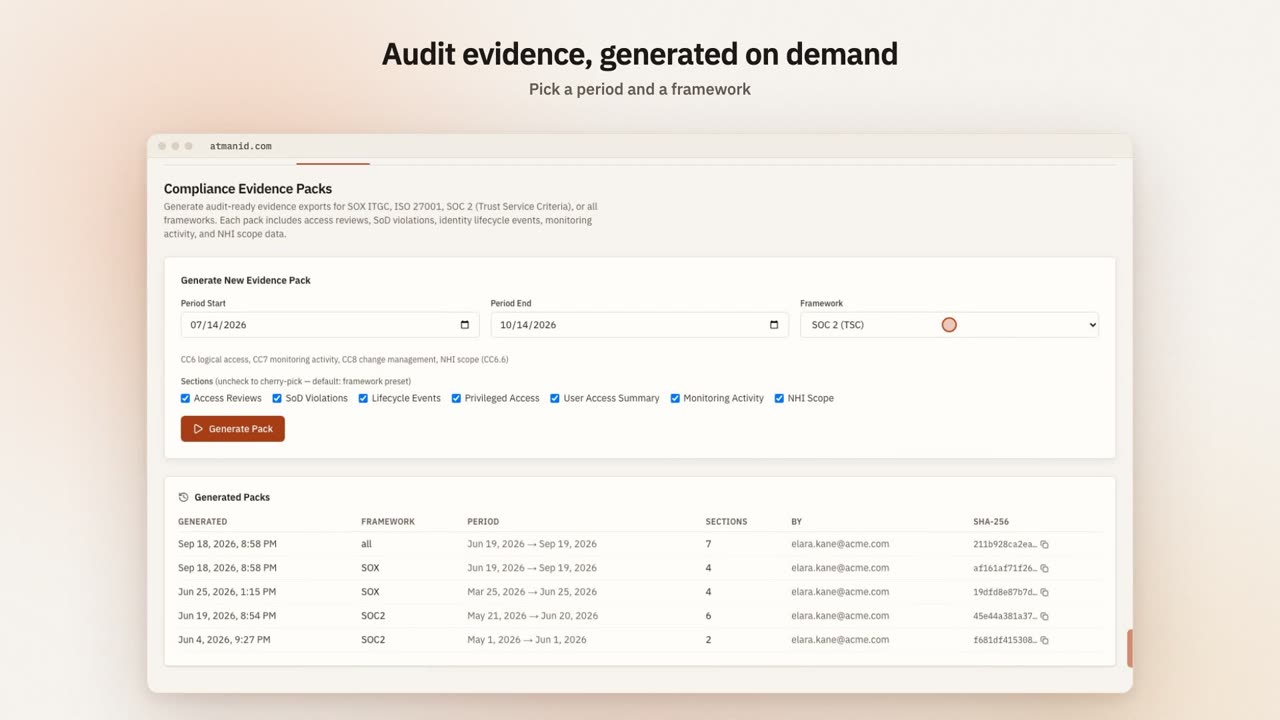](https://atmanid.com/video/card-evidence.mp4)
Generating a SOC 2 evidence pack: per-section summaries for access reviews, SoD, lifecycle and privileged access, stored with its integrity signature.
## Step 4 — Marcus signs in (auditor experience)
(Switch perspective. You’re now experiencing this as Marcus.)
Marcus signs in and opens **Security & Risk → Compliance → Auditor portal**. He sees:
* **Framework Posture** and **Compliance Frameworks** — the control coverage summary
* **Evidence Packs** — when the last pack was generated, with a link to generate one
* **Audit Resources** — links to the **Audit Log**, **SoD Violations** and **Certifications**
Every visit writes `AUDITOR_PORTAL_VIEWED` with Marcus as the actor. Marcus’s experience is deliberately read-only: he can look and export, but he can’t approve, revoke or reconfigure anything.
## Step 5 — Verify the audit chain integrity (Marcus’s job)
This is the most important step from Marcus’s perspective. He needs to verify the audit log isn’t tampered with — otherwise every SOC 2 control that depends on audit evidence is materially weaker.
The check is run from the **Verify now** button on the Audit trail page, which compliance officers and super admins can use. Marcus asks the compliance officer to run it while he watches (in person or on a shared screen), so he sees the result first-hand.
The platform walks the most recent hashed audit records (up to 10,000), recomputing each `integrity_hash` and checking that each record’s `previous_hash` matches the record before it. The result is one of:
* **Audit chain intact — tamper-evident.** All checked records verified, with the sequence range covered.
* **Audit chain tampered — review immediately.** The specific sequence number where a hash didn’t match. Auditor cannot proceed; this is a P0 finding.
* **A chain gap, or benign historical rows noted** — a break or known pre-fix records that are reported separately from tampering, so they can be reviewed rather than mistaken for it.
AtmanID’s audit log is append-only and hash-chained, with checkpoints signed outside the database (see [Audit chain integrity](/architecture/audit-chain/)). Marcus’s verification therefore rests on:
* The hash-chain walk above — any edit, deletion or forged insertion breaks recomputation from that point forward
* Scheduled re-verification that tells tampering apart from a gap or a known pre-chain record
* Cross-table consistency: API usage records and audit records share a request ID, so tampering on one is detectable by joining to the other
* One documented limitation: records written before the chain was introduced (before March 2026) carry no hash and are reported as unchained historical records, not as verified
This honest accounting matters: Marcus knows exactly what the chain proves and where its limits are.
## Step 6 — Per-control evidence review
For each SOC 2 control in scope, Marcus works from the evidence pack sections and the audit trail. These are the questions he typically answers:
**CC6.6 — Logical access controls:**
```plaintext
For tenant Acme Corp, date range 2025-12-01 to 2026-05-31:
- Show every access grant
- Show every access revocation
- Show distribution by approval workflow
- Show any access granted without an audit row (should be zero)
```
**CC7.2 — System monitoring:**
```plaintext
- Show every privileged action, by actor
- Show the distribution of action types over the period
- Show every denied action (RBAC blocks), with its reason
```
**CC7.5 — Anomaly detection:**
```plaintext
- Show every action by users marked SUSPENDED or DEACTIVATED (should be zero post-deactivation)
```
**CC8.1 — Change management:**
```plaintext
- Show every configuration change, with who made it
- Show before/after state for each change (from the audit API, which returns the previous state)
```
Comparisons are Marcus’s own analysis, not something AtmanID computes for him: a user whose privileged activity spiked against earlier periods, activity at unusual hours, or activity from a new IP address. He pulls the records for the periods he wants from the audit API — which returns the IP address where it was recorded — and compares them in his own tools.
These are not saved one-click queries. On **Security & Risk → Audit & Forensics → Audit trail**, Marcus narrows the log with **Search**, **Category**, **Actor Type**, **From** and **To**, and expands a row to see the state recorded with the event. **Export CSV** saves the rows on screen (one page, up to 50). For a whole period, the previous state of a change or the IP address, he uses the audit API (API-key scope `read:audit_logs`), which returns them where they were recorded — see [Navigate the audit trail](/guides/navigate-the-audit-trail/).
## Step 7 — Engagement closeout (Sarah’s job)
When the access window ends, Marcus’s exports stop on his next request and the External Auditor role comes off his session within a few minutes; a daily job records `AUDITOR_GRANT_EXPIRED`. Sarah doesn’t need to do anything for that part.
If the engagement changes:
* **Extension:** grants can’t be edited. Issue Marcus a new grant with the new window (Step 2); the new grant writes its own `AUDITOR_GRANT_ISSUED`.
* **Early termination:** on **Auditor Access Grants**, click **Revoke** on Marcus’s grant. Access ends immediately and AtmanID writes `AUDITOR_GRANT_REVOKED`.
Expiry and revocation end the grant, which ends what the role can open; the role assignment itself stays. When the engagement is over, also remove Marcus from the external auditor role in **Platform roles** (or deactivate his account) so his account holds nothing it no longer needs. His engagement’s audit records are retained per your organisation’s audit retention setting (between one and seven years; two by default).
## Step 8 — Verify the engagement audit trail
Sarah verifies the engagement end to end from the audit API (a key with the `read:audit_logs` scope) — everything Marcus did in the portal is attributed to him:
```bash
curl -s "$ATMANID_BASE_URL/api/v1/audit?actor_email=marcus.brooks%40ey.com&since=2026-04-01T00:00:00Z" \
-H "Authorization: Bearer $ATMANID_API_KEY"
```
Expected output: each `AUDITOR_PORTAL_VIEWED` while he worked, and any `EVIDENCE_PACK_GENERATED` he ran himself. The grant records are attributed to the people (or the scheduled job) that wrote them — Sarah for `AUDITOR_GRANT_ISSUED` and `AUDITOR_GRANT_REVOKED`, the system for `AUDITOR_GRANT_EXPIRED` — so query those with `action_type` instead, for example `?action_type=AUDITOR_GRANT_ISSUED&since=2026-04-01T00:00:00Z`.
This corpus is the proof of how the engagement actually went — when Marcus had access, what he opened, which packs were generated. If your CFO asks 6 months later “what did we share with EY in Q2 2026?” the answer is a query, not a memory of what was emailed.
## What just happened
You converted “external auditor onboarding” from an ad-hoc shared-drive + email-trail mess into a structured engagement with:
* **Read-only by role:** Marcus’s role can view and export but cannot change anything
* **Time-bounded access:** the grant expires on its own, at most 90 days out — no forgotten standing access to the auditor workspace
* **Self-service verification:** Marcus runs his own audit chain integrity check, doesn’t need to trust your assertion
* **Queryable engagement history:** the audit query above replaces “did we share X with the auditor?” memory checks
* **Fingerprinted evidence:** every pack carries a SHA-256 hash recorded in the audit log, not a hand-curated PDF
This is the **shape** of every external engagement going forward — same flow whether it’s SOC 2, ISO 27001, SOX or a customer-driven security questionnaire. The first onboarding takes \~25 min; subsequent engagements take \~10 min once your team has the muscle memory.
## Common pitfalls
* **An access window longer than the fieldwork.** The longest window is 90 days; for a 4-week engagement, pick 30 days and issue a new grant if fieldwork runs over.
* **Missing scopes on the grant.** Evidence packs need **Report Export** and **Audit Export**; the Auditor Portal needs **Audit View**. For a SOC 2 engagement tick all four.
* **Forgetting the role after the grant ends.** Expiry closes everything the role opens, but the assignment stays on the account until you remove it — tidy it up at closeout.
* **Granting external\_auditor any write permissions via custom role.** The shipped `external_auditor` role carries no mutating permissions, but a custom role built to “help the auditor” can drift. Stick to the canonical role.
* **Not running the chain integrity check.** Marcus reading the evidence pack without verifying the chain is rubber-stamping. Make it the first thing he does.
## Going further
* For the engineering depth on how the audit chain provides the integrity guarantee, see [Architecture → Audit chain integrity](/architecture/audit-chain/).
* For the broader Trust posture (subprocessors, certifications, security commitments), point Marcus at .
* For more on Marcus’s persona — what makes external\_auditor distinct from internal compliance roles — see [Concepts → Personas → Marcus](/concepts/personas/).
* For the certification campaign workflow that produces the underlying audit evidence Marcus is reviewing, see [Onboard your first app and run a certification campaign](/tutorials/onboard-app-and-certify/).
# First API call
> Make your first authenticated AtmanID API call in under 10 minutes — get a key, list your users, parse the response.
This tutorial walks through making your first authenticated request to the AtmanID v1 REST API. We’ll use `curl` for transport-level clarity; the [First SDK script tutorial](/tutorials/first-sdk-script/) covers the same flow with the TypeScript SDK once you’re past the basics.
**Time estimate:** \~10 minutes including the API key request.
## Prerequisites
* An AtmanID account with the `identity_admin`, `tenant_owner` or `super_admin` role (needed to issue API keys)
* `curl` installed (or any HTTP client — Postman, Insomnia, Bruno, your language’s standard library)
* A terminal
## Step 1 — Get an API key
API keys are issued from the AtmanID web app:
1. Log in to your AtmanID tenant (at your tenant’s base URL, provided with your onboarding)
2. Navigate to **Platform Config → Integrations & API → API Keys** (`/dashboard/settings/api-keys`)
3. Click **Create Key**
4. Enter a **Key Name** (e.g., “First API call tutorial”)
5. Under **Scopes**, select just `read:users`
6. Fill in **Purpose** (required, at least 20 characters) and pick how long the key is **Valid for**
7. Click **Create Key**
8. **Copy the key immediately** — it starts with `atman_` and is shown only once
Treat the key like a password. Don’t commit it to source control. For this tutorial, set it as an environment variable — along with the base URL every snippet below uses:
```bash
export ATMANID_API_KEY="atman_your_key_here"
export ATMANID_BASE_URL="https://" # your tenant's base URL
```
## Step 2 — Make your first call
The simplest read: list users in your tenant. The endpoint is `GET /api/v1/users`.
```bash
curl -X GET "$ATMANID_BASE_URL/api/v1/users" \
-H "Authorization: Bearer $ATMANID_API_KEY" \
-H "Accept: application/json"
```
Expected response shape (truncated for clarity):
```json
{
"data": [
{
"id": "3f2a9c1e-7b4d-4e8a-9c21-5d6e7f8a9b0c",
"email": "sarah.chen@example.com",
"first_name": "Sarah",
"last_name": "Chen",
"full_name": "Sarah Chen",
"department": "Security",
"title": "Identity Administrator",
"status": "ACTIVE",
"identity_type": "employee",
"role": "Identity Administrator",
"entitlement_count": 12,
"last_login_at": "2026-05-09T17:42:08.000Z",
"created_at": "2026-01-15T08:23:11.000Z"
},
/* ... up to 25 users by default ... */
],
"total": 48,
"page": 1,
"limit": 25,
"total_pages": 2
}
```
**What just happened:**
* `Authorization: Bearer atman_...` authenticated the request as that API key (its scopes decide what it may call)
* The endpoint returned users in YOUR tenant only — the tenant comes from the key itself and isolation is enforced at the database layer, no parameter required
* Response follows the standard pagination shape (`{ data, total, page, limit, total_pages }`). Use `?page=` and `?limit=` (default 25, max 100) to move through it
* Every response carries an `X-Request-Id` header — keep it when you need support
## Step 3 — Parse the response
In whatever language you’re working in:
**bash + jq:**
```bash
curl -s -X GET "$ATMANID_BASE_URL/api/v1/users" \
-H "Authorization: Bearer $ATMANID_API_KEY" \
| jq '.data[] | {email, status, last_login_at}'
```
**Python:**
```python
import os, requests
r = requests.get(
f"{os.environ['ATMANID_BASE_URL']}/api/v1/users",
headers={"Authorization": f"Bearer {os.environ['ATMANID_API_KEY']}"},
)
for user in r.json()["data"]:
print(f"{user['email']:40} {user['status']:15} {user['last_login_at']}")
```
**TypeScript (without SDK):**
```typescript
const r = await fetch(`${process.env.ATMANID_BASE_URL}/api/v1/users`, {
headers: { Authorization: `Bearer ${process.env.ATMANID_API_KEY}` },
});
const { data } = await r.json();
for (const user of data) {
console.log(`${user.email} ${user.status} ${user.last_login_at}`);
}
```
For TypeScript specifically, the [SDK](/reference/sdk/) provides typed responses, a retry on server and network errors, and error classes out of the box — see the [First SDK script tutorial](/tutorials/first-sdk-script/) next.
## Step 4 — Verify the call was recorded
Every API call is metered against the key that made it. Verify yours landed:
1. Open the AtmanID web app → **Platform Config → Integrations & API → API Keys**
2. On your key’s row, click the **View usage stats** icon
3. You should see the request counted, with `GET /api/v1/users` among the key’s top endpoints. The key’s **Last used** column updates too
Read-only calls like this one are metered rather than written to the audit log. Actions that change state — creating the key you just used, approving access, registering an agent — are written to the hash-chained audit log; see the [architecture overview](/concepts/architecture-overview/#the-audit-log).
## Common first-call errors
Errors come back in one shape: `{ "error": { "code": "...", "message": "...", "request_id": "..." } }`. Branch on `error.code`, not the message.
| Symptom | Cause | Fix |
| ----------------------------------------------------- | ------------------------------------------------------------------- | --------------------------------------------------------------------------------------------------------------------------------------------- |
| `401` with code `UNAUTHENTICATED` | Missing or invalid `Authorization` header, or a revoked/expired key | Verify key starts with `atman_` and the env var resolved (`echo $ATMANID_API_KEY`) |
| `403` with code `RBAC_DENIED` (“Insufficient scopes”) | Key doesn’t have the required scope | Key scopes can’t be edited — create a new key with `read:users` in Platform Config → Integrations & API → API Keys |
| `429` with code `RATE_LIMITED` | Rate limit hit (60 req/min for a standard-tier key) | Back off per `Retry-After` header — see [Common patterns](/tutorials/common-patterns/#rate-limit-handling) |
| `5xx` | Service issue | Check `$ATMANID_BASE_URL/api/healthz` for service status; if 200, email with the `X-Request-Id` from the response headers |
## What you’ve validated
By completing this tutorial:
* ✅ You can authenticate to AtmanID via API key
* ✅ You understand the standard paginated response shape
* ✅ Your tenant data is reachable + correctly scoped
* ✅ Your key’s usage is being recorded
## Where to go next
* **[First SDK script](/tutorials/first-sdk-script/)** — same flow with the TypeScript SDK, gets you typed responses + error classes
* **[Common patterns](/tutorials/common-patterns/)** — pagination across multiple pages, error handling, retries, webhook verification
* **[API Reference](/reference/api/)** — the full v1 surface
* **[Concepts → Architecture overview](/concepts/architecture-overview/)** — the security model behind why your API key only sees your tenant
# First SDK script
> Same flow as First API call but using the TypeScript SDK — typed responses, retry logic, error handling out of the box.
This tutorial walks through the same scenario as [First API call](/tutorials/first-api-call/) — listing users in your tenant — but using the AtmanID TypeScript SDK (`AtmanIDClient`). The SDK gives you typed responses, an automatic retry on server and network failures, structured error classes, and idiomatic resource accessors instead of raw URL strings.
**Time estimate:** \~15 minutes including SDK install + first script.
## Prerequisites
* Completed [First API call](/tutorials/first-api-call/) (you already have an API key + understand the basics)
* Node.js 18.17+ installed
* A TypeScript project (or willingness to create one)
## Step 1 — Install the SDK
The standalone npm package `@atmanid/sdk` is planned for v2 — until then, customers integrate via:
1. **Vendored source** — pilot customers receive the SDK source and copy it into their project.
2. **Future npm package** — `npm install @atmanid/sdk` once published. Track `$ATMANID_BASE_URL/api/v1/changelog.json` for the v2.0.0 announcement.
For this tutorial, we’ll assume you’ve vendored the SDK at `./vendor/atmanid-client/`.
## Step 2 — Instantiate the client
hello-atmanid.ts
```typescript
import { AtmanIDClient } from './vendor/atmanid-client';
const client = new AtmanIDClient({
apiKey: process.env.ATMANID_API_KEY!,
baseUrl: process.env.ATMANID_BASE_URL, // your tenant's base URL — set it explicitly
// Optional config:
// timeoutMs: 8_000, // per-request timeout (default 8 s)
// userAgent: 'my-integration/1.0', // appended to the SDK's User-Agent
});
```
The constructor validates the API key format (`atman_` prefix) before any network call — fails fast on misconfiguration. If you leave out `baseUrl`, the client targets AtmanID’s own hosted instance, not your tenant, so always pass it.
## Step 3 — Make your first call
Same scenario as the curl tutorial — list users:
```typescript
async function main() {
const result = await client.users.list({
page: 1,
limit: 25,
});
console.log(`Found ${result.total} users (page ${result.page} of ${result.total_pages}):\n`);
for (const user of result.data) {
console.log(` ${user.email.padEnd(40)} ${user.status.padEnd(15)} ${user.created_at}`);
}
}
main().catch(err => {
console.error('Request failed:', err);
process.exit(1);
});
```
Run it:
```bash
ATMANID_API_KEY="atman_your_key_here" ATMANID_BASE_URL="https://" npx tsx hello-atmanid.ts
```
Expected output:
```plaintext
Found 48 users (page 1 of 2):
sarah.chen@example.com ACTIVE 2026-01-15T08:23:11.000Z
priya.singh@example.com ACTIVE 2026-02-03T16:30:15.000Z
taylor.brooks@auditor.example ACTIVE 2026-03-08T09:11:42.000Z
...
```
## What the SDK gives you over raw HTTP
Three things show up immediately even in this minimal example:
**1. Typed responses.** `result.data` is `User[]`, not `unknown`. Your IDE autocompletes `user.email`, `user.status`, etc. If the API contract changes (a field is renamed, a type narrows), TypeScript flags it at compile time — no runtime surprises.
**2. Pagination shape is enforced.** `result.total_pages` is always present (response shape). You don’t have to remember the field name or worry about typos.
**3. Errors are structured classes.** Instead of parsing raw HTTP, the SDK throws typed errors: `AtmanIDClientError` for any 4xx (with `status`, the machine-readable `code` and `details`), `AtmanIDServerError` for 5xx and `AtmanIDNetworkError` for timeouts and connection failures. All three extend `AtmanIDError`.
```typescript
import { AtmanIDClientError } from './vendor/atmanid-client';
try {
const user = await client.users.get('00000000-0000-0000-0000-000000000000');
} catch (err) {
if (err instanceof AtmanIDClientError && err.code === 'UNAUTHENTICATED') {
console.error('API key invalid or expired:', err.message);
} else if (err instanceof AtmanIDClientError && err.status === 404) {
console.error('User not found — check the ID');
} else if (err instanceof AtmanIDClientError && err.code === 'RATE_LIMITED') {
console.error('Rate limited — back off and retry later');
} else {
throw err; // propagate unknown errors
}
}
```
Each error class carries `err.requestId` (from the `X-Request-Id` response header) for logging and support. See [Common patterns](/tutorials/common-patterns/#error-handling) for the full pattern.
## Step 4 — Resource accessors
The SDK organizes endpoints into resource classes mirroring the REST surface:
```typescript
// Users
await client.users.list({ page, limit });
await client.users.get(userId);
// Apps + entitlements
await client.apps.list();
await client.entitlements.list({ application_id });
await client.entitlements.get(entitlementId);
// Bundles (role packages)
await client.bundles.list();
await client.bundles.get(bundleId);
// JML lifecycle (every write takes an idempotency_key)
await client.jml.joiner({
idempotency_key: `hris-${employeeId}`,
email: 'new.hire@example.com', first_name: 'New', last_name: 'Hire',
});
await client.jml.status(`hris-${employeeId}`); // poll the event by its idempotency_key
// Audit
await client.audit.list({ since: '2026-05-01T00:00:00Z', until: '2026-05-10T00:00:00Z' });
// Agents (NHIs)
await client.agents.register({
idempotency_key: 'register-slack-release-bot',
name: 'slack-release-bot',
type: 'Service Account',
owner_team: 'platform',
owner_email: 'platform-eng@example.com',
purpose: 'Posts release notes to #releases',
});
// SoD
await client.sodViolations.list({ status: 'OPEN' });
// Webhooks
await client.webhooks.create({
url: 'https://your-app.com/atmanid-webhook',
events: ['ACCESS_APPROVED', 'ACCESS_REVOKED'],
});
```
Each call needs the matching scope on your API key (for example `read:users`, `read:audit_logs`, `write:nhi`, `write:jml`, `write:webhooks`). The [SDK Reference](/reference/sdk/) lists the resource classes; the [API Reference](/reference/api/) has every request and response field.
## Common first-script errors
| Symptom | Cause | Fix |
| ----------------------------------------------------------------------- | ------------------------------------------ | ------------------------------------------------------------------------------------------------------- |
| `Cannot find module './vendor/atmanid-client'` | The SDK isn’t where the import expects it | Check the vendored folder path matches the import |
| `Error: AtmanIDClient: apiKey is required and must start with "atman_"` | Key missing or doesn’t start with `atman_` | Verify env var — see Step 1 of [First API call](/tutorials/first-api-call/#step-1--get-an-api-key) |
| TypeScript type errors on fields | Stale SDK vendored vs current API | Ask us for the current SDK source; check `$ATMANID_BASE_URL/api/v1/changelog.json` for breaking changes |
| `AtmanIDNetworkError: Request timed out after 8000ms` | Network or service issue | Check `$ATMANID_BASE_URL/api/healthz`; the SDK retries once on `5xx` and network errors before throwing |
## Where to go next
* **[Common patterns](/tutorials/common-patterns/)** — pagination across multiple pages, error handling, retries, rate limit handling, webhook signature verification
* **[SDK Reference](/reference/sdk/)** — installation and the resource catalog
* **[API Reference](/reference/api/)** — the underlying REST surface the SDK wraps
# GitOps NHI lifecycle with the jml-sync GitHub Action
> Dev manages a fleet of NHIs via a YAML manifest in his repo. The atmanid/jml-sync GitHub Action runs on every push, diffs the manifest against tenant state, and applies CREATE/UPDATE/DEACTIVATE changes (unchanged rows report SKIPPED_NOOP) with audit-chain attribution. The managed_by ownership boundary as the architectural safety primitive. ~30 minutes.
## What you’ll do
You’re **Dev Torres**. Your team owns 8 NHIs (service accounts + AI agents) for the payments domain. Today they’re managed through ad-hoc `curl` calls when someone remembers — there’s no canonical source-of-truth for “what NHIs SHOULD exist.” If a teammate accidentally deletes one, nobody notices for weeks. After this tutorial, the manifest IS the source-of-truth, every diff is auditable, and a daily drift check catches any out-of-band changes.
This walks the canonical GitOps-NHI scenario, the highest-leverage automation pattern for teams managing >5 NHIs. Time investment: \~30 min for first manifest + perpetual zero-touch on every commit.
## Prerequisites
* Repo where you’ll commit the manifest (any Git provider with GitHub Actions or compatible CI)
* An AtmanID API key with three scopes: `read:nhi` + `write:nhi` + `read:audit_logs`. Mint at Platform Config → Integrations & API → **API keys**. Store as repo secret `ATMANID_API_KEY`.
* Access to the `atmanid/jml-sync` action. It is an internal action today — not published to the GitHub Marketplace — so ask AtmanID for access before you start (see Going further).
* Familiarity with [Register an NHI via curl](/guides/register-nhi-via-curl/) — this tutorial wraps the API in a declarative YAML interface
## The shape of GitOps for NHIs
The mental model that makes this work:
```plaintext
nhi-manifest.yaml in repo ──push──> GitHub Action runs jml-sync
↓
Diff vs AtmanID tenant
↓
┌─────────────┼─────────────┐
↓ ↓ ↓
CREATED UPDATED DEACTIVATED
↓
Audit row per change
with X-Request-Id linking
back to the workflow run
```
Three things to internalize:
1. **The manifest is the desired state.** Anything in the manifest but not in tenant → CREATE. Anything in tenant but not in manifest → DEACTIVATE. Anything different between the two → UPDATE.
2. **The `managed_by` field is the GitOps boundary.** The action only sees agents tagged with the manifest’s `managed_by` value. Without this, the diff engine would consider EVERY agent in your tenant — including seed data and other-team agents — as candidates for DEACTIVATE.
3. **Every change audits.** Every CREATE/UPDATE/DEACTIVATE writes an audit record carrying the `request_id` of that API call, and the run summary links each row to it. Auditors trace from “this NHI was deactivated on date X” back to “the workflow run that made the call.”
## Step 1 — Create the manifest
Commit `nhi-manifest.yaml` to your repo root:
```yaml
apiVersion: atmanid.dev/v1
kind: NHIManifest
metadata:
# CRITICAL: managed_by is the GitOps boundary. The action only operates
# on agents tagged with this value. Without it, the diff engine would
# see your entire tenant and classify every unrelated agent as DEACTIVATE.
managed_by: my-payments-workflow
spec:
agents:
- name: stripe-webhook-listener
type: External AI Tool
framework: node-stripe-sdk
owner_team: payments
owner_email: payments-eng@example.com
environment: Production
vendor: stripe
purpose: Listens for Stripe webhook events and triggers reconciliation
- name: nightly-reconciler
type: Service Account
owner_team: payments
owner_email: payments-eng@example.com
environment: Production
purpose: Runs daily payment reconciliation against ledger
```
**Pick `managed_by` carefully.** It’s the namespace for this workflow’s agents. Convention: `-` (e.g., `acme-payments-workflow`, `acme-platform-deploy-pipeline`). Once chosen, do NOT change it — changing breaks the GitOps boundary because previously-tagged agents become “unmanaged” from the diff engine’s view.
## Step 2 — Add the workflow
Commit `.github/workflows/sync-nhis.yml`:
```yaml
name: Sync NHIs to AtmanID
on:
push:
paths: [ nhi-manifest.yaml ]
workflow_dispatch:
inputs:
dry_run:
description: 'Run as dry-run (no mutations)'
type: boolean
default: true
jobs:
sync:
runs-on: ubuntu-latest
permissions:
contents: read
steps:
- uses: actions/checkout@v4
- uses: atmanid/jml-sync@v1
with:
api_key: ${{ secrets.ATMANID_API_KEY }}
manifest_path: nhi-manifest.yaml
dry_run: ${{ github.event.inputs.dry_run || 'false' }}
# safety guard — refuse to apply a plan that
# would deactivate more than this many rows. Default 3.
max_deactivates: 3
```
Three workflow design decisions worth understanding:
* **`paths: [nhi-manifest.yaml]`** — the workflow only runs when the manifest changes. Saves CI minutes for unrelated commits.
* **`workflow_dispatch` with `dry_run` input** — lets you trigger a manual dry-run from the Actions tab to preview changes before they apply. Useful for “what would happen if I added this agent” exploration.
* **`max_deactivates: 3`** — refuses to apply a plan that would deactivate more than 3 rows. This is the belt-and-braces against catastrophic mistakes (e.g., accidentally deleting all spec.agents from the manifest would otherwise trigger mass deactivation).
## Step 3 — First run with `dry_run=true`
NEVER apply for the first time. Always dry-run first:
1. Go to GitHub Actions → “Sync NHIs to AtmanID” workflow → Run workflow → check the dry\_run box → Run
2. Wait \~30 seconds for the action to complete
3. Open the workflow run summary
The run log shows the plan, one line per intended change:
```plaintext
atmanid/jml-sync — dry-run mode
[1] would CREATE: stripe-webhook-listener (External AI Tool)
[2] would CREATE: nightly-reconciler (Service Account)
```
The step summary (“AtmanID JML Sync — dry-run run”) lists the same rows in a table (`#`, Name, Status, Agent ID, Audit) with status `DRY_RUN`; nothing is changed.
Verify the plan matches your expectation. If yes, re-run without dry\_run; the action applies the plan + writes audit rows. New agents are created in `PENDING_REVIEW` (see What’s NOT covered).
## Step 4 — Verify in the audit trail
After the apply run, open AtmanID → Security & Risk → Audit & Forensics and search for the `request_id` shown in the workflow run summary, or list the registrations from the audit API and match the same `request_id`:
```bash
curl -s "$ATMANID_BASE_URL/api/v1/audit?action_type=AGENT_REGISTERED&since=2026-10-08T00:00:00Z" \
-H "Authorization: Bearer $ATMANID_API_KEY"
```
Expected: 2 rows — `AGENT_REGISTERED` for stripe-webhook-listener + `AGENT_REGISTERED` for nightly-reconciler, each with the agent’s name, type, owner and environment in `new_state`. The `managed_by` tag is on the agent itself: `GET /api/v1/agents?managed_by=my-payments-workflow` returns both.
The forensic chain is intact: workflow run → request\_id → audit records → the registered agents. An auditor asking “when was stripe-webhook-listener created” gets a complete answer in one query.
## Step 5 — Mover scenario (UPDATE)
Three months later, `nightly-reconciler` should run in Staging not Production (engineering is decommissioning the dedicated prod-only nightly job in favor of a staging-then-promote pattern). Edit the manifest:
```yaml
- name: nightly-reconciler
type: Service Account
owner_team: payments
owner_email: payments-eng@example.com
environment: Staging # ← changed from Production
```
Commit + push. Workflow fires. Run summary:
```plaintext
nightly-reconciler UPDATED (fields: environment)
stripe-webhook-listener SKIPPED_NOOP
```
Audit row: `AGENT_UPDATED` with `new_state.updated_fields = ["environment"]` and `new_state.diff.environment = { "from": "Production", "to": "Staging" }`. The change is tracked + reversible (revert the YAML commit, push, workflow re-applies the prior state).
## Step 6 — Leaver scenario (DEACTIVATE)
`stripe-webhook-listener` is being decommissioned (the team migrated to Stripe’s hosted webhook routing). Remove the entry from the manifest:
```yaml
spec:
agents:
# stripe-webhook-listener removed (migrated to Stripe hosted routing — 2026-08)
- name: nightly-reconciler
...
```
Commit + push. Workflow fires. Run summary:
```plaintext
stripe-webhook-listener DEACTIVATED
nightly-reconciler SKIPPED_NOOP
```
The agent’s status flips to DEPROVISIONED (soft-delete; we never hard-delete). Audit row: `AGENT_DEACTIVATED` with `new_state.status = "DEPROVISIONED"` and `new_state.previous_status` set to the status it had (e.g. `"ACTIVE"`).
If you accidentally remove the agent (the deactivation was unintended), reverting the commit does **not** bring it back: the deprovisioned agent still holds its name, so the re-create is refused (`AGENT_NAME_CONFLICT`) and the run reports the row as `SKIPPED_EXISTS`. Restore it under a new name, or ask an administrator to resolve the old registration first. The prior agent stays soft-deleted for forensic continuity.
## Step 7 — Daily drift check
Schedule a daily dry-run so drift shows up in the run summary:
.github/workflows/drift-check.yml
```yaml
on:
schedule:
- cron: '0 6 * * *' # 6am UTC daily
jobs:
drift-check:
runs-on: ubuntu-latest
steps:
- uses: actions/checkout@v4
- id: sync
uses: atmanid/jml-sync@v1
with:
api_key: ${{ secrets.ATMANID_API_KEY }}
manifest_path: nhi-manifest.yaml
dry_run: true # Always dry — drift detection only
```
Any row other than `SKIPPED_NOOP` in the summary is drift. The action has no “changes detected” output today (its outputs are `agents_created`, `rows_succeeded`, `rows_failed` and `summary_url`), so an automatic Slack or email alert needs your own step — for example one that checks the run log for `would CREATE`, `would UPDATE` or `would DEACTIVATE` lines.
This catches:
* Manual changes someone made via the AtmanID dashboard (out-of-band)
* Changes someone made via direct API call (out-of-band)
* Agents that someone created via dashboard but forgot to add to manifest
The drift alert is your “is GitOps actually being respected” canary. Without it, the manifest can drift from reality silently.
## How the safety layers work
Two layers protect you from catastrophic mistakes:
### Layer 1 (architectural) — `managed_by` GitOps boundary
The diff engine ONLY considers agents tagged with `managed_by: my-payments-workflow`. Agents tagged with another value, or not tagged at all, never appear in the plan — so they can never be classified as DEACTIVATE. (A manifest must list at least one agent; an empty `spec.agents` is rejected before any diff.)
This is the FIRST defense. A misconfigured workflow can’t accidentally affect agents owned by a different workflow OR untagged seed data.
### Layer 2 (belt-and-braces) — `max_deactivates` safety guard
If your manifest legitimately had 50 agents and you accidentally delete 47 of them in a commit, Layer 1 doesn’t catch it (those 47 ARE in your `managed_by` namespace). Layer 2 does: the action refuses to apply a plan that would DEACTIVATE more than `max_deactivates` (default 3) rows.
The override is `force_deactivate: true` — explicit opt-in for the rare case you intend a bulk leaver event (e.g., team disbandment).
The combination means: a misconfigured workflow can’t affect other teams’ agents (Layer 1) AND can’t catastrophically affect your own team’s agents (Layer 2).
## Lesson cited from the design history
An early dogfood run surfaced the need for the `managed_by` boundary. The original GitOps design didn’t have this boundary; the first dogfood run treated the entire tenant as in-scope and would have soft-deleted 18 unrelated agents had it not been caught and reverted via SQL. The two-layer safety design above is the architectural fix, not a band-aid. Worth understanding because it explains why both layers exist — neither alone is sufficient.
See [Set up an external auditor for SOC 2 evidence collection](/tutorials/external-auditor-soc2/) Step 5 (audit chain integrity) for the auditor-side perspective on why the GitOps audit trail matters for compliance.
## What just happened
You converted “ad-hoc NHI management” into:
* **Manifest-as-source-of-truth** — the YAML IS the canonical NHI inventory
* **Auditable changes** — every CREATE/UPDATE/DEACTIVATE traceable from workflow run → audit row
* **Drift detection** — daily check catches out-of-band changes
* **Two-layer safety** — managed\_by boundary + max\_deactivates guard prevent catastrophic mistakes
This is the **shape** of GitOps NHI management — same flow whether you have 2 NHIs or 200. The investment scales with team size (a team of 1 won’t bother; a team of 8+ benefits a lot).
## Common pitfalls
* **Forgetting `managed_by` in metadata.** The action still runs, but warns and diffs against EVERY agent in the tenant — only the `max_deactivates` guard stands between you and mass deactivation. Always set it. And if you set it AND later try to change it, you orphan your existing agents — they keep the old tag, your new manifest sees zero matching agents, and the plan would CREATE-everything-anew + DEACTIVATE-nothing (because Layer 1 hides them). Once chosen, never change.
* **First run without dry\_run.** Always dry-run first. The 30-second cost is worth it.
* **Removing entries when you mean to update them.** A typo in the agent name reads as “remove the old + add a new.” The diff engine sees a DEACTIVATE + CREATE with the new name — and the old name stays reserved by the deactivated agent. If max\_deactivates=3, small typos get through; if it’s a bulk rename, you’ll trigger the safety guard.
* **No drift check.** Without it, the manifest silently diverges from reality. Always set up the daily drift detection.
* **Letting `managed_by` apply across multiple repos.** Each workflow should have its own unique `managed_by`. Two workflows sharing a `managed_by` see each other’s agents — both think they’re the source-of-truth, which is the recipe for fights.
## Going further
* For per-call SDK depth (e.g., if you want to write a custom GitOps tool instead of using the action), see [Register an NHI with the TypeScript SDK](/guides/register-nhi-via-sdk/)
* For the API spec including the `managed_by` field details, see [API Reference](/reference/api/) `/api/v1/agents` endpoints + the [v1.7.0 changelog entry](/reference/changelog/#v170--2026-04-29) for the managed\_by introduction
* For the auditor’s perspective on verifying GitOps changes, see [Set up an external auditor for SOC 2 evidence collection](/tutorials/external-auditor-soc2/)
* The GitHub Action is internal today (not on the Marketplace); its source publishes to the AtmanID GitHub org at open-sourcing (post-incorporation). Until then, email for access and the full input/output reference. Inputs: `api_key`, `api_base_url`, `manifest_path` (default `nhi-manifest.yaml`), `dry_run`, `fail_on_error` (default `true`), `max_deactivates` (default 3), `force_deactivate`.
## What’s NOT covered by jml-sync today
Honest accounting:
* **Human (Joiner/Mover/Leaver) lifecycle.** This action handles NHI lifecycle only. For human JML, see [Onboard a Joiner / Mover / Leaver lifecycle](/tutorials/jml-lifecycle/).
* **Approval of NHI registration.** Every agent the action creates lands in `PENDING_REVIEW`, and an administrator must approve it before full policy enforcement applies. The action does not approve agents or configure any auto-approval.
* **JIT capability elevation.** The action manages the agent’s existence but not its scope. There is no JIT endpoint in the public `/api/v1` surface today; see the [CI/CD SDK tutorial](/tutorials/cicd-sdk-integration/) for how elevation is handled.
* **Cross-tenant federation.** Each manifest applies to one tenant. Multi-tenant scenarios need one manifest per tenant.
# Onboard a Joiner / Mover / Leaver lifecycle
> Sarah handles a full HR-driven JML cycle — new hire joins (birthright access), changes department (mover; new access granted, stranded access revoked or ticketed), then leaves (full deprovision, owned agents swept, mailbox clean-up). End-to-end with the HRIS integration APIs. ~30 minutes.
## What you’ll do
You’re **Sarah Chen**. Your HR system (Workday, Rippling, BambooHR, etc.) is the source-of-truth for “who works here + what role + which department.” But IAM lifecycle events (provisioning baseline access on join, revoking on leave, transferring on role change) currently live in a “weekly sync of who-knows-what.” After this tutorial, every JML event triggers automated provisioning, revocation and an audit trail.
Time investment: \~30 min for the first integration setup + perpetual zero-touch per HR event.
[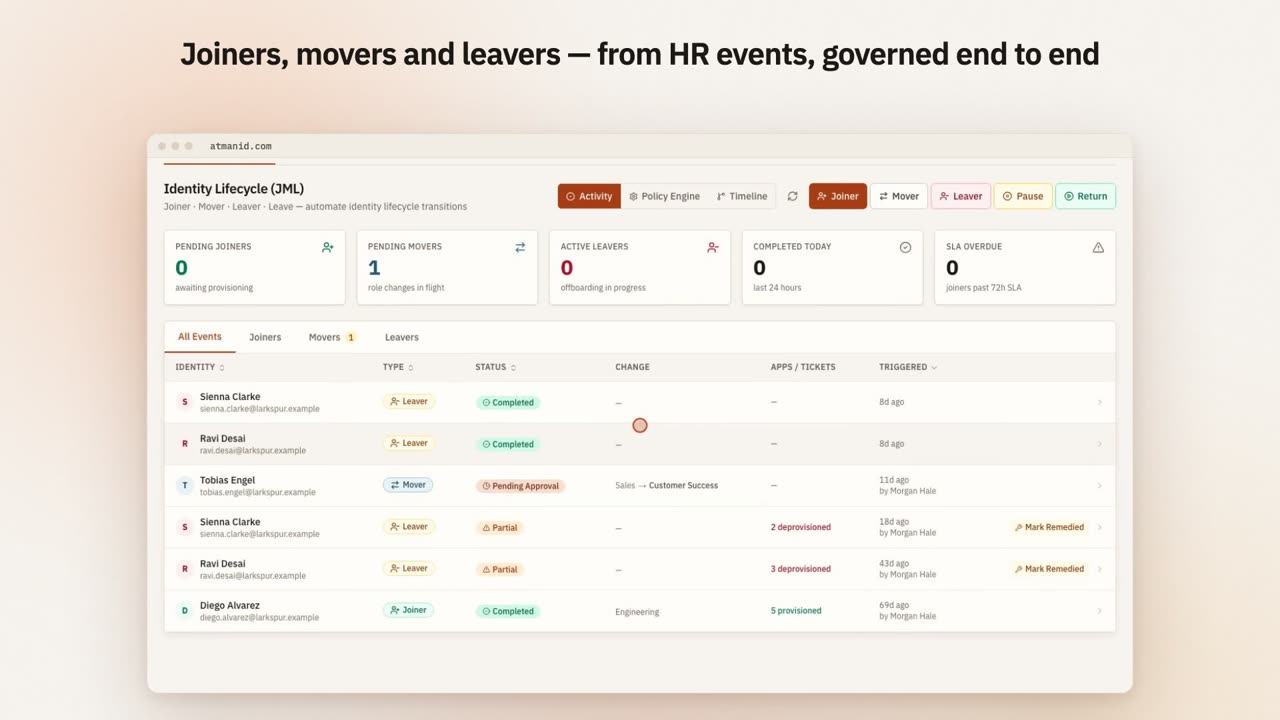](https://atmanid.com/video/card-joiner.mp4)
The JML activity view: a joiner provisioned to five applications, a mover whose department change waits for approval, and a leaver whose leftover access is flagged.
## Prerequisites
* `identity_admin` role
* An HR feed into AtmanID. Two options:
* **Identity Sources** (Identity & Access → Identity Sources) — AtmanID syncs from Workday, Rippling, BambooHR, ADP, SuccessFactors, generic SCIM or a flat file.
* **The JML API** — your HRIS (or the middleware in front of it) calls `POST /api/v1/jml/joiner`, `/mover` and `/leaver` with an API key that has the `write:jml` scope. This tutorial uses the API so every step is visible.
* Birthright access profiles defined (Identity & Access → Roles → **Birthright access**), e.g. “every Engineering employee gets GitHub + Slack + 1Password”. AtmanID matches profiles on department, identity type and title.
## Joiner: new hire arrives
HR creates Jane Doe (Software Engineer, Engineering) on Tuesday with a start date next week. The HRIS calls the joiner endpoint:
```bash
curl -s -X POST "$ATMANID_BASE_URL/api/v1/jml/joiner" \
-H "Authorization: Bearer $ATMANID_API_KEY" \
-H "Content-Type: application/json" \
-d '{
"idempotency_key": "wd-12345-hire",
"email": "jane.doe@example.com",
"first_name": "Jane",
"last_name": "Doe",
"department": "Engineering",
"title": "Software Engineer",
"identity_type": "employee",
"manager_email": "alex.lee@example.com",
"start_date": "2026-05-20",
"hris_system": "workday"
}'
```
AtmanID answers `202` with `status: "QUEUED"` and:
1. **Creates the user.** Because `start_date` is in the future, the user is created as `PRE_HIRE` (`user_status: "PRE_HIRE"`, `is_pre_hire: true`). Sign-in is refused until the start date, and pre-hire users are left out of `GET /api/v1/users` unless you pass `include_pre_hire=true`. With no start date, or one that is today or earlier, the user is created `ACTIVE`.
2. **Links the manager** if `manager_email` matches an existing user (otherwise the manager is left empty).
3. **Queues a joiner identity event** for the JML workflow engine and fires a `USER_CREATED` webhook.
4. **Audits** `JML_JOINER_PREHIRED` (or `JML_JOINER_TRIGGERED` for an immediate hire), with the API key and `request_id` on the row.
On the start date, a daily job (00:00 UTC) flips `PRE_HIRE` users to `ACTIVE` and audits `USER_ACTIVATED_FROM_PREHIRE`. Upcoming hires are listed under Identity & Access → Lifecycle → **Pre-hire**.
The API call records the event as pending and grants no access by itself; pending joiners, movers and leavers are counted on Identity & Access → Lifecycle (**Identity Lifecycle (JML)**). The joiner *workflow* — run from that page with the **Joiner** button — resolves the matching birthright profiles, grants their entitlements, provisions accounts in connected applications (or opens tickets for disconnected ones), and notifies about the new joiner. When it finishes, the API’s joiner event is completed with the outcome, so `GET /api/v1/jml/status/{idempotency_key}` reports `completed`, `partial` or `failed` instead of `pending`.
This is the **Joiner happy path**. From HRIS event to provisioned access with one operator click: the **Joiner** run.
### Joiner edge cases worth knowing
* **User already exists.** If the email is already `ACTIVE` or `PRE_HIRE`, the call returns `409 USER_ALREADY_EXISTS` — usually an HRIS re-send.
* **Same request sent twice.** The same `idempotency_key` within 24 hours returns the original result with `cached: true` instead of creating anything.
* **No birthright profile matches.** Nothing is granted automatically; the joiner workflow reports that there are no applications to provision. Define a profile for the department, or provision manually.
* **Re-hire.** If the email belongs to a `DEPROVISIONED` user, AtmanID reactivates that user (`is_rehire: true`) instead of creating a new one. Prior access is not restored — the re-hire gets birthright access only. A re-joiner processed through the workflow also gets a 30-day lifecycle hold that pauses HR sync for that user.
## Mover: Jane changes department
A year in, Jane moves from Engineering to Platform and gets a new manager. HRIS calls the mover endpoint:
```bash
curl -s -X POST "$ATMANID_BASE_URL/api/v1/jml/mover" \
-H "Authorization: Bearer $ATMANID_API_KEY" \
-H "Content-Type: application/json" \
-d '{
"idempotency_key": "wd-12345-move-1",
"user_email": "jane.doe@example.com",
"new_department": "Platform",
"new_title": "Tech Lead",
"new_manager_email": "priya.singh@example.com",
"hris_system": "workday"
}'
```
At least one of `new_department`, `new_title` or `new_manager_email` is required. AtmanID updates the user, changes the manager, queues a mover identity event and audits `JML_MOVER_TRIGGERED`. Access is not touched by the call. When the mover workflow runs (from the **Mover** button on the Lifecycle page), it measures the transfer from the department and title the HR event recorded — the user record already shows the new ones — completes that event with its outcome, and:
1. **Applications you name for provisioning or review** — new accounts are provisioned, and review tickets are raised for applications the operator flags for review.
2. **Department-transfer drift.** AtmanID computes the *stranded* access: entitlements Jane holds because of her **old** department’s birthright profile that the **new** department’s profile doesn’t confer. Access she requested and had approved is never in that set.
3. **Low-risk stranded entitlements are revoked automatically** (audited `ENTITLEMENT_AUTO_REVOKED`). Medium, high and critical ones get a revocation ticket in the Revocation Queue (Identity & Access → Provisioning Queues → **Revocation**) for a human to act on.
4. **Certification trigger.** If you have an enabled certification trigger rule for movers (Security & Risk → Access Certifications → **Trigger rules**), a certification campaign covering Jane’s access is created automatically.
5. **SoD scan** of Jane’s resulting access, and a notification about the move.
This is the **Mover discipline.** Remove only what the old department conferred and the new one doesn’t; leave requested access alone; and send anything above low risk to a person. Engineers don’t lose access they still need, and stale access doesn’t quietly accumulate.
### Mover edge cases
* **Manager or title change only.** The user is updated; no department drift is computed (`NO_DEPARTMENT_CHANGE`).
* **New department has no birthright profile.** AtmanID refuses to treat that as “revoke everything from the old department” — the drift step emits nothing and says why (`NEW_BASELINE_UNKNOWN`).
* **Suspiciously large drift.** More than 25 stranded entitlements for one person is treated as a profile misconfiguration, not a finding, and nothing is revoked or ticketed.
## Leaver: Jane leaves the company
Fast-forward 18 months. Jane resigns. HRIS calls the leaver endpoint:
```bash
curl -s -X POST "$ATMANID_BASE_URL/api/v1/jml/leaver" \
-H "Authorization: Bearer $ATMANID_API_KEY" \
-H "Content-Type: application/json" \
-d '{
"idempotency_key": "wd-12345-term",
"user_email": "jane.doe@example.com",
"termination_date": "2027-08-31",
"offboarding_type": "voluntary",
"hris_system": "workday"
}'
```
`offboarding_type` is one of `voluntary`, `involuntary`, `contract_end` or `retirement`. AtmanID sets the user’s termination and expiry dates, queues a leaver identity event, fires a `USER_DEPROVISIONED` webhook, audits `JML_LEAVER_TRIGGERED` and answers `202` with `scheduled_revocation_at` (end of day on the termination date). Sign-in is refused once the expiry date passes. Upcoming departures of contractors are listed under Identity & Access → Lifecycle → **Contract ending**.
On the termination date, the daily scheduled-leaver job (12:00 UTC) runs the full leaver workflow for Jane, as the system, keeping the termination date HR sent. It is the same workflow as the **Leaver** button on the Lifecycle page, or **Terminate** on her Directory page, which you can use to offboard her before that date. Whichever runs first completes the queued leaver event, so `GET /api/v1/jml/status/{idempotency_key}` reports the outcome. The workflow:
1. **Deprovisions every active application account** — connected apps through their connector, disconnected apps through a revocation ticket.
2. **Sets the user to `DEPROVISIONED`** and revokes their outstanding email approve/reject links.
3. **Re-evaluates live sessions** with the `hr_leaver` trigger — suspended when session enforcement is on, recorded only in shadow mode.
4. **Handles what Jane owns:**
* AI agents registered through the API and owned by Jane are **deprovisioned** — unless the agent has a managing team, in which case it keeps running and its accountable owner is cleared for reassignment.
* Other non-human identities she owns are flagged **orphaned** for reassignment.
5. **Exchange Online clean-up** (for tenants with the Exchange Online connector): removes inbox forwarding rules and removes her from distribution lists and Microsoft 365 / security groups (classic distribution lists are handed back as a manual PowerShell step). Optional steps, when requested on the leaver: set an out-of-office reply, delegate her calendar, and convert her mailbox to a shared mailbox.
6. **Certification trigger.** If you have an enabled certification trigger rule for leavers, a campaign is created for Jane’s residual access.
7. **Notifies** about the departure.
The response reports what happened: `accounts_deprovisioned`, `tickets_created`, `agents_deactivated`, `agents_reassigned`, `nhis_orphaned` and the per-step Exchange counts. Anything that couldn’t be removed automatically is a ticket in the Revocation Queue, not a silent gap.
### Leaver edge cases
* **Already deprovisioned.** The leaver call returns `409 USER_ALREADY_DEPROVISIONED`.
* **Last tenant owner.** Offboarding is refused if it would leave the organisation without a Tenant Owner.
* **Immediate termination.** For an involuntary exit you don’t want to wait for, terminate the user from their Directory page: sign-in and live sessions stop and entitlements are revoked immediately, then the full leaver workflow runs.
* **Termination + immediate rehire (e.g., contractor → FT conversion).** Process the leaver first; the later joiner call reactivates the same user with birthright access only. No automatic restoration of prior access.
* **Connector unavailable at termination time.** The account isn’t removed silently: the failure is reported in the leaver result and the account is handled through a revocation ticket or connector retry.
## Verifying the full lifecycle audit trail
For a complete view of one person’s lifecycle, open their profile in the dashboard (Directory → the person → Activity), or list joiner events for the period from the audit API (repeat with `JML_MOVER_TRIGGERED` and `JML_LEAVER_TRIGGERED`) and filter to the person in the results. `action_type` is an exact match:
```bash
curl -s "$ATMANID_BASE_URL/api/v1/audit?action_type=JML_JOINER_TRIGGERED&since=2026-01-01T00:00:00Z" \
-H "Authorization: Bearer $ATMANID_API_KEY"
```
The key needs the `read:audit_logs` scope. Pre-hires are recorded as `JML_JOINER_PREHIRED`, so query that action type as well. Together the rows give the lifecycle: joiner → activation → mover → automatic revocations and revocation tickets → leaver → deprovisioning and agent clean-up.
This is the **JML compliance evidence layer** — auditors testing “was access lifecycle-managed for terminated employees” run this query for any employee + see the complete chain.
## What just happened
You converted “weekly HR sync of who-knows-what” into:
* **HRIS-driven lifecycle** — joiner, mover and leaver events land through the API (or Identity Sources) as they happen
* **Mover discipline** — only access the old department conferred is removed; anything above low risk goes to a person
* **Leaver hygiene** — accounts, sessions, owned agents and mailbox rules handled in one workflow, with tickets for anything that needs a human
* **Full forensic chain** — every JML event audits with the API key, `request_id` and HRIS system that sent it
## Common pitfalls
* **Skipping birthright profiles.** Without them, joiners are created but nothing is provisioned automatically, and mover drift can’t be computed. Define profiles per department + per common role.
* **Ignoring the Revocation Queue.** Medium/high/critical mover drift and disconnected-app leaver accounts become tickets. Someone has to work them.
* **Reusing idempotency keys.** A key reused within 24 hours returns the earlier result instead of processing the new event. Derive keys from the HR event (employee id + event type + sequence).
* **Not reassigning ownership.** Orphaned non-human identities and agents with a cleared owner need a new accountable owner. Check them after each leaver.
## Going further
* For the API-direct approach to driving JML programmatically, see [Reference → API Reference](/reference/api/) `/api/v1/jml/*` endpoints (and `GET /api/v1/jml/status/{idempotency_key}` to check an event)
* For the workflow-designer integration to add custom approval steps, see [Build a custom approval workflow](/tutorials/workflow-designer-custom-approval/)
* For investigating a specific lifecycle event via Iris, see [Iris query patterns → Forensic queries](/iris/query-patterns/)
# Onboard your first app and run a certification campaign
> The canonical end-to-end scenario for a new identity admin. Add a SaaS app to AtmanID, define entitlements, identify reviewers, launch a quarterly access certification campaign, review responses, and generate the audit-ready report. ~30 minutes.
## What you’ll do
You’re **Sarah Chen, identity\_admin** at Acme Corp. Your CFO just asked: *“Who has access to Salesforce, and have we reviewed it in the last quarter?”* Today the answer is “I’d have to ask each manager and aggregate it manually.” After this tutorial, the answer is “here’s the evidence pack from the campaign that closed last week.”
This is the **canonical operator scenario** — the workflow every identity admin runs first when adopting AtmanID. It exercises three concepts (entitlement, owner, certification campaign) and ties them into a single 30-minute end-to-end loop. Time investment: one-time \~30 min for the first app, \~15 min for each additional app, \~5 min/quarter to launch each campaign cycle.
If you’re new to AtmanID concepts, read [How AtmanID thinks about IAM](/concepts/how-atmanid-thinks-about-iam/) first — this tutorial assumes you understand the entitlement / role / campaign vocabulary.
## Prerequisites
* An AtmanID tenant where you have the `identity_admin` role (your roles are shown on **My Profile**)
* A SaaS app you want to onboard. This tutorial uses **Salesforce** as the running example, but the flow is identical for Workday, Okta, GitHub, Snowflake, etc. — anything with a CRUD-shaped admin API or a manual user export.
* For the connected path: admin credentials to the target app (OAuth client + secret, or service account + API key)
* For the disconnected path: a CSV export of current users + their access from the target app
## Step 1 — Add the app to AtmanID
Navigate to **Identity & Access → Applications** and click **Add Application**. The wizard has three steps (**Choose Type → App Details → Connector**). First, choose how the app is connected:
* **Connected** — automated sync via a connector; AtmanID discovers and tracks accounts. Connected apps are included in the scheduled connector sync (daily). Requires admin credentials to the target.
* **CSV-Managed** — no API connector; accounts are discovered through periodic CSV upload and reconciliation. Use this for systems AtmanID doesn’t yet have a connector for, or when you can’t share admin credentials yet.
* **Manual** — no connector; accounts and entitlements are tracked by hand.
Pick **Connected** if you have the credentials. Otherwise pick **CSV-Managed** and you’ll re-upload before each campaign (it’s slightly more work but functionally equivalent for certification purposes).
Fill in the basics:
* **Name:** `Salesforce Production` (or your equivalent — this is the human-readable label that shows up everywhere downstream)
* **Description:** one line on what the app is used for.
* **Connector (Connected only):** pick **Salesforce** from the gallery. Credentials (instance URL, connected-app client ID and secret, integration user) are entered in the app’s **⚙ Config** tab after creation, not in the wizard.
Create the app. AtmanID writes an audit record with `action_type = 'APPLICATION_CREATED'`. Then open the app and set its **App Owner** — the person who reviews access in an App Owner campaign and is notified about it.
## Step 2 — Define entitlements
An **entitlement** is a thing inside the app that someone can have access to. For Salesforce, entitlements include things like:
* `Sales Cloud — Standard User` (the core seat)
* `Service Cloud — Read Only`
* `System Administrator` (the dangerous one)
* `Reports — Manage Custom Reports`
* `Data Export Tool` (regulated — touches customer PII)
For a connected app, open **Applications → Salesforce Production → Entitlements** and click **Discover Entitlements** once the credentials are saved; discovered entitlements are listed on that tab.
For a CSV-Managed app, include an `entitlement_code` column in the CSV, or define entitlements manually.
For each discovered entitlement:
* Set the **risk level** (typically: System Administrator → Critical, Data Export → High, everything else Low or Medium)
* Assign an **entitlement owner** — the person who knows whether someone should still have this access. Often this is an engineering manager or a department head, not the IAM admin. The certification campaign will route review requests to this person.
* Add a **business description** — one sentence answering “what does this access let someone do?” The certification reviewer reads this, not the technical name.
This is the highest-leverage step in the whole tutorial. **Bad entitlement metadata = rubber-stamp certifications.** A reviewer who sees “Salesforce — sf\_admin role X.7” with no description has no way to make a meaningful decision; they approve everything. A reviewer who sees “Salesforce — System Administrator (full database export, can edit billing)” pauses and thinks. Spend 5 extra minutes here for every entitlement; it pays back over years of certifications.
## Step 3 — Verify the current access state
Before launching a certification, sanity-check what AtmanID thinks the access state is.
Navigate to **Applications → Salesforce Production → Accounts**. You’ll see every account the connector has discovered. Spot-check 3 things:
* **Are there orphan accounts?** Users in Salesforce who don’t match any AtmanID identity. This usually means a former employee whose Salesforce account didn’t get deactivated when they left. Flag these to the app owner — they should be cleaned up before the campaign, otherwise reviewers waste time on accounts that shouldn’t exist at all.
* **Are there accounts you’d expect that aren’t shown?** A user reaching out and saying “I can’t see my access in AtmanID” usually means a connector mapping issue. Fix before campaign.
* **Do the entitlement counts feel right?** If you have 50 employees and 200 entitlements assigned, either someone has a lot of access OR you’re seeing duplicate-account artifacts from a connector quirk.
If anything looks off, fix it now — a campaign that runs on bad data is worse than no campaign because it pollutes the audit trail with rubber-stamp reviews on accounts that shouldn’t have existed.
## Step 4 — Launch the certification campaign
Navigate to **Security & Risk → Access Certifications** and click **Launch Campaign**. The wizard has five steps — **Basics → Scope → Reviewers → Schedule → Review & launch**. Configure:
* **Campaign Name:** `Salesforce Quarterly Review — Q2 2026` (use a consistent naming convention; you’ll have many of these over time)
* **Campaign Type:** **App Owner Certification** reviews every active entitlement in one application with the app owner as reviewer. To route each entitlement to its own owner instead, use **Entitlement Owner Certification** (one entitlement per campaign). **Manager Certification** routes each user’s access to their manager — the high-volume, rubber-stamp-prone default; avoid it for app reviews.
* **Scope:** select `Salesforce Production`. The population estimate beside the scope shows how many reviews will be queued.
* **Deadline:** the campaign closes at 23:59 UTC on the date you pick. 14 days is standard. 7 days = reviewers complain. 30 days = reviewers procrastinate AND complain.
* **Non-Response Policy:** what happens to items a reviewer hasn’t decided by the deadline — **Escalate**, **Auto-Revoke** or **Auto-Certify**, with a grace period in days for the two automatic options. Auto-Revoke is the only setting that guarantees a campaign actually finishes at scale.
Click **Launch Campaign** (or **Save as Draft** to launch later). AtmanID writes a `CERT_CAMPAIGN_CREATED` audit row with the campaign id (a draft launched later writes `CERT_CAMPAIGN_LAUNCHED`) and queues one review per access assignment in scope.
Reviewers find their items under **My Workspace → Inbox → Reviews** (My Reviews).
## Step 5 — Reviewer experience (you can preview as Sarah)
To see what reviewers experience, open the campaign from **Access Certifications** — its items list shows each review as the reviewer will see it.
For each access assignment under review, the reviewer sees context such as:
* **User name + email + manager** (so they know who they’re approving)
* **The entitlement** with its description (so they know what access they’re approving)
* **Original business justification** — what was claimed when access was granted
* **Last-used date** — when did this user last actually use this entitlement? Shown when usage data is available for the app. **Stale access (no use in 90+ days) is the strongest signal for revocation.**
* **Peer group comparison** — how many other people on the same team have this entitlement? If the user is the only one on their team with `System Administrator`, that’s worth questioning. If 18 of 20 sales engineers have `Sales Cloud — Standard User`, the rest is the question.
* Three actions: **Certify** (access stays as-is), **Revoke** (access queued for removal), **Escalate** (sent to another reviewer).
If you’ve designed Step 2 entitlement metadata well, this experience is informative not annoying. If Step 2 was rushed, this is where you find out — reviewers complain that they can’t tell what they’re approving.
## Step 6 — Monitor campaign progress
Open the campaign from **Access Certifications** for its progress view. You’ll see:
* **Progress** and a burndown toward the deadline (so you can nudge stragglers)
* **Decisions** — filter items by Certified / Revoked / Escalated / still deciding, and by risk
* **Remediation** — items where the reviewer chose Revoke, and whether the revocation has been carried out
Reminders can be configured on the campaign or sent on demand to reviewers who haven’t finished. Social reminders still close the loop faster.
## Step 7 — Closeout + audit trail
When the campaign closes, its page shows the outcome, for example:
* **Total reviews:** 247
* **Decisions:** 198 Certified, 31 Revoked, 18 Escalated
* **Revocations:** 28 of 31 carried out; the rest are open revocation tickets in the Revocation Queue (Identity & Access → Provisioning Queues → **Revocation**)
* **Audit trail:** every decision, reviewer action and revocation, queryable from the audit API and the dashboard. The compliance evidence is a query, not a separately curated report (per [Audit chain integrity](/architecture/audit-chain/)).
Use **Export Report** on the campaign to download every decision as a CSV for the SOC 2 audit firm. Or the auditor can query the audit trail themselves under their `external_auditor` role (see [Set up an external auditor for SOC 2 evidence collection](/tutorials/external-auditor-soc2/) for that workflow).
Verify in the audit trail that the campaign ran (launch, reviews and decisions all appear; this example lists the launch):
```bash
curl -s "$ATMANID_BASE_URL/api/v1/audit?action_type=CERT_CAMPAIGN_CREATED&since=2026-10-01T00:00:00Z" \
-H "Authorization: Bearer $ATMANID_API_KEY"
```
Expected output: the campaign’s `CERT_CAMPAIGN_CREATED` record (query `CERT_CAMPAIGN_LAUNCHED` if you launched from a draft). Reviewer decisions are recorded as `ACCESS_CERTIFIED`, `ACCESS_REVOKE_QUEUED` and `ACCESS_REVIEW_ESCALATED` in the same period.
## What just happened
You converted a question your CFO asked (“who has access to Salesforce + has it been reviewed?”) from a multi-week manual aggregation effort into a recurring, audit-ready 14-day cycle that runs every quarter automatically. The first run took \~30 min of your time + 14 days of waiting; subsequent runs take \~5 min of your time to launch + 14 days of waiting. The audit evidence is intrinsic to the workflow, not a separate report you have to assemble.
This is the **shape** of every certification you’ll run in AtmanID — same flow for Workday, Snowflake, GitHub, anything with discoverable users and entitlements. The 5-extra-minutes-per-entitlement investment in Step 2 is what separates campaigns that produce real evidence from campaigns that produce rubber stamps.
## Common pitfalls
* **Skipping Step 3 (verify access state).** Launching a campaign on bad data wastes everyone’s time and pollutes the audit trail with bogus reviews. Always sanity-check first.
* **Routing all reviews to a single reviewer.** Some admins do this for speed; it’s the highest-volume rubber-stamp pattern. Per-entitlement-owner routing is slower for the admin but produces real evidence. Use it.
* **Setting decision deadline shorter than 14 days.** Reviewers have day jobs. 7-day deadlines produce rushed reviews and angry reviewers. 14-21 days is the sweet spot.
* **No non-response policy.** Without Auto-Revoke on no-response, some reviews never close and the whole campaign drifts open indefinitely. Set it. Make it the default.
* **No follow-up on Revoke failures.** If the connector failed to revoke 3 entitlements, those users still have access. Check the campaign’s remediation status and the Revocation Queue at closeout and chase any non-zero numbers.
## Going further
* For the auditor’s perspective on verifying this campaign actually happened correctly, see [Set up an external auditor for SOC 2 evidence collection](/tutorials/external-auditor-soc2/).
* For the technical depth of how the audit chain proves the campaign happened, see [Architecture → Audit chain integrity](/architecture/audit-chain/).
* For launching campaigns automatically on events (movers, leavers, SoD violations), see **Access Certifications → Trigger rules** in the dashboard. The public `/api/v1` surface has no campaign endpoints today (see [API Reference](/reference/api/)).
* For more on the persona who owns this workflow day-to-day, see [Concepts → Personas → Sarah Chen](/concepts/personas/).
# Investigate and remediate a privileged access incident
> Priya gets a SIEM alert at 2am. A user account just performed 47 admin actions in 5 minutes from a new IP. Walk the security-shaped scenario from detection (Iris query) → investigation (audit trail) → containment (revocation) → certification (post-incident review). ~30 minutes (during the incident).
## What you’ll do
You’re **Priya Singh, CISO** at Acme Corp. It’s 2:14am. Your phone buzzes with an alert from your SIEM: *“User performed 47 admin actions in the last 5 minutes from a new IP geolocation (Romania).”* Dev is your platform engineer. He’s based in San Francisco. He should be asleep.
This walks the security-shaped scenario — detection through forensic investigation, containment, post-incident review. Time investment: \~30 min during the incident + \~2 hours post-incident write-up.
## Phase 1 — Detect (the alert that woke you up)
Your SIEM’s anomaly-detection rules fired. AtmanID streams its audit events to your SIEM (Platform Config → Integrations & API → **SIEM**), and you wrote these three rules there during the AtmanID rollout — they are your SIEM’s rules, not built-in AtmanID alerts:
* **Geo anomaly:** any user-actor action from a NEW country (not seen before in this user’s audit history)
* **Volume anomaly:** any user-actor producing >10x their personal baseline of audit events in a 5-minute window
* **Privileged-action burst:** any user with >20 privileged actions (e.g., USER\_CREATE, ENTITLEMENT\_GRANTED, AGENT\_REGISTERED) in a 5-minute window
Dev’s session triggered all three simultaneously — high-confidence anomaly. The alert carries the `request_id`s of the suspicious actions, which you can look up in the AtmanID audit trail.
## Phase 2 — Investigate (Iris-driven forensic dig)
Open AtmanID and open Iris. Your first question:
```plaintext
show me every action by actor_email = dev.torres@example.com in the last 60 minutes
```
Returns 47 rows. Each audit record carries action\_type, target\_resource\_id, ip\_address, user\_agent, request\_id and the timestamp. (For a point-and-click version of the same search, use Security & Risk → Audit & Forensics → **Forensics**.)
Glance the pattern:
* **First 5 actions (2:09:00 - 2:09:30):** LOGIN\_SUCCESS, USER\_CREATE for “”, ENTITLEMENT\_GRANTED for that new user with `Salesforce — System Administrator`, ENTITLEMENT\_GRANTED for `GitHub — Org Admin`, ENTITLEMENT\_GRANTED for `1Password — Admin Vault`
* **Actions 6-47 (2:09:30 - 2:14:00):** repeated grants of the same admin entitlements to FIVE more new “contractor” accounts
This is **a fresh-account-creation + admin-grant burst**. Classic credential-compromise pattern: attacker creates new accounts they control, grants those accounts admin access, then the burst stops because they’ve established persistence.
Confirm with the geolocation check:
```plaintext
show me every action by actor_email = dev.torres@example.com from source_ip not in (192.168.0.0/16, 73.140.0.0/16) in the last 24 hours
```
The first occurrence of the Romania IP is 2:08:47am — one minute before the burst started. No prior visits from that IP. **High confidence: account is compromised.**
## Phase 3 — Contain (immediate)
Two parallel actions, in this order:
### 3a. Lock down Dev’s account
```plaintext
emergency lock dev.torres@example.com — reason: incident-2026-05-11-romania-burst, compromised credentials
```
Iris shows a confirmation card naming the account and the action. Confirm it. AtmanID:
* Sets the user’s status to `LOCKED` (an emergency lock — not a termination, which would run the leaver workflow and revoke his access). Entitlements stay in place for forensics.
* Ends his sessions: every signed-in session (his MacBook in California + the 2 sessions from Romania) stops working on its next request, because the session check requires an `ACTIVE` account. His outstanding email approve/reject links are revoked too.
* Audits: `ACCOUNT_EMERGENCY_LOCKED` with your reason.
(`suspend user …` does the same with status `SUSPENDED` and audits `USER_SUSPENDED`; both are also available as **Emergency Lock** / **Suspend** on the user’s Directory page.)
Dev is now locked out. The attacker is also locked out (their session ends the same way).
### 3b. Reverse the damage — deactivate the rogue accounts
```plaintext
list users created in the last 30 minutes
```
Returns the 6 contractor accounts. Each is named “” or similar.
Use **Terminate** on each rogue account’s Directory page (or ask Iris to `offboard ramos.contractor@contractor.example`, one account per request, each with its own confirmation — Iris runs the leaver workflow only).
For each terminated account, AtmanID:
* Contains it immediately: sign-in and live sessions stop and its entitlements are revoked
* Runs the leaver workflow: connected app accounts (Salesforce, GitHub, …) are deprovisioned through their connectors, disconnected apps get a revocation ticket, and the account ends `DEPROVISIONED`
* Audits each step (`USER_TERMINATED` plus the leaver and revocation records), each with its own `request_id`
Total elapsed since detection: \~12 minutes. The blast radius is contained.
## Phase 4 — Verify containment
Re-query to confirm:
```plaintext
show me any active users where created_at > 1 hour ago
```
Should return zero. The 6 accounts are SUSPENDED.
```plaintext
show me any ENTITLEMENT_GRANTED audit events from actor_email = dev.torres@example.com in the last 30 minutes that haven't been ENTITLEMENT_REVOKED yet
```
Should return zero. Every grant has a corresponding revoke. (If any are non-zero — a connector failed; work the open tickets in Identity & Access → Provisioning Queues → **Revocation**, or revoke by hand in the target system.)
## Phase 5 — Investigate the root cause (post-immediate-containment)
Now that the burst is contained, dig into how Dev’s account was compromised:
```plaintext
show me dev.torres login history grouped by source_ip in the last 30 days
```
Returns IP frequency table. The Romania IP shows only one prior visit — yesterday at 9pm Acme time, one LOGIN\_SUCCESS + immediate logout. No actions, no audit-row clusters. **That’s likely when the credential was tested.**
Pattern: attacker gained creds yesterday, tested them, came back tonight to execute. Common pattern.
Check Dev’s MFA enrollment:
```plaintext
show me dev.torres MFA enrollment status and recent MFA events
```
If MFA is enrolled, AND the Romania login succeeded — either the attacker bypassed MFA (unlikely given AtmanID’s TOTP enforcement) OR Dev’s MFA device was also compromised (possible if it’s SMS-based; very unlikely if it’s TOTP/passkey).
Most common reality: Dev’s MFA wasn’t enrolled, or was enrolled but bypassed via account-recovery social engineering. The audit trail will show the credential reset attempt if one happened.
## Phase 6 — Notify + escalate
In parallel with investigation:
1. **Reach Dev directly** (not via email — assume his email is also compromised). Phone call: “I locked your AtmanID account; here’s why; meet me in 30 min.”
2. **Notify your incident response team** (other CISO + engineering on-call + legal if customer data was exposed)
3. **Notify the affected target systems** (Salesforce/GitHub/1Password admins) with the request\_ids of the suspicious grants — they may need to invalidate sessions on their end too
4. **Begin breach-notification timer** if customer data was actually exposed (the rogue accounts had Salesforce admin = customer data access; assume yes until proven otherwise)
## Phase 7 — Post-incident certification
Within 48 hours of containment:
1. **Audit-trail review** — pull every audit row from `[2 hours before incident, 1 hour after containment]` and review row-by-row. This is the forensic record for any subsequent regulatory disclosure or insurance claim.
2. **Reactivate Dev’s account** with fresh credentials + re-enrolled MFA + a forced password change. Reactivation (**Unlock** on his Directory page, or `activate user` in Iris) requires a reason and is audited (`USER_UNSUSPENDED` from the Directory page, `USER_ACTIVATED` from Iris).
3. **Re-review Dev’s existing entitlements** — were any LEGITIMATE grants made that you should re-verify? Launch a small certification campaign that covers Dev (for example a Manager Certification scoped to his department), \~10 entitlements, \~15 minutes.
4. **Assemble the incident evidence** for customer notification (if breach reaches notification threshold) or insurance claim — the audit records for the incident window, exported from the audit trail or the audit API with `since` / `until`.
## Phase 8 — Lessons + harden
Within 7 days:
1. **File the post-mortem in our internal lessons archive** if any AtmanID detection or containment didn’t work as expected (e.g., a connector failed to revoke; an audit row was missing actor context; an Iris query returned wrong results)
2. **Update your SIEM alert rules** if the incident revealed a gap (e.g., add a “burst of new account creations” rule if you didn’t already have one)
3. **Update incident playbook** in internal incident response runbook with anything you did differently from the documented flow
4. **Review the 30-day audit log** for similar patterns — does Dev have other accounts that were compromised? Are other engineers showing the same anomaly profile?
## What just happened
You converted “incident response is reactive ad-hoc fire-fighting” into:
* **Sub-15-minute containment** — detection (alert) → investigation (Iris) → containment (revoke) in one continuous flow
* **Forensic chain by construction** — every action audits with request\_id; the full incident is one audit query away
* **Bounded blast radius** — credentials compromised but cross-tenant defense bounded the damage to your tenant; no other customer affected
* **Compliance-ready evidence** — the incident audit trail IS the post-incident report
This is the **shape** of every privileged-access incident — same flow whether it’s compromised credentials, insider threat, or accidental over-privileged-grant by a legitimate operator.
## Common pitfalls during incidents
* **Skipping the confirmation.** During an incident, you’ll be tempted to rush past Iris’s confirmation cards. Don’t. The audit record captures how each action was confirmed, which is what demonstrates “the operator deliberately did this.”
* **Reactivating too quickly.** Don’t reactivate Dev’s account until you’ve verified MFA is enrolled + credentials are rotated. Premature reactivation = re-compromise.
* **Not notifying target systems.** Salesforce/GitHub/1Password admins need to know to invalidate sessions on their end. The connector-level revoke clears the entitlement; in-flight sessions in those tools may persist.
* **Rushing the certification.** Quickly running certification “to close the incident” defeats the purpose. Take the 15 minutes; audit each grant.
* **Not filing the post-mortem.** Missed lessons are missed lessons forever. Even if everything went perfectly, document it for the next incident.
## Adjacent reading
* [Architecture → Audit chain integrity](/architecture/audit-chain/) — why every action is queryable in real-time
* [Architecture → Multi-tenancy isolation](/architecture/multi-tenancy/) — why a credential compromise in your tenant cannot reach other tenants
* [Iris for compliance officers](/iris/for-compliance-officers/) — the forensic query patterns Marcus uses post-incident
* [Set up an external auditor for SOC 2 evidence collection](/tutorials/external-auditor-soc2/) — how the incident evidence pack flows to the auditor
# Build a custom approval workflow with the Workflow Designer
> Sarah builds a multi-stage approval workflow for high-risk Salesforce admin entitlements. Serial stages, approver quorums, conditional routing, SLA-breach policy, approver delegation, version history and audit trail. ~25 minutes.
## What you’ll do
You’re **Sarah Chen**. Your CISO just established that **Salesforce System Administrator** access requires both the requestor’s manager AND the application owner to approve, in serial — and when the requester is a contractor or vendor rather than an employee, security must additionally sign off. Today this happens via Slack-back-and-forth, gets lost, and produces zero audit trail. After this tutorial, the workflow runs itself.
This walks the canonical custom-approval-workflow scenario. Time investment: \~25 min for the first workflow design + perpetual zero-touch for every subsequent request that matches.
## Prerequisites
* `identity_admin` role
* The target entitlement exists in the application (e.g., `Salesforce — System Administrator` per [Onboard your first app](/tutorials/onboard-app-and-certify/)), with an entitlement owner set
* A clear policy from your CISO/legal on what approvers + routing are required
* Optional: an approver group for the security team (Platform Config → Access & Approvals → **Approver groups**)
## Step 1 — Create the workflow template
Navigate to **Platform Config → Access & Approvals → Approval workflows** (the **Approval Workflow Templates** page) and click **New Template**. Pick a clear name + describe the policy in plain English:
* **Name:** `salesforce-admin-approval`
* **Description:** “Multi-stage approval for Salesforce System Administrator. Manager → entitlement owner → security (non-employees only). 5-day SLA per stage.”
* **Risk Levels:** leave these unchecked. Checked levels make this template the automatic route for every request at that risk level; this template should apply only where you bind it (Step 3).
You don’t need a `-v1` suffix: every save records a version in the template’s **Version history** (Step 7).
## Step 2 — Define the stages
Templates are serial stages of approvers. Each stage has a **Stage Label**, an **Approver Role**, an **SLA (hrs)**, and a quorum (**Min approvals** / **Min rejections**, both default 1). Add three stages:
**Stage 1: Manager approval (SLA 120 hours)**
* Approver Role: **Manager** — the requester’s direct manager. If the requester would be approving their own request, AtmanID escalates up the management hierarchy.
* Min approvals: 1
**Stage 2: Entitlement owner approval (SLA 120 hours)**
* Approver Role: **Entitlement Owner** — the named owner of the entitlement being requested (the Salesforce admin owner you assigned in [Onboard your first app](/tutorials/onboard-app-and-certify/)). Use **App Owner** instead if you want the application owner.
* Min approvals: 1
**Stage 3: Security signoff (SLA 72 hours; CONDITIONAL — non-employees only)**
* Approver Role: **Approver Group** → your security team group (any member can approve), or **Security Analyst** (any user with that role)
* Min approvals: 1
Then make Stage 3 conditional. Add a condition — field `user_type`, operator `neq`, value `employee` — and, in **Visual view**, connect the condition’s **Yes** branch to Stage 3 and its **No** branch to the end of the workflow. Branch connections are only configured in Visual view.
The condition is the load-bearing detail. AtmanID evaluates it when the request is submitted, against the requester’s identity type; for employees, Stage 3 is skipped and the workflow completes after Stage 2 approval. Conditions can test `risk_level`, `entitlement_count`, `user_type`, `department`, `location` and `sensitivity_level` — there is no date-based condition.
Finally, set the **SLA-breach policy**: what happens **At the deadline** (**Auto-reject (fail-closed)** — the right choice for admin access — or Auto-approve), the **Decision deadline (days)** (default 14) and the **Escalations before reassign** (default 3). Overdue stages escalate first; after that many escalations the stage is reassigned; at the decision deadline the request is auto-rejected.
Save. AtmanID audits `WORKFLOW_TEMPLATE_CREATED`.
## Step 3 — Bind the workflow to the entitlement
Navigate to **Identity & Access → Applications → Salesforce Production → ⚙ Config → Approval Workflow**. Leave the app default as it is, open **Entitlement-level overrides**, and pick `salesforce-admin-approval` for **System Administrator**.
Save. AtmanID audits `ENTITLEMENT_WORKFLOW_OVERRIDE_UPDATED` with the entitlement and the `workflow_template_id`. An entitlement has at most one override.
From now on, every access request for `Salesforce — System Administrator` runs through this workflow. Other Salesforce entitlements keep their normal routing, most specific first: the app’s default workflow, then a template whose **Risk Levels** include the request’s risk, then the tenant’s default template, then a single implicit approval stage.
## Step 4 — Preview the approval chain
There is no simulate mode for templates. Instead, preview the chain the way a requester sees it: in **My Workspace → Request Access → Catalog**, add `Salesforce — System Administrator` to your cart. Before anything is submitted, the cart shows which template will apply, its stages, the approvers and the SLAs — no request or audit record is created.
Check:
* The template shown is `salesforce-admin-approval` (if not, re-check the override in Step 3)
* Stage 1 (manager) → Stage 2 (entitlement owner), with your SLAs
* The preview evaluates conditions as an employee, so Stage 3 does not appear. To see Stage 3 fire, submit a `[Test]` request as a contractor test user and cancel it afterwards.
If the path doesn’t match your CISO’s intent, fix the template now. Catching design issues here saves hours of back-and-forth on real requests.
## Step 5 — Watch a real request flow through
A user submits an access request for Salesforce System Administrator. The workflow instantiates:
```plaintext
Request submitted
→ Audit row: ACCESS_REQUEST_SUBMITTED
Stage 1: Manager review
→ Notification to the requester's manager
→ Approved (or rejected — the request is rejected, requester notified)
→ Audit row: ACCESS_REQUEST_STAGE_APPROVED
Stage 2: Entitlement owner review
→ Notification to the entitlement owner
→ Approved
→ Audit row: ACCESS_REQUEST_STAGE_APPROVED
Stage 3: Security signoff (skipped for employees)
Workflow completes:
→ Audit row: ACCESS_REQUEST_APPROVED
→ Provisioning runs (connector, or a provisioning ticket for a disconnected app)
```
Every record is tied to the access request it belongs to, so an auditor can reconstruct the whole chain from that one request.
## Step 6 — Approver delegation (for vacations)
The Salesforce admin owner is going on vacation for two weeks. Without delegation, every Stage 2 approval would block her inbox while she’s away.
She delegates from **My Profile**: in the delegations panel she enters the **Delegate’s Email** (e.g., her direct report), a **Starts** date and a **Valid Until** date, and an optional reason. AtmanID audits `APPROVAL_DELEGATED`.
While the delegation is active, her delegate can decide the approvals routed to her; a decision made that way is audited `APPROVAL_DECIDED_AS_DELEGATE`, so the record shows both the original approver and the person who decided. The delegation ends at its Valid Until date, or earlier if she revokes it (`APPROVAL_DELEGATION_REVOKED`).
## Step 7 — Iterate on the policy
Six months in, the CISO updates the policy: Stage 3 (security signoff) should fire NOT just for non-employees but also for anyone outside the US.
Edit the template: add a second condition (`location` `neq` `US`) and, in **Visual view**, connect the first condition’s **No** branch to it, its **Yes** branch to Stage 3 and its **No** branch to the end — so either condition can route to Stage 3. Save. AtmanID audits `WORKFLOW_TEMPLATE_UPDATED` and records the previous definition in **Version history**, from which you can view or restore any earlier version (`WORKFLOW_TEMPLATE_RESTORED`).
The binding from Step 3 doesn’t change — the entitlement still points at `salesforce-admin-approval`, and new requests use the updated definition. “What was the policy when this access was granted in 2026 Q1?” is answered from the version history.
This is the **version-history pattern.** Every saved version is kept; template and binding changes are themselves audited.
## What just happened
You converted “approval policy lives in Slack” into:
* **Codified policy** — the workflow template IS the policy, with every saved version kept
* **Zero-touch execution** — every request for the entitlement runs the workflow automatically
* **Full audit trail** — every stage decision, escalation and delegation audited with actor + timestamp
* **CISO-grade evidence** — auditors asking “show me how Salesforce admin access was approved in Q2 2026” get the answer from the audit trail, per request
This is the **shape** of every workflow you’ll build — same flow whether it’s Workday admin, Snowflake DBA, GitHub admin. Time investment is once-per-policy, not per-request.
## Common pitfalls
* **Assuming self-approval is impossible everywhere.** The Manager role escalates up the hierarchy when the requester is their own approver. Role-pool stages (e.g., Security Analyst) don’t — keep requesters out of the groups that approve their own requests.
* **No SLA-breach policy.** Stages without a sensible SLA and deadline sit open. Set 72–120 hours per stage and fail-closed at the deadline for privileged access.
* **Checking Risk Levels by accident.** A checked risk level routes every request at that risk to this template, not just the entitlement you bound.
* **Not binding workflow to the entitlement.** Template exists but isn’t applied = real requests use the default routing + your custom one is just decoration. Bind explicitly.
* **No preview before real requests.** Catches design issues before they become operator pain. Always check the cart preview.
## Going further
* For the API path to manage templates as code, see [Reference → API Reference](/reference/api/) `/api/v1/workflow-templates` (`GET` lists, `POST` applies a manifest in JSON or YAML, idempotent on `metadata.name`; needs `read:workflows` / `write:workflows`). The template page’s **Code** panel shows the manifest for any template.
* For the GitOps approach to managing workflows as code (the atmanid/workflow-sync GitHub Action), see the [v1.9.0 changelog entry](/reference/changelog/#v190--2026-05-05)
* For the architectural model behind workflow execution, see [Architecture → RBAC architecture](/architecture/rbac-architecture/)
* For the audit-trail forensic patterns auditors use to verify workflow execution, see [Iris for compliance officers](/iris/for-compliance-officers/)